在当前的消费电子市场中,智能手表作为可穿戴设备的重要品类,呈现出快速增长的趋势。消费者在面对众多品牌、型号和功能差异时,往往需要专业的信息筛选和决策支持。传统综合性电商平台虽然商品丰富,但在垂直细分领域的专业度不足,导致用户决策效率低下。针对这一痛点,我们开发了基于Vue与SpringBoot的智能手表专业电商平台"WatchHub",通过精细化商品信息架构和智能推荐系统,为用户提供专业高效的购物体验。
系统架构与技术栈
WatchHub采用前后端分离的架构模式,前端基于Vue.js生态构建,后端采用SpringBoot微服务框架。这种架构选择不仅保证了系统的可扩展性和维护性,还实现了前后端开发的解耦,提高了开发效率。
前端技术栈的核心是Vue 3.0组合式API,配合Vue Router实现路由管理,使用Vuex进行状态管理。界面组件库采用Element Plus,为系统提供了统一且美观的UI组件。前端构建工具使用Vite,显著提升了开发环境的热重载速度。
// 商品列表组件核心逻辑
import { ref, onMounted, computed } from 'vue'
import { useStore } from 'vuex'
import { useRouter } from 'vue-router'

export default {
  setup() {
    const store = useStore()
    const router = useRouter()
    const loading = ref(false)
    const filterParams = ref({
      brand: '',
      priceRange: [0, 5000],
      features: []
    })

    const products = computed(() => store.state.product.filteredList)

    const loadProducts = async () => {
      loading.value = true
      await store.dispatch('product/fetchProducts', filterParams.value)
      loading.value = false
    }

    onMounted(() => {
      loadProducts()
    })

    return {
      products,
      filterParams,
      loading,
      loadProducts
    }
  }
}
后端技术栈以SpringBoot 2.7为核心,整合了Spring Security进行安全认证,Spring Data JPA用于数据持久化,Redis作为缓存层提升系统性能。API设计遵循RESTful规范,确保接口的简洁性和一致性。
// 商品服务核心实现
@Service
@Transactional
public class ProductServiceImpl implements ProductService {

    @Autowired
    private ProductRepository productRepository;

    @Autowired
    private RedisTemplate<String, Object> redisTemplate;

    private static final String PRODUCT_CACHE_KEY = "products:filter:";

    @Override
    public Page<ProductDTO> getProductsByFilter(ProductFilter filter, Pageable pageable) {
        String cacheKey = PRODUCT_CACHE_KEY + filter.hashCode() + ":" + pageable.getPageNumber();

        // 缓存查询
        Page<ProductDTO> cachedResult = (Page<ProductDTO>) redisTemplate.opsForValue().get(cacheKey);
        if (cachedResult != null) {
            return cachedResult;
        }

        // 数据库查询
        Specification<Product> spec = buildSpecification(filter);
        Page<Product> products = productRepository.findAll(spec, pageable);
        Page<ProductDTO> result = products.map(this::convertToDTO);

        // 设置缓存
        redisTemplate.opsForValue().set(cacheKey, result, Duration.ofMinutes(30));

        return result;
    }

    private Specification<Product> buildSpecification(ProductFilter filter) {
        return (root, query, criteriaBuilder) -> {
            List<Predicate> predicates = new ArrayList<>();

            if (StringUtils.hasText(filter.getBrand())) {
                predicates.add(criteriaBuilder.equal(root.get("brand"), filter.getBrand()));
            }

            if (filter.getMinPrice() != null) {
                predicates.add(criteriaBuilder.ge(root.get("price"), filter.getMinPrice()));
            }

            if (filter.getMaxPrice() != null) {
                predicates.add(criteriaBuilder.le(root.get("price"), filter.getMaxPrice()));
            }

            return criteriaBuilder.and(predicates.toArray(new Predicate[0]));
        };
    }
}
数据库设计深度解析
系统共设计28张数据表,涵盖了用户管理、商品管理、订单处理、内容管理等多个业务模块。以下重点分析几个核心表的设计亮点。
商品信息表设计
商品表的设计充分考虑了智能手表的专业特性,除了基础的商品信息外,还包含了详细的技术参数和功能特性字段。
CREATE TABLE `product` (
  `id` bigint(20) NOT NULL AUTO_INCREMENT,
  `name` varchar(200) NOT NULL COMMENT '商品名称',
  `brand` varchar(50) NOT NULL COMMENT '品牌',
  `model` varchar(100) NOT NULL COMMENT '型号',
  `price` decimal(10,2) NOT NULL COMMENT '价格',
  `original_price` decimal(10,2) DEFAULT NULL COMMENT '原价',
  `stock` int(11) NOT NULL DEFAULT '0' COMMENT '库存',
  `description` text COMMENT '商品描述',
  `specifications` json DEFAULT NULL COMMENT '技术规格JSON',
  `features` json DEFAULT NULL COMMENT '功能特性JSON',
  `images` json DEFAULT NULL COMMENT '商品图片JSON数组',
  `category_id` bigint(20) NOT NULL COMMENT '分类ID',
  `status` tinyint(4) NOT NULL DEFAULT '1' COMMENT '状态:1-上架,0-下架',
  `sales_count` int(11) NOT NULL DEFAULT '0' COMMENT '销量',
  `view_count` int(11) NOT NULL DEFAULT '0' COMMENT '浏览量',
  `avg_rating` decimal(3,2) DEFAULT '0.00' COMMENT '平均评分',
  `created_time` datetime NOT NULL DEFAULT CURRENT_TIMESTAMP,
  `updated_time` datetime NOT NULL DEFAULT CURRENT_TIMESTAMP ON UPDATE CURRENT_TIMESTAMP,
  PRIMARY KEY (`id`),
  KEY `idx_brand` (`brand`),
  KEY `idx_category` (`category_id`),
  KEY `idx_price` (`price`),
  KEY `idx_status` (`status`),
  KEY `idx_sales` (`sales_count`),
  FULLTEXT KEY `ft_name_desc` (`name`,`description`)
) ENGINE=InnoDB DEFAULT CHARSET=utf8mb4 COMMENT='商品信息表';
该表设计的亮点在于:
- JSON字段的使用:
specifications、features、images字段采用JSON格式,灵活存储结构化数据,避免了过度范式化带来的联表查询开销。 - 全文索引:对商品名称和描述建立全文索引,支持高效的商品搜索功能。
- 多维度索引:针对品牌、分类、价格、状态、销量等常用查询条件建立索引,优化查询性能。
订单表设计
订单表采用主表-子表的分拆设计,主表记录订单基础信息,子表记录订单商品详情,这种设计既保证了数据的一致性,又提高了查询效率。
CREATE TABLE `order` (
  `id` bigint(20) NOT NULL AUTO_INCREMENT,
  `order_no` varchar(32) NOT NULL COMMENT '订单号',
  `user_id` bigint(20) NOT NULL COMMENT '用户ID',
  `total_amount` decimal(10,2) NOT NULL COMMENT '订单总金额',
  `discount_amount` decimal(10,2) DEFAULT '0.00' COMMENT '优惠金额',
  `pay_amount` decimal(10,2) NOT NULL COMMENT '实付金额',
  `payment_method` tinyint(4) DEFAULT NULL COMMENT '支付方式',
  `payment_time` datetime DEFAULT NULL COMMENT '支付时间',
  `status` tinyint(4) NOT NULL COMMENT '订单状态',
  `shipping_address` json NOT NULL COMMENT '收货地址JSON',
  `invoice_info` json DEFAULT NULL COMMENT '发票信息JSON',
  `remark` varchar(500) DEFAULT NULL COMMENT '订单备注',
  `created_time` datetime NOT NULL DEFAULT CURRENT_TIMESTAMP,
  `updated_time` datetime NOT NULL DEFAULT CURRENT_TIMESTAMP ON UPDATE CURRENT_TIMESTAMP,
  PRIMARY KEY (`id`),
  UNIQUE KEY `uk_order_no` (`order_no`),
  KEY `idx_user_id` (`user_id`),
  KEY `idx_status` (`status`),
  KEY `idx_create_time` (`created_time`)
) ENGINE=InnoDB DEFAULT CHARSET=utf8mb4 COMMENT='订单主表';

CREATE TABLE `order_item` (
  `id` bigint(20) NOT NULL AUTO_INCREMENT,
  `order_id` bigint(20) NOT NULL COMMENT '订单ID',
  `product_id` bigint(20) NOT NULL COMMENT '商品ID',
  `product_name` varchar(200) NOT NULL COMMENT '商品名称',
  `product_price` decimal(10,2) NOT NULL COMMENT '商品单价',
  `quantity` int(11) NOT NULL COMMENT '购买数量',
  `subtotal` decimal(10,2) NOT NULL COMMENT '小计金额',
  `specifications` json DEFAULT NULL COMMENT '商品规格JSON',
  PRIMARY KEY (`id`),
  KEY `idx_order_id` (`order_id`),
  KEY `idx_product_id` (`product_id`)
) ENGINE=InnoDB DEFAULT CHARSET=utf8mb4 COMMENT='订单商品表';
核心功能实现深度解析
智能商品筛选系统
WatchHub的智能筛选系统是平台的核心竞争力之一。系统根据智能手表的产品特性,提供了多维度的筛选条件,包括品牌、价格区间、运动健康功能、通信功能等专业参数。
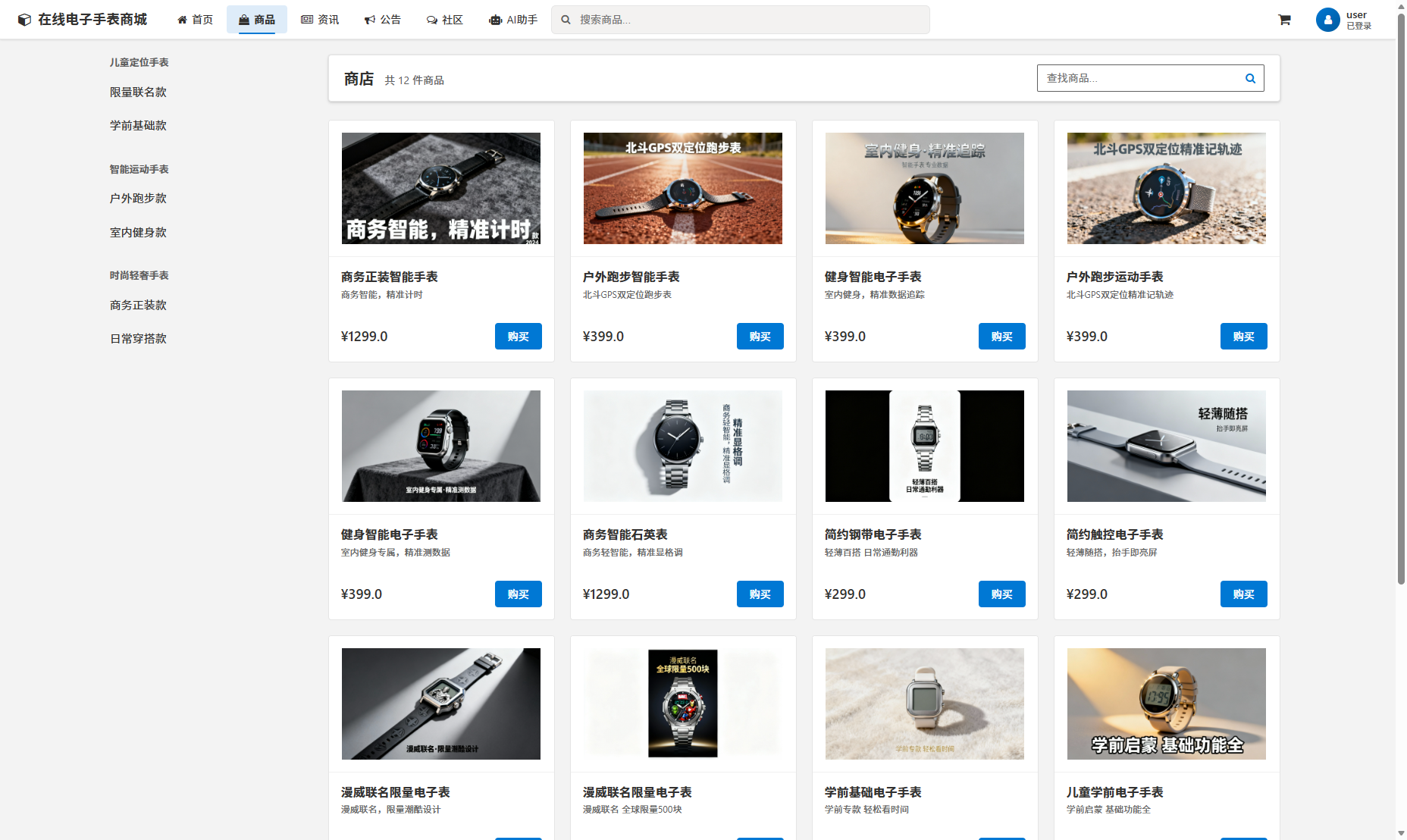
前端筛选组件采用响应式设计,实时与后端API交互,确保筛选结果的即时性。Vuex状态管理确保了筛选条件在组件间的共享和同步。
// 筛选条件状态管理
const productModule = {
  state: () => ({
    filterConditions: {
      brands: [],
      priceRange: [0, 5000],
      features: [],
      sortBy: 'default',
      keywords: ''
    },
    products: [],
    pagination: {
      currentPage: 1,
      pageSize: 20,
      total: 0
    }
  }),

  mutations: {
    UPDATE_FILTER_CONDITIONS(state, conditions) {
      state.filterConditions = { ...state.filterConditions, ...conditions }
    },

    SET_PRODUCTS(state, { products, pagination }) {
      state.products = products
      state.pagination = pagination
    }
  },

  actions: {
    async fetchProducts({ commit, state }) {
      const params = {
        ...state.filterConditions,
        page: state.pagination.currentPage,
        size: state.pagination.pageSize
      }

      try {
        const response = await api.product.getProducts(params)
        commit('SET_PRODUCTS', {
          products: response.data.content,
          pagination: {
            currentPage: response.data.number + 1,
            pageSize: response.data.size,
            total: response.data.totalElements
          }
        })
      } catch (error) {
        console.error('获取商品列表失败:', error)
      }
    }
  }
}
商品详情页的专业展示
商品详情页不仅展示基础的商品信息,还针对智能手表的特点,提供了详细的技术参数对比、功能特性说明和用户评价系统。
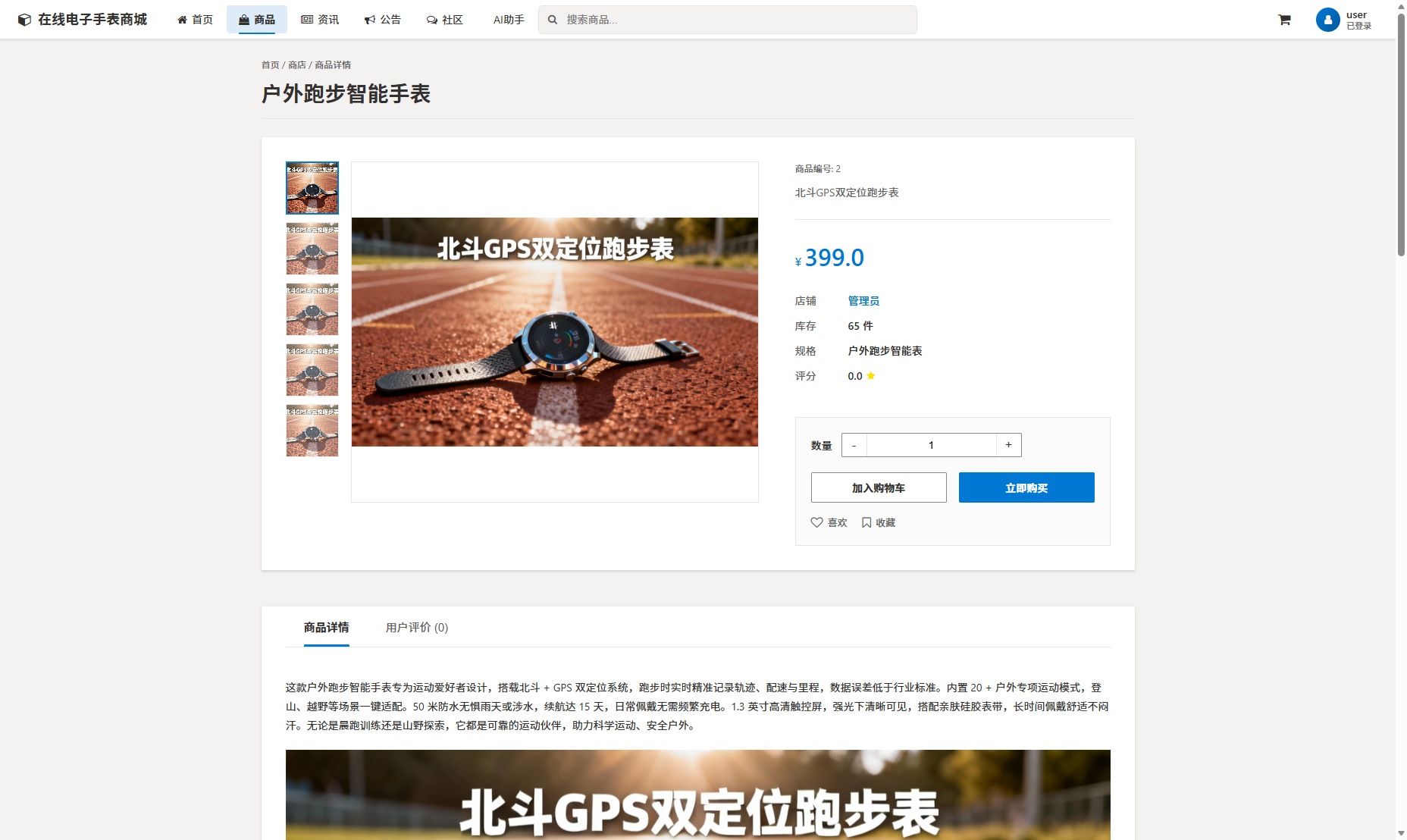
后端通过复杂的SQL查询和数据处理,为前端提供结构化的商品详情数据。
// 商品详情服务实现
@Service
public class ProductDetailService {

    @Autowired
    private ProductRepository productRepository;

    @Autowired
    private ProductSpecRepository specRepository;

    @Autowired
    private ReviewRepository reviewRepository;

    public ProductDetailDTO getProductDetail(Long productId) {
        // 获取基础商品信息
        Product product = productRepository.findById(productId)
            .orElseThrow(() -> new ResourceNotFoundException("商品不存在"));

        // 获取技术规格
        List<ProductSpecification> specifications = specRepository.findByProductId(productId);

        // 获取用户评价统计
        ReviewSummary summary = reviewRepository.getReviewSummary(productId);

        // 构建DTO对象
        return ProductDetailDTO.builder()
            .id(product.getId())
            .name(product.getName())
            .brand(product.getBrand())
            .price(product.getPrice())
            .images(parseImages(product.getImages()))
            .description(product.getDescription())
            .specifications(buildSpecificationMap(specifications))
            .reviewSummary(summary)
            .build();
    }

    private Map<String, Object> buildSpecificationMap(List<ProductSpecification> specs) {
        return specs.stream()
            .collect(Collectors.toMap(
                ProductSpecification::getSpecKey,
                ProductSpecification::getSpecValue
            ));
    }
}
AI智能客服系统
平台集成了基于自然语言处理的AI客服系统,能够理解用户关于产品功能、技术参数、购买咨询等专业问题。
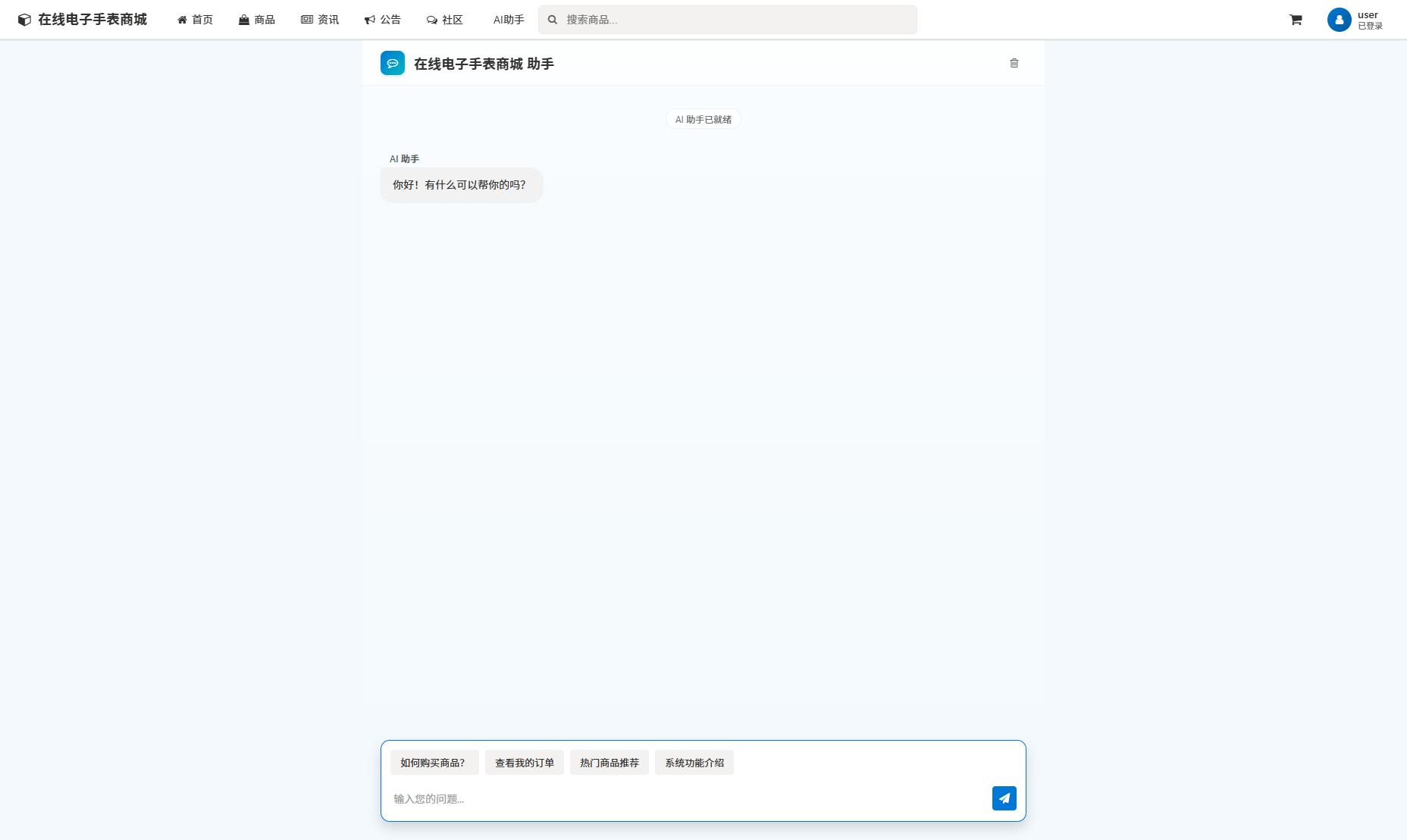
AI客服后端服务采用Spring Boot集成TensorFlow Serving,实现智能问答功能。
// AI客服服务层
@Service
public class AICustomerService {

    @Autowired
    private TensorFlowService tensorFlowService;

    @Autowired
    private ProductKnowledgeBase knowledgeBase;

    public ChatResponse handleUserQuery(ChatRequest request) {
        // 意图识别
        Intent intent = tensorFlowService.detectIntent(request.getMessage());

        // 根据意图类型处理
        switch (intent.getType()) {
            case PRODUCT_QUERY:
                return handleProductQuery(intent, request);
            case TECHNICAL_SUPPORT:
                return handleTechnicalQuery(intent, request);
            case ORDER_INQUIRY:
                return handleOrderQuery(intent, request);
            default:
                return handleGeneralQuery(intent, request);
        }
    }

    private ChatResponse handleProductQuery(Intent intent, ChatRequest request) {
        // 从知识库中检索产品信息
        List<ProductInfo> products = knowledgeBase.searchProducts(
            intent.getParameters(), request.getUserId());

        return ChatResponse.builder()
            .message(buildProductResponse(products))
            .suggestions(generateProductSuggestions(products))
            .type(ResponseType.PRODUCT_INFO)
            .build();
    }
}
用户个人中心管理
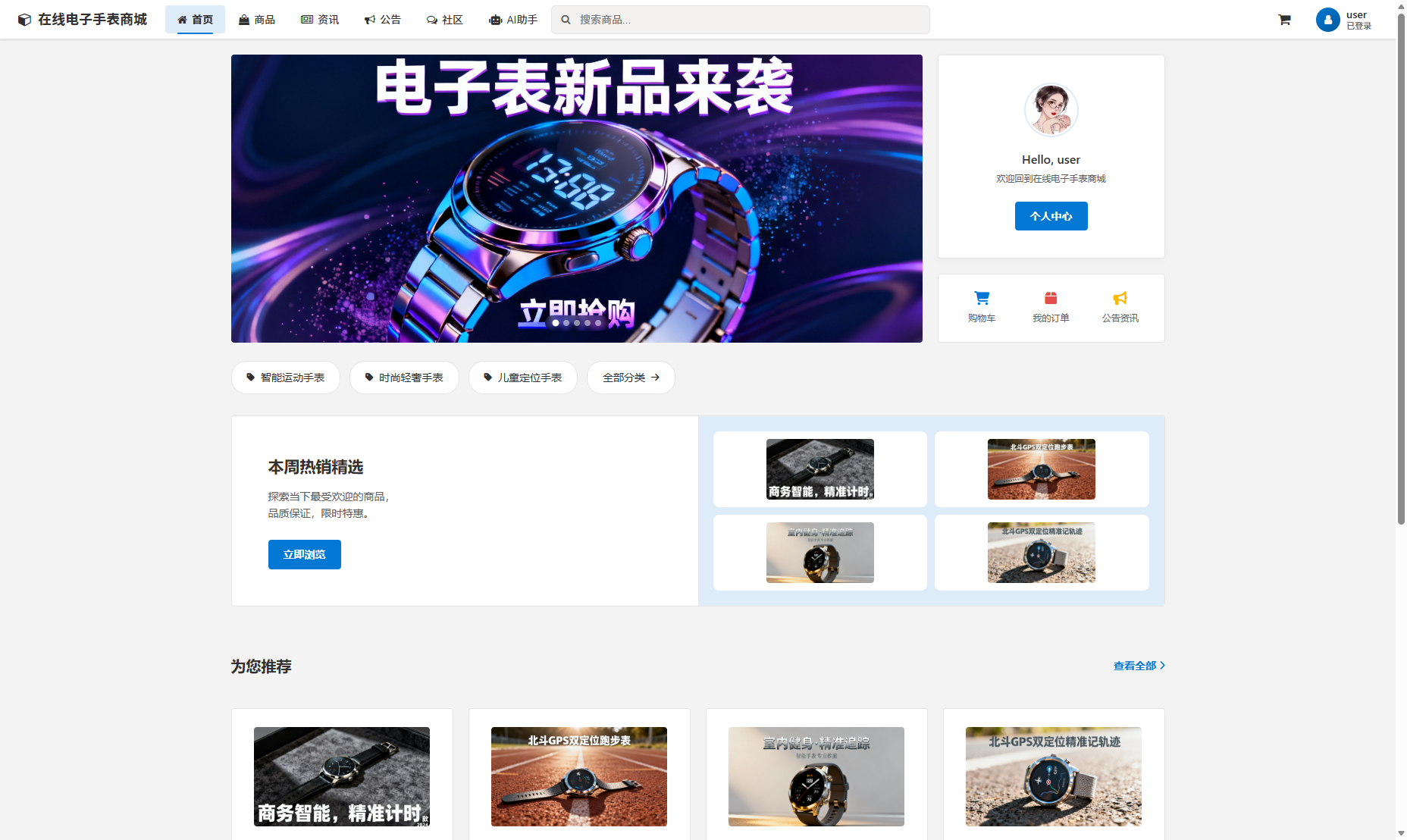
用户个人中心提供完整的订单管理、地址管理、收藏夹等功能,采用微服务架构确保各模块的独立性和可扩展性。
// 用户服务Feign客户端
@FeignClient(name = "user-service", path = "/api/users")
public interface UserServiceClient {

    @GetMapping("/{userId}/profile")
    ResponseEntity<UserProfileDTO> getUserProfile(@PathVariable Long userId);

    @PutMapping("/{userId}/profile")
    ResponseEntity<Void> updateUserProfile(@PathVariable Long userId,
                                         @RequestBody UserProfileUpdateRequest request);

    @GetMapping("/{userId}/addresses")
    ResponseEntity<List<AddressDTO>> getUserAddresses(@PathVariable Long userId);
}

// 订单服务Feign客户端
@FeignClient(name = "order-service", path = "/api/orders")
public interface OrderServiceClient {

    @GetMapping("/users/{userId}")
    ResponseEntity<Page<OrderDTO>> getUserOrders(@PathVariable Long userId,
                                                @SpringQueryMap OrderQuery query);

    @PostMapping("/{orderId}/cancel")
    ResponseEntity<Void> cancelOrder(@PathVariable Long orderId,
                                    @RequestBody CancelRequest request);
}
实体模型与业务逻辑
系统采用领域驱动设计(DDD)思想,将核心业务逻辑封装在实体和值对象中。以订单实体为例,其包含了丰富的业务规则验证。
// 订单实体类
@Entity
@Table(name = "`order`")
public class Order extends BaseEntity {

    @Id
    @GeneratedValue(strategy = GenerationType.IDENTITY)
    private Long id;

    @Column(unique = true, nullable = false)
    private String orderNo;

    @ManyToOne(fetch = FetchType.LAZY)
    @JoinColumn(name = "user_id")
    private User user;

    @OneToMany(mappedBy = "order", cascade = CascadeType.ALL)
    private List<OrderItem> items = new ArrayList<>();

    @Embedded
    private Money totalAmount;

    @Embedded
    private Money payAmount;

    @Enumerated(EnumType.STRING)
    private OrderStatus status;

    // 业务方法
    public void addItem(Product product, int quantity) {
        if (product.getStock() < quantity) {
            throw new BusinessException("库存不足");
        }

        OrderItem item = new OrderItem(this, product, quantity);
        this.items.add(item);
        calculateTotalAmount();
    }

    public void applyDiscount(Discount discount) {
        if (!discount.isValid()) {
            throw new BusinessException("优惠券无效");
        }

        this.payAmount = this.totalAmount.subtract(discount.getAmount());
    }

    private void calculateTotalAmount() {
        this.totalAmount = items.stream()
            .map(OrderItem::getSubtotal)
            .reduce(Money.ZERO, Money::add);
    }
}
性能优化与安全措施
系统在性能优化方面采取了多项措施。数据库层面使用读写分离和分库分表策略,应用层使用Redis缓存热点数据,前端使用懒加载和图片优化技术。
安全方面,系统实现了完整的权限控制体系,使用JWT进行身份认证,对敏感操作进行日志记录和审计。
// 安全配置类
@Configuration
@EnableWebSecurity
@EnableGlobalMethodSecurity(prePostEnabled = true)
public class SecurityConfig extends WebSecurityConfigurerAdapter {

    @Autowired
    private JwtAuthenticationFilter jwtAuthenticationFilter;

    @Autowired
    private CustomUserDetailsService userDetailsService;

    @Override
    protected void configure(HttpSecurity http) throws Exception {
        http.csrf().disable()
            .sessionManagement().sessionCreationPolicy(SessionCreationPolicy.STATELESS)
            .and()
            .authorizeRequests()
            .antMatchers("/api/auth/**").permitAll()
            .antMatchers("/api/products/**").permitAll()
            .antMatchers("/api/users/**").hasRole("USER")
            .antMatchers("/api/admin/**").hasRole("ADMIN")
            .anyRequest().authenticated()
            .and()
            .addFilterBefore(jwtAuthenticationFilter, UsernamePasswordAuthentication