随着人口老龄化趋势的加剧,针对老年群体的数字化服务需求日益凸显。本文介绍的"银龄e家"平台正是基于这一社会背景开发的全栈应用,专注于为老年人提供便捷的物资采购和社区交流服务。
技术架构设计
平台采用前后端分离架构,前端基于Vue.js生态系统构建,后端采用SpringBoot框架。这种架构模式实现了关注点分离,前端负责用户界面渲染和交互逻辑,后端专注于业务逻辑处理和数据持久化。
前端技术栈包括Vue Router实现单页面应用路由管理,Vuex进行全局状态管理,Element UI提供基础组件库。后端采用Spring Security进行安全认证,MyBatis-Plus简化数据库操作,MySQL作为数据存储方案。
数据库设计解析
平台数据库包含24个核心表,以下是几个关键表的设计分析:
用户表设计
CREATE TABLE `user` (
  `id` bigint(20) NOT NULL AUTO_INCREMENT,
  `username` varchar(50) NOT NULL COMMENT '用户名',
  `password` varchar(100) NOT NULL COMMENT '密码',
  `real_name` varchar(50) DEFAULT NULL COMMENT '真实姓名',
  `gender` tinyint(1) DEFAULT '0' COMMENT '性别:0-未知 1-男 2-女',
  `age` int(11) DEFAULT NULL COMMENT '年龄',
  `phone` varchar(20) DEFAULT NULL COMMENT '手机号',
  `email` varchar(100) DEFAULT NULL COMMENT '邮箱',
  `avatar` varchar(500) DEFAULT NULL COMMENT '头像',
  `user_type` tinyint(1) DEFAULT '1' COMMENT '用户类型:1-普通用户 2-管理员',
  `status` tinyint(1) DEFAULT '1' COMMENT '状态:0-禁用 1-正常',
  `create_time` datetime DEFAULT CURRENT_TIMESTAMP,
  `update_time` datetime DEFAULT CURRENT_TIMESTAMP ON UPDATE CURRENT_TIMESTAMP,
  PRIMARY KEY (`id`),
  UNIQUE KEY `uk_username` (`username`),
  KEY `idx_phone` (`phone`),
  KEY `idx_status` (`status`)
) ENGINE=InnoDB DEFAULT CHARSET=utf8mb4 COMMENT='用户表';
该表设计考虑了老年人使用特点,包含年龄字段用于个性化推荐,状态字段支持账户管理,时间戳字段便于行为分析。
商品表设计
CREATE TABLE `product` (
  `id` bigint(20) NOT NULL AUTO_INCREMENT,
  `name` varchar(200) NOT NULL COMMENT '商品名称',
  `category_id` bigint(20) NOT NULL COMMENT '分类ID',
  `price` decimal(10,2) NOT NULL COMMENT '价格',
  `original_price` decimal(10,2) DEFAULT NULL COMMENT '原价',
  `stock` int(11) NOT NULL DEFAULT '0' COMMENT '库存',
  `main_image` varchar(500) DEFAULT NULL COMMENT '主图',
  `sub_images` text COMMENT '子图列表',
  `detail` text COMMENT '商品详情',
  `specs` json DEFAULT NULL COMMENT '规格参数',
  `suitable_age` varchar(50) DEFAULT NULL COMMENT '适用年龄',
  `tags` varchar(200) DEFAULT NULL COMMENT '标签',
  `status` tinyint(1) DEFAULT '1' COMMENT '状态:0-下架 1-上架',
  `sales_count` int(11) DEFAULT '0' COMMENT '销量',
  `view_count` int(11) DEFAULT '0' COMMENT '浏览量',
  `create_time` datetime DEFAULT CURRENT_TIMESTAMP,
  `update_time` datetime DEFAULT CURRENT_TIMESTAMP ON UPDATE CURRENT_TIMESTAMP,
  PRIMARY KEY (`id`),
  KEY `idx_category` (`category_id`),
  KEY `idx_status` (`status`),
  KEY `idx_price` (`price`),
  FULLTEXT KEY `ft_name` (`name`)
) ENGINE=InnoDB DEFAULT CHARSET=utf8mb4 COMMENT='商品表';
商品表特别设计了适合老年人使用的字段,如适用年龄、大字版标签等,全文索引支持商品搜索功能。
核心功能实现
1. 商品展示与购物流程
前端商品列表组件实现:
<template>
  <div class="product-list">
    <div class="filter-section">
      <el-select v-model="filter.category" placeholder="选择分类" @change="loadProducts">
        <el-option v-for="cat in categories" :key="cat.id" :label="cat.name" :value="cat.id"/>
      </el-select>
      <el-input v-model="filter.keyword" placeholder="搜索商品" @input="debounceSearch"/>
    </div>

    <div class="product-grid">
      <div v-for="product in products" :key="product.id" class="product-card">
        <el-image :src="product.mainImage" fit="cover" class="product-image"/>
        <div class="product-info">
          <h3 class="product-name">{{ product.name }}</h3>
          <div class="price-section">
            <span class="current-price">¥{{ product.price }}</span>
            <span v-if="product.originalPrice" class="original-price">¥{{ product.originalPrice }}</span>
          </div>
          <el-button type="primary" @click="addToCart(product)">加入购物车</el-button>
        </div>
      </div>
    </div>

    <el-pagination
      :current-page="pagination.current"
      :page-size="pagination.size"
      :total="pagination.total"
      @current-change="handlePageChange"
      layout="total, prev, pager, next, jumper"
    />
  </div>
</template>

<script>
export default {
  data() {
    return {
      products: [],
      categories: [],
      filter: {
        category: '',
        keyword: ''
      },
      pagination: {
        current: 1,
        size: 12,
        total: 0
      },
      searchTimer: null
    }
  },
  methods: {
    async loadProducts() {
      const params = {
        page: this.pagination.current,
        size: this.pagination.size,
        ...this.filter
      }

      try {
        const response = await this.$api.product.getList(params)
        this.products = response.data.records
        this.pagination.total = response.data.total
      } catch (error) {
        this.$message.error('加载商品失败')
      }
    },

    debounceSearch() {
      clearTimeout(this.searchTimer)
      this.searchTimer = setTimeout(() => {
        this.pagination.current = 1
        this.loadProducts()
      }, 500)
    },

    async addToCart(product) {
      try {
        await this.$api.cart.addItem({
          productId: product.id,
          quantity: 1
        })
        this.$message.success('已加入购物车')
      } catch (error) {
        this.$message.error('操作失败')
      }
    }
  }
}
</script>
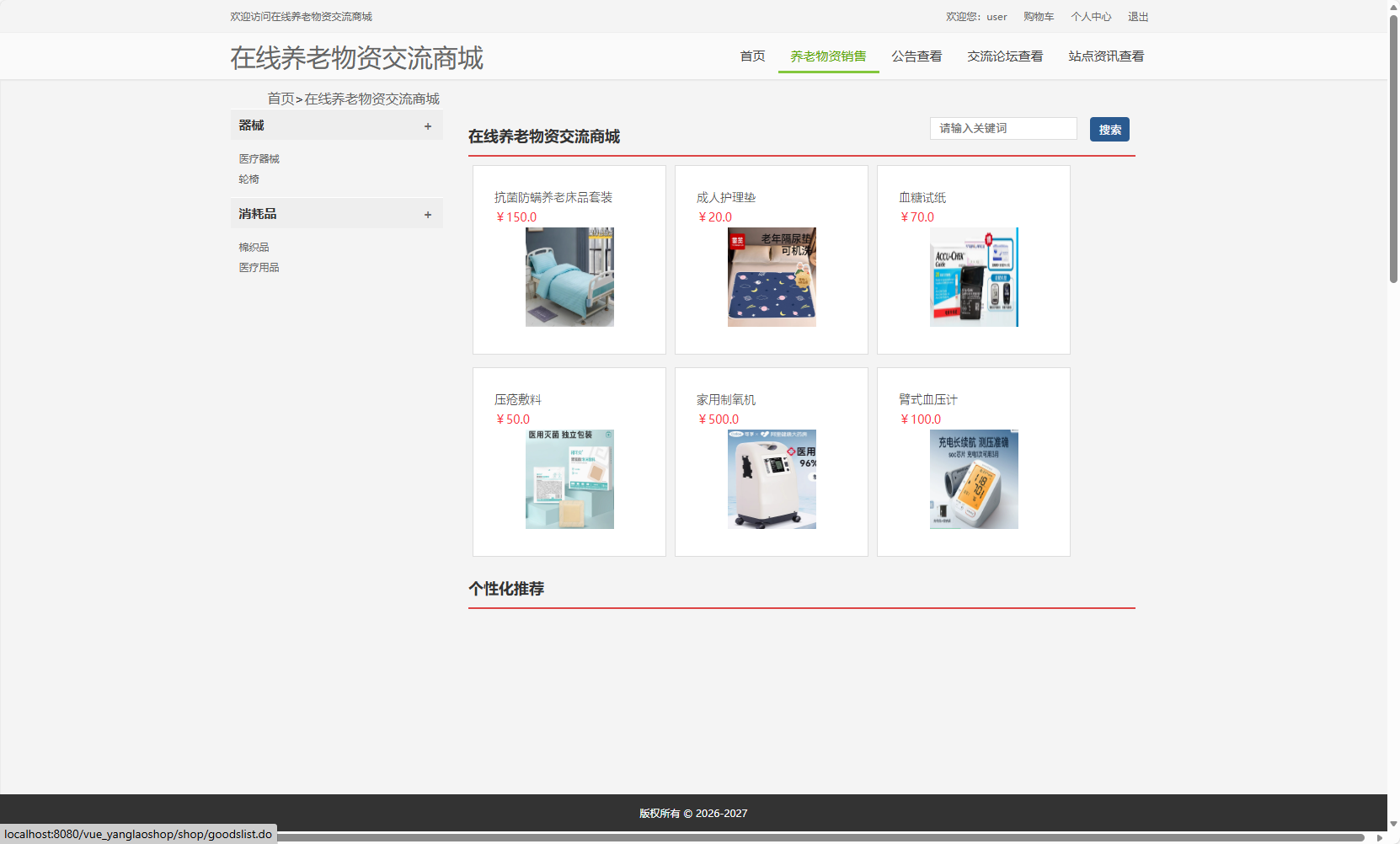
后端商品查询服务实现:
@RestController
@RequestMapping("/api/product")
public class ProductController {

    @Autowired
    private ProductService productService;

    @GetMapping("/list")
    public ApiResult<PageResult<ProductVO>> getProductList(
            @RequestParam(defaultValue = "1") Integer page,
            @RequestParam(defaultValue = "12") Integer size,
            @RequestParam(required = false) Long categoryId,
            @RequestParam(required = false) String keyword) {

        ProductQuery query = ProductQuery.builder()
                .page(page)
                .size(size)
                .categoryId(categoryId)
                .keyword(keyword)
                .status(1) // 只查询上架商品
                .build();

        PageResult<ProductVO> result = productService.queryProducts(query);
        return ApiResult.success(result);
    }
}

@Service
public class ProductService {

    @Autowired
    private ProductMapper productMapper;

    public PageResult<ProductVO> queryProducts(ProductQuery query) {
        Page<Product> page = new Page<>(query.getPage(), query.getSize());

        LambdaQueryWrapper<Product> wrapper = new LambdaQueryWrapper<>();
        wrapper.eq(Product::getStatus, 1);

        if (query.getCategoryId() != null) {
            wrapper.eq(Product::getCategoryId, query.getCategoryId());
        }

        if (StringUtils.isNotBlank(query.getKeyword())) {
            wrapper.and(w -> w.like(Product::getName, query.getKeyword())
                          .or().like(Product::getTags, query.getKeyword()));
        }

        wrapper.orderByDesc(Product::getSalesCount)
               .orderByDesc(Product::getCreateTime);

        IPage<Product> productPage = productMapper.selectPage(page, wrapper);

        List<ProductVO> voList = productPage.getRecords().stream()
                .map(this::convertToVO)
                .collect(Collectors.toList());

        return new PageResult<>(voList, productPage.getTotal());
    }

    private ProductVO convertToVO(Product product) {
        return ProductVO.builder()
                .id(product.getId())
                .name(product.getName())
                .price(product.getPrice())
                .originalPrice(product.getOriginalPrice())
                .mainImage(product.getMainImage())
                .salesCount(product.getSalesCount())
                .viewCount(product.getViewCount())
                .build();
    }
}
2. 社区交流系统
论坛帖子发布功能前端实现:
<template>
  <div class="post-editor">
    <el-form :model="form" :rules="rules" ref="formRef">
      <el-form-item label="帖子类型" prop="typeId">
        <el-select v-model="form.typeId" placeholder="选择类型">
          <el-option v-for="type in postTypes" :key="type.id"
                     :label="type.name" :value="type.id"/>
        </el-select>
      </el-form-item>

      <el-form-item label="标题" prop="title">
        <el-input v-model="form.title" maxlength="100" show-word-limit/>
      </el-form-item>

      <el-form-item label="内容" prop="content">
        <el-input type="textarea" v-model="form.content"
                  :rows="10" maxlength="2000" show-word-limit
                  placeholder="请文明发言,遵守社区规范"/>
      </el-form-item>

      <el-form-item>
        <el-button type="primary" @click="submitForm">发布帖子</el-button>
        <el-button @click="resetForm">重置</el-button>
      </el-form-item>
    </el-form>
  </div>
</template>

<script>
export default {
  data() {
    return {
      form: {
        typeId: '',
        title: '',
        content: ''
      },
      postTypes: [],
      rules: {
        typeId: [{ required: true, message: '请选择帖子类型', trigger: 'change' }],
        title: [
          { required: true, message: '请输入标题', trigger: 'blur' },
          { min: 5, max: 100, message: '标题长度5-100字符', trigger: 'blur' }
        ],
        content: [
          { required: true, message: '请输入内容', trigger: 'blur' },
          { min: 10, max: 2000, message: '内容长度10-2000字符', trigger: 'blur' }
        ]
      }
    }
  },

  methods: {
    async loadPostTypes() {
      try {
        const response = await this.$api.post.getTypes()
        this.postTypes = response.data
      } catch (error) {
        this.$message.error('加载类型失败')
      }
    },

    async submitForm() {
      try {
        await this.$refs.formRef.validate()

        await this.$api.post.create(this.form)
        this.$message.success('发布成功')
        this.$router.push('/forum')
      } catch (error) {
        if (error.response?.data?.code === 'CONTENT_SENSITIVE') {
          this.$message.error('内容包含敏感词汇,请修改后重试')
        } else {
          this.$message.error('发布失败')
        }
      }
    }
  }
}
</script>
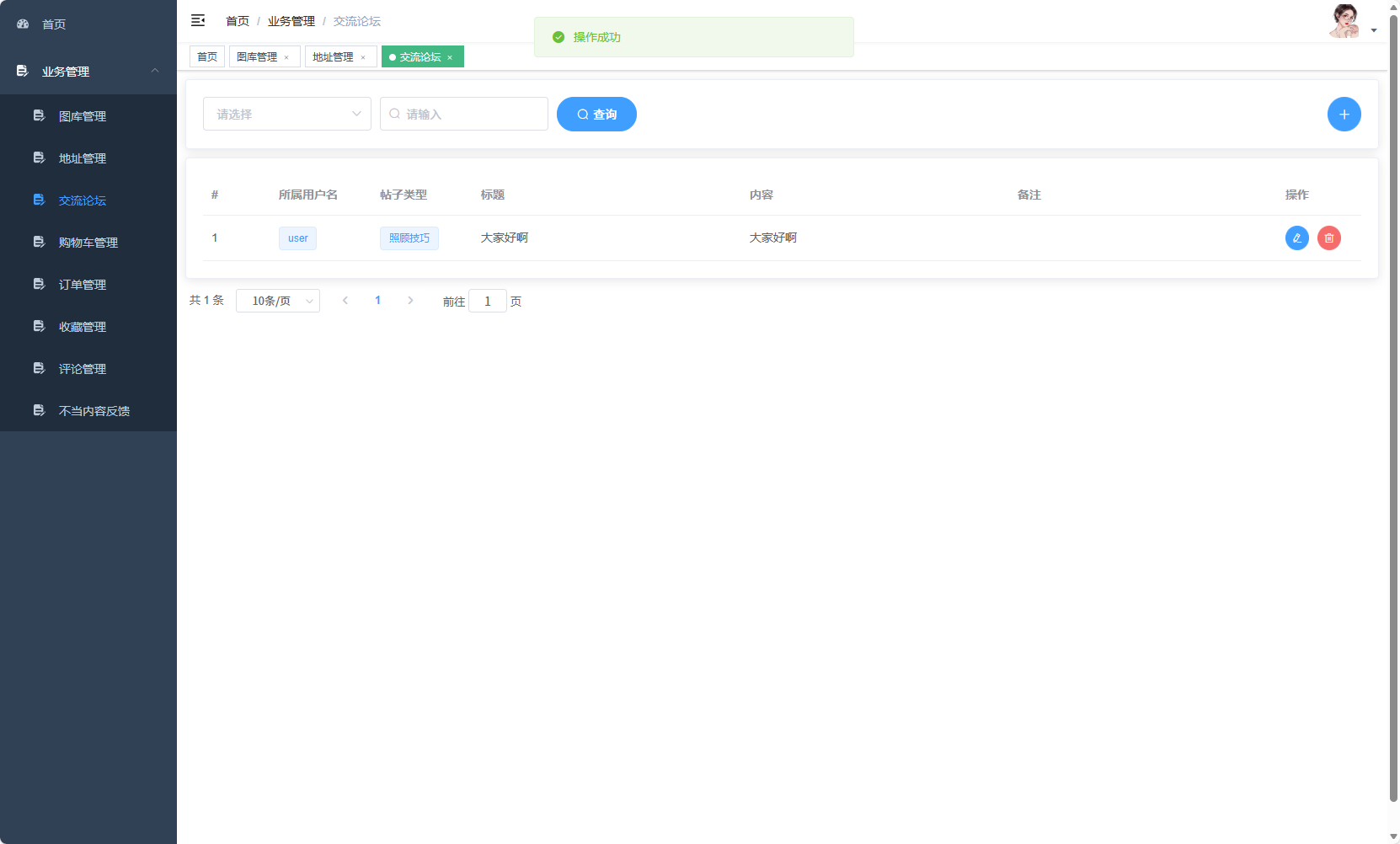
后端帖子服务与敏感词过滤:
@Service
public class PostService {

    @Autowired
    private PostMapper postMapper;

    @Autowired
    private SensitiveWordService sensitiveWordService;

    @Transactional
    public void createPost(PostCreateDTO dto, Long userId) {
        // 敏感词检测
        String filteredContent = sensitiveWordService.filter(dto.getContent());
        if (!filteredContent.equals(dto.getContent())) {
            throw new BusinessException("CONTENT_SENSITIVE", "内容包含敏感词汇");
        }

        Post post = Post.builder()
                .userId(userId)
                .typeId(dto.getTypeId())
                .title(dto.getTitle())
                .content(filteredContent)
                .status(1)
                .viewCount(0)
                .likeCount(0)
                .commentCount(0)
                .build();

        postMapper.insert(post);

        // 更新用户发帖数
        userService.incrementPostCount(userId);
    }

    public PageResult<PostVO> getPostList(PostQuery query) {
        Page<Post> page = new Page<>(query.getPage(), query.getSize());

        LambdaQueryWrapper<Post> wrapper = new LambdaQueryWrapper<>();
        wrapper.eq(Post::getStatus, 1);

        if (query.getTypeId() != null) {
            wrapper.eq(Post::getTypeId, query.getTypeId());
        }

        if (StringUtils.isNotBlank(query.getKeyword())) {
            wrapper.and(w -> w.like(Post::getTitle, query.getKeyword())
                          .or().like(Post::getContent, query.getKeyword()));
        }

        wrapper.orderByDesc(Post::getIsTop)
               .orderByDesc(Post::getCreateTime);

        IPage<Post> postPage = postMapper.selectPage(page, wrapper);

        List<PostVO> voList = postPage.getRecords().stream()
                .map(this::convertToVO)
                .collect(Collectors.toList());

        return new PageResult<>(voList, postPage.getTotal());
    }
}

@Service
public class SensitiveWordService {

    @Autowired
    private SensitiveWordMapper sensitiveWordMapper;

    private Set<String> sensitiveWords;

    @PostConstruct
    public void init() {
        loadSensitiveWords();
    }

    public String filter(String text) {
        if (StringUtils.isBlank(text)) {
            return text;
        }

        String result = text;
        for (String word : sensitiveWords) {
            result = result.replaceAll(word, "***");
        }
        return result;
    }

    private void loadSensitiveWords() {
        List<SensitiveWord> words = sensitiveWordMapper.selectList(
            new LambdaQueryWrapper<SensitiveWord>().eq(SensitiveWord::getStatus, 1)
        );
        sensitiveWords = words.stream()
                .map(SensitiveWord::getWord)
                .collect(Collectors.toSet());
    }
}
3. 订单管理系统
订单创建业务逻辑:
@Service
public class OrderService {

    @Autowired
    private OrderMapper orderMapper;

    @Autowired
    private OrderItemMapper orderItemMapper;

    @Autowired
    private ProductService productService;

    @Transactional
    public OrderVO createOrder(OrderCreateDTO dto, Long userId) {
        // 验证商品库存
        Map<Long, Integer> productStockMap = verifyStock(dto.getItems());

        // 计算订单总金额
        BigDecimal totalAmount = calculateTotalAmount(dto.getItems());

        // 生成订单号
        String orderNo = generateOrderNo();

        // 创建订单
        Order order = Order.builder()
                .orderNo(orderNo)
                .userId(userId)
                .totalAmount(totalAmount)
                .status(OrderStatus.UNPAID.getCode())
                .addressId(dto.getAddressId())
                .remark(dto.getRemark())
                .build();

        orderMapper.insert(order);

        // 创建订单项
        List<OrderItem> orderItems = createOrderItems(order.getId(), dto.getItems());
        orderItemMapper.batchInsert(orderItems);

        // 扣减库存
        reduceProductStock(productStockMap);

        return convertToVO(order, orderItems);
    }

    private Map<Long, Integer> verifyStock(List<OrderItemDTO> items) {
        Map<Long, Integer> stockMap = new HashMap<>();

        for (OrderItemDTO item : items) {
            Product product = productService.getById(item.getProductId());
            if (product == null || product.getStatus() == 0) {
                throw new BusinessException("PRODUCT_NOT_AVAILABLE", "商品已下架");
            }

            if (product.getStock() < item.getQuantity()) {
                throw new BusinessException("INSUFFICIENT_STOCK",
                    String.format("商品【%s】库存不足", product.getName()));
            }

            stockMap.put(product.getId(), item.getQuantity());
        }

        return stockMap;
    }

    private void reduceProductStock(Map<Long, Integer> stockMap) {
        for (Map.Entry<Long, Integer> entry : stockMap.entrySet()) {
            productService.reduceStock(entry.getKey(), entry.getValue());
        }
    }
}
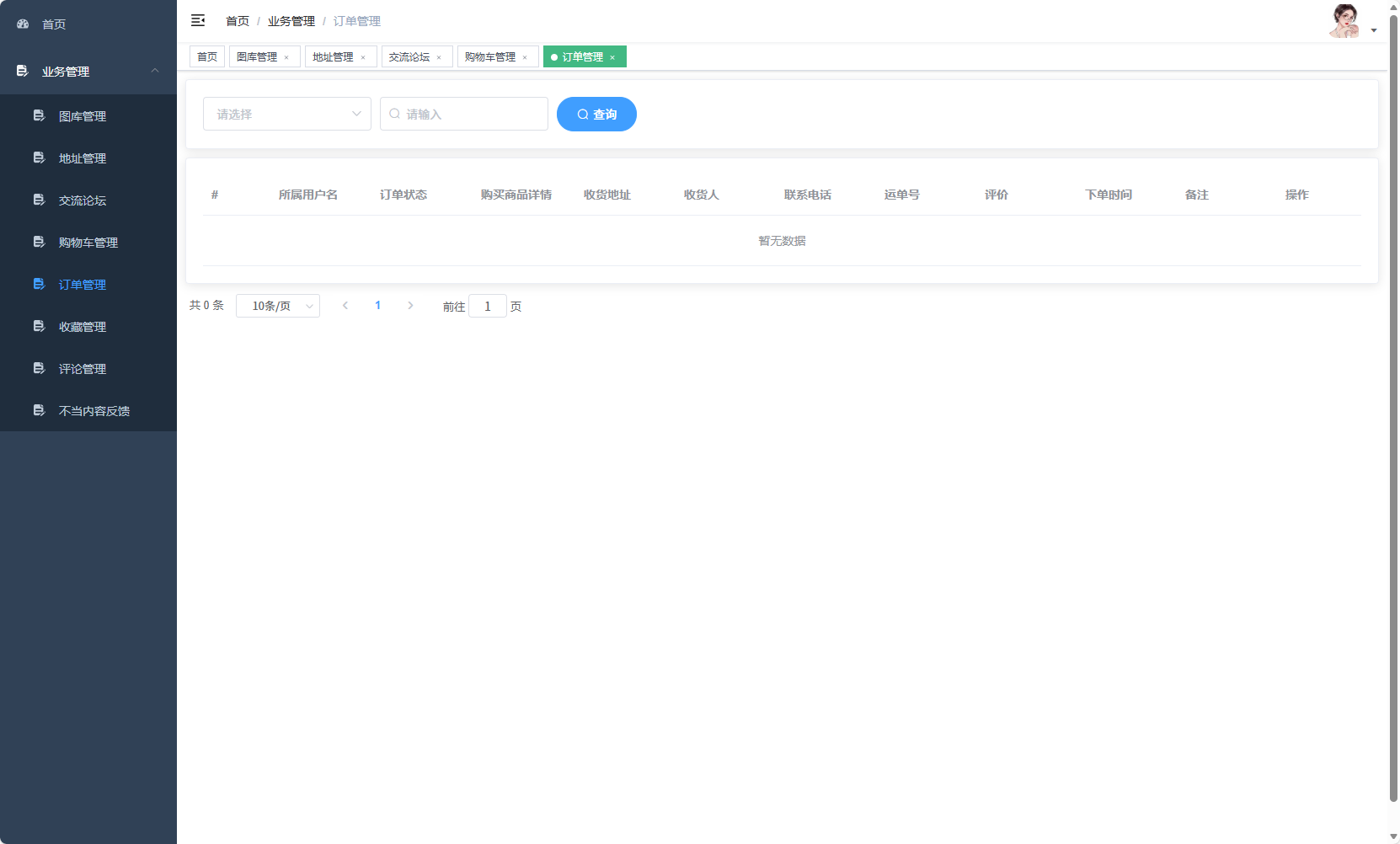
4. 权限管理与安全控制
Spring Security配置:
@Configuration
@EnableWebSecurity
public class SecurityConfig extends WebSecurityConfigurerAdapter {

    @Autowired
    private UserDetailsService userDetailsService;

    @Autowired
    private JwtAuthenticationTokenFilter jwtAuthenticationTokenFilter;

    @Bean
    public PasswordEncoder passwordEncoder() {
        return new BCryptPasswordEncoder();
    }

    @Override
    protected void configure(HttpSecurity http) throws Exception {
        http.csrf().disable()
            .sessionManagement().sessionCreationPolicy(SessionCreationPolicy.STATELESS)
            .and()
            .authorizeRequests()
            .antMatchers("/api/auth/**",