鲜果云商:基于SSM+Vue的智能生鲜电商平台技术深度解析
系统架构与技术栈设计
该系统采用现代化前后端分离架构,充分发挥了各自技术栈的优势,实现了高内聚低耦合的系统设计。
后端技术栈
- Spring框架:通过控制反转(IoC)和依赖注入(DI)机制,实现业务组件间的松耦合
- SpringMVC:基于MVC模式的Web框架,负责请求路由、参数绑定和视图渲染
- MyBatis:轻量级ORM框架,通过XML配置简化数据库操作,支持动态SQL
前端技术栈
- Vue.js:渐进式JavaScript框架,采用组件化开发模式
- Vue Router:官方路由管理器,实现单页面应用(SPA)的路由控制
- Vuex:集中式状态管理,解决多组件共享状态问题
- Axios:基于Promise的HTTP客户端,处理RESTful API请求
核心配置文件示例:
<!-- Spring数据源配置,使用Druid连接池 -->
<bean id="dataSource" class="com.alibaba.druid.pool.DruidDataSource">
    <property name="url" value="${jdbc.url}"/>
    <property name="username" value="${jdbc.username}"/>
    <property name="password" value="${jdbc.password}"/>
    <property name="initialSize" value="5"/>  <!-- 初始连接数 -->
    <property name="maxActive" value="20"/>   <!-- 最大连接数 -->
</bean>

<!-- MyBatis会话工厂配置 -->
<bean id="sqlSessionFactory" class="org.mybatis.spring.SqlSessionFactoryBean">
    <property name="dataSource" ref="dataSource"/>
    <property name="mapperLocations" value="classpath:mapper/*.xml"/>
    <property name="typeAliasesPackage" value="com.fruit.entity"/>  <!-- 实体类包扫描 -->
</bean>
数据库设计深度剖析
商品信息表的精细化设计
shangpinxinxi表的设计充分考虑了电商业务的实际需求,体现了专业级的数据建模思路:
CREATE TABLE `shangpinxinxi` (
  `id` bigint(20) NOT NULL AUTO_INCREMENT COMMENT '商品ID',
  `addtime` timestamp NOT NULL DEFAULT current_timestamp() COMMENT '商品创建时间',
  `shangpinmingcheng` varchar(200) NOT NULL COMMENT '商品名称',
  `shangpinfenlei` varchar(200) NOT NULL COMMENT '商品分类',
  `tupian` varchar(200) DEFAULT NULL COMMENT '商品图片',
  `chima` varchar(200) DEFAULT NULL COMMENT '商品规格',
  `yanshe` varchar(200) DEFAULT NULL COMMENT '商品颜色',
  `shangpinyongtu` varchar(200) DEFAULT NULL COMMENT '商品用途',
  `zengsongduixiang` varchar(200) DEFAULT NULL COMMENT '赠送对象',
  `shuliang` int(11) DEFAULT NULL COMMENT '商品数量',
  `shangpinxiangqing` longtext DEFAULT NULL COMMENT '商品详情',
  `clicktime` datetime DEFAULT NULL COMMENT '最近点击时间',
  `clicknum` int(11) DEFAULT 0 COMMENT '点击次数',
  `price` float NOT NULL COMMENT '商品价格',
  PRIMARY KEY (`id`),
  KEY `idx_category` (`shangpinfenlei`),      -- 分类索引
  KEY `idx_clicktime` (`clicktime`)           -- 点击时间索引
) ENGINE=InnoDB AUTO_INCREMENT=1738634063733 DEFAULT CHARSET=utf8 COMMENT='商品信息表'
设计亮点分析:
高性能主键设计
- 采用
bigint(20)自增主键,支持海量数据存储 - AUTO_INCREMENT机制确保主键唯一性和连续性
- 采用
业务字段优化
varchar(200)合理控制字段长度,平衡存储效率与业务扩展性longtext类型支持富文本商品详情描述
用户行为追踪
clicktime和clicknum字段实现用户点击行为分析- 为个性化推荐和热门商品统计提供数据支撑
扩展性考虑
- 通过规格、颜色等字段满足水果商品的多样化需求
- 分类字段支持多级分类扩展
地址管理的智能设计
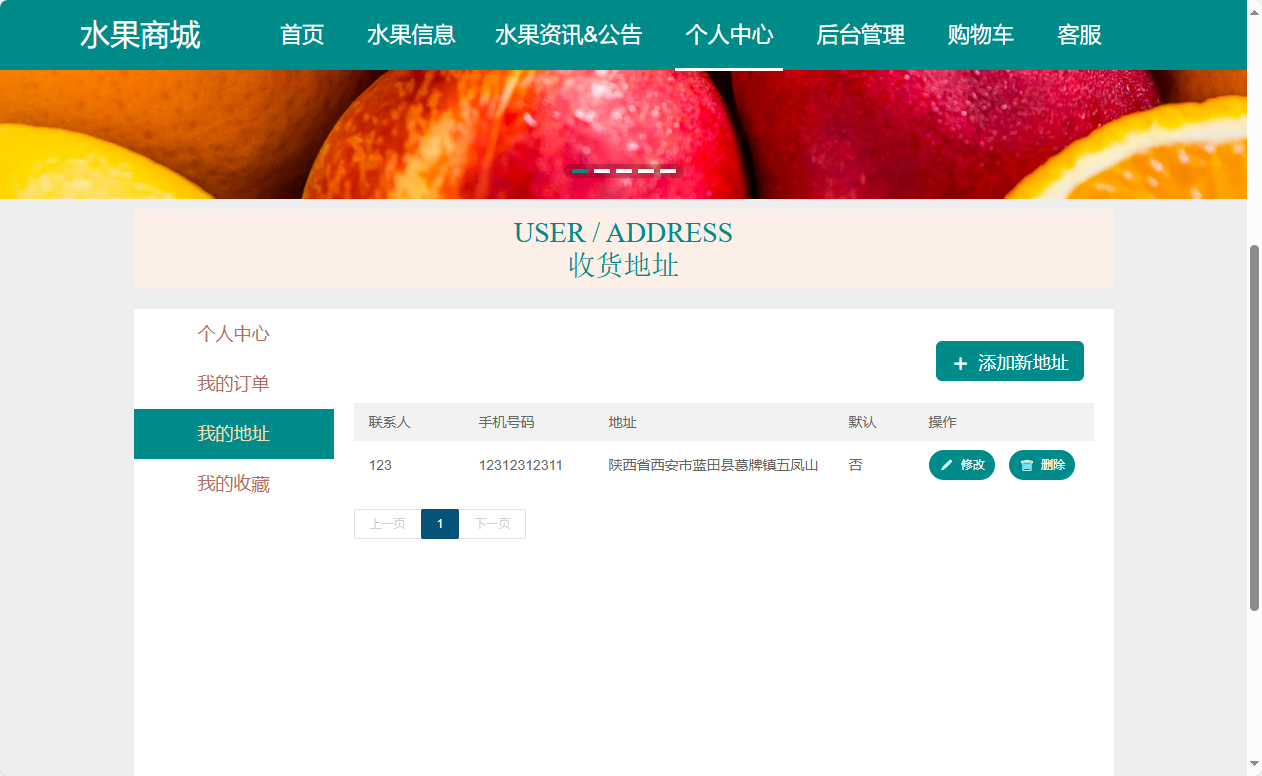
address表采用用户中心化设计理念,支持灵活的地址管理:
CREATE TABLE `address` (
  `id` bigint(20) NOT NULL AUTO_INCREMENT COMMENT '地址ID',
  `addtime` timestamp NOT NULL DEFAULT current_timestamp() COMMENT '地址创建时间',
  `userid` bigint(20) NOT NULL COMMENT '所属用户ID',
  `address` varchar(200) NOT NULL COMMENT '收货地址',
  `name` varchar(200) NOT NULL COMMENT '收货人姓名',
  `phone` varchar(200) NOT NULL COMMENT '收货人联系电话',
  `isdefault` varchar(200) NOT NULL COMMENT '是否默认地址[是/否]',
  PRIMARY KEY (`id`),
  KEY `idx_userid` (`userid`),                -- 用户ID索引
  KEY `idx_default` (`isdefault`)             -- 默认地址索引
) ENGINE=InnoDB AUTO_INCREMENT=1614566611577 DEFAULT CHARSET=utf8 COMMENT='用户地址表'
技术创新点:
- 智能默认地址机制:通过
isdefault字段实现一键设置默认地址 - 用户关联优化:建立用户与地址的一对多关系,支持多地址管理
- 时间维度分析:
addtime字段记录创建时间,支持地址使用频率统计
核心业务功能实现
商品信息管理模块
实体类设计采用JPA注解:
@Entity
@Table(name = "shangpinxinxi")
public class ProductInfo implements Serializable {
    private static final long serialVersionUID = 1L;

    @Id
    @GeneratedValue(strategy = GenerationType.IDENTITY)
    private Long id;

    @Column(name = "shangpinmingcheng", nullable = false)
    private String productName;

    @Column(name = "shangpinfenlei", nullable = false)
    private String category;

    @Column(name = "price", nullable = false)
    private Double price;

    @Column(name = "shuliang")
    private Integer quantity;

    @Column(name = "clicknum")
    private Integer clickCount = 0;

    @Column(name = "clicktime")
    @Temporal(TemporalType.TIMESTAMP)
    private Date clickTime;

    // 构造方法、getter/setter方法省略
}
服务层实现包含分页查询和点击统计:
@Service
@Transactional
public class ProductService {

    @Autowired
    private ProductMapper productMapper;

    /**
     * 分页查询商品信息
     */
    public PageInfo<ProductInfo> getProductsByPage(Map<String, Object> params) {
        // 使用PageHelper实现物理分页
        PageHelper.startPage(Integer.parseInt(params.get("page").toString()),
                           Integer.parseInt(params.get("limit").toString()));
        List<ProductInfo> productList = productMapper.selectByMap(params);
        return new PageInfo<>(productList);
    }

    /**
     * 更新商品点击统计
     */
    public void updateClickCount(Long productId) {
        ProductInfo product = productMapper.selectById(productId);
        if (product != null) {
            product.setClickCount(product.getClickCount() + 1);
            product.setClickTime(new Date());
            productMapper.updateById(product);
        }
    }

    /**
     * 获取热门商品(基于点击量)
     */
    public List<ProductInfo> getHotProducts(int limit) {
        Map<String, Object> params = new HashMap<>();
        params.put("orderBy", "clicknum desc");
        params.put("limit", limit);
        return productMapper.selectByMap(params);
    }
}
购物车与订单处理
订单控制器实现RESTful API:
@RestController
@RequestMapping("/api/order")
@CrossOrigin(origins = "*")  // 支持跨域请求
public class OrderController {

    @Autowired
    private OrderService orderService;

    /**
     * 创建订单接口
     */
    @PostMapping("/create")
    public R createOrder(@RequestBody OrderDTO orderDTO, HttpServletRequest request) {
        Long userId = (Long) request.getSession().getAttribute("userId");

        try {
            // 参数校验
            if (userId == null) {
                return R.error("用户未登录");
            }

            OrderEntity order = orderService.createOrder(orderDTO, userId);
            return R.ok().put("data", order);
        } catch (BusinessException e) {
            return R.error(e.getMessage());
        }
    }

    /**
     * 订单列表查询
     */
    @GetMapping("/list")
    public R getOrderList(@RequestParam Map<String, Object> params,
                         HttpServletRequest request) {
        Long userId = (Long) request.getSession().getAttribute("userId");
        params.put("userId", userId);

        PageUtils page = orderService.queryPage(params);
        return R.ok().put("page", page);
    }
}
订单服务层核心业务逻辑:
@Service
public class OrderService {

    @Autowired
    private OrderMapper orderMapper;

    @Autowired
    private ProductMapper productMapper;

    @Transactional(rollbackFor = Exception.class)
    public OrderEntity createOrder(OrderDTO orderDTO, Long userId) {
        // 1. 库存校验
        for (OrderItemDTO item : orderDTO.getItems()) {
            ProductInfo product = productMapper.selectById(item.getProductId());
            if (product.getQuantity() < item.getQuantity()) {
                throw new BusinessException("商品库存不足:" + product.getProductName());
            }
        }

        // 2. 生成订单号
        String orderNo = generateOrderNo();

        // 3. 创建订单主表记录
        OrderEntity order = new OrderEntity();
        order.setOrderNo(orderNo);
        order.setUserId(userId);
        order.setTotalAmount(calculateTotalAmount(orderDTO.getItems()));
        order.setStatus(OrderStatus.PENDING_PAYMENT);
        orderMapper.insert(order);

        // 4. 创建订单明细
        createOrderItems(order.getId(), orderDTO.getItems());

        // 5. 扣减库存
        deductInventory(orderDTO.getItems());

        return order;
    }

    private String generateOrderNo() {
        // 时间戳 + 随机数,确保订单号唯一性
        return System.currentTimeMillis() + String.valueOf(new Random().nextInt(9999));
    }
}
系统特色与技术创新
性能优化策略
- 数据库连接池:使用Druid连接池,提供监控统计功能
- 缓存机制:集成Redis缓存热门商品数据和用户会话
- 异步处理:采用消息队列处理订单通知等非实时操作
安全防护措施
- SQL注入防护:MyBatis参数化查询
- XSS攻击防护:前端输入过滤和后端数据校验
- 会话安全:Session超时机制和Token验证
该系统通过合理的技术选型和精心的架构设计,实现了高可用、易扩展的新鲜水果电商平台,为同类项目的开发提供了优秀的技术参考。