在当前的电子商务浪潮中,垂直细分领域的线上交易平台展现出巨大的市场潜力。针对球鞋这一兼具功能性、潮流性与收藏价值的特殊商品品类,一个专有的线上销售系统不仅是销售渠道的延伸,更是品牌文化与用户社群运营的核心载体。该系统正是为此目标构建,命名为“SneakerHub”,它基于成熟稳定的SSM技术栈,为球鞋生态的各方参与者提供了一个高效、可靠的全功能交易环境。
技术架构与选型依据
SneakerHub采用经典的三层架构模式,即表现层、业务逻辑层和数据持久层,分别由SpringMVC、Spring和MyBatis框架承担。这种选择基于多方面的考量:Spring框架作为整个应用的基石,通过其控制反转(IoC)容器统一管理所有业务对象(Service Beans)的生命周期和依赖关系。其依赖注入(DI)特性极大地降低了模块间的耦合度,而面向切面编程(AOP)能力则使得事务管理、日志记录、安全控制等横切关注点能够被集中处理,例如,通过@Transactional注解即可声明式地管理数据库事务,确保了订单创建、库存扣减等核心操作的数据一致性。
SpringMVC框架承担了Web请求的调度职责。其核心组件DispatcherServlet作为前端控制器,拦截所有HTTP请求,并依据配置的处理器映射(Handler Mapping)将其分发给对应的@Controller类中的方法进行处理。控制器方法处理完成后,返回一个ModelAndView对象,其中包含了业务数据和视图名称,最后由视图解析器(View Resolver)定位到具体的JSP页面进行渲染。这种清晰的职责分离使得Web层的开发逻辑清晰,易于维护和测试。
数据持久层选用MyBatis,主要看重其SQL语句的灵活性与可优化性。与完全对象化的Hibernate不同,MyBatis要求开发者编写具体的SQL语句在XML映射文件中,这对于需要进行复杂查询优化、存储过程调用或数据库特定功能使用的电商系统而言,提供了更大的控制力。通过SqlSessionTemplate,MyBatis与Spring框架实现了无缝集成。
前端展示层主要基于JSP(JavaServer Pages)技术,结合JSTL(JSP Standard Tag Library)标签库来动态生成HTML内容。页面的交互逻辑由JavaScript和jQuery库实现,例如购物车的异步更新、商品图片的轮播展示等。项目依赖管理通过Maven进行,确保了第三方库版本的一致性和构建过程的标准化。数据库则选用开源且性能稳定的MySQL。
核心数据模型设计剖析
一个稳健的数据库设计是系统高效运行的基石。SneakerHub的数据库包含11张核心表,以下重点分析其中三个关键表的设计思路与技术细节。
1. 商品信息表(sneaker)
商品表是电商系统的核心,其设计直接影响到商品展示、搜索和库存管理的效率。
CREATE TABLE `sneaker` (
  `sneaker_id` int(11) NOT NULL AUTO_INCREMENT COMMENT '商品ID',
  `sneaker_name` varchar(255) NOT NULL COMMENT '商品名称',
  `sneaker_title` varchar(255) DEFAULT NULL COMMENT '商品标题',
  `sneaker_info` longtext COMMENT '商品详情',
  `sneaker_price` int(11) DEFAULT NULL COMMENT '商品价格',
  `sneaker_stock` int(11) DEFAULT '0' COMMENT '商品库存',
  `sneaker_type_id` int(11) DEFAULT NULL COMMENT '商品分类ID',
  `sneaker_image` varchar(500) DEFAULT NULL COMMENT '商品图片',
  `sneaker_date` timestamp NULL DEFAULT CURRENT_TIMESTAMP ON UPDATE CURRENT_TIMESTAMP COMMENT '上架时间',
  `sneaker_status` int(11) DEFAULT '0' COMMENT '商品状态(0正常,1下架)',
  PRIMARY KEY (`sneaker_id`),
  KEY `sneaker_type_id` (`sneaker_type_id`),
  CONSTRAINT `sneaker_ibfk_1` FOREIGN KEY (`sneaker_type_id`) REFERENCES `sneaker_type` (`type_id`)
) ENGINE=InnoDB AUTO_INCREMENT=1 DEFAULT CHARSET=utf8;
- 设计亮点:
- 字段类型选择:
sneaker_info(商品详情)字段使用LONGTEXT类型,足以容纳包含大量文字和HTML格式的详细描述。sneaker_price和sneaker_stock使用INT类型存储,以分为单位存储价格,避免浮点数计算带来的精度问题。库存字段使用整数,便于原子操作。 - 索引策略:主键
sneaker_id是表的聚集索引。同时,为外键sneaker_type_id建立了普通索引(KEY),这能显著加速根据商品分类进行查询的速度,例如在“按分类浏览”功能中。 - 数据完整性:通过外键约束(
FOREIGN KEY)确保了每条商品记录都必须关联到一个有效的商品分类,防止了“孤儿数据”的产生。 - 状态管理:
sneaker_status字段实现了商品的软删除(Soft Delete)逻辑。当商品下架时,只需将此字段更新为1,而非物理删除记录。这既保留了历史数据,又便于后续重新上架或数据分析。
- 字段类型选择:
2. 订单主表(order)
订单表是交易流程的核心,其设计需要兼顾查询效率与业务扩展性。
CREATE TABLE `order` (
  `order_id` varchar(255) NOT NULL COMMENT '订单ID',
  `order_user_id` int(11) DEFAULT NULL COMMENT '下单用户ID',
  `order_address` varchar(255) DEFAULT NULL COMMENT '收货地址',
  `order_cost` int(11) DEFAULT NULL COMMENT '订单总金额',
  `order_status` int(11) DEFAULT '0' COMMENT '订单状态(0待付款,1已付款/待发货,2已发货/待收货,3已完成)',
  `order_date` timestamp NULL DEFAULT CURRENT_TIMESTAMP COMMENT '订单创建时间',
  `order_serial` int(11) NOT NULL AUTO_INCREMENT COMMENT '订单流水号',
  PRIMARY KEY (`order_id`),
  UNIQUE KEY `order_serial` (`order_serial`),
  KEY `order_user_id` (`order_user_id`),
  CONSTRAINT `order_ibfk_1` FOREIGN KEY (`order_user_id`) REFERENCES `user` (`user_id`)
) ENGINE=InnoDB AUTO_INCREMENT=1 DEFAULT CHARSET=utf8;
- 设计亮点:
- 主键设计:主键并未使用常见的自增整数,而是采用了
VARCHAR类型的order_id。这种设计通常用于生成具有业务意义的订单号(如包含日期、随机码等),既保证了唯一性,也便于人工识别和沟通。同时,另设一个自增的order_serial作为唯一索引,兼顾了内部处理的效率。 - 状态机设计:
order_status字段使用简单的整数代码来定义订单的生命周期(0待付款 -> 1已付款 -> 2已发货 -> 3已完成)。这种状态机模式清晰地定义了订单的流转路径,是后端业务逻辑控制的核心依据。 - 查询优化:为
order_user_id建立了索引,这使得“我的订单”查询能够快速定位到特定用户的所有订单记录,极大提升了用户体验。
- 主键设计:主键并未使用常见的自增整数,而是采用了
3. 购物车表(cart)
购物车作为用户临时的选购清单,其设计需要高效处理增删改查。
CREATE TABLE `cart` (
  `cart_id` int(11) NOT NULL AUTO_INCREMENT COMMENT '购物车ID',
  `cart_user_id` int(11) DEFAULT NULL COMMENT '用户ID',
  `cart_sneaker_id` int(11) DEFAULT NULL COMMENT '商品ID',
  `cart_count` int(11) DEFAULT NULL COMMENT '商品数量',
  `cart_price` int(11) DEFAULT NULL COMMENT '加入时价格',
  `cart_date` timestamp NULL DEFAULT CURRENT_TIMESTAMP COMMENT '加入时间',
  PRIMARY KEY (`cart_id`),
  KEY `cart_user_id` (`cart_user_id`),
  KEY `cart_sneaker_id` (`cart_sneaker_id`),
  CONSTRAINT `cart_ibfk_1` FOREIGN KEY (`cart_user_id`) REFERENCES `user` (`user_id`),
  CONSTRAINT `cart_ibfk_2` FOREIGN KEY (`cart_sneaker_id`) REFERENCES `sneaker` (`sneaker_id`)
) ENGINE=InnoDB AUTO_INCREMENT=1 DEFAULT CHARSET=utf8;
- 设计亮点:
- 数据冗余以保持一致性:
cart_price字段存储了用户将商品加入购物车时的价格。这是一个重要的冗余设计。因为商品的主价格sneaker_price可能会变动,而购物车中的商品价格应在加入时就被锁定,直到用户结算,从而保证交易公平性,避免价格纠纷。 - 复合查询优化:虽然表结构简单,但查询模式固定:总是根据
cart_user_id来查询某个用户的全部购物车项。因此,为cart_user_id建立索引是至关重要的。如果业务中频繁需要根据商品查询(如后台统计),cart_sneaker_id的索引也会发挥作用。
- 数据冗余以保持一致性:
核心业务功能实现解析
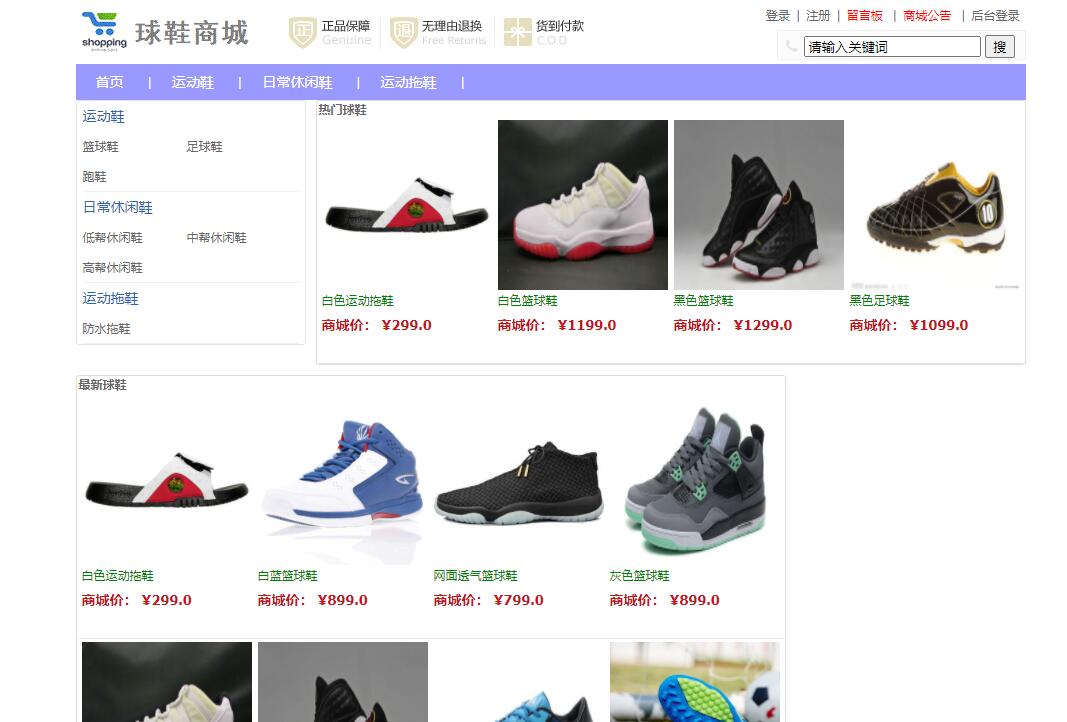
1. 商品展示与分类浏览 商城首页和分类页是流量入口,其实现关键在于高效的数据查询与渲染。
Controller层代码 (ProductController.java):
控制器负责接收请求参数,调用业务服务,并准备模型数据用于页面渲染。
@Controller
@RequestMapping("/product")
public class ProductController {

    @Autowired
    private ProductService productService;

    @RequestMapping("/list")
    public String getProductList(
            @RequestParam(value = "typeId", required = false) Integer typeId,
            @RequestParam(value = "page", defaultValue = "1") Integer pageNum,
            Model model) {
        // 设置分页参数
        PageHelper.startPage(pageNum, 12); // 每页显示12条商品
        // 构建查询条件
        ProductExample example = new ProductExample();
        ProductExample.Criteria criteria = example.createCriteria();
        criteria.andStatusEqualTo(0); // 只查询上架商品
        if (typeId != null && typeId > 0) {
            criteria.andTypeIdEqualTo(typeId);
        }
        example.setOrderByClause("sneaker_date DESC"); // 按上架时间倒序排列

        // 调用Service层查询
        List<Product> productList = productService.getProductListByExample(example);
        // 将查询结果转换为分页信息对象
        PageInfo<Product> pageInfo = new PageInfo<>(productList);

        // 将数据添加到Model,供视图层使用
        model.addAttribute("pageInfo", pageInfo);
        model.addAttribute("typeId", typeId);
        return "mall/product-list"; // 返回视图名称
    }
}
Service层代码 (ProductServiceImpl.java):
服务层处理核心业务逻辑,这里直接调用数据访问层。
@Service
public class ProductServiceImpl implements ProductService {

    @Autowired
    private ProductMapper productMapper;

    @Override
    public List<Product> getProductListByExample(ProductExample example) {
        return productMapper.selectByExampleWithBLOBs(example); // 查询包括大文本字段
    }
}
MyBatis Mapper XML (ProductMapper.xml):
数据访问层定义了具体的SQL查询。
<?xml version="1.0" encoding="UTF-8"?>
<!DOCTYPE mapper PUBLIC "-//mybatis.org//DTD Mapper 3.0//EN" "http://mybatis.org/dtd/mybatis-3-mapper.dtd">
<mapper namespace="com.sneakerhub.dao.ProductMapper">
  <resultMap id="BaseResultMap" type="com.sneakerhub.entity.Product">
    <id column="sneaker_id" jdbcType="INTEGER" property="sneakerId" />
    <result column="sneaker_name" jdbcType="VARCHAR" property="sneakerName" />
    <result column="sneaker_title" jdbcType="VARCHAR" property="sneakerTitle" />
    <result column="sneaker_price" jdbcType="INTEGER" property="sneakerPrice" />
    <result column="sneaker_image" jdbcType="VARCHAR" property="sneakerImage" />
    <!-- 其他字段映射 -->
  </resultMap>
  <resultMap id="ResultMapWithBLOBs" type="com.sneakerhub.entity.Product" extends="BaseResultMap">
    <result column="sneaker_info" jdbcType="LONGVARCHAR" property="sneakerInfo" />
  </resultMap>

  <sql id="Example_Where_Clause">
    <where>
      <foreach collection="oredCriteria" item="criteria" separator="or">
        <if test="criteria.valid">
          <trim prefix="(" prefixOverrides="and" suffix=")">
            <foreach collection="criteria.criteria" item="criterion">
              <choose>
                <when test="criterion.noValue">
                  and ${criterion.condition}
                </when>
                <when test="criterion.singleValue">
                  and ${criterion.condition} #{criterion.value}
                </when>
                <when test="criterion.betweenValue">
                  and ${criterion.condition} #{criterion.value} and #{criterion.secondValue}
                </when>
                <when test="criterion.listValue">
                  and ${criterion.condition}
                  <foreach close=")" collection="criterion.value" item="listItem" open="(" separator=",">
                    #{listItem}
                  </foreach>
                </when>
              </choose>
            </foreach>
          </trim>
        </if>
      </foreach>
    </where>
  </sql>

  <select id="selectByExampleWithBLOBs" parameterType="com.sneakerhub.entity.ProductExample" resultMap="ResultMapWithBLOBs">
    select
    <if test="distinct">
      distinct
    </if>
    <include refid="Base_Column_List" />,
    <include refid="Blob_Column_List" />
    from sneaker
    <if test="_parameter != null">
      <include refid="Example_Where_Clause" />
    </if>
    <if test="orderByClause != null">
      order by ${orderByClause}
    </if>
  </select>
</mapper>
此功能通过PageHelper分页插件实现商品列表的分页查询,根据typeId动态过滤商品分类,并通过MyBatis的动态SQL能力构建灵活的查询条件。
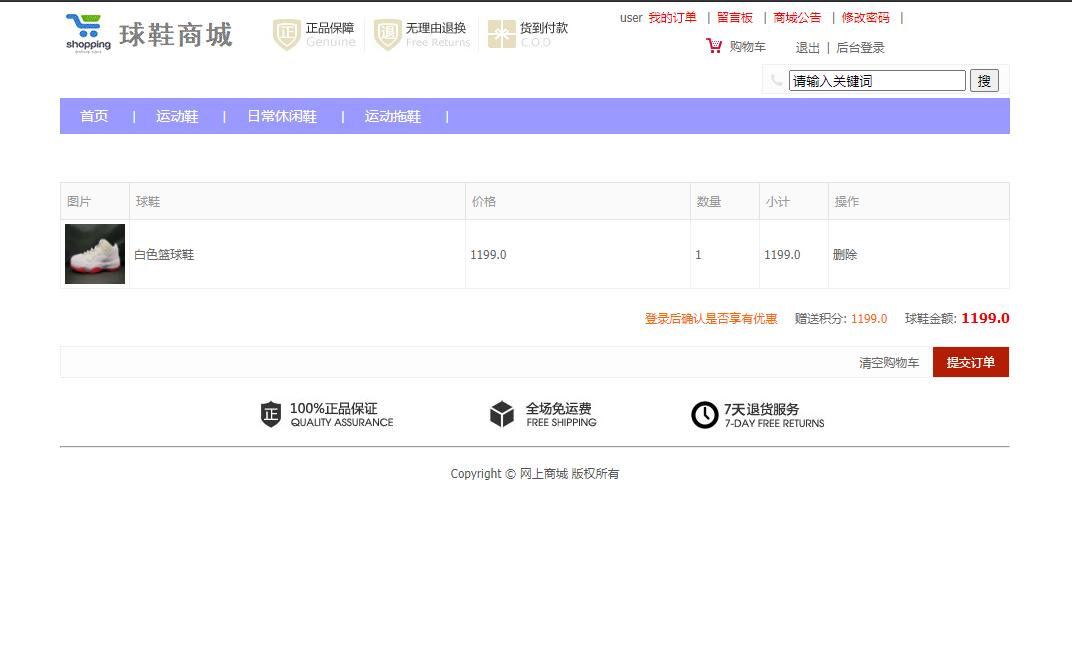
2. 购物车管理 购物车功能涉及商品的添加、删除、数量修改和金额计算,需要保证操作的实时性和数据一致性。
Controller层代码 (CartController.java):
处理前端Ajax请求,实现购物车项的添加。
@Controller
@RequestMapping("/cart")
public class CartController {

    @Autowired
    private CartService cartService;

    @ResponseBody
    @RequestMapping(value = "/add", method = RequestMethod.POST)
    public Map<String, Object> addToCart(@RequestBody CartItem cartItem, HttpSession session) {
        Map<String, Object> result = new HashMap<>();
        // 从session中获取当前登录用户ID
        User currentUser = (User) session.getAttribute("currentUser");
        if (currentUser == null) {
            result.put("success", false);
            result.put("message", "请先登录");
            return result;
        }
        cartItem.setUserId(currentUser.getUserId());

        try {
            // 调用服务层方法添加商品到购物车
            cartService.addOrUpdateCartItem(cartItem);
            result.put("success", true);
            result.put("message", "添加成功");
        } catch (Exception e) {
            result.put("success", false);
            result.put("message", "添加失败: " + e.getMessage());
        }
        return result; // 返回JSON结果给前端
    }
}
Service层代码 (CartServiceImpl.java):
服务层包含核心业务逻辑:判断商品是否存在、库存是否充足,并决定是新增记录还是更新数量。
@Service
public class CartServiceImpl implements CartService {

    @Autowired
    private CartMapper cartMapper;
    @Autowired
    private ProductMapper productMapper;

    @Override
    @Transactional // 声明式事务管理
    public void addOrUpdateCartItem(CartItem cartItem) throws BusinessException {
        // 1. 验证商品是否存在且已上架
        Product product = productMapper.selectByPrimaryKey(cartItem.getSneakerId());
        if (product == null || product.getStatus() != 0) {
            throw new BusinessException("商品不存在或已下架");
        }

        // 2. 验证库存是否充足
        if (product.getStock() < cartItem.getCount()) {
            throw new BusinessException("商品库存不足");
        }

        // 3. 查询该商品是否已在用户购物车中
        CartExample example = new CartExample();
        example.createCriteria().andUserIdEqualTo(cartItem.getUserId())
                                .andSneakerIdEqualTo(cartItem.getSneakerId());
        List<Cart> existingItems = cartMapper.selectByExample(example);

        if (existingItems != null && !existingItems.isEmpty()) {
            // 4. 已存在,更新数量
            Cart existingItem = existingItems.get(0);
            existingItem.setCount(existingItem.getCount() + cartItem.getCount());
            cartMapper.updateByPrimaryKey(existingItem);
        } else {
            // 5. 不存在,新增记录
            Cart newItem = new Cart();
            newItem.setUserId(cartItem.getUserId());
            newItem.setSneakerId(cartItem.getSneakerId());
            newItem.setCount(cartItem.getCount());
            newItem.setPrice(product.getSneakerPrice()); // 锁定加入时的价格
            newItem.setCreateTime(new Date());
            cartMapper.insert(newItem);
        }
    }
}
此功能通过@Transactional注解保证了在验证库存和更新购物车数据过程中的原子性,防止出现数据不一致的情况。前端通过jQuery发起Ajax POST请求,实现页面的无刷新更新。
3. 订单创建与处理 订单创建是系统中最复杂的业务流程之一,涉及购物车清理、库存扣减、订单号生成等多个步骤,必须在一个事务内完成。
![确认订单](