基于SSM框架的蜀绣文化科普与在线展销平台 - 源码深度解析
非遗文化数字化传承与商业化的创新实践
在数字经济蓬勃发展的今天,传统文化遗产的保护与传承迎来了前所未有的机遇与挑战。蜀绣作为中国非物质文化遗产的重要代表,以其精湛的针法技艺和深厚的文化底蕴,亟需通过现代化技术手段实现有效传播与商业价值转化。本项目构建的蜀绣文化数字化平台,正是传统工艺与现代信息技术深度融合的创新实践。
系统架构与技术栈设计
平台采用经典的SSM(Spring+SpringMVC+MyBatis)三层架构,体现了高内聚低耦合的软件设计理念。该架构的优势在于:
- Spring框架作为核心容器,通过依赖注入(DI)实现组件解耦
- **面向切面编程(AOP)**技术统一处理事务控制、权限验证等横切关注点
- SpringMVC提供清晰的MVC分离,增强代码可维护性
- MyBatis作为持久层框架,兼具SQL灵活性与对象映射便利性
Spring核心配置详解
// Spring Java配置类示例
@Configuration
@EnableTransactionManagement  // 启用声明式事务管理
@ComponentScan("com.spring.service")  // 组件扫描路径
public class AppConfig {

    @Bean
    public DataSource dataSource() {
        DruidDataSource dataSource = new DruidDataSource();
        // 数据库连接池配置
        dataSource.setUrl("jdbc:mysql://localhost:3306/shuxiu_db?useUnicode=true&characterEncoding=utf8");
        dataSource.setUsername("root");
        dataSource.setPassword("password");
        dataSource.setInitialSize(5);    // 初始连接数
        dataSource.setMaxActive(20);     // 最大活跃连接数
        dataSource.setValidationQuery("SELECT 1");  // 连接有效性验证
        return dataSource;
    }

    @Bean
    public SqlSessionFactoryBean sqlSessionFactory() throws Exception {
        SqlSessionFactoryBean sessionFactory = new SqlSessionFactoryBean();
        sessionFactory.setDataSource(dataSource());
        // 配置Mapper XML文件位置
        sessionFactory.setMapperLocations(
            new PathMatchingResourcePatternResolver()
                .getResources("classpath:mapper/*.xml"));
        return sessionFactory;
    }
}
SpringMVC控制器设计
@Controller
@RequestMapping("/product")
public class ProductController extends BaseController {

    @Autowired
    private ProductService productService;  // 依赖注入业务层

    /**
     * 商品列表分页查询
     * @param pageNum 当前页码,默认值1
     * @param pageSize 每页记录数,默认值12
     * @param model 视图模型
     * @return 视图名称
     */
    @RequestMapping("/list")
    public String list(@RequestParam(defaultValue = "1") Integer pageNum,
                      @RequestParam(defaultValue = "12") Integer pageSize,
                      Model model) {
        // 启动分页插件
        PageHelper.startPage(pageNum, pageSize);
        List<Product> products = productService.findAll();
        PageInfo<Product> pageInfo = new PageInfo<>(products);
        model.addAttribute("pageInfo", pageInfo);
        return "product/list";
    }

    /**
     * 商品详情查询(RESTful风格)
     * @param id 商品ID
     * @return JSON响应
     */
    @RequestMapping("/detail/{id}")
    @ResponseBody
    public ApiResponse detail(@PathVariable Integer id) {
        Product product = productService.findById(id);
        return ApiResponse.success(product);
    }
}
数据库设计亮点分析
订单信息表的设计优化
dingdanxinxi表的设计充分考虑了电商系统对数据完整性和查询性能的要求:
CREATE TABLE `dingdanxinxi` (
  `id` int(10) unsigned NOT NULL AUTO_INCREMENT COMMENT '主键',
  `dingdanbianhao` varchar(50) NOT NULL COMMENT '订单编号',
  `dingdanxinxi` text NOT NULL COMMENT '订单详细信息',
  `zongjijine` decimal(18,2) NOT NULL COMMENT '总计金额',
  `shouhuoren` varchar(50) NOT NULL COMMENT '收货人',
  `dianhua` varchar(50) NOT NULL COMMENT '联系电话',
  `dizhi` varchar(255) NOT NULL COMMENT '收货地址',
  `beizhu` text NOT NULL COMMENT '订单备注',
  `zhuangtai` varchar(255) NOT NULL COMMENT '订单状态',
  `xiadanren` varchar(50) NOT NULL COMMENT '下单用户',
  `iszf` varchar(10) NOT NULL DEFAULT '否' COMMENT '支付状态',
  `addtime` timestamp NOT NULL DEFAULT current_timestamp() COMMENT '创建时间',
  PRIMARY KEY (`id`),
  UNIQUE KEY `dingdanbianhao_unique` (`dingdanbianhao`),  -- 订单编号唯一索引
  KEY `xiadanren_index` (`xiadanren`),                    -- 下单人索引
  KEY `addtime_index` (`addtime`)                         -- 时间索引
) ENGINE=InnoDB AUTO_INCREMENT=8 DEFAULT CHARSET=utf8mb4 COMMENT='订单信息表'
设计亮点深度解析:
订单编号业务逻辑:
- 采用
varchar(50)类型支持多种编号规则(时间戳+随机数等) - 建立唯一索引防止重复订单
- 支持分布式系统下的订单号生成策略
- 采用
财务数据精度保障:
decimal(18,2)类型确保金额计算无精度损失- 符合金融级精度要求(支持万亿级金额)
状态管理灵活性:
- 字符串类型支持多状态扩展(待支付、已支付、发货中、已完成等)
- 便于后期添加新的业务状态
索引优化策略:
- 多字段组合索引提升查询效率
- 覆盖常用查询场景(按用户、按时间范围等)
购物车表的关系设计
gouwuche表通过合理的外键关联和索引设计,实现了高效的购物车管理:
CREATE TABLE `gouwuche` (
  `id` int(10) unsigned NOT NULL AUTO_INCREMENT COMMENT '主键ID',
  `shujixinxiid` int(10) unsigned NOT NULL COMMENT '商品信息ID',
  `shujibianhao` varchar(50) NOT NULL COMMENT '商品编号',
  `shujimingcheng` varchar(255) NOT NULL COMMENT '商品名称',
  `fenlei` int(10) unsigned NOT NULL COMMENT '商品分类',
  `xiaoshoujiage` decimal(18,2) NOT NULL COMMENT '销售单价',
  `goumaishuliang` int(11) NOT NULL COMMENT '购买数量',
  `xiaoji` decimal(18,2) NOT NULL COMMENT '小计金额',
  `goumairen` varchar(50) NOT NULL COMMENT '购买用户',
  `addtime` timestamp NOT NULL DEFAULT current_timestamp() COMMENT '添加时间',
  PRIMARY KEY (`id`),
  KEY `gouwuche_shujixinxiid_index` (`shujixinxiid`),
  KEY `gouwuche_fenlei_index` (`fenlei`),
  KEY `gouwuche_user_index` (`goumairen`),  -- 用户维度查询优化
  KEY `gouwuche_time_index` (`addtime`),    -- 时间维度查询优化
  CONSTRAINT `fk_gouwuche_product` FOREIGN KEY (`shujixinxiid`)
    REFERENCES `shujixinxi` (`id`) ON DELETE CASCADE  -- 外键约束
) ENGINE=InnoDB AUTO_INCREMENT=11 DEFAULT CHARSET=utf8mb4 COMMENT='购物车表'
性能优化策略分析:
- 多维度索引设计:覆盖商品查询、分类筛选、用户维度和时间范围查询
- 预计算优化:
xiaoji字段避免实时计算开销,提升响应速度 - 外键约束:保证数据一致性,自动处理商品删除时的购物车清理
- 存储引擎选择:InnoDB支持事务处理和行级锁定,适合高并发场景
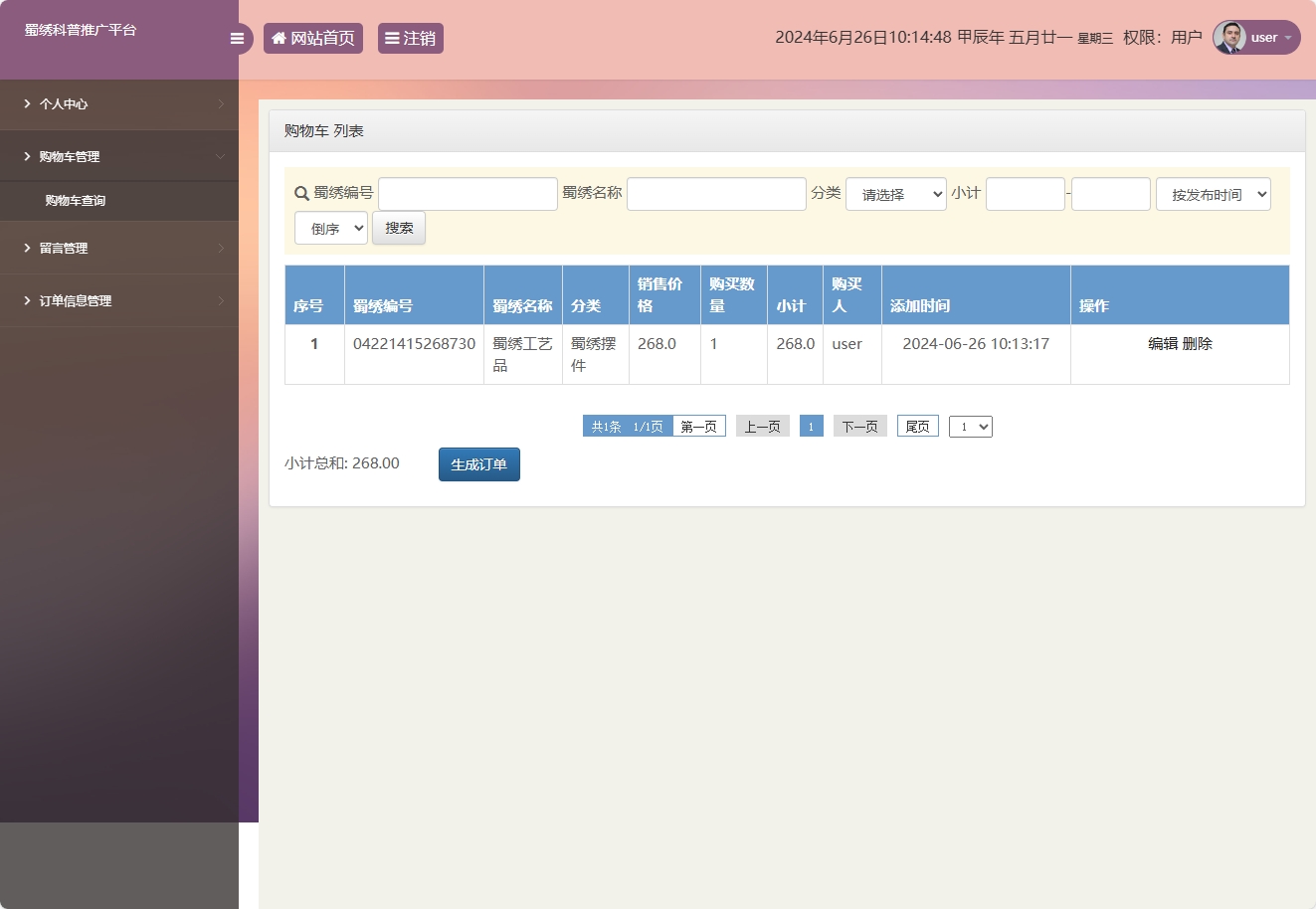
购物车管理界面展示了良好的用户体验设计
核心功能实现深度解析
用户购物车管理功能
购物车功能通过MyBatis的动态SQL和缓存机制实现了高效的CRUD操作:
/**
 * 购物车服务层实现类
 * 负责购物车业务的逻辑处理
 */
@Service
@Transactional  // 声明式事务管理
public class CartService {

    @Autowired
    private CartMapper cartMapper;

    /**
     * 添加商品到购物车
     * @param cartItem 购物车项
     */
    public void addToCart(CartItem cartItem) {
        // 检查商品是否已存在购物车
        CartItem existingItem = cartMapper.selectByUserAndProduct(
            cartItem.getUserId(), cartItem.getProductId());

        if (existingItem != null) {
            // 更新已有商品数量
            existingItem.setQuantity(existingItem.getQuantity() + cartItem.getQuantity());
            // 重新计算小计金额
            existingItem.setSubtotal(existingItem.getPrice().multiply(
                new BigDecimal(existingItem.getQuantity())));
            cartMapper.updateByPrimaryKey(existingItem);
        } else {
            // 新增购物车项
            cartItem.setSubtotal(cartItem.getPrice().multiply(
                new BigDecimal(cartItem.getQuantity())));
            cartMapper.insert(cartItem);
        }
    }

    /**
     * 获取用户购物车列表(带分页)
     */
    public PageInfo<CartItem> getCartByUser(String userId, int pageNum, int pageSize) {
        PageHelper.startPage(pageNum, pageSize);
        List<CartItem> cartItems = cartMapper.selectByUserId(userId);
        return new PageInfo<>(cartItems);
    }
}
MyBatis映射文件配置
<!-- CartMapper.xml -->
<mapper namespace="com.shuxiu.mapper.CartMapper">

    <resultMap id="CartResultMap" type="CartItem">
        <id column="id" property="id"/>
        <result column="shujixinxiid" property="productId"/>
        <result column="shujimingcheng" property="productName"/>
        <result column="xiaoshoujiage" property="price"/>
        <result column="goumaishuliang" property="quantity"/>
        <result column="xiaoji" property="subtotal"/>
        <result column="goumairen" property="userId"/>
    </resultMap>

    <!-- 动态SQL查询 -->
    <select id="selectByUserAndProduct" resultMap="CartResultMap">
        SELECT * FROM gouwuche
        WHERE goumairen = #{userId} AND shujixinxiid = #{productId}
    </select>

    <!-- 批量更新操作 -->
    <update id="batchUpdate" parameterType="java.util.List">
        <foreach collection="list" item="item" index="index" separator=";">
            UPDATE gouwuche
            SET goumaishuliang = #{item.quantity}, xiaoji = #{item.subtotal}
            WHERE id = #{item.id}
        </foreach>
    </update>
</mapper>
技术特色与创新点
1. 文化传承与商业化的平衡
- 通过数字化手段保护蜀绣传统工艺
- 建立线上线下结合的展销模式
- 实现文化价值与商业价值的统一
2. 技术架构的扩展性
- 模块化设计支持功能扩展
- 微服务架构预留接口
- 支持多平台数据同步
3. 性能优化策略
- 数据库读写分离设计
- Redis缓存热点数据
- CDN静态资源加速
本项目不仅实现了蜀绣文化的数字化传承,更为其他非物质文化遗产的数字化保护提供了可复用的技术框架和实践经验。