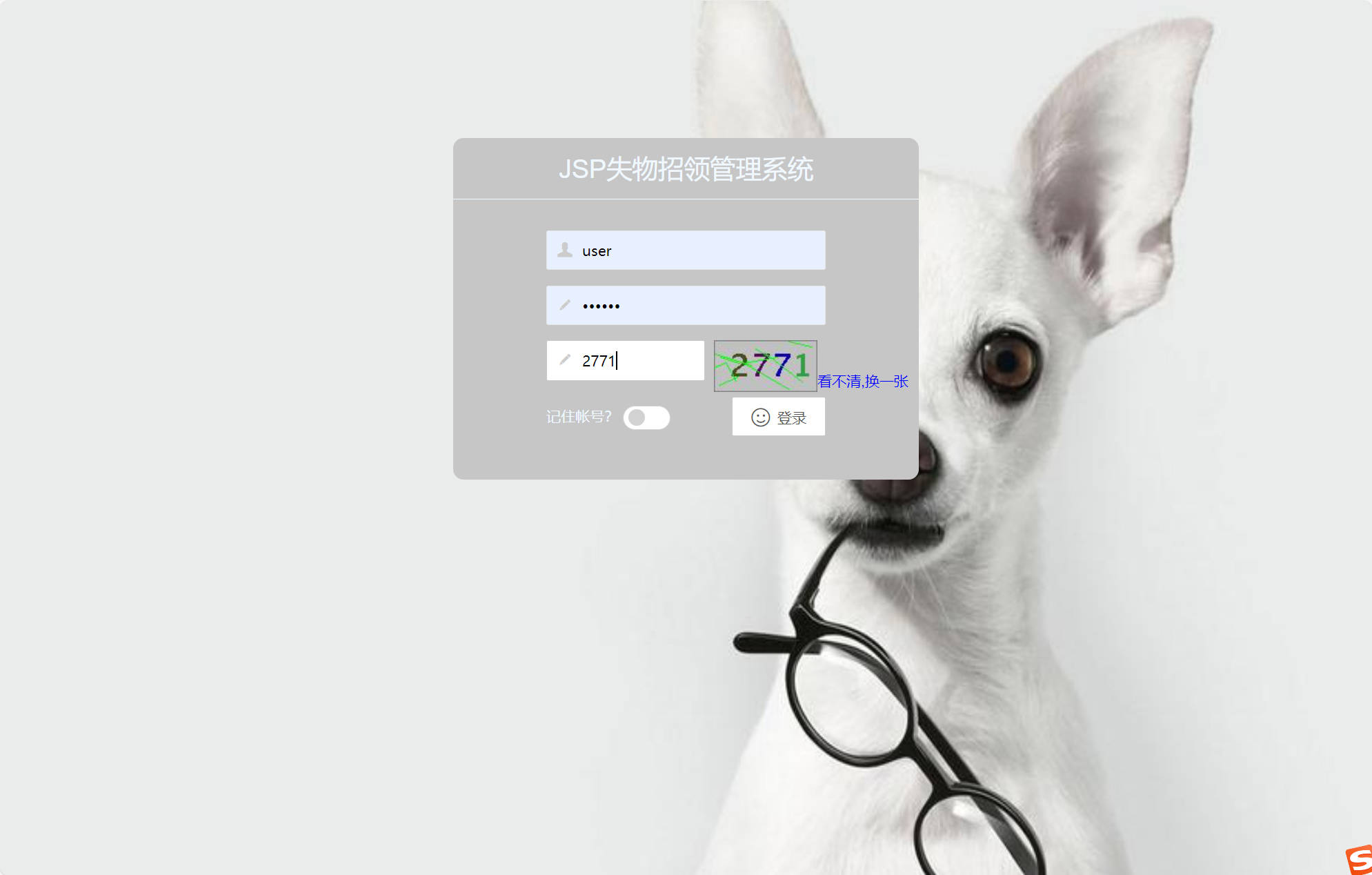
在现代社会公共场所管理中,失物招领是一个长期存在且频繁发生的需求场景。传统模式下,失物登记、信息发布和认领流程主要依赖物理公告栏、广播通知或人工登记等线下方式,存在信息传播范围有限、查询效率低下、管理成本高等痛点。数字化失物招领平台的开发正是为了解决这些实际问题,通过技术手段构建一个高效、透明的信息交互枢纽。
这一平台采用经典的SSM(Spring+Spring MVC+MyBatis)三层架构进行构建,结合MySQL数据库,为校园、社区、车站等公共场所提供了一套完整的在线失物招领解决方案。系统通过Web界面实现用户注册登录、物品信息发布、多条件检索、公告管理等核心功能,显著提升了失物招领的管理效率和用户体验。
系统架构与技术栈
该平台采用分层架构设计,确保各组件职责清晰、耦合度低。Spring框架作为核心容器,通过依赖注入(DI)管理业务逻辑层的对象生命周期,利用面向切面编程(AOP)处理事务控制、日志记录等横切关注点。Spring MVC模块负责Web请求的调度与响应,通过DispatcherServlet统一接收前端请求,由Controller进行参数绑定和业务逻辑分发。数据持久层采用MyBatis框架,通过XML映射文件或注解方式实现Java对象与数据库表之间的灵活映射。
技术栈配置如下:
<dependencies>
<!-- Spring核心框架 -->
<dependency>
<groupId>org.springframework</groupId>
<artifactId>spring-context</artifactId>
<version>5.3.18</version>
</dependency>
<!-- Spring MVC -->
<dependency>
<groupId>org.springframework</groupId>
<artifactId>spring-webmvc</artifactId>
<version>5.3.18</version>
</dependency>
<!-- MyBatis -->
<dependency>
<groupId>org.mybatis</groupId>
<artifactId>mybatis</artifactId>
<version>3.5.9</version>
</dependency>
<!-- MySQL驱动 -->
<dependency>
<groupId>mysql</groupId>
<artifactId>mysql-connector-java</artifactId>
<version>8.0.28</version>
</dependency>
</dependencies>
数据库设计亮点
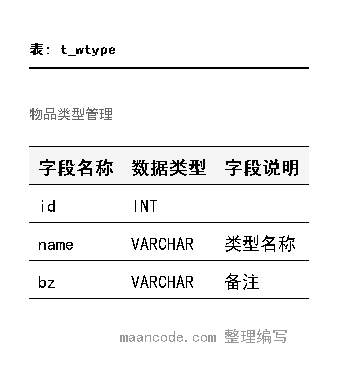
数据库设计采用了规范化的关系模型,通过外键约束确保数据完整性。核心表包括用户表(t_user)、物品类型表(t_wtype)、失物信息表(t_winfo)、拾物信息表(t_sinfo)和公告表(t_gonggao)。
用户表设计分析
CREATE TABLE `t_user` (
`id` int(11) NOT NULL AUTO_INCREMENT,
`username` varchar(255) DEFAULT NULL COMMENT '用户名',
`password` varchar(255) DEFAULT NULL COMMENT '密码',
`type` varchar(255) DEFAULT NULL COMMENT '类型',
`phone` varchar(255) DEFAULT NULL COMMENT '电话',
`bz` varchar(255) DEFAULT NULL COMMENT '备注',
PRIMARY KEY (`id`)
) ENGINE=InnoDB AUTO_INCREMENT=4 DEFAULT CHARSET=utf8mb4 COLLATE=utf8mb4_unicode_ci COMMENT='用户管理'
用户表设计中,id字段采用自增主键,确保每条记录的唯一性。username和password字段使用varchar(255)类型,预留足够的长度空间。type字段用于区分用户角色(如管理员、普通用户),采用字符串存储便于扩展。phone字段存储用户联系方式,便于失物认领时的联系验证。表引擎选用InnoDB,支持事务处理和行级锁定,字符集采用utf8mb4,全面支持中文和特殊字符。
物品信息表的关联设计
失物信息表(t_winfo)和拾物信息表(t_sinfo)采用了相似的结构设计,均通过外键关联用户表和物品类型表:
CREATE TABLE `t_winfo` (
`id` int(11) NOT NULL AUTO_INCREMENT,
`address` varchar(255) DEFAULT NULL COMMENT '丢失地点',
`dtime` varchar(255) DEFAULT NULL COMMENT '丢失时间',
`bz` varchar(255) DEFAULT NULL COMMENT '备注',
`user_id` int(11) DEFAULT NULL COMMENT '失主名称',
`wType_id` int(11) DEFAULT NULL COMMENT '物品类型',
PRIMARY KEY (`id`),
KEY `FK7201593218405835297` (`user_id`),
KEY `FK8605157683939167850` (`wType_id`),
CONSTRAINT `FK7201593218405835297` FOREIGN KEY (`user_id`) REFERENCES `t_user` (`id`),
CONSTRAINT `FK8605157683939167850` FOREIGN KEY (`wType_id`) REFERENCES `t_wtype` (`id`)
) ENGINE=InnoDB AUTO_INCREMENT=6 DEFAULT CHARSET=utf8mb4 COLLATE=utf8mb4_unicode_ci COMMENT='失物招领信息管理'
这种设计实现了数据的规范化存储,通过外键约束确保用户ID和物品类型ID的引用完整性。索引的创建显著提升了关联查询的性能,特别是在大数据量下的多表连接操作。

核心功能实现
用户登录与权限控制
系统采用基于角色的访问控制(RBAC)模型,不同用户类型拥有不同的操作权限。登录功能通过Spring Security或自定义拦截器实现安全验证。
@Controller
@RequestMapping("/user")
public class UserController {
@Autowired
private UserService userService;
@RequestMapping(value = "/login", method = RequestMethod.POST)
public String login(@RequestParam String username,
@RequestParam String password,
HttpSession session) {
User user = userService.login(username, password);
if (user != null) {
session.setAttribute("currentUser", user);
if ("admin".equals(user.getType())) {
return "redirect:/admin/main";
} else {
return "redirect:/user/main";
}
} else {
return "redirect:/login?error=1";
}
}
}

分页查询功能实现
系统采用自定义的PageBean类实现数据分页,支持大量数据的分批展示,提升用户体验和系统性能。
public class PageBean {
private int curPage;//当前页
private int prePage;//上一页
private int nextPage;//下一页
private int maxSize;//每页最大数
private int pageCount;//总页数
private long readCount;//查询总记录数
public PageBean(int curPage, int maxSize, long readCount) {
this.curPage = curPage;
this.maxSize = maxSize;
this.readCount = readCount;
updatePage();
}
public void updatePage(){
//总页数计算
this.pageCount = (int) (this.readCount/this.maxSize +
(this.readCount % this.maxSize == 0 ? 0 : 1));
//上一页计算
this.prePage = this.curPage > 1 ? (this.curPage - 1) : 1;
//下一页计算
this.nextPage = this.curPage >= this.pageCount ?
this.pageCount : (this.curPage + 1);
}
// Getter和Setter方法
public int getCurPage() { return curPage; }
public void setCurPage(int curPage) {
this.curPage = curPage;
updatePage();
}
}
在Service层中,分页查询的实现如下:
@Service
public class LostFoundService {
@Autowired
private LostFoundMapper lostFoundMapper;
public PageBean<LostFoundInfo> getLostFoundList(int page, int size,
String keyword, String type) {
// 计算起始位置
int start = (page - 1) * size;
// 查询数据列表
List<LostFoundInfo> list = lostFoundMapper.selectByCondition(
start, size, keyword, type);
// 查询总记录数
long total = lostFoundMapper.countByCondition(keyword, type);
// 构建分页对象
PageBean<LostFoundInfo> pageBean = new PageBean<>(page, size, total);
pageBean.setDataList(list);
return pageBean;
}
}
物品信息管理
管理员可以对失物和拾物信息进行全面的管理操作,包括添加、修改、删除和查询。
@Controller
@RequestMapping("/admin")
public class AdminController {
@Autowired
private ItemService itemService;
@RequestMapping(value = "/item/add", method = RequestMethod.POST)
@ResponseBody
public ResponseEntity<String> addItem(@RequestBody Item item) {
try {
itemService.addItem(item);
return ResponseEntity.ok("添加成功");
} catch (Exception e) {
return ResponseEntity.status(500).body("添加失败: " + e.getMessage());
}
}
@RequestMapping(value = "/item/update", method = RequestMethod.POST)
@ResponseBody
public ResponseEntity<String> updateItem(@RequestBody Item item) {
try {
itemService.updateItem(item);
return ResponseEntity.ok("更新成功");
} catch (Exception e) {
return ResponseEntity.status(500).body("更新失败: " + e.getMessage());
}
}
@RequestMapping("/item/delete/{id}")
@ResponseBody
public ResponseEntity<String> deleteItem(@PathVariable("id") Integer id) {
try {
itemService.deleteItem(id);
return ResponseEntity.ok("删除成功");
} catch (Exception e) {
return ResponseEntity.status(500).body("删除失败: " + e.getMessage());
}
}
}

公告管理功能
系统提供公告发布和管理功能,管理员可以发布重要通知,用户可以在首页查看最新公告。
@Service
public class AnnouncementService {
@Autowired
private AnnouncementMapper announcementMapper;
public List<Announcement> getLatestAnnouncements(int count) {
return announcementMapper.selectLatest(count);
}
public void publishAnnouncement(Announcement announcement) {
announcement.setPublishTime(new Date());
announcementMapper.insert(announcement);
}
public PageBean<Announcement> getAnnouncementList(int page, int size) {
int start = (page - 1) * size;
List<Announcement> list = announcementMapper.selectByPage(start, size);
long total = announcementMapper.countAll();
PageBean<Announcement> pageBean = new PageBean<>(page, size, total);
pageBean.setDataList(list);
return pageBean;
}
}
对应的Mapper接口定义:
public interface AnnouncementMapper {
@Select("SELECT * FROM t_gonggao ORDER BY shijian DESC LIMIT #{count}")
List<Announcement> selectLatest(@Param("count") int count);
@Select("SELECT * FROM t_gonggao ORDER BY shijian DESC LIMIT #{start}, #{size}")
List<Announcement> selectByPage(@Param("start") int start,
@Param("size") int size);
@Select("SELECT COUNT(*) FROM t_gonggao")
long countAll();
@Insert("INSERT INTO t_gonggao(title, content, shijian, bz) " +
"VALUES(#{title}, #{content}, #{publishTime}, #{remark})")
@Options(useGeneratedKeys = true, keyProperty = "id")
int insert(Announcement announcement);
}

多条件搜索功能
系统提供强大的搜索功能,用户可以根据物品名称、类型、地点、时间等多个条件进行组合查询。
@Mapper
public interface LostFoundMapper {
@Select({"<script>",
"SELECT w.*, u.username, t.name as type_name ",
"FROM t_winfo w ",
"LEFT JOIN t_user u ON w.user_id = u.id ",
"LEFT JOIN t_wtype t ON w.wType_id = t.id ",
"WHERE 1=1 ",
"<if test='keyword != null and keyword != \"\"'>",
"AND (w.bz LIKE CONCAT('%', #{keyword}, '%') ",
"OR u.username LIKE CONCAT('%', #{keyword}, '%')) ",
"</if>",
"<if test='type != null and type != \"\"'>",
"AND t.name = #{type} ",
"</if>",
"<if test='address != null and address != \"\"'>",
"AND w.address LIKE CONCAT('%', #{address}, '%') ",
"</if>",
"ORDER BY w.dtime DESC ",
"LIMIT #{start}, #{size}",
"</script>"})
List<Map<String, Object>> searchItems(@Param("start") int start,
@Param("size") int size,
@Param("keyword") String keyword,
@Param("type") String type,
@Param("address") String address);
}
实体模型设计
系统采用面向对象的设计思想,通过实体类映射数据库表结构,实现业务数据的对象化操作。
用户实体类
public class User {
private Integer id;
private String username;
private String password;
private String type; // 用户类型:admin-管理员, user-普通用户
private String phone;
private String remark;
// 构造函数
public User() {}
public User(String username, String password, String type) {
this.username = username;
this.password = password;
this.type = type;
}
// Getter和Setter方法
public Integer getId() { return id; }
public void setId(Integer id) { this.id = id; }
public String getUsername() { return username; }
public void setUsername(String username) { this.username = username; }
public String getPassword() { return password; }
public void setPassword(String password) { this.password = password; }
public String getType() { return type; }
public void setType(String type) { this.type = type; }
public String getPhone() { return phone; }
public void setPhone(String phone) { this.phone = phone; }
public String getRemark() { return remark; }
public void setRemark(String remark) { this.remark = remark; }
}
物品信息实体类
public class ItemInfo {
private Integer id;
private String address; // 地点信息
private String time; // 时间信息
private String remark; // 备注信息
private Integer userId; // 关联用户ID
private Integer typeId; // 物品类型ID
// 关联对象
private User user; // 用户信息
private ItemType type; // 物品类型信息
// 构造函数
public ItemInfo() {}
public ItemInfo(String address, String time, String remark,
Integer userId, Integer typeId) {
this.address = address;
this.time = time;
this.remark = remark;
this.userId = userId;
this.typeId = typeId;
}
// Getter和Setter方法
public Integer getId() { return id; }
public void setId(Integer id) { this.id = id; }
public String getAddress() { return address; }
public void setAddress(String address) { this.address = address; }
public String getTime() { return time; }
public void setTime(String time) { this.time = time; }
public String getRemark() { return remark; }
public void setRemark(String remark) { this.remark = remark; }
public Integer getUserId() { return userId; }
public void setUserId(Integer userId) { this.userId = userId; }
public Integer getTypeId() { return typeId; }
public void setTypeId(Integer typeId) { this.typeId = typeId; }
public User getUser() { return user; }
public void setUser(User user) { this.user = user; }
public ItemType getType() { return type; }
public void setType(ItemType type) { this.type = type; }
}
功能展望与优化
基于当前系统架构,可以从以下几个方向进行功能扩展和性能优化:
1. 引入Redis缓存提升性能
对于频繁读取且更新不频繁的数据(如物品类型、公告信息等),可以引入Redis作为缓存层,显著降低数据库压力。
@Service
public class ItemTypeService {
@Autowired
private ItemTypeMapper itemTypeMapper;
@Autowired
private RedisTemplate<String, Object> redisTemplate;
private static final String CACHE_KEY = "item_types";
@Cacheable(value = CACHE_KEY, key = "'all'")
public List<ItemType> getAllTypes() {
return itemTypeMapper.selectAll();
}
@CacheEvict(value = CACHE_KEY, allEntries = true)
public void addType(ItemType type) {
itemTypeMapper.insert(type);
}
}
2. 增加消息队列实现异步处理
对于邮件通知、短信提醒等耗时操作,可以引入消息队列实现异步处理,提升系统响应速度。
@Service
public class NotificationService {
@Autowired
private AmqpTemplate rabbitTemplate;
public void sendMatchNotification(Integer lostItemId, Integer foundItemId) {
MatchNotification notification = new MatchNotification(lostItemId, foundItemId);
rabbitTemplate.convertAndSend("notification.exchange",
"match.notification", notification);
}
}
3. 微服务架构改造
随着业务复杂度增加,可以考虑将系统拆分为多个微服务,如用户服务、物品服务、通知服务等,提升系统的可维护性和扩展性。
# application.yml 配置示例
spring:
application:
name: lost-found-platform
cloud:
nacos:
discovery:
server-addr: