在互联网信息爆炸的时代,健康领域的信息呈现出海量但质量参差不齐的特点。用户在面对健身、养生、慢性病管理等特定健康需求时,往往难以从纷繁复杂的信息中筛选出可信、有用的内容,更缺乏一个能够与同好进行深度交流的专业社区。传统的健康论坛功能单一,缺乏对用户兴趣的系统性引导和数据沉淀,无法满足日益增长的个性化健康管理需求。
针对这一市场痛点,我们设计并实现了“康健社区”——一个基于SSM(Spring+SpringMVC+MyBatis)技术栈的在线健康兴趣交流平台。该平台创新性地将社区交流与兴趣调研功能深度融合,不仅为用户提供了高质量的信息分享空间,还通过结构化的调研机制收集用户偏好,为后续的个性化推荐和社区运营提供数据支撑。
系统架构与技术栈选型
平台采用经典的三层架构设计,确保系统的高内聚、低耦合。表现层由SpringMVC框架负责,通过DispatcherServlet统一接收和分发HTTP请求,结合JSP视图技术和jQuery库实现动态页面渲染和丰富的用户交互体验。业务逻辑层基于Spring框架构建,利用其强大的IoC(控制反转)容器管理Bean的生命周期,通过AOP(面向切面编程)实现声明式事务管理、安全拦截等横切关注点。数据持久层选用MyBatis框架,通过XML映射文件灵活配置SQL语句,实现了对象关系映射(ORM)与手写SQL的优势结合。
项目采用Maven进行依赖管理和构建,确保了第三方库版本的一致性和项目构建的可重复性。数据库选用MySQL 5.7,兼顾了性能、可靠性和成本效益。整个技术栈成熟稳定,社区生态丰富,为平台的快速迭代和长期维护奠定了坚实基础。
数据库设计亮点解析
数据库设计是系统稳定运行的基石。平台共设计10张核心数据表,以下是几个关键表的设计分析:
用户表(user)设计体现了扩展性与安全性考量:
CREATE TABLE `user` (
  `userId` int(11) NOT NULL AUTO_INCREMENT,
  `userName` varchar(20) DEFAULT NULL,
  `userPassword` varchar(20) DEFAULT NULL,
  `userEmail` varchar(30) DEFAULT NULL,
  `userBirthday` date DEFAULT NULL,
  `userPhone` varchar(11) DEFAULT NULL,
  `userSex` varchar(2) DEFAULT NULL,
  `userAddress` varchar(50) DEFAULT NULL,
  `userHobby` varchar(50) DEFAULT NULL,
  `userSignature` varchar(150) DEFAULT NULL,
  `userStatus` int(11) DEFAULT '0',
  `userRegTime` datetime DEFAULT NULL,
  PRIMARY KEY (`userId`),
  UNIQUE KEY `userName` (`userName`),
  UNIQUE KEY `userEmail` (`userEmail`)
) ENGINE=InnoDB DEFAULT CHARSET=utf8;
该表设计具有多个亮点:首先,userId作为自增主键,确保了用户标识的唯一性;其次,对userName和userEmail字段添加了唯一约束,防止数据重复;第三,userStatus字段支持用户状态管理(如激活、禁用等);最后,userHobby和userSignature等字段为后续的兴趣推荐和个性化展示预留了空间。
帖子表(post)与分类表的关联设计体现了业务逻辑的完整性:
CREATE TABLE `post` (
  `postId` int(11) NOT NULL AUTO_INCREMENT,
  `postTitle` varchar(50) DEFAULT NULL,
  `postContent` text,
  `postTime` datetime DEFAULT NULL,
  `postClick` int(11) DEFAULT '0',
  `userId` int(11) DEFAULT NULL,
  `postTypeId` int(11) DEFAULT NULL,
  PRIMARY KEY (`postId`),
  KEY `userId` (`userId`),
  KEY `postTypeId` (`postTypeId`),
  CONSTRAINT `post_ibfk_1` FOREIGN KEY (`userId`) REFERENCES `user` (`userId`),
  CONSTRAINT `post_ibfk_2` FOREIGN KEY (`postTypeId`) REFERENCES `posttype` (`postTypeId`)
) ENGINE=InnoDB DEFAULT CHARSET=utf8;
通过外键约束确保了数据引用完整性,postClick字段支持热度排序功能,postContent使用TEXT类型满足长内容存储需求。这种设计支持了帖子的分类管理、作者追踪和访问统计等核心功能。
调研问卷表(questionnaire)与选项表的多表设计支持复杂的调研场景:
CREATE TABLE `questionnaire` (
  `qId` int(11) NOT NULL AUTO_INCREMENT,
  `qTitle` varchar(50) DEFAULT NULL,
  `qDescription` varchar(200) DEFAULT NULL,
  `qStatus` int(11) DEFAULT '0',
  `qCreateTime` datetime DEFAULT NULL,
  `qEndTime` datetime DEFAULT NULL,
  `qMaxParticipants` int(11) DEFAULT NULL,
  PRIMARY KEY (`qId`)
) ENGINE=InnoDB DEFAULT CHARSET=utf8;

CREATE TABLE `question` (
  `questionId` int(11) NOT NULL AUTO_INCREMENT,
  `qId` int(11) DEFAULT NULL,
  `questionText` varchar(200) DEFAULT NULL,
  `questionType` int(11) DEFAULT NULL,
  PRIMARY KEY (`questionId`),
  KEY `qId` (`qId`),
  CONSTRAINT `question_ibfk_1` FOREIGN KEY (`qId`) REFERENCES `questionnaire` (`qId`)
) ENGINE=InnoDB DEFAULT CHARSET=utf8;
这种分离设计使得单个问卷可以包含多个问题,每个问题可以配置不同的类型(单选、多选、文本等),极大增强了调研功能的灵活性和可扩展性。
核心功能模块深度解析
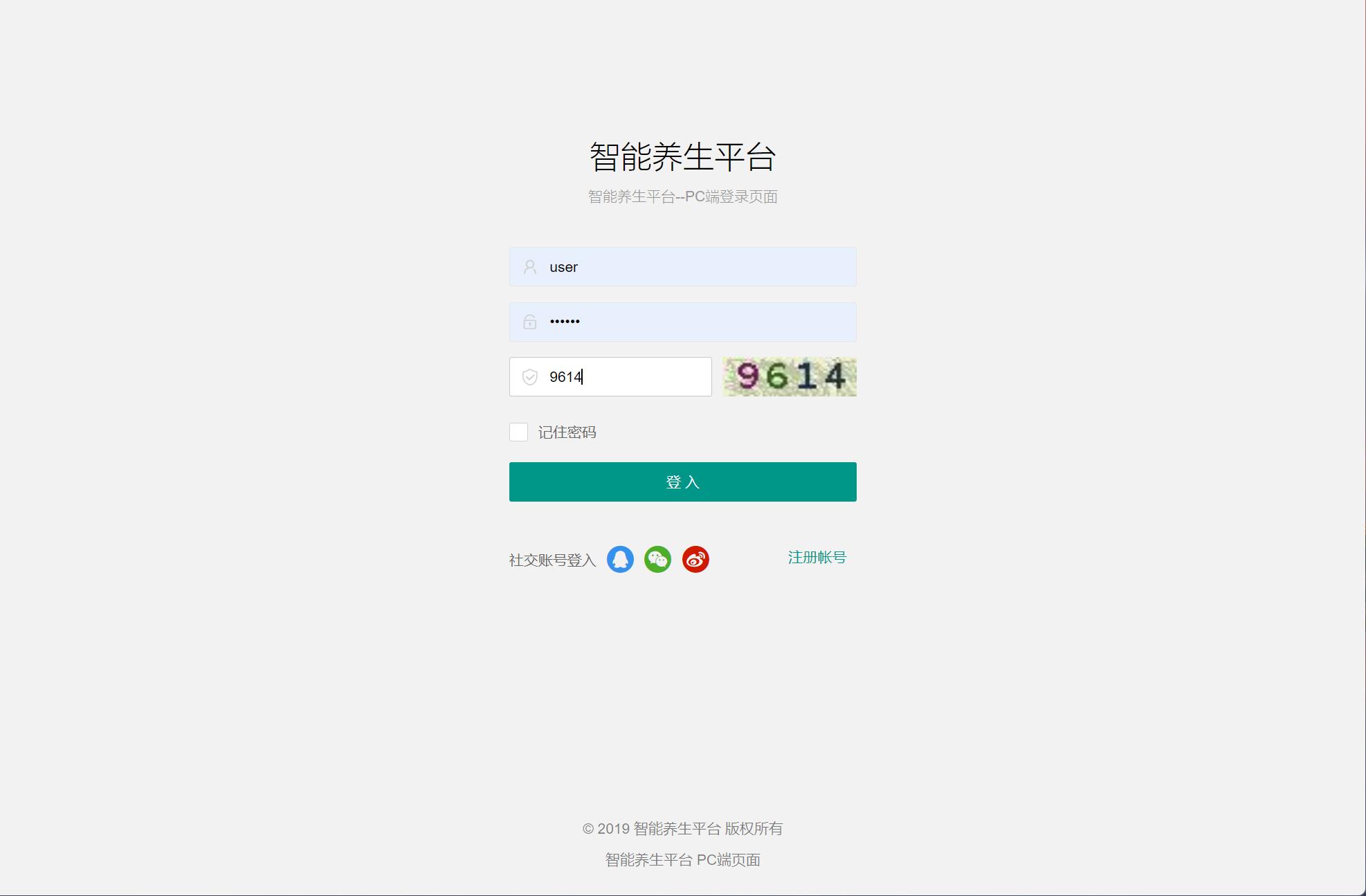
1. 用户认证与权限管理子系统
平台实现了细粒度的权限控制机制,不同角色的用户拥有不同的操作权限。以下是用户登录验证的核心代码:
@Controller
@RequestMapping("/user")
public class UserController {

    @Autowired
    private UserService userService;

    @RequestMapping(value="/login", method=RequestMethod.POST)
    public String login(String userName, String userPassword,
                       HttpSession session, Model model) {
        try {
            User user = userService.login(userName, userPassword);
            if (user != null) {
                if (user.getUserStatus() == 1) {
                    model.addAttribute("msg", "该账号已被禁用,请联系管理员");
                    return "user/login";
                }
                session.setAttribute("currentUser", user);
                return "redirect:/index";
            } else {
                model.addAttribute("msg", "用户名或密码错误");
                return "user/login";
            }
        } catch (Exception e) {
            model.addAttribute("msg", "登录异常,请稍后重试");
            return "user/login";
        }
    }
}
配合Spring拦截器实现权限验证:
@Component
public class AuthInterceptor implements HandlerInterceptor {

    @Override
    public boolean preHandle(HttpServletRequest request,
                           HttpServletResponse response, Object handler) throws Exception {
        HttpSession session = request.getSession();
        User user = (User) session.getAttribute("currentUser");

        if (user == null) {
            response.sendRedirect(request.getContextPath() + "/user/login");
            return false;
        }

        // 管理员权限验证
        String uri = request.getRequestURI();
        if (uri.contains("/admin/") && user.getUserType() != 1) {
            response.sendRedirect(request.getContextPath() + "/error/403");
            return false;
        }

        return true;
    }
}
2. 社区交流与内容管理模块
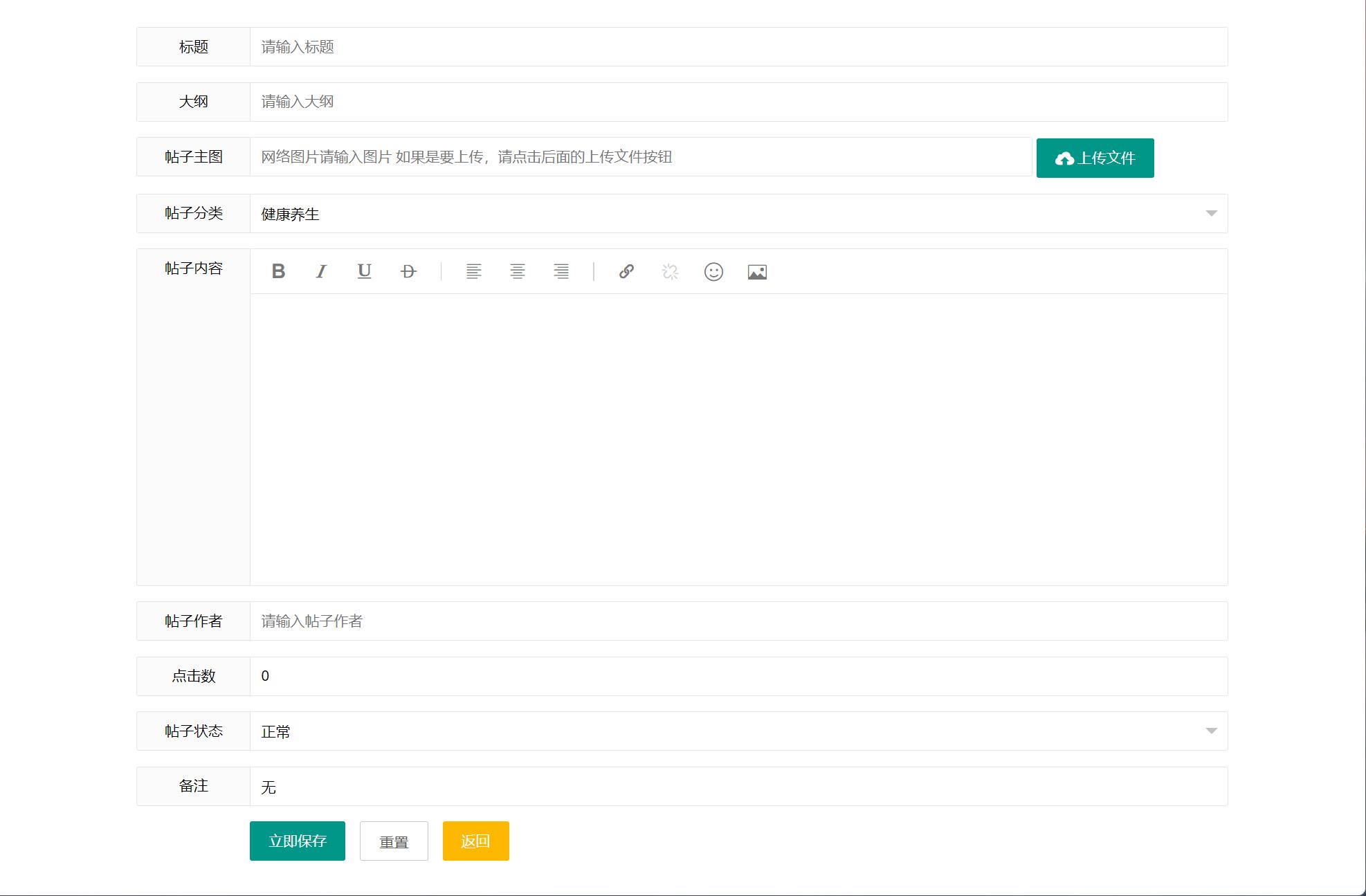
帖子发布和管理的实现展示了平台的内容处理能力。以下是帖子服务的核心逻辑:
@Service
public class PostServiceImpl implements PostService {

    @Autowired
    private PostMapper postMapper;

    @Override
    @Transactional
    public boolean publishPost(Post post) {
        try {
            // 参数验证
            if (post.getPostTitle() == null || post.getPostTitle().trim().isEmpty()) {
                throw new IllegalArgumentException("帖子标题不能为空");
            }
            if (post.getPostContent() == null || post.getPostContent().trim().isEmpty()) {
                throw new IllegalArgumentException("帖子内容不能为空");
            }

            // 设置发布时间
            post.setPostTime(new Date());
            post.setPostClick(0);

            int result = postMapper.insert(post);
            return result > 0;
        } catch (Exception e) {
            TransactionAspectSupport.currentTransactionStatus().setRollbackOnly();
            throw new RuntimeException("发布帖子失败: " + e.getMessage());
        }
    }

    @Override
    public PageInfo<Post> getPostsByPage(int pageNum, int pageSize, Integer postTypeId) {
        PageHelper.startPage(pageNum, pageSize);
        List<Post> posts = postMapper.selectByTypeWithUser(postTypeId);
        return new PageInfo<>(posts);
    }
}
对应的MyBatis映射文件配置:
<!-- PostMapper.xml -->
<mapper namespace="com.healthcommunity.mapper.PostMapper">

    <resultMap id="PostWithUserMap" type="com.healthcommunity.entity.Post">
        <id column="postId" property="postId" />
        <result column="postTitle" property="postTitle" />
        <result column="postContent" property="postContent" />
        <result column="postTime" property="postTime" />
        <result column="postClick" property="postClick" />
        <association property="user" javaType="com.healthcommunity.entity.User">
            <id column="userId" property="userId" />
            <result column="userName" property="userName" />
            <result column="userSignature" property="userSignature" />
        </association>
        <association property="postType" javaType="com.healthcommunity.entity.PostType">
            <id column="postTypeId" property="postTypeId" />
            <result column="typeName" property="typeName" />
        </association>
    </resultMap>

    <select id="selectByTypeWithUser" parameterType="int" resultMap="PostWithUserMap">
        SELECT p.*, u.userName, u.userSignature, pt.typeName
        FROM post p
        LEFT JOIN user u ON p.userId = u.userId
        LEFT JOIN posttype pt ON p.postTypeId = pt.postTypeId
        <where>
            <if test="postTypeId != null and postTypeId != 0">
                AND p.postTypeId = #{postTypeId}
            </if>
        </where>
        ORDER BY p.postTime DESC
    </select>
</mapper>
3. 健康兴趣调研引擎
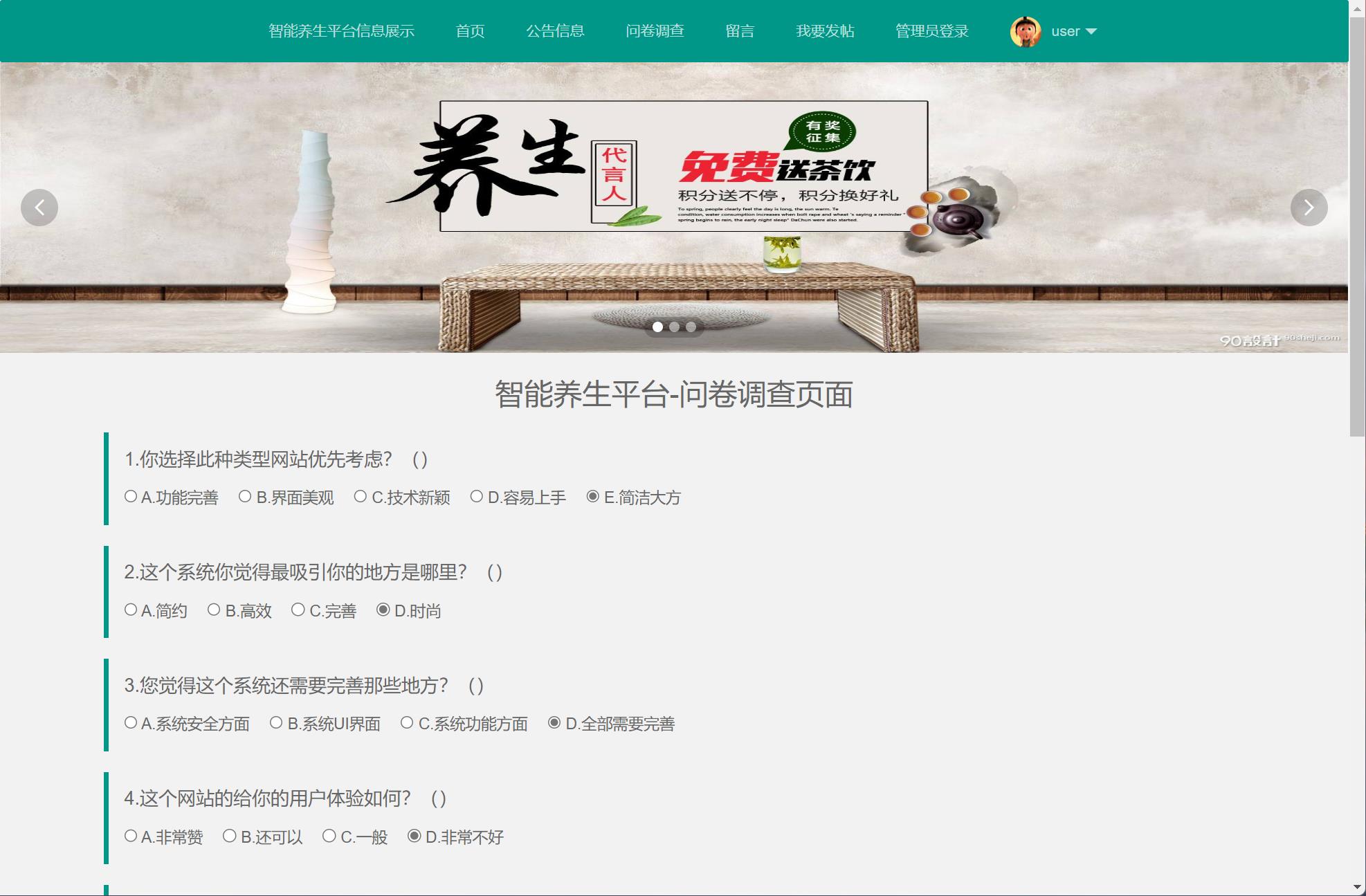
调研模块是平台的核心创新点,支持创建、分发、统计完整的调研流程。以下是调研问卷创建的服务实现:
@Service
public class QuestionnaireServiceImpl implements QuestionnaireService {

    @Autowired
    private QuestionnaireMapper questionnaireMapper;

    @Autowired
    private QuestionMapper questionMapper;

    @Override
    @Transactional
    public boolean createQuestionnaire(Questionnaire questionnaire, List<Question> questions) {
        try {
            // 验证问卷基本参数
            if (questionnaire.getQTitle() == null || questionnaire.getQTitle().trim().isEmpty()) {
                throw new IllegalArgumentException("问卷标题不能为空");
            }
            if (questionnaire.getQEndTime() != null &&
                questionnaire.getQEndTime().before(new Date())) {
                throw new IllegalArgumentException("结束时间不能早于当前时间");
            }

            questionnaire.setQCreateTime(new Date());
            questionnaire.setQStatus(0); // 0-未发布,1-已发布,2-已结束

            int result = questionnaireMapper.insert(questionnaire);
            if (result > 0 && questions != null) {
                for (Question question : questions) {
                    question.setQId(questionnaire.getQId());
                    questionMapper.insert(question);
                }
            }
            return result > 0;
        } catch (Exception e) {
            TransactionAspectSupport.currentTransactionStatus().setRollbackOnly();
            throw new RuntimeException("创建问卷失败: " + e.getMessage());
        }
    }

    @Override
    public Questionnaire getQuestionnaireWithQuestions(Integer qId) {
        Questionnaire questionnaire = questionnaireMapper.selectByPrimaryKey(qId);
        if (questionnaire != null) {
            List<Question> questions = questionMapper.selectByQuestionnaireId(qId);
            questionnaire.setQuestions(questions);
        }
        return questionnaire;
    }
}
调研数据统计功能实现:
@Override
public Map<String, Object> getQuestionnaireStatistics(Integer qId) {
    Map<String, Object> statistics = new HashMap<>();

    // 获取参与人数
    Integer participantCount = answerMapper.countParticipantsByQuestionnaire(qId);
    statistics.put("participantCount", participantCount);

    // 获取每个问题的统计结果
    List<Question> questions = questionMapper.selectByQuestionnaireId(qId);
    List<Map<String, Object>> questionStats = new ArrayList<>();

    for (Question question : questions) {
        Map<String, Object> questionStat = new HashMap<>();
        questionStat.put("questionText", question.getQuestionText());

        if (question.getQuestionType() == 1) { // 单选题
            List<Map<String, Object>> optionStats = answerMapper.
                countOptionsByQuestion(question.getQuestionId());
            questionStat.put("optionStats", optionStats);
        } else if (question.getQuestionType() == 3) { // 文本题
            List<String> textAnswers = answerMapper.
                selectTextAnswersByQuestion(question.getQuestionId());
            questionStat.put("textAnswers", textAnswers);
        }

        questionStats.add(questionStat);
    }

    statistics.put("questionStats", questionStats);
    return statistics;
}
4. 管理员后台管理系统
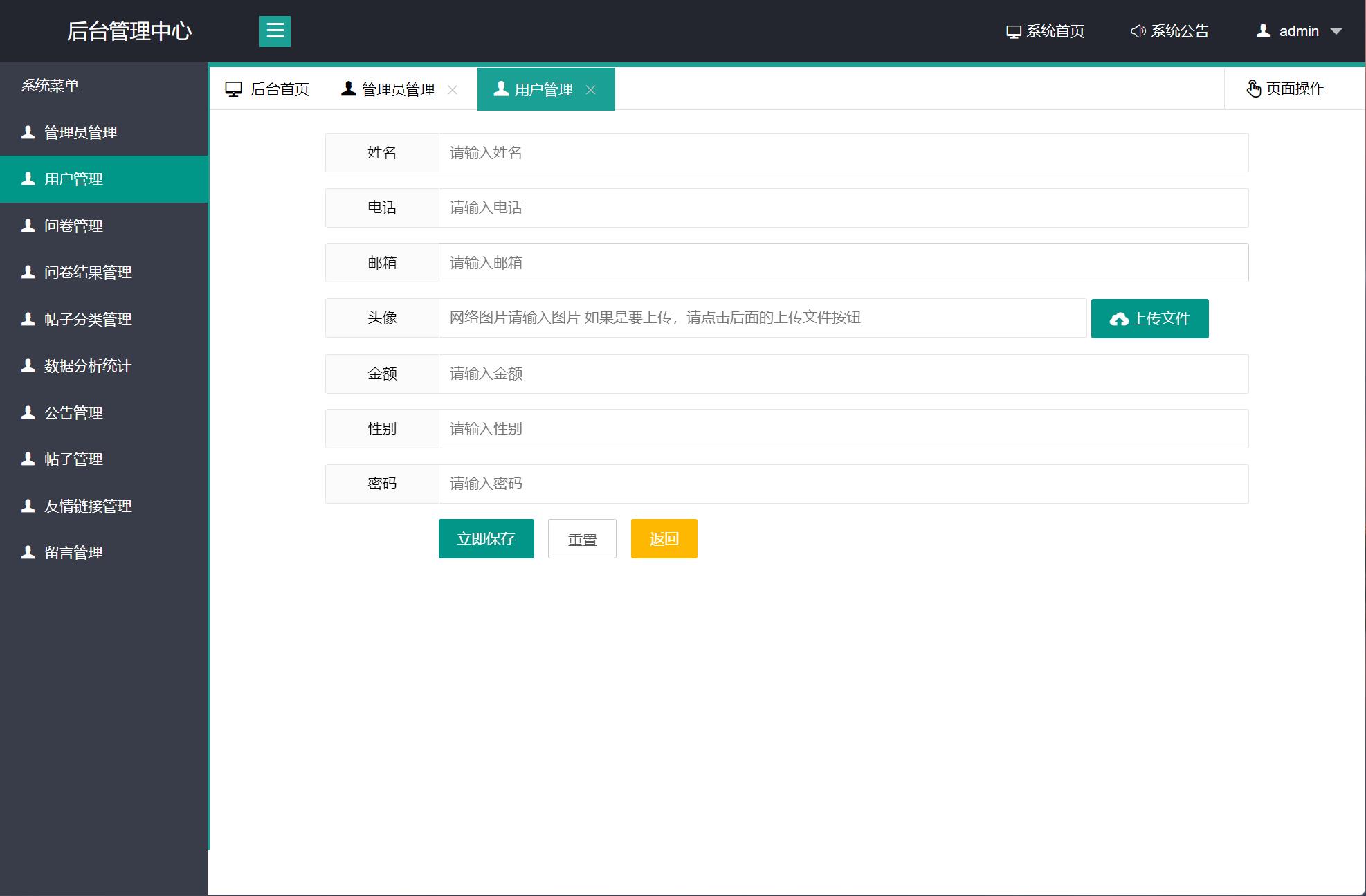
管理员后台提供了完整的平台管理功能,包括用户管理、内容审核、数据统计等。以下是用户管理功能的实现:
@Controller
@RequestMapping("/admin/user")
public class AdminUserController {

    @Autowired
    private UserService userService;

    @RequestMapping("/list")
    public String userList(@RequestParam(defaultValue = "1") Integer pageNum,
                          @RequestParam(defaultValue = "10") Integer pageSize,
                          Model model) {
        PageInfo<User> pageInfo = userService.getUsersByPage(pageNum, pageSize);
        model.addAttribute("pageInfo", pageInfo);
        return "admin/user/list";
    }

    @RequestMapping("/updateStatus")
    @ResponseBody
    public Map<String, Object> updateUserStatus(Integer userId, Integer status) {
        Map<String, Object> result = new HashMap<>();
        try {
            boolean success = userService.updateUserStatus(userId, status);
            result.put("success", success);
            result.put("message", success ? "操作成功" : "操作失败");
        } catch (Exception e) {
            result.put("success", false);
            result.put("message", "操作异常: " + e.getMessage());
        }
        return result;
    }
}
实体模型与业务对象设计
系统采用面向对象的设计思想,核心实体模型设计合理,关系清晰。以用户实体为例:
public class User {
    private Integer userId;
    private String userName;
    private String userPassword;
    private String userEmail;
    private Date userBirthday;
    private String userPhone;
    private String userSex;
    private String userAddress;
    private String userHobby;
    private String userSignature;
    private Integer userStatus;
    private Date userRegTime;
    private Integer userType; // 0-普通用户,1-管理员

    // 关联对象
    private List<Post> posts;
    private List<Answer> answers;

    // 构造方法、getter、setter省略
}
帖子实体设计了丰富的关联关系:
public class Post {
    private Integer postId;
    private String postTitle;
    private String postContent;
    private Date postTime;
    private Integer postClick;

    // 关联属性
    private Integer userId;
    private Integer postTypeId;
    private User user;
    private PostType postType;
    private List<Comment> comments;

    // 业务方法
    public String getShortContent() {
        if (postContent != null && postContent.length() > 100) {
            return postContent.substring(0, 100) + "...";
        }
        return postContent;
    }

    public boolean isPopular() {
        return postClick != null && postClick > 1000;
    }
}
性能优化与安全考量
在系统性能方面,平台实施了多层次的优化策略。数据库层面通过合理的索引设计(如对常用查询字段建立复合索引)、查询优化(使用EXPLAIN分析慢查询)提升数据访问效率。应用层面采用连接池技术管理数据库连接,使用PageHelper插件实现物理分页,避免大数据量查询的内存溢出问题。
安全方面,平台实施了全面的防护措施:使用PreparedStatement防止SQL注入,对用户密码进行MD5加盐加密存储,通过XSS过滤器对用户输入进行转义处理,采用CSRF令牌防止跨站请求伪造,对文件上传进行类型和大小限制。
// 密码加密工具类
@Component
public class PasswordEncoder {

    private static final String SALT = "health_community_salt";

    public String encode(String rawPassword) {
        try {
            String data = rawPassword + SALT;
            MessageDigest md = MessageDigest.getInstance("MD5");
            byte[] digest = md.digest(data.getBytes(StandardCharsets.UTF_8));
            return bytesToHex(digest);
        } catch (NoSuchAlgorithmException e) {
            throw new RuntimeException("密码加密失败", e);
        }
    }

    public boolean matches(String rawPassword, String encodedPassword) {
        return encode(rawPassword).equals(encodedPassword);
    }

    private static String bytesToHex(byte[] bytes) {
        StringBuilder hexString = new StringBuilder();
        for (byte b : bytes) {
            String hex = Integer.toHexString(0xff & b);
            if (hex.length() == 1) {
                hexString.append('0');
            }
            hexString.append(hex