基于SSM框架的在线游戏商城交易系统 - 源码深度解析

JavaJavaScriptMavenHTMLCSSSSM框架MySQL
2026-02-0813 浏览

文章摘要

本系统是一款基于SSM(Spring+SpringMVC+MyBatis)整合框架构建的在线游戏虚拟商品交易平台。其核心业务价值在于为游戏玩家和数字商品提供者之间建立一个安全、高效、集中的交易环境,有效解决了传统交易模式中信息不透明、交易风险高、支付流程繁琐等核心痛点。系统通过标准化的商品上架、搜索...

在数字娱乐产业蓬勃发展的今天,虚拟商品交易已成为游戏生态中不可或缺的一环。传统交易模式存在信息不对称、信任缺失、流程繁琐等痛点,亟需一个专业化、规范化的平台来保障交易安全与效率。为此,我们设计并实现了一套企业级游戏数字资产交易平台,该系统采用成熟的SSM(Spring+SpringMVC+MyBatis)技术架构,为游戏玩家和数字商品提供者构建了安全高效的交易环境。

系统架构与技术栈

该平台采用经典的三层架构设计,展现层由SpringMVC框架负责请求路由和视图解析,业务层通过Spring IoC容器管理各类服务组件,数据持久层则依托MyBatis实现与数据库的高效交互。

技术栈配置示例:

<!-- pom.xml核心依赖配置 -->
<dependencies>
    <!-- Spring核心框架 -->
    <dependency>
        <groupId>org.springframework</groupId>
        <artifactId>spring-webmvc</artifactId>
        <version>5.2.8.RELEASE</version>
    </dependency>
    
    <!-- MyBatis持久层框架 -->
    <dependency>
        <groupId>org.mybatis</groupId>
        <artifactId>mybatis-spring</artifactId>
        <version>2.0.6</version>
    </dependency>
    
    <!-- 数据库连接池 -->
    <dependency>
        <groupId>com.alibaba</groupId>
        <artifactId>druid</artifactId>
        <version>1.2.8</version>
    </dependency>
</dependencies>

Spring的声明式事务管理确保了交易过程中的数据一致性,特别是在资金扣除与库存更新的关键操作中。SpringMVC的拦截器机制被广泛应用于用户身份验证、权限控制等横切关注点,有效提升了代码的复用性和系统的安全性。

数据库设计亮点分析

用户表(yonghu)的精细化设计

CREATE TABLE `yonghu` (
  `id` int(11) NOT NULL AUTO_INCREMENT COMMENT '主键',
  `username` varchar(200) DEFAULT NULL COMMENT '账户',
  `password` varchar(200) DEFAULT NULL COMMENT '密码',
  `yonghu_uuid_number` varchar(200) DEFAULT NULL COMMENT '用户编号',
  `yonghu_name` varchar(200) DEFAULT NULL COMMENT '用户姓名',
  `yonghu_phone` varchar(200) DEFAULT NULL COMMENT '用户手机号',
  `yonghu_id_number` varchar(200) DEFAULT NULL COMMENT '用户身份证号',
  `yonghu_photo` varchar(200) DEFAULT NULL COMMENT '用户头像',
  `age` int(11) DEFAULT NULL COMMENT '年龄',
  `sex_types` int(11) DEFAULT NULL COMMENT '性别',
  `xueli_types` int(11) DEFAULT NULL COMMENT '学历',
  `yonghu_email` varchar(200) DEFAULT NULL COMMENT '电子邮箱',
  `new_money` decimal(10,2) DEFAULT NULL COMMENT '余额',
  `yonghu_sum_jifen` decimal(10,2) DEFAULT NULL COMMENT '总积分',
  `yonghu_new_jifen` decimal(10,2) DEFAULT NULL COMMENT '现积分',
  `huiyuandengji_types` int(11) DEFAULT NULL COMMENT '会员等级',
  `create_time` timestamp NULL DEFAULT NULL COMMENT '创建时间',
  PRIMARY KEY (`id`)
) ENGINE=InnoDB DEFAULT CHARSET=utf8 COMMENT='用户'

该表设计体现了多个优化考量:使用decimal(10,2)类型精确处理金融数据,避免浮点数精度问题;通过yonghu_uuid_number字段实现业务编号与自增主键解耦;会员等级字段采用字典表关联方式,保证系统扩展性。索引策略上,对usernameyonghu_phone等查询频繁字段建立了唯一索引,确保数据唯一性的同时提升查询性能。

游戏商品表(youxi)的多维度属性设计

CREATE TABLE `youxi` (
  `id` int(11) NOT NULL AUTO_INCREMENT COMMENT '主键',
  `youxi_name` varchar(200) DEFAULT NULL COMMENT '游戏名称',
  `youxi_uuid_number` varchar(200) DEFAULT NULL COMMENT '游戏编号',
  `youxi_photo` varchar(200) DEFAULT NULL COMMENT '游戏照片',
  `youxi_types` int(11) DEFAULT NULL COMMENT '游戏类型',
  `youxi_zuidipeizhi` varchar(200) DEFAULT NULL COMMENT '最低配置',
  `youxi_tuijianpeizhi` varchar(200) DEFAULT NULL COMMENT '推荐配置',
  `youxi_kaifashang` varchar(200) DEFAULT NULL COMMENT '开发商',
  `youxi_yuyan` varchar(200) DEFAULT NULL COMMENT '支持语言',
  `youxi_kongjian` varchar(200) DEFAULT NULL COMMENT '需要空间',
  `youxi_shoufa` varchar(200) DEFAULT NULL COMMENT '首发日期',
  `youxi_address` varchar(200) DEFAULT NULL COMMENT '游戏下载链接',
  `youxi_price` int(11) DEFAULT NULL COMMENT '购买获得积分',
  `youxi_old_money` decimal(10,2) DEFAULT NULL COMMENT '游戏原价',
  `youxi_new_money` decimal(10,2) DEFAULT NULL COMMENT '现价',
  `youxi_clicknum` int(11) DEFAULT NULL COMMENT '游戏热度',
  `youxi_content` text DEFAULT NULL COMMENT '游戏详细介绍',
  `shangxia_types` int(11) DEFAULT NULL COMMENT '是否上架',
  `youxi_delete` int(11) DEFAULT NULL COMMENT '逻辑删除',
  `create_time` timestamp NULL DEFAULT NULL COMMENT '创建时间',
  PRIMARY KEY (`id`)
) ENGINE=InnoDB DEFAULT CHARSET=utf8 COMMENT='游戏'

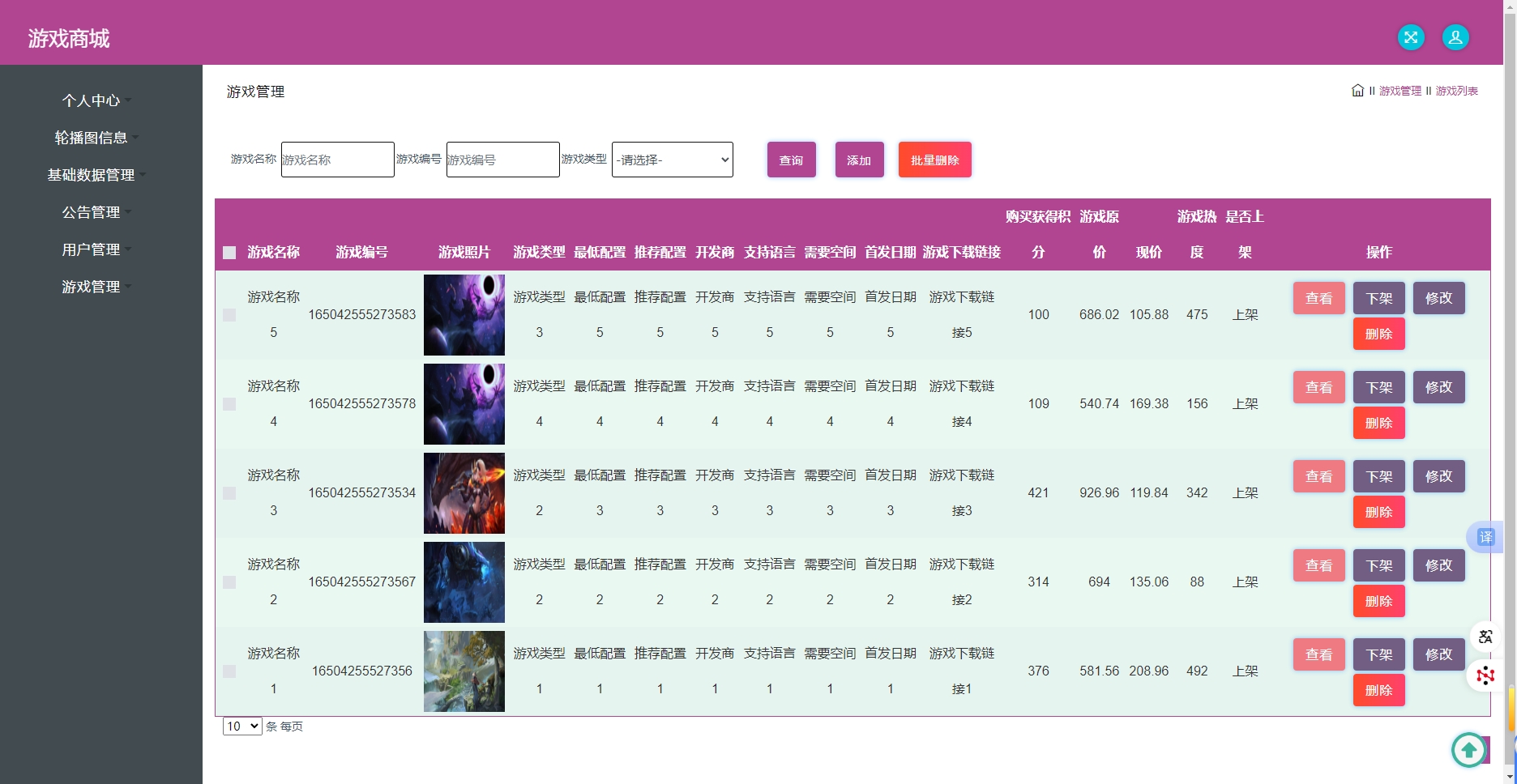
该表设计充分考虑了游戏商品的复杂属性,通过youxi_clicknum字段实现热度统计,支持个性化推荐;shangxia_typesyouxi_delete字段分别控制商品上下架状态和逻辑删除,满足业务灵活性和数据安全需求。对youxi_typesshangxia_types等枚举字段建立索引,大幅提升商品筛选和分类查询效率。

游戏管理界面

核心功能实现解析

购物车模块的完整业务实现

购物车作为交易流程的核心环节,其实现涉及复杂的业务逻辑和数据处理。系统通过CartController提供完整的RESTful API接口:

@RestController
@Controller
@RequestMapping("/cart")
public class CartController {
    private static final Logger logger = LoggerFactory.getLogger(CartController.class);

    @Autowired
    private CartService cartService;
    
    @Autowired
    private TokenService tokenService;
    
    /**
     * 后端列表分页查询
     */
    @RequestMapping("/page")
    public R page(@RequestParam Map<String, Object> params, HttpServletRequest request){
        logger.debug("page方法:,,Controller:{},,params:{}",this.getClass().getName(),
                    JSONObject.toJSONString(params));
        
        // 权限验证与数据过滤
        String role = String.valueOf(request.getSession().getAttribute("role"));
        if("用户".equals(role))
            params.put("yonghuId",request.getSession().getAttribute("userId"));
            
        if(params.get("orderBy")==null || params.get("orderBy")==""){
            params.put("orderBy","id");
        }
        
        PageUtils page = cartService.queryPage(params);
        
        // 字典表数据转换
        List<CartView> list =(List<CartView>)page.getList();
        for(CartView c:list){
            dictionaryService.dictionaryConvert(c, request);
        }
        return R.ok().put("data", page);
    }
    
    /**
     * 添加到购物车
     */
    @RequestMapping("/add")
    public R add(@RequestBody CartEntity cart, HttpServletRequest request){
        logger.debug("add方法:,,Controller:{},,cart:{}",this.getClass().getName(),
                    cart.toString());
        
        // 验证用户登录状态
        String token = request.getHeader("token");
        Integer userId = tokenService.getUserIdFromToken(token);
        if(userId == null) return R.error("请先登录");
        
        cart.setYonghuId(userId);
        cart.setCreateTime(new Date());
        cart.setInsertTime(new Date());
        
        // 检查商品是否已存在购物车
        Wrapper<CartEntity> queryWrapper = new EntityWrapper<CartEntity>()
            .eq("yonghu_id", userId)
            .eq("youxi_id", cart.getYouxiId());
        
        CartEntity existingCart = cartService.selectOne(queryWrapper);
        if(existingCart != null){
            // 更新数量
            existingCart.setBuyNumber(existingCart.getBuyNumber() + cart.getBuyNumber());
            cartService.updateById(existingCart);
        } else {
            cartService.insert(cart);
        }
        
        return R.ok("添加成功");
    }
}

实体类设计采用MyBatis-Plus注解方式,简化数据映射配置:

@TableName("cart")
public class CartEntity<T> implements Serializable {
    private static final long serialVersionUID = 1L;

    /**
     * 主键
     */
    @TableId(type = IdType.AUTO)
    private Integer id;

    /**
     * 所属用户
     */
    private Integer yonghuId;

    /**
     * 游戏
     */
    private Integer youxiId;

    /**
     * 购买数量
     */
    private Integer buyNumber;

    /**
     * 添加时间
     */
    @JsonFormat(locale="zh", timezone="GMT+8", pattern="yyyy-MM-dd HH:mm:ss")
    @TableField(fill = FieldFill.INSERT)
    private Date createTime;

    // Getter和Setter方法
    public Integer getId() {
        return id;
    }

    public void setId(Integer id) {
        this.id = id;
    }
    
    // 其他getter/setter方法...
}

购物车功能界面

订单处理与支付集成

订单模块实现了完整的交易流程,包括库存验证、金额计算、支付接口集成等关键功能:

@Service("orderService")
public class OrderServiceImpl extends ServiceImpl<OrderDao, OrderEntity> 
    implements OrderService {
    
    @Autowired
    private YouxiService youxiService;
    
    @Autowired
    private YonghuService yonghuService;
    
    @Transactional(rollbackFor = Exception.class)
    public R createOrder(OrderEntity order) {
        // 验证商品库存
        YouxiEntity youxi = youxiService.selectById(order.getYouxiId());
        if(youxi == null || youxi.getShangxiaTypes() != 1) {
            return R.error("商品不存在或已下架");
        }
        
        // 计算订单金额
        BigDecimal totalAmount = youxi.getYouxiNewMoney()
            .multiply(new BigDecimal(order.getBuyNumber()));
        
        // 验证用户余额
        YonghuEntity user = yonghuService.selectById(order.getYonghuId());
        if(user.getNewMoney().compareTo(totalAmount) < 0) {
            return R.error("余额不足");
        }
        
        // 扣减库存
        youxi.setKucunNumber(youxi.getKucunNumber() - order.getBuyNumber());
        youxiService.updateById(youxi);
        
        // 扣减用户余额
        user.setNewMoney(user.getNewMoney().subtract(totalAmount));
        yonghuService.updateById(user);
        
        // 生成订单号
        order.setOrderUuidNumber(GenerateOrderNumberUtil.generate());
        order.setOrderMoney(totalAmount);
        order.setOrderTypes(1); // 待支付状态
        
        this.insert(order);
        
        return R.ok().put("orderId", order.getId());
    }
}

订单管理界面

游戏收藏与个性化推荐

收藏功能通过youxi_collection表实现用户兴趣建模,为个性化推荐提供数据基础:

CREATE TABLE `youxi_collection` (
  `id` int(11) NOT NULL AUTO_INCREMENT COMMENT '主键',
  `youxi_id` int(11) DEFAULT NULL COMMENT '游戏',
  `yonghu_id` int(11) DEFAULT NULL COMMENT '用户',
  `youxi_collection_types` int(11) DEFAULT NULL COMMENT '类型',
  `insert_time` timestamp NULL DEFAULT NULL COMMENT '收藏时间',
  `create_time` timestamp NULL DEFAULT NULL COMMENT '创建时间',
  PRIMARY KEY (`id`)
) ENGINE=InnoDB DEFAULT CHARSET=utf8 COMMENT='游戏收藏'

对应的业务逻辑实现:

@RestController
@RequestMapping("/youxicollection")
public class YouxiCollectionController {
    
    @Autowired
    private YouxiCollectionService youxiCollectionService;
    
    /**
     * 添加收藏
     */
    @RequestMapping("/add")
    public R add(@RequestBody YouxiCollectionEntity youxiCollection, 
                HttpServletRequest request) {
        
        Integer userId = (Integer) request.getSession().getAttribute("userId");
        youxiCollection.setYonghuId(userId);
        youxiCollection.setInsertTime(new Date());
        
        // 检查是否已收藏
        Wrapper<YouxiCollectionEntity> wrapper = new EntityWrapper<YouxiCollectionEntity>()
            .eq("yonghu_id", userId)
            .eq("youxi_id", youxiCollection.getYouxiId());
        
        if(youxiCollectionService.selectCount(wrapper) > 0) {
            return R.error("已收藏该游戏");
        }
        
        youxiCollectionService.insert(youxiCollection);
        return R.ok("收藏成功");
    }
    
    /**
     * 获取用户收藏列表
     */
    @RequestMapping("/mycollection")
    public R myCollection(HttpServletRequest request,
                         @RequestParam Map<String, Object> params) {
        
        Integer userId = (Integer) request.getSession().getAttribute("userId");
        params.put("yonghuId", userId);
        
        PageUtils page = youxiCollectionService.queryPage(params);
        return R.ok().put("data", page);
    }
}

实体模型设计与数据字典

系统采用统一的数据字典管理方案,通过dictionary表维护所有枚举类型数据:

CREATE TABLE `dictionary` (
  `id` bigint(20) NOT NULL AUTO_INCREMENT COMMENT '主键',
  `dic_code` varchar(200) DEFAULT NULL COMMENT '字段',
  `dic_name` varchar(200) DEFAULT NULL COMMENT '字段名',
  `code_index` int(11) DEFAULT NULL COMMENT '编码',
  `index_name` varchar(200) DEFAULT NULL COMMENT '编码名字',
  `super_id` int(11) DEFAULT NULL COMMENT '父字段id',
  `beizhu` varchar(200) DEFAULT NULL COMMENT '备注',
  `create_time` timestamp NULL DEFAULT NULL COMMENT '创建时间',
  PRIMARY KEY (`id`)
) ENGINE=InnoDB DEFAULT CHARSET=utf8 COMMENT='字典'

字典服务实现类提供高效的数据转换功能:

@Service("dictionaryService")
public class DictionaryServiceImpl extends ServiceImpl<DictionaryDao, DictionaryEntity> 
    implements DictionaryService {
    
    /**
     * 字典数据转换
     */
    public void dictionaryConvert(Object object, HttpServletRequest request) {
        if(object == null) return;
        
        Field[] fields = object.getClass().getDeclaredFields();
        for(Field field : fields) {
            if(field.getType().equals(Integer.class)) {
                // 处理枚举字段转换逻辑
                convertIntegerField(object, field);
            }
        }
    }
    
    private void convertIntegerField(Object object, Field field) {
        try {
            field.setAccessible(true);
            Integer value = (Integer) field.get(object);
            if(value != null) {
                // 查询字典表获取对应显示值
                DictionaryEntity dict = this.selectOne(
                    new EntityWrapper<DictionaryEntity>()
                        .eq("dic_code", field.getName())
                        .eq("code_index", value)
                );
                if(dict != null) {
                    // 设置显示值到对应字段
                    Field showField = object.getClass()
                        .getDeclaredField(field.getName() + "String");
                    showField.setAccessible(true);
                    showField.set(object, dict.getIndexName());
                }
            }
        } catch (Exception e) {
            logger.error("字典转换异常", e);
        }
    }
}

数据字典管理

功能展望与系统优化方向

1. 引入Redis缓存提升系统性能

当前系统在热门商品查询、用户会话管理等方面存在性能优化空间。建议引入Redis作为缓存层:

@Service
public class RedisCacheService {
    
    @Autowired
    private RedisTemplate<String, Object> redisTemplate;
    
    private static final String GAME_HOT_KEY = "game:hot:";
    private static final long EXPIRETIME = 3600; // 1小时
    
    /**
     * 缓存热门游戏信息
     */
    public void cacheHotGames(List<YouxiEntity> games) {
        String key = GAME_HOT_KEY + "list";
        redisTemplate.opsForValue().set(key, games, EXPIRETIME, TimeUnit.SECONDS);
    }
    
    /**
     * 从缓存获取热门游戏
     */
    @SuppressWarnings("unchecked")
    public List<YouxiEntity> getHotGamesFromCache() {
        String key = GAME_HOT_KEY + "list";
        return (List<YouxiEntity>) redisTemplate.opsForValue().get(key);
    }
}

2. 消息队列实现异步处理

对于订单创建、库存更新、消息通知等耗时操作,可引入RabbitMQ实现异步处理:

@Component
public class OrderMessageProducer {
    
    @Autowired
    private RabbitTemplate rabbitTemplate;
    
    /**
     * 发送订单创建消息
     */
    public void sendOrderCreateMessage(OrderEntity order) {
        rabbitTemplate.convertAndSend("order.exchange", 
                                    "order.create", 
                                    JSON.toJSONString(order));
    }
}

@Component
@RabbitListener(queues = "order.queue")
public class OrderMessageConsumer {
    
    @RabbitHandler
    public void processOrderCreate(String message) {
        OrderEntity order = JSON.parseObject(message, OrderEntity.class);
        // 异步处理订单后续逻辑
        processInventoryUpdate(order);
        sendNotification(order);
    }
}
本文关键词
SSM框架在线游戏商城交易系统源码解析数据库设计

上下篇

上一篇
没有更多文章
下一篇
没有更多文章