基于SSM框架的在线品牌电脑销售与库存管理系统 - 源码深度解析
在电子商务迅猛发展的浪潮下,传统电脑零售行业正面临库存管理效率低下、销售与库存数据脱节、订单处理流程繁琐等核心挑战。为应对这些痛点,我们设计并实现了一套企业级电脑销售与库存管理平台,通过数字化手段打通销售前端与库存后端的业务闭环,实现全流程自动化管理。
系统架构与技术栈选型
本系统采用业界成熟的SSM(Spring + Spring MVC + MyBatis)框架组合,结合Maven进行项目依赖管理,MySQL作为核心数据存储引擎。系统采用经典的分层架构设计,明确划分表现层、业务逻辑层和数据持久层,确保代码的可维护性和可扩展性。
技术栈核心依赖配置:
<!-- Spring MVC Web框架 -->
<dependency>
    <groupId>org.springframework</groupId>
    <artifactId>spring-webmvc</artifactId>
    <version>5.3.8</version>
</dependency>

<!-- MyBatis持久层框架 -->
<dependency>
    <groupId>org.mybatis</groupId>
    <artifactId>mybatis-spring</artifactId>
    <version>2.0.6</version>
</dependency>

<!-- Druid数据库连接池 -->
<dependency>
    <groupId>com.alibaba</groupId>
    <artifactId>druid</artifactId>
    <version>1.2.6</version>
</dependency>

<!-- MySQL数据库驱动 -->
<dependency>
    <groupId>mysql</groupId>
    <artifactId>mysql-connector-java</artifactId>
    <version>8.0.25</version>
</dependency>
架构组件分工:
- Spring MVC:负责请求路由和视图渲染,通过注解驱动的控制器处理用户交互
- Spring IoC容器:管理业务Bean组件生命周期,提供声明式事务支持
- MyBatis:通过XML映射文件实现灵活的SQL操作,支持动态SQL和结果集映射
数据库设计核心亮点
购物车项表的高性能设计
CREATE TABLE `shopcartitem` (
  `cartitemid` int(11) NOT NULL AUTO_INCREMENT COMMENT '购物车项ID-主键',
  `uid` int(11) DEFAULT NULL COMMENT '用户ID-外键关联用户表',
  `pid` int(11) DEFAULT NULL COMMENT '商品ID-外键关联商品表',
  `pcount` int(11) DEFAULT NULL COMMENT '商品数量',
  `price` double DEFAULT NULL COMMENT '商品单价',
  `image` varchar(255) DEFAULT NULL COMMENT '商品展示图片',
  `ptotal` double DEFAULT NULL COMMENT '商品总价(price*pcount)',
  `pname` varchar(255) DEFAULT NULL COMMENT '商品名称',
  PRIMARY KEY (`cartitemid`) USING BTREE,
  KEY `idx_uid` (`uid`) USING BTREE,
  KEY `idx_pid` (`pid`) USING BTREE
) ENGINE=InnoDB DEFAULT CHARSET=utf8 ROW_FORMAT=COMPACT
设计优势分析:
- 反范式优化:在购物车项中冗余存储商品名称、价格和图片信息,避免频繁的表关联查询
- 性能提升:显著减少数据库IO操作,提升购物车页面加载速度
- 数据一致性:通过数据库触发器或应用层计算维护
ptotal字段,确保金额准确性
订单模块的完整性设计
CREATE TABLE `orderitem` (
  `oiid` int(11) NOT NULL AUTO_INCREMENT COMMENT '订单项ID-主键',
  `count` int(11) DEFAULT NULL COMMENT '购买数量',
  `subtotal` double DEFAULT NULL COMMENT '小计金额(count*单价)',
  `pid` int(11) DEFAULT NULL COMMENT '商品ID-外键',
  `oid` int(11) DEFAULT NULL COMMENT '订单ID-外键',
  PRIMARY KEY (`oiid`) USING BTREE,
  KEY `fk_order` (`oid`) USING BTREE,
  KEY `fk_product` (`pid`) USING BTREE,
  CONSTRAINT `fk_order_item_order` FOREIGN KEY (`oid`) REFERENCES `orders` (`oid`) ON DELETE CASCADE,
  CONSTRAINT `fk_order_item_product` FOREIGN KEY (`pid`) REFERENCES `product` (`pid`)
) ENGINE=InnoDB AUTO_INCREMENT=16 DEFAULT CHARSET=utf8
关键技术点:
- 外键约束:确保订单项与订单、商品的关联完整性
- 级联删除:订单删除时自动删除关联的订单项
- 复合索引:优化订单详情查询性能
核心功能模块实现详解
商品管理模块架构设计
商品管理作为系统的核心模块,实现了完整的商品生命周期管理,包括上架、下架、库存调整、热销标识等功能。
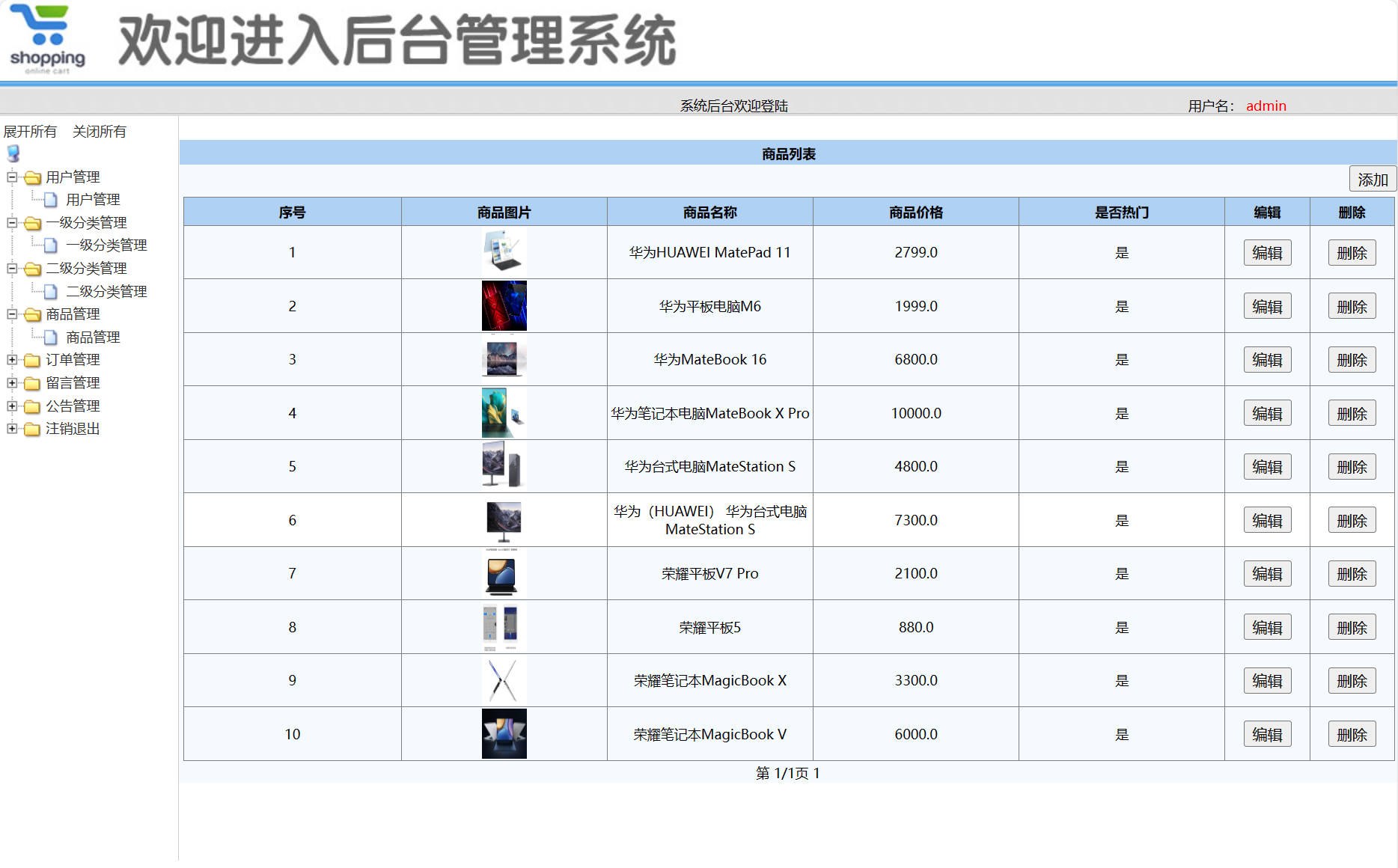
商品添加控制器实现:
@Controller
@RequestMapping("/admin")
public class ProductAdminController {

    @Autowired
    private ProductService productService;

    /**
     * 商品添加处理方法
     * @param imageFile 商品图片文件
     * @param product 商品实体对象
     * @param request HTTP请求对象
     * @return 视图名称
     */
    @RequestMapping(value = "/product_save", method = RequestMethod.POST)
    public String productSave(@RequestParam("image") MultipartFile imageFile,
                            @Valid Product product,
                            BindingResult result,
                            HttpServletRequest request) {

        // 参数校验
        if (result.hasErrors()) {
            request.setAttribute("message", "商品信息校验失败");
            return "admin/product/add";
        }

        try {
            // 图片文件上传处理
            if (!imageFile.isEmpty()) {
                String originalFilename = imageFile.getOriginalFilename();
                String filePath = request.getSession().getServletContext()
                    .getRealPath("/products/1/");

                // 创建目录
                File directory = new File(filePath);
                if (!directory.exists()) {
                    directory.mkdirs();
                }

                File file = new File(filePath, originalFilename);
                imageFile.transferTo(file);
                product.setImage("products/1/" + originalFilename);
            }

            // 设置商品上架时间
            product.setPdate(new Date());
            product.setIsHot(0); // 默认非热销商品

            // 调用服务层保存商品
            productService.saveProduct(product);

            request.setAttribute("message", "商品添加成功");
        } catch (IOException e) {
            request.setAttribute("message", "图片上传失败");
            logger.error("商品图片上传异常", e);
        } catch (Exception e) {
            request.setAttribute("message", "商品添加失败");
            logger.error("商品添加业务异常", e);
        }
        return "admin/product/add";
    }

    /**
     * 商品分页查询
     * @param page 当前页码
     * @param model 模型对象
     * @return 商品列表视图
     */
    @RequestMapping("/product_findByPage")
    public String productFindByPage(@RequestParam(defaultValue = "1") Integer page,
                                  Model model) {
        PageBean<Product> pageBean = productService.findByPage(page);
        model.addAttribute("pageBean", pageBean);
        return "admin/product/list";
    }
}
商品服务层业务逻辑实现:
@Service
@Transactional
public class ProductServiceImpl implements ProductService {

    @Autowired
    private ProductMapper productMapper;

    private static final int PAGE_SIZE = 10; // 每页显示记录数

    /**
     * 分页查询商品信息
     * @param page 当前页码
     * @return 分页数据封装对象
     */
    @Override
    @Transactional(readOnly = true)
    public PageBean<Product> findByPage(Integer page) {
        PageBean<Product> pageBean = new PageBean<>();

        // 设置分页参数
        pageBean.setPage(page);
        pageBean.setLimit(PAGE_SIZE);

        // 查询总记录数
        int totalCount = productMapper.findCount();
        pageBean.setTotalCount(totalCount);

        // 计算总页数
        int totalPage = (int) Math.ceil(totalCount / (double) PAGE_SIZE);
        pageBean.setTotalPage(totalPage);

        // 计算起始位置
        int begin = (page - 1) * PAGE_SIZE;

        // 查询当前页数据
        List<Product> productList = productMapper.findByPage(begin, PAGE_SIZE);
        pageBean.setList(productList);

        return pageBean;
    }

    /**
     * 保存商品信息
     * @param product 商品实体
     */
    @Override
    public void saveProduct(Product product) {
        // 业务校验
        if (product.getMarketPrice() < product.getShopPrice()) {
            throw new BusinessException("市场价不能低于商城价");
        }

        productMapper.insert(product);

        // 记录操作日志
        logService.recordOperation("添加商品", "商品ID: " + product.getPid());
    }

    /**
     * 根据商品ID查询商品详情
     * @param pid 商品ID
     * @return 商品实体
     */
    @Override
    @Transactional(readOnly = true)
    public Product findByPid(Integer pid) {
        return productMapper.selectByPrimaryKey(pid);
    }

    /**
     * 更新商品库存
     * @param pid 商品ID
     * @param quantity 库存变化量
     */
    @Override
    public void updateStock(Integer pid, Integer quantity) {
        Product product = productMapper.selectByPrimaryKey(pid);
        if (product == null) {
            throw new BusinessException("商品不存在");
        }

        int newStock = product.getStock() + quantity;
        if (newStock < 0) {
            throw new BusinessException("库存不足");
        }

        product.setStock(newStock);
        productMapper.updateByPrimaryKey(product);
    }
}
技术实现亮点:
- 事务管理:使用Spring声明式事务管理,确保数据一致性
- 分页优化:数据库层面分页查询,避免内存溢出
- 异常处理:统一的业务异常处理机制
- 日志记录:关键操作日志记录,便于问题追踪
- 参数校验:前后端双重校验,确保数据有效性
该系统通过合理的架构设计和精细的代码实现,为企业提供了稳定可靠的电商管理解决方案,有效提升了运营效率和用户体验。