在企业内部物资管理领域,传统线下办公用品申领流程普遍存在效率低下、数据滞后、管理成本高昂等痛点。员工需要填写纸质表单,经过多级审批,再由仓储人员手动查找、发放并更新台账。这一过程不仅耗时费力,而且极易导致库存数据不准确,出现重复采购或物资短缺。为解决这些问题,我们设计并实现了一套基于SSM(Spring + Spring MVC + MyBatis)框架的办公物资智能管控与电商一体化平台,将电商式的便捷购物体验与企业级的库存管理需求深度融合。
该平台采用经典的三层架构模式,通过Spring框架实现业务组件的依赖注入与事务管理,Spring MVC负责Web请求的调度与响应,MyBatis则作为数据持久层框架,完成Java对象与关系型数据库的映射。系统前端使用HTML、CSS和JavaScript构建用户界面,后端数据库采用MySQL,共计设计了11张数据表来支撑完整的业务流程。
系统架构与技术栈深度解析
Spring框架作为整个系统的核心,通过其控制反转(IoC)容器管理着所有业务逻辑层(Service)和数据访问层(DAO)的Bean生命周期。利用面向切面编程(AOP),系统实现了声明式事务管理,确保如“创建订单并同步扣减库存”这类涉及多表操作的业务具备原子性。以下是一个典型的Service层方法,展示了Spring的声明式事务管理:
@Service
@Transactional
public class OrderServiceImpl implements OrderService {

    @Autowired
    private OrderMapper orderMapper;

    @Autowired
    private InventoryMapper inventoryMapper;

    @Override
    public boolean createOrder(Order order, List<OrderItem> items) {
        // 插入订单主记录
        int orderResult = orderMapper.insert(order);
        if (orderResult <= 0) {
            throw new RuntimeException("订单创建失败");
        }

        // 插入订单明细并更新库存
        for (OrderItem item : items) {
            orderMapper.insertItem(item);
            // 扣减库存,采用乐观锁防止超卖
            int updateCount = inventoryMapper.decreaseStock(item.getProductId(),
                                                          item.getQuantity());
            if (updateCount <= 0) {
                throw new RuntimeException("商品库存不足: " + item.getProductId());
            }
        }
        return true;
    }
}
Spring MVC框架负责处理前端HTTP请求。DispatcherServlet作为前端控制器,根据@RequestMapping注解将请求分发给相应的Controller方法。Controller方法处理业务逻辑后,返回ModelAndView对象,其中包含数据模型和视图名称,由视图解析器定位JSP页面并进行渲染。以下是一个商品查询的Controller示例:
@Controller
@RequestMapping("/product")
public class ProductController {

    @Autowired
    private ProductService productService;

    @RequestMapping("/list")
    public ModelAndView getProductsByCategory(@RequestParam("categoryId") Integer categoryId,
                                             @RequestParam(value = "page", defaultValue = "1") Integer page) {
        ModelAndView mav = new ModelAndView("product/list");

        // 分页查询商品
        PageHelper.startPage(page, 10);
        List<Product> products = productService.getByCategoryId(categoryId);
        PageInfo<Product> pageInfo = new PageInfo<>(products);

        mav.addObject("products", products);
        mav.addObject("pageInfo", pageInfo);
        return mav;
    }
}
MyBatis作为数据持久层框架,通过XML映射文件或注解方式实现对象关系映射。其动态SQL功能能够根据参数条件灵活构建查询语句,大大提高了开发效率。以下是一个复杂的商品查询SQL映射示例:
<!-- ProductMapper.xml -->
<mapper namespace="com.maancode.mapper.ProductMapper">
<resultMap id="ProductResultMap" type="com.maancode.entity.Product">
<id column="id" property="id"/>
<result column="name" property="name"/>
<result column="price" property="price"/>
<result column="stock" property="stock"/>
<result column="description" property="description"/>
<result column="image_url" property="imageUrl"/>
<association property="category" javaType="com.maancode.entity.Category">
<id column="category_id" property="id"/>
<result column="category_name" property="name"/>
</association>
</resultMap>
<select id="selectByComplexCondition" parameterType="map" resultMap="ProductResultMap">
SELECT p.*, c.name as category_name
FROM product p
LEFT JOIN category c ON p.category_id = c.id
WHERE p.status = 1
<if test="categoryId != null">
AND p.category_id = #{categoryId}
</if>
<if test="minPrice != null">
AND p.price >= #{minPrice}
</if>
<if test="maxPrice != null">
AND p.price <= #{maxPrice}
</if>
<if test="keyword != null and keyword != ''">
AND (p.name LIKE CONCAT('%', #{keyword}, '%')
OR p.description LIKE CONCAT('%', #{keyword}, '%'))
</if>
ORDER BY
<choose>
<when test="sortType == 'price_asc'">p.price ASC</when>
<when test="sortType == 'price_desc'">p.price DESC</when>
<when test="sortType == 'sales'">p.sales_count DESC</when>
<otherwise>p.create_time DESC</otherwise>
</choose>
</select>
</mapper>
数据库设计亮点剖析
系统数据库设计充分考虑了业务复杂性和数据一致性要求,其中几个核心表的设计体现了良好的规范化程度和性能考量。
product表(商品表)的设计不仅包含了基本商品信息,还通过外键与分类表关联,支持多级分类体系。其中stock字段使用无符号整数确保库存不为负,status字段使用枚举类型控制商品上下架状态:
CREATE TABLE `product` (
  `id` int(11) NOT NULL AUTO_INCREMENT,
  `name` varchar(100) NOT NULL COMMENT '商品名称',
  `category_id` int(11) NOT NULL COMMENT '分类ID',
  `price` decimal(10,2) unsigned NOT NULL COMMENT '售价',
  `cost_price` decimal(10,2) unsigned DEFAULT NULL COMMENT '成本价',
  `stock` int(11) unsigned NOT NULL DEFAULT '0' COMMENT '库存数量',
  `image_url` varchar(255) DEFAULT NULL COMMENT '商品图片',
  `description` text COMMENT '商品描述',
  `status` enum('上架','下架') NOT NULL DEFAULT '上架' COMMENT '商品状态',
  `sales_count` int(11) unsigned NOT NULL DEFAULT '0' COMMENT '销售数量',
  `create_time` datetime NOT NULL DEFAULT CURRENT_TIMESTAMP,
  `update_time` datetime NOT NULL DEFAULT CURRENT_TIMESTAMP ON UPDATE CURRENT_TIMESTAMP,
  PRIMARY KEY (`id`),
  KEY `idx_category` (`category_id`),
  KEY `idx_status` (`status`),
  KEY `idx_price` (`price`),
  CONSTRAINT `fk_product_category` FOREIGN KEY (`category_id`) REFERENCES `category` (`id`)
) ENGINE=InnoDB DEFAULT CHARSET=utf8mb4 COMMENT='商品表';
order表(订单表)和order_item表(订单明细表)的设计采用了主从表结构,有效减少了数据冗余。订单表记录订单总体信息,而明细表则存储每个商品的具体购买情况。这种设计支持一个订单包含多个商品,同时便于后续的销售统计分析:
CREATE TABLE `order` (
  `id` varchar(32) NOT NULL COMMENT '订单号(业务主键)',
  `user_id` int(11) NOT NULL COMMENT '用户ID',
  `total_amount` decimal(10,2) unsigned NOT NULL COMMENT '订单总金额',
  `status` enum('待付款','已付款','配送中','已完成','已取消') NOT NULL DEFAULT '待付款',
  `payment_time` datetime DEFAULT NULL COMMENT '支付时间',
  `delivery_address` varchar(200) NOT NULL COMMENT '收货地址',
  `create_time` datetime NOT NULL DEFAULT CURRENT_TIMESTAMP,
  `update_time` datetime NOT NULL DEFAULT CURRENT_TIMESTAMP ON UPDATE CURRENT_TIMESTAMP,
  PRIMARY KEY (`id`),
  KEY `idx_user_id` (`user_id`),
  KEY `idx_status` (`status`),
  KEY `idx_create_time` (`create_time`),
  CONSTRAINT `fk_order_user` FOREIGN KEY (`user_id`) REFERENCES `user` (`id`)
) ENGINE=InnoDB DEFAULT CHARSET=utf8mb4 COMMENT='订单表';

CREATE TABLE `order_item` (
  `id` int(11) NOT NULL AUTO_INCREMENT,
  `order_id` varchar(32) NOT NULL COMMENT '订单ID',
  `product_id` int(11) NOT NULL COMMENT '商品ID',
  `quantity` int(11) unsigned NOT NULL COMMENT '购买数量',
  `unit_price` decimal(10,2) unsigned NOT NULL COMMENT '成交单价',
  `subtotal` decimal(10,2) unsigned NOT NULL COMMENT '小计金额',
  PRIMARY KEY (`id`),
  KEY `idx_order_id` (`order_id`),
  KEY `idx_product_id` (`product_id`),
  CONSTRAINT `fk_order_item_order` FOREIGN KEY (`order_id`) REFERENCES `order` (`id`) ON DELETE CASCADE,
  CONSTRAINT `fk_order_item_product` FOREIGN KEY (`product_id`) REFERENCES `product` (`id`)
) ENGINE=InnoDB DEFAULT CHARSET=utf8mb4 COMMENT='订单明细表';
inventory表(库存表)的设计特别考虑了并发场景下的数据一致性问题。除了基本的库存数量字段外,还设计了locked_stock字段用于预占库存,防止超卖。版本号字段version用于实现乐观锁机制:
CREATE TABLE `inventory` (
  `id` int(11) NOT NULL AUTO_INCREMENT,
  `product_id` int(11) NOT NULL COMMENT '商品ID',
  `available_stock` int(11) NOT NULL DEFAULT '0' COMMENT '可用库存',
  `locked_stock` int(11) NOT NULL DEFAULT '0' COMMENT '锁定库存(已下单未支付)',
  `total_stock` int(11) NOT NULL DEFAULT '0' COMMENT '总库存',
  `safety_stock` int(11) NOT NULL DEFAULT '0' COMMENT '安全库存阈值',
  `version` int(11) NOT NULL DEFAULT '0' COMMENT '版本号(乐观锁)',
  PRIMARY KEY (`id`),
  UNIQUE KEY `uk_product_id` (`product_id`),
  CONSTRAINT `fk_inventory_product` FOREIGN KEY (`product_id`) REFERENCES `product` (`id`)
) ENGINE=InnoDB DEFAULT CHARSET=utf8mb4 COMMENT='库存表';
核心功能模块深度解析
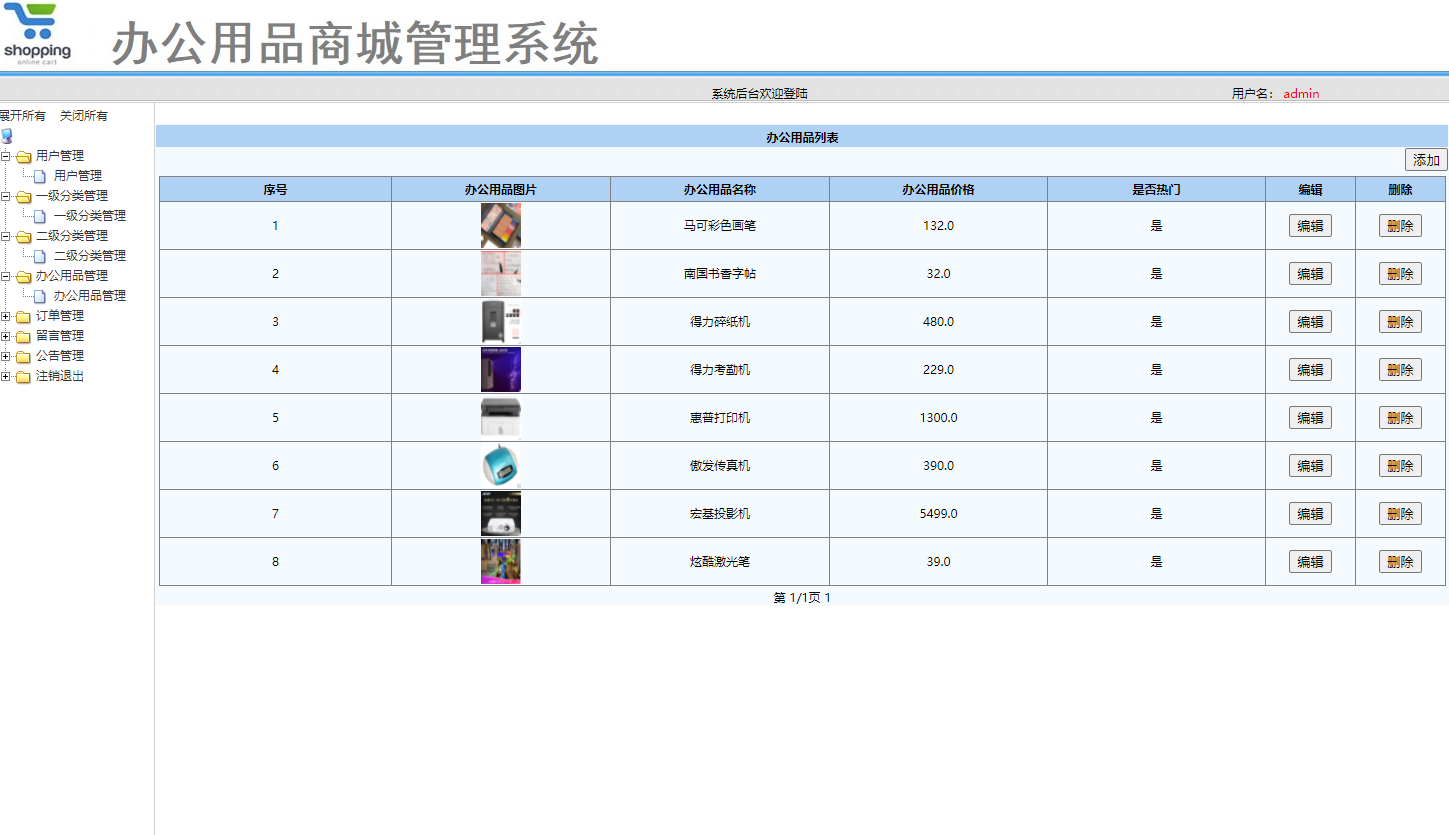
- 智能库存管理机制
系统实现了实时库存监控和自动预警功能。当商品销售或采购入库时,库存数据会自动更新。通过数据库触发器或应用层逻辑,系统会检查库存水平是否低于安全阈值,并生成预警通知。以下是库存扣减的核心代码,展示了如何利用MyBatis实现乐观锁防止超卖:
// InventoryMapper.java
public interface InventoryMapper {

    /**
     * 扣减库存(使用乐观锁)
     * @param productId 商品ID
     * @param quantity 扣减数量
     * @param version 当前版本号
     * @return 更新影响的行数
     */
    @Update("UPDATE inventory SET available_stock = available_stock - #{quantity}, "
            + "version = version + 1 WHERE product_id = #{productId} AND version = #{version} "
            + "AND available_stock >= #{quantity}")
    int decreaseStockWithLock(@Param("productId") Integer productId,
                             @Param("quantity") Integer quantity,
                             @Param("version") Integer version);
}

// 在Service层实现重试机制
@Service
public class InventoryService {

    @Autowired
    private InventoryMapper inventoryMapper;

    public boolean deductStock(Integer productId, Integer quantity) {
        int retryCount = 0;
        while (retryCount < 3) {  // 最大重试次数
            Inventory inventory = inventoryMapper.selectByProductId(productId);
            if (inventory.getAvailableStock() < quantity) {
                throw new RuntimeException("库存不足");
            }

            int result = inventoryMapper.decreaseStockWithLock(productId, quantity,
                                                              inventory.getVersion());
            if (result > 0) {
                return true;  // 更新成功
            }
            retryCount++;
        }
        throw new RuntimeException("库存扣减失败,请重试");
    }
}
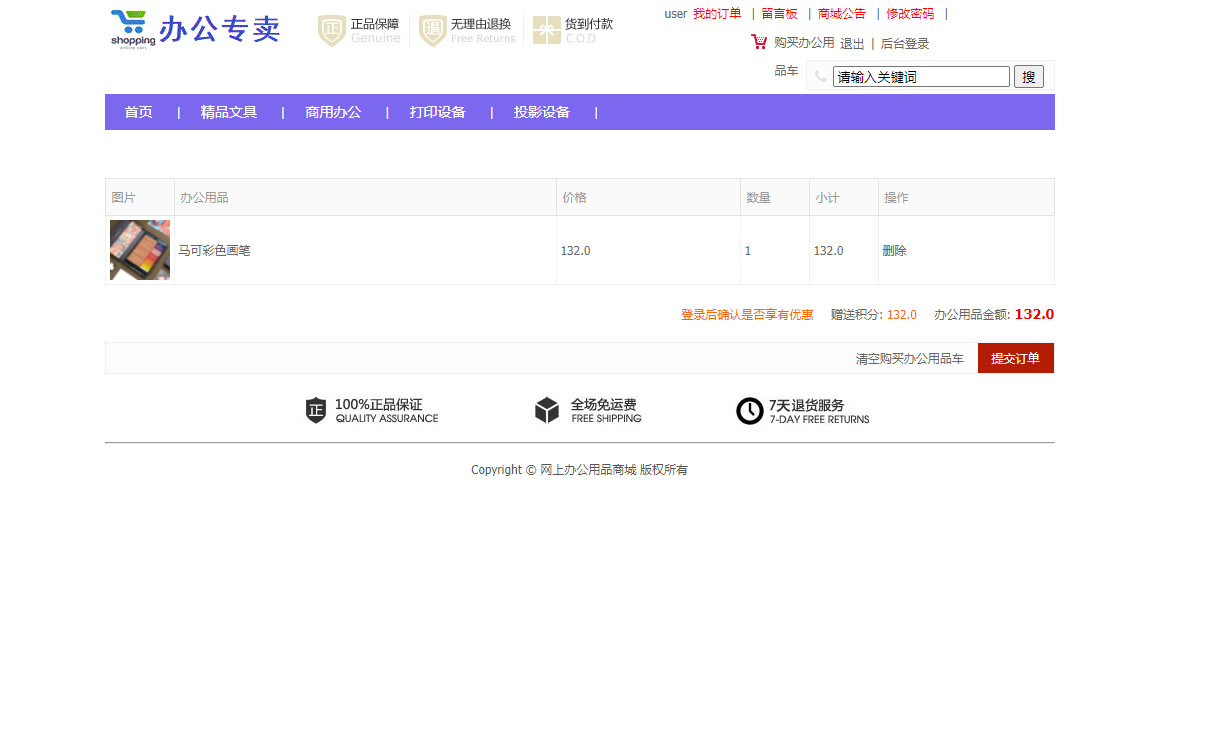
- 购物车与订单处理流程
系统提供了完整的电商购物流程,用户可以将商品加入购物车,批量下单结算。订单生成过程中,系统会验证库存、计算金额,并生成唯一的订单号。以下是购物车结算的关键代码:
@Service
public class CartService {

    @Autowired
    private ProductService productService;

    @Autowired
    private OrderService orderService;

    /**
     * 购物车结算
     */
    @Transactional
    public Order checkout(Integer userId, List<CartItem> cartItems, String address) {
        // 验证商品信息和库存
        List<OrderItem> orderItems = new ArrayList<>();
        BigDecimal totalAmount = BigDecimal.ZERO;

        for (CartItem cartItem : cartItems) {
            Product product = productService.getById(cartItem.getProductId());
            if (product == null || !"上架".equals(product.getStatus())) {
                throw new RuntimeException("商品已下架或不存在: " + cartItem.getProductId());
            }

            if (product.getStock() < cartItem.getQuantity()) {
                throw new RuntimeException("商品库存不足: " + product.getName());
            }

            // 计算小计金额
            BigDecimal subtotal = product.getPrice()
                                    .multiply(new BigDecimal(cartItem.getQuantity()));

            OrderItem orderItem = new OrderItem();
            orderItem.setProductId(product.getId());
            orderItem.setQuantity(cartItem.getQuantity());
            orderItem.setUnitPrice(product.getPrice());
            orderItem.setSubtotal(subtotal);
            orderItems.add(orderItem);

            totalAmount = totalAmount.add(subtotal);
        }

        // 生成订单
        Order order = new Order();
        order.setId(generateOrderId());  // 生成唯一订单号
        order.setUserId(userId);
        order.setTotalAmount(totalAmount);
        order.setStatus("待付款");
        order.setDeliveryAddress(address);

        boolean success = orderService.createOrder(order, orderItems);
        if (!success) {
            throw new RuntimeException("订单创建失败");
        }

        return order;
    }

    private String generateOrderId() {
        // 时间戳 + 随机数,确保唯一性
        return System.currentTimeMillis() + "" + (int)((Math.random() * 9 + 1) * 1000);
    }
}
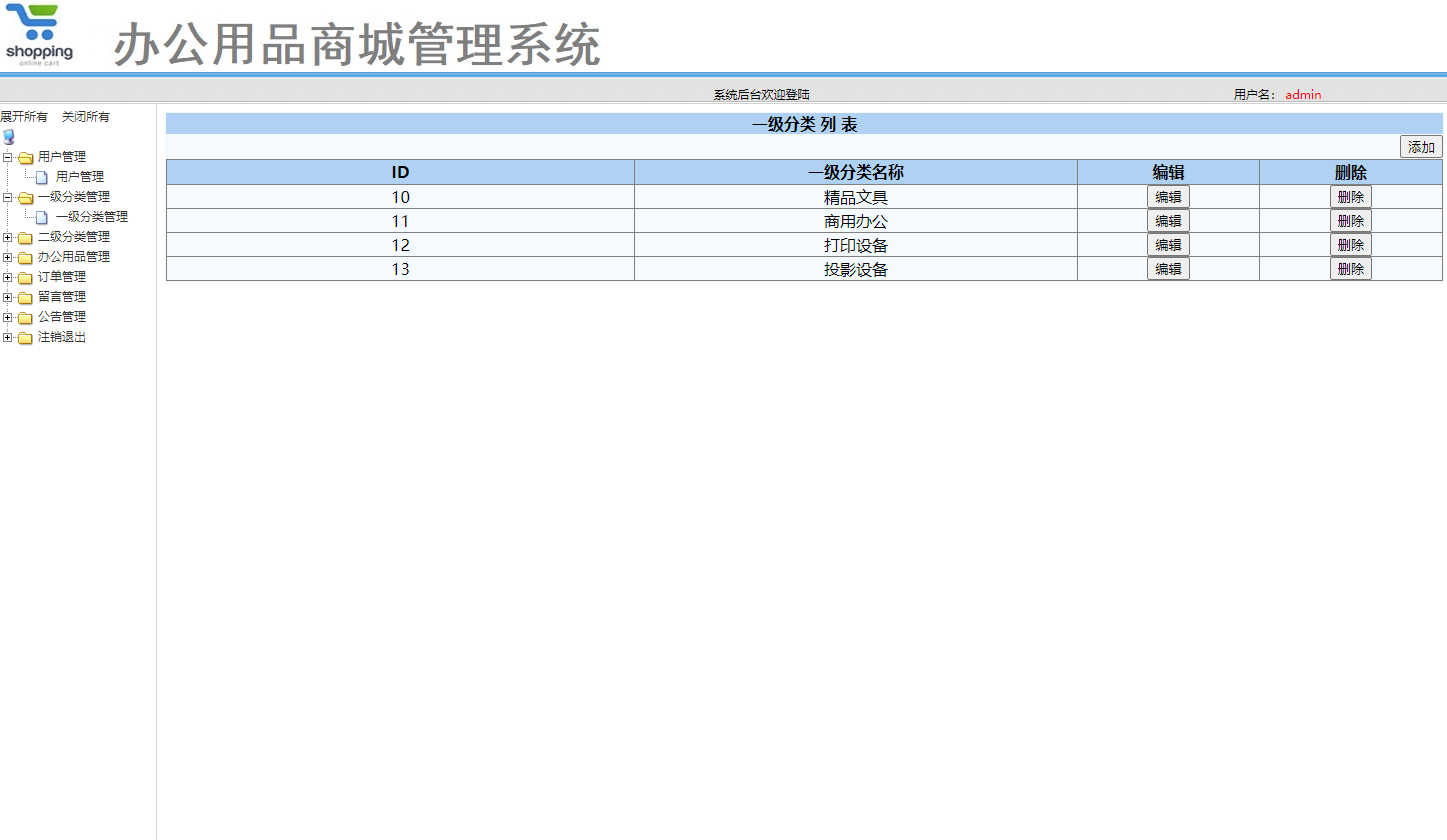
- 多层次商品分类体系
系统支持无限级商品分类,通过父子关系实现灵活的品类管理。前端页面可以根据分类树动态展示商品导航,提升用户体验。以下是分类管理的核心实体类和查询方法:
// 分类实体类
public class Category {
    private Integer id;
    private String name;
    private Integer parentId;  // 父级分类ID,0表示根分类
    private Integer level;     // 分类层级
    private Integer sortOrder; // 排序值
    private Date createTime;

    // 子分类列表(非数据库字段)
    private List<Category> children;

    // getter和setter方法
}

// 分类数据访问层
@Mapper
public interface CategoryMapper {

    /**
     * 根据父级ID查询子分类
     */
    @Select("SELECT * FROM category WHERE parent_id = #{parentId} ORDER BY sort_order ASC")
    List<Category> selectByParentId(Integer parentId);

    /**
     * 查询完整的分类树
     */
    default List<Category> selectCategoryTree() {
        // 先查询所有根分类
        List<Category> rootCategories = selectByParentId(0);

        // 递归查询子分类
        for (Category category : rootCategories) {
            category.setChildren(getChildrenRecursive(category.getId()));
        }
        return rootCategories;
    }

    private List<Category> getChildrenRecursive(Integer parentId) {
        List<Category> children = selectByParentId(parentId);
        for (Category child : children) {
            child.setChildren(getChildrenRecursive(child.getId()));
        }
        return children;
    }
}
- 用户权限与安全管理
系统采用基于角色的访问控制(RBAC)模型,区分普通用户、部门管理员和系统管理员等不同角色。用户密码经过加密存储,关键操作需要权限验证。以下是用户认证和权限检查的核心实现:
@Service
public class UserService {

    @Autowired
    private UserMapper userMapper;

    /**
     * 用户登录验证
     */
    public User login(String username, String password) {
        User user = userMapper.selectByUsername(username);
        if (user == null) {
            throw new RuntimeException("用户名不存在");
        }

        // 密码加密验证(使用MD5加盐)
        String encryptedPassword = encryptPassword(password, user.getSalt());
        if (!encryptedPassword.equals(user.getPassword())) {
            throw new RuntimeException("密码错误");
        }

        if (!"正常".equals(user.getStatus())) {
            throw new RuntimeException("账户已被禁用");
        }

        return user;
    }

    /**
     * 密码加密方法
     */
    private String encryptPassword(String password, String salt) {
        // 实际应用中应使用更安全的加密算法如BCrypt
        return DigestUtils.md5DigestAsHex((password + salt).getBytes());
    }
}

// 权限拦截器
@Component
public class AuthInterceptor implements HandlerInterceptor {

    @Override
    public boolean preHandle(HttpServletRequest request,
                           HttpServletResponse response, Object handler) throws Exception {

        // 检查登录状态
        User user = (User) request.getSession().getAttribute("currentUser");
        if (user == null