农产品批发行业作为连接农业生产与消费市场的重要纽带,长期以来面临着信息不对称、交易链条冗长、价格波动频繁等挑战。传统批发模式依赖线下看货、电话询价、人工对账等低效流程,不仅增加了运营成本,还容易因信息滞后导致供需错配。特别是对于生鲜类产品,较长的交易周期会直接影响商品的新鲜度和损耗率。
针对这些行业痛点,我们设计并实现了一套基于SSM架构的数字化批发交易平台。该系统将农产品批发业务全流程线上化,通过标准化接口整合供应商管理、商品展示、智能定价、订单处理、库存监控等核心功能,为批发商和供应商构建了一个高效、透明、可追溯的交易环境。
技术架构设计
系统采用经典的三层架构模式,表现层使用SpringMVC框架处理Web请求,业务层通过Spring容器管理服务组件,数据持久层则采用MyBatis实现ORM映射。这种分层架构确保了各层之间的松耦合性,便于团队分工协作和系统维护升级。
核心依赖配置展示了项目的基础技术选型:
<dependencies>
    <dependency>
        <groupId>org.springframework</groupId>
        <artifactId>spring-webmvc</artifactId>
        <version>5.2.8.RELEASE</version>
    </dependency>
    <dependency>
        <groupId>org.mybatis</groupId>
        <artifactId>mybatis-spring</artifactId>
        <version>2.0.5</version>
    </dependency>
    <dependency>
        <groupId>mysql</groupId>
        <artifactId>mysql-connector-java</artifactId>
        <version>8.0.21</version>
    </dependency>
    <dependency>
        <groupId>com.fasterxml.jackson.core</groupId>
        <artifactId>jackson-databind</artifactId>
        <version>2.11.2</version>
    </dependency>
</dependencies>
Spring的IOC容器通过注解方式统一管理Bean生命周期,以下配置类展示了核心组件的扫描规则:
@Configuration
@ComponentScan(basePackages = "com.agriculture.wholesale")
@EnableTransactionManagement
public class AppConfig {

    @Bean
    public DataSource dataSource() {
        DruidDataSource ds = new DruidDataSource();
        ds.setUrl("jdbc:mysql://localhost:3306/agriculture_db?useUnicode=true");
        ds.setUsername("root");
        ds.setPassword("123456");
        ds.setInitialSize(5);
        ds.setMaxActive(20);
        return ds;
    }

    @Bean
    public SqlSessionFactoryBean sqlSessionFactory() throws Exception {
        SqlSessionFactoryBean sessionFactory = new SqlSessionFactoryBean();
        sessionFactory.setDataSource(dataSource());
        sessionFactory.setMapperLocations(new PathMatchingResourcePatternResolver()
            .getResources("classpath:mappers/*.xml"));
        return sessionFactory;
    }
}
数据库架构剖析
系统共设计10张核心数据表,围绕商品管理、订单处理、用户体系三大业务域构建数据模型。每张表都设置了合理的索引策略和外键约束,确保数据一致性和查询性能。
商品信息表设计
商品表采用纵向分字段设计,将基础信息、库存状态、价格策略等属性分别存储,支持灵活的查询条件组合:
CREATE TABLE `product` (
  `id` bigint(20) NOT NULL AUTO_INCREMENT COMMENT '商品ID',
  `name` varchar(100) NOT NULL COMMENT '商品名称',
  `category_id` int(11) NOT NULL COMMENT '分类ID',
  `supplier_id` bigint(20) NOT NULL COMMENT '供应商ID',
  `specification` varchar(200) DEFAULT NULL COMMENT '规格描述',
  `unit` varchar(20) NOT NULL COMMENT '计量单位',
  `wholesale_price` decimal(10,2) NOT NULL COMMENT '批发价',
  `retail_price` decimal(10,2) DEFAULT NULL COMMENT '零售参考价',
  `stock_quantity` int(11) NOT NULL DEFAULT '0' COMMENT '库存数量',
  `min_order_quantity` int(11) NOT NULL COMMENT '最小起订量',
  `shelf_status` tinyint(1) NOT NULL DEFAULT '1' COMMENT '上架状态',
  `create_time` datetime NOT NULL DEFAULT CURRENT_TIMESTAMP,
  `update_time` datetime NOT NULL DEFAULT CURRENT_TIMESTAMP ON UPDATE CURRENT_TIMESTAMP,
  PRIMARY KEY (`id`),
  KEY `idx_category` (`category_id`),
  KEY `idx_supplier` (`supplier_id`),
  KEY `idx_status` (`shelf_status`),
  KEY `idx_price` (`wholesale_price`),
  CONSTRAINT `fk_product_category` FOREIGN KEY (`category_id`) REFERENCES `product_category` (`id`),
  CONSTRAINT `fk_product_supplier` FOREIGN KEY (`supplier_id`) REFERENCES `supplier` (`id`)
) ENGINE=InnoDB DEFAULT CHARSET=utf8mb4 COMMENT='商品信息表';
该表设计具有以下技术亮点:
- 使用
decimal(10,2)类型精确存储金额数据,避免浮点数精度问题 - 通过
min_order_quantity字段实现批发场景特有的最小起订量控制 - 建立多列索引支持按分类、供应商、价格区间的联合查询
- 时间戳字段自动更新机制确保数据审计追踪
订单表结构设计
订单表采用主从表结构设计,主表存储订单基础信息,从表记录商品明细,这种设计支持一个订单包含多个商品项:
CREATE TABLE `order` (
  `id` bigint(20) NOT NULL AUTO_INCREMENT COMMENT '订单ID',
  `order_no` varchar(32) NOT NULL COMMENT '订单编号',
  `user_id` bigint(20) NOT NULL COMMENT '用户ID',
  `supplier_id` bigint(20) NOT NULL COMMENT '供应商ID',
  `total_amount` decimal(12,2) NOT NULL COMMENT '订单总金额',
  `payment_status` tinyint(1) NOT NULL DEFAULT '0' COMMENT '支付状态',
  `order_status` tinyint(1) NOT NULL DEFAULT '1' COMMENT '订单状态',
  `delivery_address` text NOT NULL COMMENT '配送地址',
  `contact_phone` varchar(20) NOT NULL COMMENT '联系电话',
  `create_time` datetime NOT NULL DEFAULT CURRENT_TIMESTAMP,
  `update_time` datetime NOT NULL DEFAULT CURRENT_TIMESTAMP ON UPDATE CURRENT_TIMESTAMP,
  PRIMARY KEY (`id`),
  UNIQUE KEY `uk_order_no` (`order_no`),
  KEY `idx_user` (`user_id`),
  KEY `idx_supplier` (`supplier_id`),
  KEY `idx_status` (`order_status`),
  KEY `idx_create_time` (`create_time`),
  CONSTRAINT `fk_order_user` FOREIGN KEY (`user_id`) REFERENCES `user` (`id`),
  CONSTRAINT `fk_order_supplier` FOREIGN KEY (`supplier_id`) REFERENCES `supplier` (`id`)
) ENGINE=InnoDB DEFAULT CHARSET=utf8mb4 COMMENT='订单主表';

CREATE TABLE `order_item` (
  `id` bigint(20) NOT NULL AUTO_INCREMENT,
  `order_id` bigint(20) NOT NULL,
  `product_id` bigint(20) NOT NULL,
  `quantity` int(11) NOT NULL COMMENT '购买数量',
  `unit_price` decimal(10,2) NOT NULL COMMENT '成交单价',
  `subtotal` decimal(10,2) NOT NULL COMMENT '小计金额',
  PRIMARY KEY (`id`),
  KEY `idx_order` (`order_id`),
  KEY `idx_product` (`product_id`),
  CONSTRAINT `fk_order_item_order` FOREIGN KEY (`order_id`) REFERENCES `order` (`id`),
  CONSTRAINT `fk_order_item_product` FOREIGN KEY (`product_id`) REFERENCES `product` (`id`)
) ENGINE=InnoDB DEFAULT CHARSET=utf8mb4 COMMENT='订单明细表';
订单系统的技术特色体现在:
- 订单编号使用业务无关的UUID生成,避免顺序编号的信息泄露风险
- 状态字段使用枚举类型,明确区分支付状态与订单流程状态
- 金额相关字段均采用decimal类型,确保计算精度
- 通过索引优化大幅提升订单查询效率
核心功能实现解析
商品管理模块
商品管理界面支持供应商自主维护商品信息,包括批量上架、库存调整、价格设置等功能:
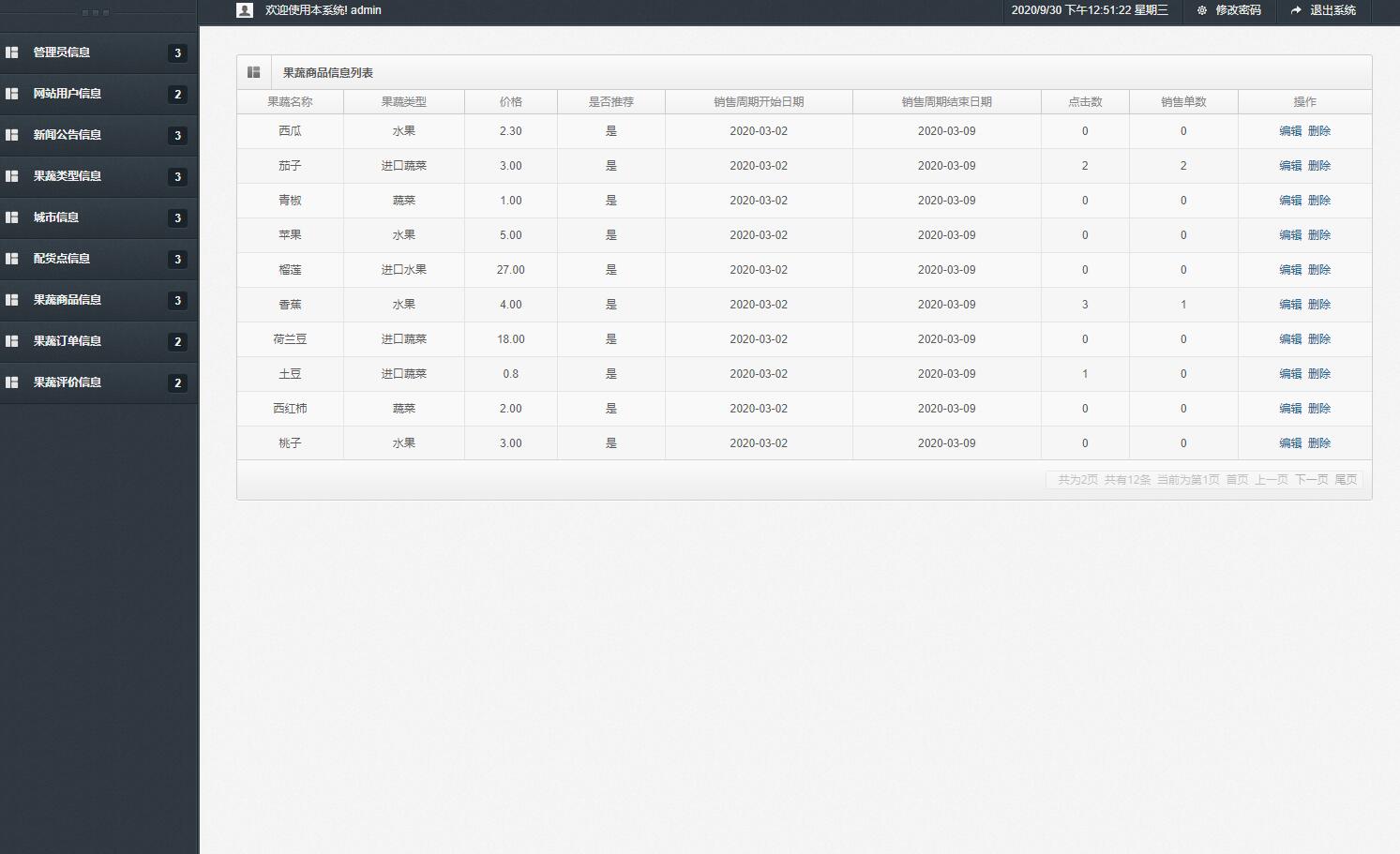
商品服务层实现了复杂的业务逻辑,包括库存校验、价格计算、状态同步等:
@Service
@Transactional
public class ProductServiceImpl implements ProductService {

    @Autowired
    private ProductMapper productMapper;

    @Autowired
    private InventoryMapper inventoryMapper;

    @Override
    public ProductVO getProductDetail(Long productId) {
        Product product = productMapper.selectById(productId);
        if (product == null) {
            throw new BusinessException("商品不存在");
        }

        // 构建商品详情视图对象
        ProductVO vo = new ProductVO();
        BeanUtils.copyProperties(product, vo);

        // 查询实时库存
        Integer availableStock = inventoryMapper.getAvailableStock(productId);
        vo.setAvailableStock(availableStock);

        // 计算批发折扣
        BigDecimal discount = calculateWholesaleDiscount(product.getWholesalePrice());
        vo.setDiscountRate(discount);

        return vo;
    }

    @Override
    @CacheEvict(value = "product", key = "#product.id")
    public void updateProduct(Product product) {
        // 验证数据完整性
        validateProductInfo(product);

        // 更新商品信息
        int result = productMapper.updateById(product);
        if (result == 0) {
            throw new BusinessException("商品更新失败");
        }

        // 记录操作日志
        logService.recordProductUpdate(product.getId(), "商品信息修改");
    }

    private void validateProductInfo(Product product) {
        if (StringUtils.isBlank(product.getName())) {
            throw new BusinessException("商品名称不能为空");
        }
        if (product.getWholesalePrice() == null ||
            product.getWholesalePrice().compareTo(BigDecimal.ZERO) <= 0) {
            throw new BusinessException("批发价必须大于0");
        }
        if (product.getMinOrderQuantity() <= 0) {
            throw new BusinessException("最小起订量必须大于0");
        }
    }
}
订单处理流程
订单生成流程涉及多个服务的协同操作,通过事务管理确保数据一致性:
@Service
public class OrderServiceImpl implements OrderService {

    @Autowired
    private OrderMapper orderMapper;

    @Autowired
    private OrderItemMapper orderItemMapper;

    @Autowired
    private ProductMapper productMapper;

    @Autowired
    private InventoryService inventoryService;

    @Override
    @Transactional(rollbackFor = Exception.class)
    public Order createOrder(OrderCreateDTO createDTO) {
        // 1. 验证用户和收货地址
        User user = validateUser(createDTO.getUserId());
        validateDeliveryAddress(createDTO.getDeliveryAddress());

        // 2. 生成订单编号
        String orderNo = generateOrderNo();

        // 3. 处理订单项并计算总金额
        BigDecimal totalAmount = BigDecimal.ZERO;
        List<OrderItem> items = new ArrayList<>();

        for (OrderItemDTO itemDTO : createDTO.getItems()) {
            Product product = productMapper.selectById(itemDTO.getProductId());
            if (product == null) {
                throw new BusinessException("商品不存在: " + itemDTO.getProductId());
            }

            // 验证库存
            inventoryService.checkStock(product.getId(), itemDTO.getQuantity());

            // 计算小计
            BigDecimal subtotal = product.getWholesalePrice()
                .multiply(new BigDecimal(itemDTO.getQuantity()));

            OrderItem item = new OrderItem();
            item.setProductId(product.getId());
            item.setQuantity(itemDTO.getQuantity());
            item.setUnitPrice(product.getWholesalePrice());
            item.setSubtotal(subtotal);
            items.add(item);

            totalAmount = totalAmount.add(subtotal);
        }

        // 4. 创建订单主记录
        Order order = new Order();
        order.setOrderNo(orderNo);
        order.setUserId(user.getId());
        order.setSupplierId(createDTO.getSupplierId());
        order.setTotalAmount(totalAmount);
        order.setDeliveryAddress(createDTO.getDeliveryAddress());
        order.setContactPhone(createDTO.getContactPhone());
        order.setOrderStatus(OrderStatus.PENDING_PAYMENT);

        orderMapper.insert(order);

        // 5. 保存订单明细
        for (OrderItem item : items) {
            item.setOrderId(order.getId());
            orderItemMapper.insert(item);

            // 扣减库存
            inventoryService.deductStock(item.getProductId(), item.getQuantity());
        }

        return order;
    }

    private String generateOrderNo() {
        // 时间戳 + 随机数 + 用户ID哈希
        String timestamp = LocalDateTime.now().format(
            DateTimeFormatter.ofPattern("yyyyMMddHHmmss"));
        String random = String.valueOf(ThreadLocalRandom.current().nextInt(1000, 9999));
        return timestamp + random;
    }
}
用户订单管理界面提供了完整的订单生命周期视图:
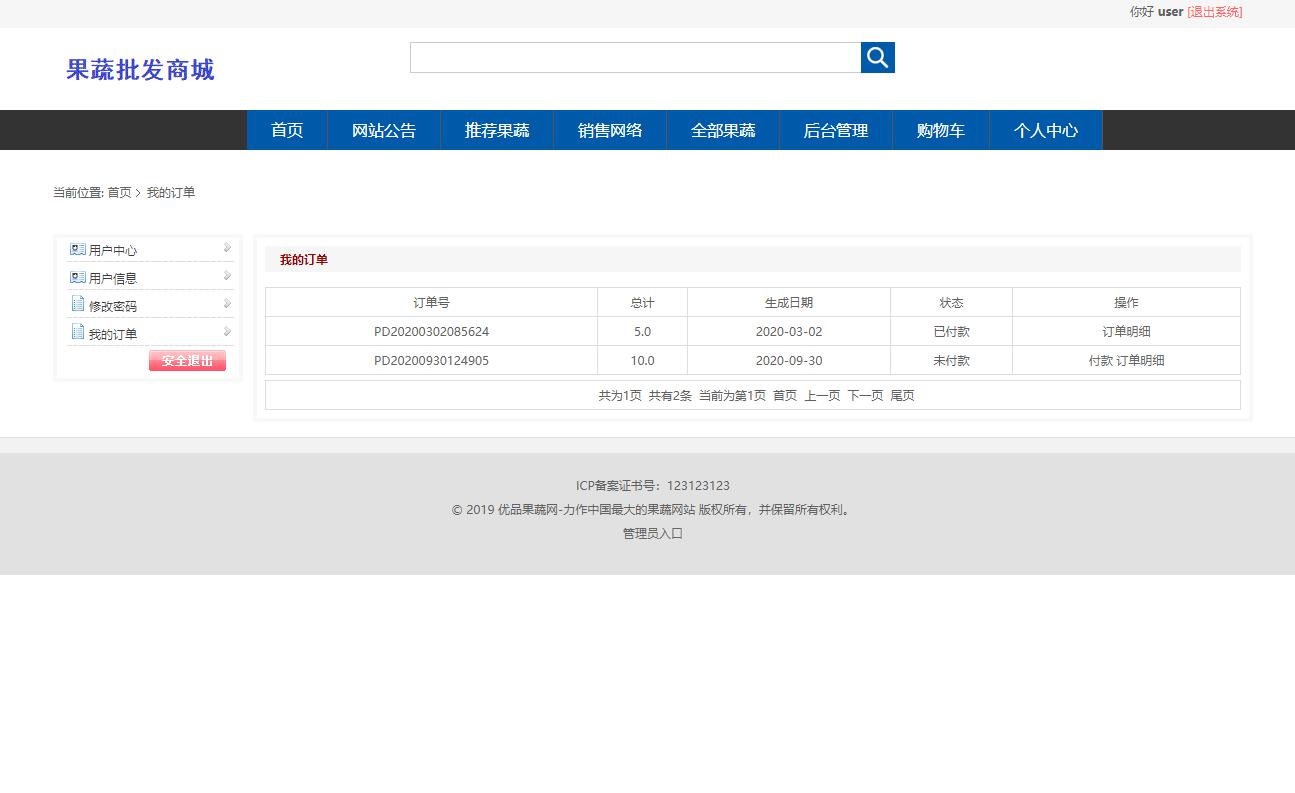
权限控制系统
系统采用基于角色的访问控制模型,不同角色拥有不同的操作权限。Spring拦截器负责权限验证:
@Component
public class AuthInterceptor implements HandlerInterceptor {

    @Autowired
    private UserService userService;

    @Override
    public boolean preHandle(HttpServletRequest request,
                           HttpServletResponse response, Object handler) throws Exception {

        // 获取token
        String token = request.getHeader("Authorization");
        if (StringUtils.isBlank(token)) {
            token = request.getParameter("token");
        }

        // 验证token有效性
        User user = userService.validateToken(token);
        if (user == null) {
            response.setStatus(HttpStatus.UNAUTHORIZED.value());
            response.getWriter().write("{\"code\":401,\"message\":\"未授权访问\"}");
            return false;
        }

        // 检查接口权限
        if (handler instanceof HandlerMethod) {
            HandlerMethod handlerMethod = (HandlerMethod) handler;
            RequiredPermission permission = handlerMethod.getMethodAnnotation(
                RequiredPermission.class);

            if (permission != null && !hasPermission(user, permission.value())) {
                response.setStatus(HttpStatus.FORBIDDEN.value());
                response.getWriter().write("{\"code\":403,\"message\":\"权限不足\"}");
                return false;
            }
        }

        // 用户信息存入请求上下文
        RequestContext.setCurrentUser(user);
        return true;
    }

    private boolean hasPermission(User user, String permissionCode) {
        // 查询用户角色权限
        Set<String> permissions = userService.getUserPermissions(user.getId());
        return permissions.contains(permissionCode);
    }
}
管理员界面展示了完整的用户权限管理功能:
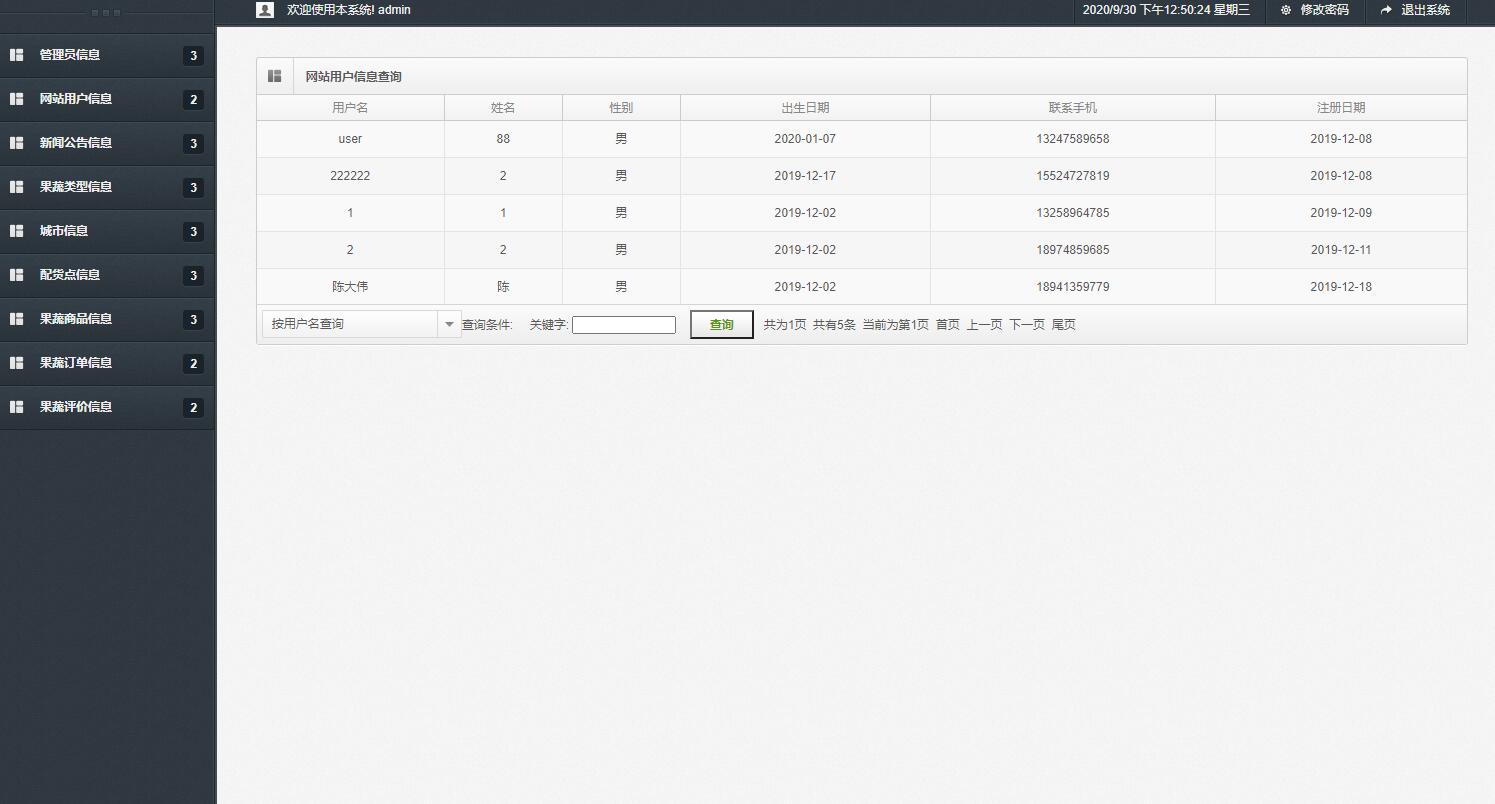
数据持久层实现
MyBatis的Mapper接口和XML映射文件提供了灵活的数据访问能力,支持复杂的动态查询:
<!-- 商品动态查询映射 -->
<mapper namespace="com.agriculture.wholesale.mapper.ProductMapper">

    <resultMap id="ProductResultMap" type="Product">
        <id column="id" property="id"/>
        <result column="name" property="name"/>
        <result column="category_id" property="categoryId"/>
        <result column="supplier_id" property="supplierId"/>
        <result column="specification" property="specification"/>
        <result column="unit" property="unit"/>
        <result column="wholesale_price" property="wholesalePrice"/>
        <result column="retail_price" property="retailPrice"/>
        <result column="stock_quantity" property="stockQuantity"/>
        <result column="min_order_quantity" property="minOrderQuantity"/>
        <result column="shelf_status" property="shelfStatus"/>
        <result column="create_time" property="createTime"/>
        <result column="update_time" property="updateTime"/>
    </resultMap>

    <select id="selectByCondition" parameterType="ProductQueryDTO" resultMap="ProductResultMap">
        SELECT p.*, c.name as category_name, s.company_name as supplier_name
        FROM product p
        LEFT JOIN product_category c ON p.category_id = c.id
        LEFT JOIN supplier s ON p.supplier_id = s.id
        <where>
            <if test="categoryId != null">
                AND p.category_id = #{categoryId}
            </if>
            <if test="supplierId != null">
                AND p.supplier_id = #{supplierId}
            </if>
            <if test="minPrice != null">
                AND p.wholesale_price >= #{minPrice}
            </if>
            <if test="maxPrice != null">
                AND p.wholesale_price <= #{maxPrice}
            </if>
            <if test="keyword != null and keyword != ''">
                AND (p.name LIKE CONCAT('%', #{keyword}, '%')
                     OR p.specification LIKE CONCAT('%', #{keyword}, '%'))
            </if>
            <if test="shelfStatus != null">
                AND p.shelf_status = #{shelfStatus}
            </if>
        </where>
        ORDER BY
        <choose>
            <when test="sortField == 'price'">
                p.wholesale_price ${sortOrder}
            </when>
            <when test="sortField == 'sales'">
                p.sales_volume ${sortOrder}
            </when>
            <when test="sortField == 'time'">
                p.create_time ${sortOrder}
            </when>
            <otherwise>
                p.update_time DESC
            </otherwise>
        </choose>
        LIMIT #{offset}, #{pageSize}
    </select>

    <update id="updateStock">
        UPDATE product
        SET stock_quantity = stock_quantity - #{quantity},
            update_time = NOW()
        WHERE id = #{productId}
        AND stock_quantity >= #{quantity}
    </update>
</mapper>
对应的Mapper接口定义:
@Repository
public interface ProductMapper extends Base