随着互联网技术的快速发展和消费者购物习惯的转变,传统农产品销售模式面临着渠道单一、信息不对称、流通环节多等挑战。农产品在线销售平台应运而生,通过数字化手段连接农产品生产者与消费者,构建起高效、透明的B2C电商生态系统。
系统架构与技术栈
该平台采用经典的SSM(Spring+SpringMVC+MyBatis)框架组合,构建了分层清晰、耦合度低的企业级应用架构。
技术架构层次:
- 表现层:JSP+JavaScript+jQuery实现动态页面渲染和用户交互
- 控制层:SpringMVC负责请求分发和响应处理
- 业务层:Spring IoC容器管理服务组件,AOP处理横切关注点
- 持久层:MyBatis实现数据访问,SQL映射提供灵活的数据操作
- 数据层:MySQL关系型数据库存储业务数据
// SpringMVC控制器基类示例
public abstract class BaseController<E extends PagerModel> {
    protected Logger logger = LoggerFactory.getLogger(getClass());
    protected String page_toList = null;
    protected String page_toEdit = null;
    protected String page_toAdd = null;

    public abstract Services<E> getService();

    @RequestMapping("selectList")
    public String selectList(HttpServletRequest request, @ModelAttribute("e") E e) throws Exception {
        this.initPageSelect();
        setParamWhenInitQuery(e);

        int offset = 0;
        if (request.getParameter("pager.offset") != null) {
            offset = Integer.parseInt(request.getParameter("pager.offset"));
        }
        if (offset < 0) offset = 0;
        e.setOffset(offset);

        PagerModel pager = getService().selectPageList(e);
        if (pager == null) {
            pager = new PagerModel();
        }
        pager.setPagerSize((pager.getTotal() + pager.getPageSize() - 1) / pager.getPageSize());

        selectListAfter(pager);
        request.setAttribute("pager", pager);
        return page_toList;
    }
}
数据库设计亮点分析
地址表(t_address)设计优化
地址表的设计体现了对用户体验和数据处理效率的深度考量:
CREATE TABLE `t_address` (
  `id` int(11) NOT NULL AUTO_INCREMENT COMMENT '主键ID',
  `account` varchar(45) NOT NULL COMMENT '账户',
  `name` varchar(45) NOT NULL COMMENT '姓名',
  `address` varchar(245) NOT NULL COMMENT '地址',
  `zip` varchar(6) DEFAULT NULL COMMENT '邮编',
  `phone` varchar(25) DEFAULT NULL COMMENT '电话',
  `mobile` varchar(25) NOT NULL COMMENT '手机',
  `isdefault` varchar(2) DEFAULT 'n' COMMENT '是否默认',
  `province` varchar(15) DEFAULT NULL COMMENT '省份',
  `city` varchar(15) DEFAULT NULL COMMENT '城市',
  `area` varchar(15) DEFAULT NULL COMMENT '区域',
  `pcadetail` varchar(75) DEFAULT NULL COMMENT '省市区详情',
  PRIMARY KEY (`id`)
) ENGINE=InnoDB AUTO_INCREMENT=21 DEFAULT CHARSET=utf8 COLLATE=utf8_unicode_ci COMMENT='地址表'
设计亮点:
- 分级地址存储:将省、市、区域分别存储,便于区域统计分析和精准配送
- 默认地址标识:通过
isdefault字段标记用户常用地址,提升下单效率 - 完整地址冗余:
pcadetail字段存储完整的省市区信息,避免联表查询 - 字符集优化:采用utf8_unicode_ci支持多语言地址信息
活动表(t_activity)的灵活配置
活动表支持多种营销模式,展现了强大的扩展性:
CREATE TABLE `t_activity` (
  `id` int(11) NOT NULL AUTO_INCREMENT COMMENT '主键ID',
  `name` varchar(45) NOT NULL COMMENT '活动名称',
  `accountRange` varchar(45) NOT NULL COMMENT '账户范围',
  `startDate` datetime NOT NULL COMMENT '开始日期',
  `endDate` datetime NOT NULL COMMENT '结束日期',
  `discountType` varchar(15) DEFAULT NULL COMMENT '折扣类型',
  `discount` decimal(8,2) DEFAULT NULL COMMENT '折扣',
  `minprice` decimal(8,2) DEFAULT NULL COMMENT '最低价格',
  `activityType` char(1) DEFAULT NULL COMMENT '活动类型',
  `exchangeScore` int(11) DEFAULT NULL COMMENT '兑换积分',
  `minGroupCount` int(11) DEFAULT NULL COMMENT '最小团购数量',
  `tuanPrice` decimal(8,2) DEFAULT NULL COMMENT '团购价格',
  `hasBuyGroupPerson` int(11) DEFAULT 0 COMMENT '已购买团购人数',
  PRIMARY KEY (`id`)
) ENGINE=InnoDB AUTO_INCREMENT=7 DEFAULT CHARSET=utf8 COLLATE=utf8_unicode_ci COMMENT='活动表'
业务逻辑设计:
- 多活动类型支持:通过
activityType区分普通折扣、团购、积分兑换等 - 条件限制灵活:支持价格区间、用户范围、时间范围等多维度控制
- 团购进度追踪:
hasBuyGroupPerson实时更新团购参与人数 - 精确数值计算:使用decimal类型确保金额计算的准确性

核心功能实现深度解析
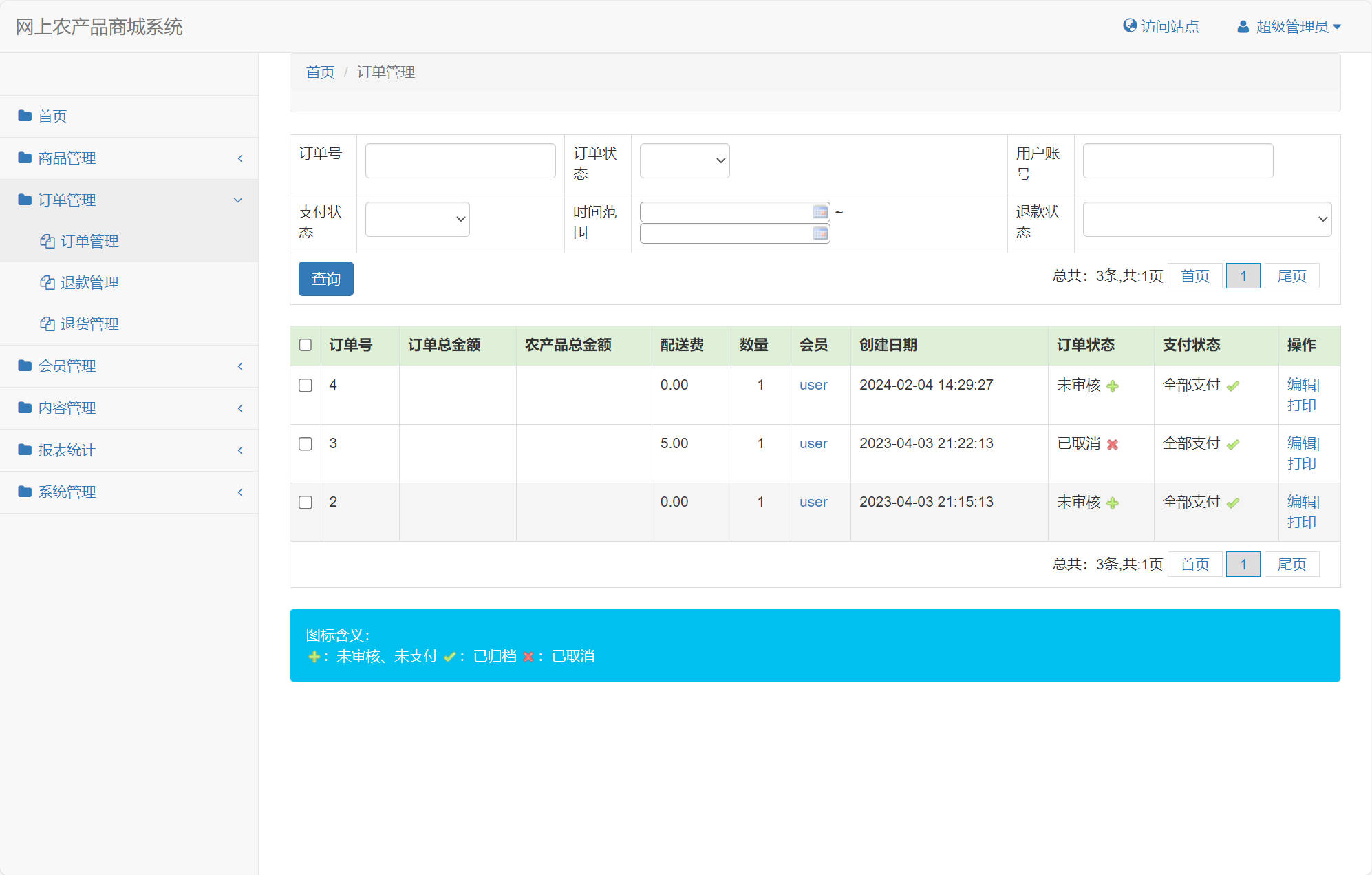
1. 订单管理系统
订单表设计支持复杂的电商业务流程:
CREATE TABLE `t_order` (
  `id` int(11) NOT NULL AUTO_INCREMENT,
  `account` varchar(45) NOT NULL,
  `payType` int(11) DEFAULT NULL,
  `carry` int(11) DEFAULT NULL,
  `rebate` decimal(10,2) DEFAULT NULL,
  `createdate` datetime DEFAULT NULL,
  `status` varchar(10) DEFAULT 'init',
  `refundStatus` varchar(45) DEFAULT NULL,
  `amount` decimal(20,2) DEFAULT 0.00,
  `fee` decimal(20,2) DEFAULT 0.00,
  `ptotal` decimal(20,2) DEFAULT NULL,
  `quantity` int(11) DEFAULT NULL,
  `paystatus` varchar(2) DEFAULT 'n',
  `expressCode` varchar(45) DEFAULT NULL,
  `expressNo` varchar(45) DEFAULT NULL,
  `lowStocks` varchar(1) DEFAULT 'n',
  `score` int(11) DEFAULT NULL,
  PRIMARY KEY (`id`),
  KEY `order_status` (`status`)
) ENGINE=InnoDB AUTO_INCREMENT=4 DEFAULT CHARSET=utf8 COLLATE=utf8_unicode_ci
订单状态机实现:
// 订单状态管理服务
@Service
public class OrderService {

    @Autowired
    private OrderMapper orderMapper;

    /**
     * 更新订单状态
     */
    @Transactional
    public void updateOrderStatus(String orderId, String newStatus, String operator) {
        Order order = orderMapper.selectById(orderId);
        if (order == null) {
            throw new BusinessException("订单不存在");
        }

        // 状态流转验证
        if (!isValidStatusTransition(order.getStatus(), newStatus)) {
            throw new BusinessException("状态流转不合法");
        }

        order.setStatus(newStatus);
        order.setUpdateTime(new Date());
        orderMapper.update(order);

        // 记录状态变更日志
        saveOrderLog(orderId, order.getStatus(), newStatus, operator);
    }

    private boolean isValidStatusTransition(String currentStatus, String newStatus) {
        Map<String, List<String>> validTransitions = new HashMap<>();
        validTransitions.put("init", Arrays.asList("paid", "cancelled"));
        validTransitions.put("paid", Arrays.asList("shipped", "refunding"));
        validTransitions.put("shipped", Arrays.asList("completed", "returning"));
        // ... 更多状态流转规则
        return validTransitions.getOrDefault(currentStatus, new ArrayList<>())
                             .contains(newStatus);
    }
}
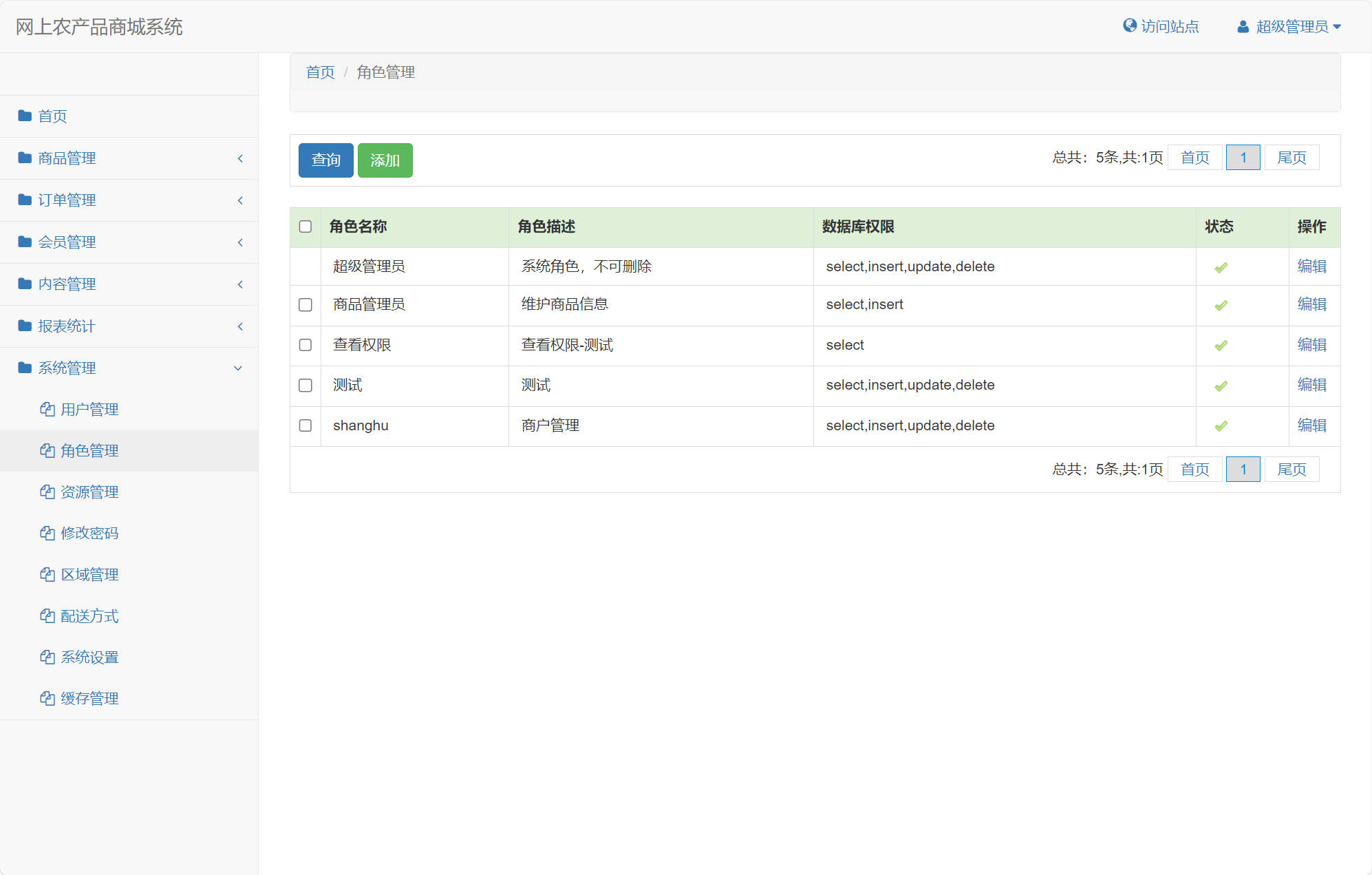
2. 权限管理系统
基于角色的访问控制(RBAC)模型实现:
CREATE TABLE `t_role` (
  `id` int(11) NOT NULL AUTO_INCREMENT,
  `role_name` varchar(45) NOT NULL,
  `role_desc` varchar(45) DEFAULT NULL,
  `role_dbPrivilege` varchar(45) DEFAULT NULL,
  `status` varchar(2) DEFAULT 'y',
  PRIMARY KEY (`id`),
  UNIQUE KEY `role_name_UNIQUE` (`role_name`)
) ENGINE=InnoDB AUTO_INCREMENT=9 DEFAULT CHARSET=utf8 COLLATE=utf8_general_ci
菜单资源实体设计:
package net.jeeshop.core.system.bean;

/**
 * 资源菜单实体类
 */
public class Menu extends PagerModel {
    private String pid;
    private String url;
    private String name;
    private int orderNum;
    private String type; // module:模块 ; page:页面 ; button:功能

    public String getPid() {
        return pid;
    }

    public void setPid(String pid) {
        this.pid = pid;
    }

    public String getUrl() {
        return url;
    }

    public void setUrl(String url) {
        this.url = url;
    }

    public String getName() {
        return name;
    }

    public void setName(String name) {
        this.name = name;
    }

    public String getType() {
        return type;
    }

    public void setType(String type) {
        this.type = type;
    }

    @Override
    public String toString() {
        return "[id:" + getId() + ",pid:" + pid + "]";
    }
}
权限拦截器实现:
@Component
public class SecurityInterceptor extends HandlerInterceptorAdapter {

    @Override
    public boolean preHandle(HttpServletRequest request,
                           HttpServletResponse response, Object handler) throws Exception {

        String requestURI = request.getRequestURI();
        User user = (User) request.getSession().getAttribute("currentUser");

        if (user == null) {
            response.sendRedirect("/login");
            return false;
        }

        // 检查用户权限
        if (!hasPermission(user, requestURI)) {
            response.sendError(403, "无权限访问");
            return false;
        }

        return true;
    }

    private boolean hasPermission(User user, String url) {
        List<Menu> userMenus = user.getRole().getMenus();
        return userMenus.stream()
                       .anyMatch(menu -> url.startsWith(menu.getUrl()));
    }
}
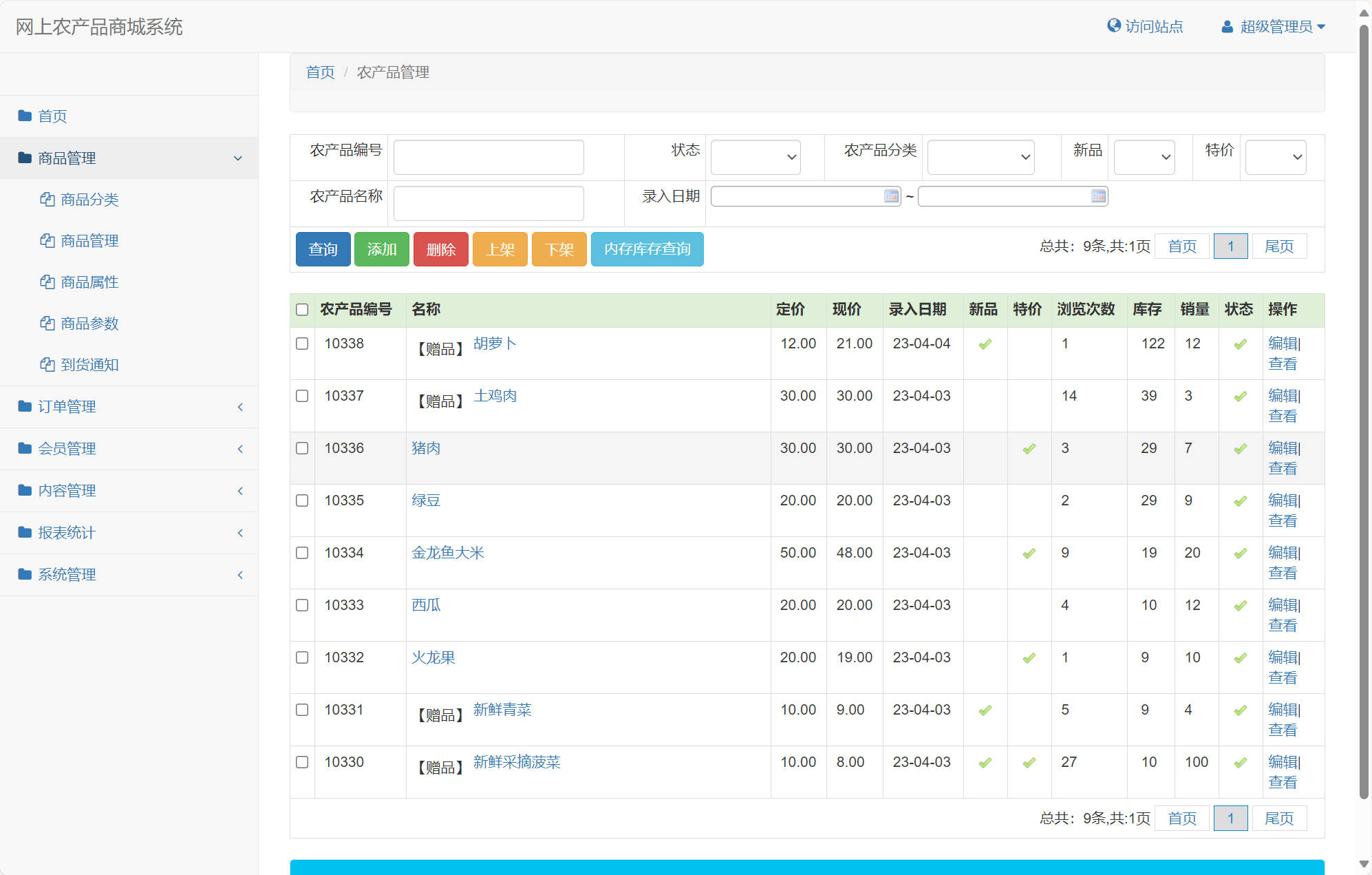
3. 商品管理功能
商品管理支持多维度属性配置:
// 商品服务实现
@Service
public class ProductService {

    @Autowired
    private ProductMapper productMapper;
    @Autowired
    private InventoryService inventoryService;

    /**
     * 商品上架
     */
    @Transactional
    public void shelveProduct(Product product, List<ProductAttribute> attributes) {
        // 验证库存
        if (product.getStock() <= 0) {
            throw new BusinessException("库存不足,无法上架");
        }

        // 设置上架状态
        product.setStatus("on_shelf");
        product.setShelveTime(new Date());
        productMapper.insert(product);

        // 保存商品属性
        saveProductAttributes(product.getId(), attributes);

        // 初始化库存记录
        inventoryService.initInventory(product.getId(), product.getStock());
    }

    /**
     * 商品搜索
     */
    public PageInfo<Product> searchProducts(ProductQuery query) {
        PageHelper.startPage(query.getPageNum(), query.getPageSize());
        List<Product> products = productMapper.selectByQuery(query);

        // 处理商品图片、价格等信息
        products.forEach(this::enrichProductInfo);

        return new PageInfo<>(products);
    }

    private void enrichProductInfo(Product product) {
        // 设置主图
        product.setMainImage(getMainImage(product.getId()));
        // 计算促销价格
        product.setPromotionPrice(calculatePromotionPrice(product));
    }
}
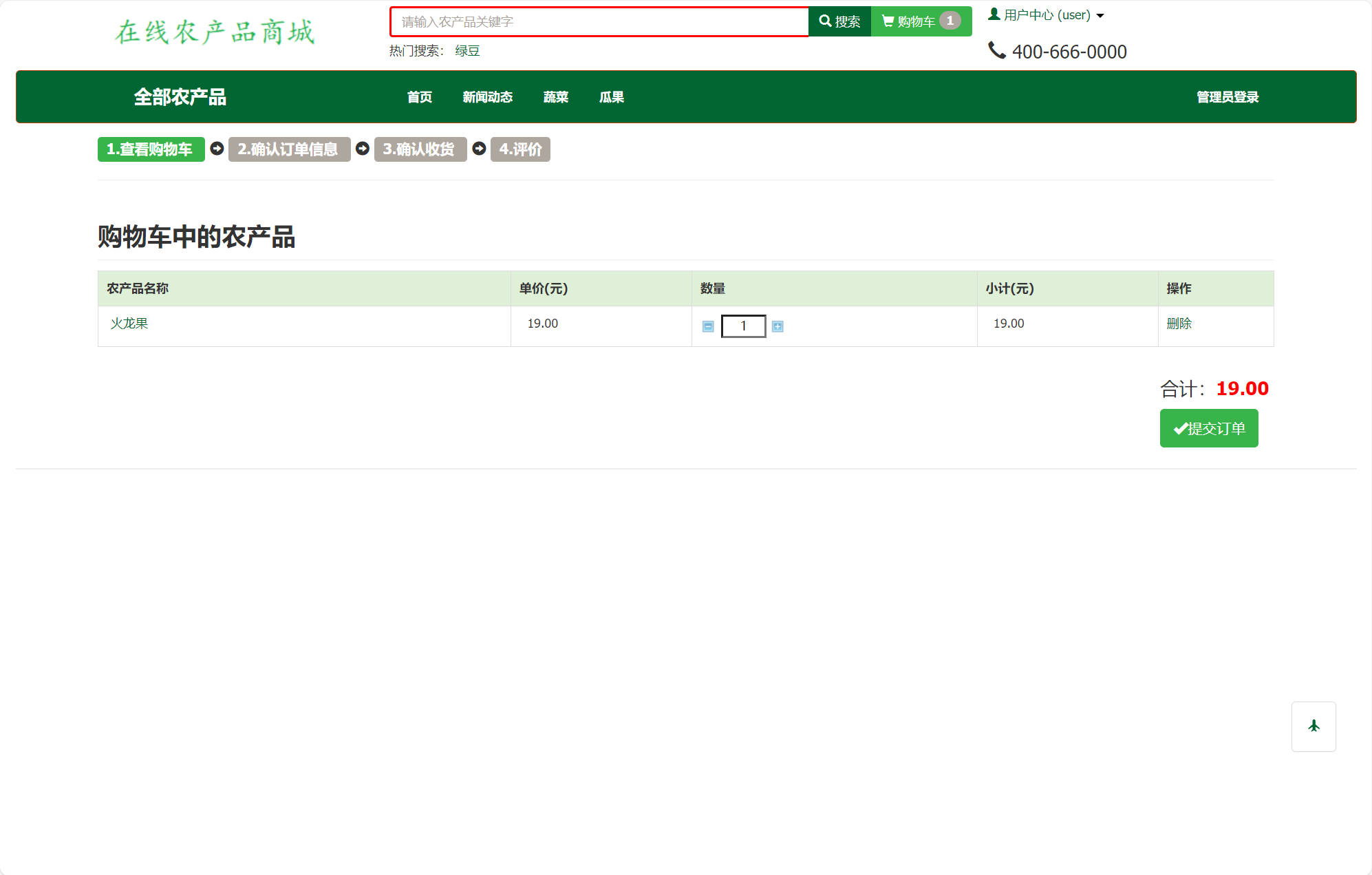
4. 购物车与订单流程
// 购物车服务
@Service
public class CartService {

    @Autowired
    private CartMapper cartMapper;
    @Autowired
    private ProductService productService;

    /**
     * 添加商品到购物车
     */
    @Transactional
    public void addToCart(String account, String productId, int quantity) {
        CartItem existingItem = cartMapper.selectByUserAndProduct(account, productId);

        if (existingItem != null) {
            // 更新数量
            existingItem.setQuantity(existingItem.getQuantity() + quantity);
            cartMapper.update(existingItem);
        } else {
            // 新增购物车项
            CartItem newItem = new CartItem();
            newItem.setAccount(account);
            newItem.setProductId(productId);
            newItem.setQuantity(quantity);
            newItem.setCreateTime(new Date());
            cartMapper.insert(newItem);
        }

        // 更新购物车统计信息
        updateCartSummary(account);
    }

    /**
     * 生成订单
     */
    @Transactional
    public Order createOrderFromCart(String account, String addressId, String payType) {
        List<CartItem> cartItems = cartMapper.selectByAccount(account);
        if (cartItems.isEmpty()) {
            throw new BusinessException("购物车为空");
        }

        Order order = new Order();
        order.setAccount(account);
        order.setCreateDate(new Date());
        order.setStatus("init");
        order.setPayType(payType);

        BigDecimal totalAmount = BigDecimal.ZERO;
        int totalQuantity = 0;

        // 计算订单金额
        for (CartItem item : cartItems) {
            Product product = productService.getProductById(item.getProductId());
            BigDecimal itemTotal = product.getPrice().multiply(
                new BigDecimal(item.getQuantity()));
            totalAmount = totalAmount.add(itemTotal);
            totalQuantity += item.getQuantity();

            // 创建订单明细
            OrderItem orderItem = createOrderItem(order.getId(), product, item);
            order.getOrderItems().add(orderItem);
        }

        order.setAmount(totalAmount);
        order.setQuantity(totalQuantity);
        orderMapper.insert(order);

        // 清空购物车
        cartMapper.deleteByAccount(account);

        return order;
    }
}
实体模型设计策略
系统采用面向对象的领域模型设计,核心实体关系清晰:
// 用户实体扩展示例
public class User extends BaseModel {
    private String account;
    private String password;
    private String email;
    private String mobile;
    private String status;
    private Date registerTime;
    private Integer score;
    private Integer level;

    // 关联对象
    private List<Address> addresses;
    private List<Order> orders;
    private Role role;

    // 业务方法
    public boolean canPlaceOrder() {
        return "active".equals(status) && !CollectionUtils.isEmpty(addresses);
    }

    public void addScore(int points) {
        this.score += points;
        updateLevel();
    }

    private void updateLevel() {
        // 根据积分更新用户等级
        this.level = calculateLevel(this.score);
    }
}
功能展望与优化方向
1. 缓存架构优化
引入Redis集群实现多级缓存,提升系统性能:
# 缓存配置示例
spring:
  redis:
    cluster:
      nodes:
        - 192.168.1.101:6379
        - 192.168.1.102:6379
    timeout: 3000ms
    jedis:
      pool:
        max-active: 20
        max-wait: -1ms
        max-idle: 8
        min-idle: 0

# 缓存策略
cache:
  product:
    ttl: 3600    # 商品信息缓存1小时
  category:
    ttl: 86400   # 分类信息缓存1天
  user:
    ttl: 1800    # 用户信息缓存30分钟
2. 消息队列集成
使用RabbitMQ实现异步处理和削峰填谷:
@Component
public class OrderMessageProducer {

    @Autowired
    private RabbitTemplate rabbitTemplate;

    /**
     * 发送订单创建消息
     */
    public void sendOrderCreatedMessage(Order order) {
        OrderMessage message = new OrderMessage();
        message.setOrderId(order.getId());
        message.setUserId(order.getAccount());
        message.setAmount(order.getAmount());
        message.setTimestamp(System.currentTimeMillis());

        rabbitTemplate.convertAndSend("order.exchange",
                                    "order.created",
                                    message);
    }
}

@Component
public class InventoryConsumer {

    @RabbitListener(queues = "inventory.update.queue")
    public void processInventoryUpdate(InventoryMessage message) {
        // 异步更新库存
        inventoryService.asyncUpdateStock(message.getProductId(),
                                         message.getQuantity());
    }
}
3. 微服务架构改造
将单体应用拆分为微服务集群:
// 商品服务独立部署
@SpringBootApplication
@EnableEurekaClient
@EnableFeignClients
public class ProductServiceApplication {
    public static void main(String[] args) {
        SpringApplication.run(ProductServiceApplication.class, args);
    }
}

// 订单服务API定义
@FeignClient(name = "order-service", path = "/api/orders")
public interface OrderServiceClient {

    @PostMapping
    OrderDTO createOrder(@RequestBody CreateOrderRequest request);

    @GetMapping("/{orderId}")
    OrderDTO getOrder(@PathVariable String