在企业日常运营中,会议管理是组织协作的重要环节。传统的手工登记、邮件通知、纸质文件流转等方式效率低下,容易造成信息孤岛和资源冲突。针对这一问题,我们设计并实现了一套企业级智能会议协作平台,通过数字化手段重构会议全生命周期管理流程。
系统架构与技术栈
该平台采用经典的SSM(Spring + Spring MVC + MyBatis)框架组合,构建了清晰的三层架构体系。Spring框架作为核心控制容器,通过依赖注入(DI)和面向切面编程(AOP)实现业务组件解耦和横切关注点的统一管理。Spring MVC负责Web请求的分发和处理,MyBatis则承担数据持久化职责,通过灵活的SQL映射满足复杂的业务查询需求。
技术栈配置如下:
<dependencies>
<dependency>
<groupId>org.springframework</groupId>
<artifactId>spring-webmvc</artifactId>
<version>5.2.8.RELEASE</version>
</dependency>
<dependency>
<groupId>org.mybatis</groupId>
<artifactId>mybatis-spring</artifactId>
<version>2.0.6</version>
</dependency>
<dependency>
<groupId>com.baomidou</groupId>
<artifactId>mybatis-plus-boot-starter</artifactId>
<version>3.4.2</version>
</dependency>
</dependencies>
数据库设计亮点分析
用户表设计 - 精细化权限控制
CREATE TABLE `yonghu` (
`id` int(11) NOT NULL AUTO_INCREMENT COMMENT '主键',
`username` varchar(200) DEFAULT NULL COMMENT '用户名',
`password` varchar(200) DEFAULT NULL COMMENT '密码',
`name` varchar(200) DEFAULT NULL COMMENT '姓名',
`phone` varchar(200) DEFAULT NULL COMMENT '手机号',
`id_number` varchar(200) DEFAULT NULL COMMENT '身份证号',
`youxiang` varchar(200) DEFAULT NULL COMMENT '邮箱',
`sex_types` int(11) DEFAULT NULL COMMENT '性别类型',
`yonghu_photo` varchar(200) DEFAULT NULL COMMENT '用户照片',
`nation` varchar(200) DEFAULT NULL COMMENT '民族',
`politics_types` int(11) DEFAULT NULL COMMENT '政治面貌类型',
`birthplace` varchar(200) DEFAULT NULL COMMENT '籍贯',
`role_types` int(11) DEFAULT NULL COMMENT '角色类型',
`create_time` timestamp NULL DEFAULT NULL COMMENT '创建时间',
PRIMARY KEY (`id`)
) ENGINE=InnoDB AUTO_INCREMENT=8 DEFAULT CHARSET=utf8 COLLATE=utf8_general_ci COMMENT='用户'
用户表设计体现了完整的人员信息管理体系:
- 角色权限分离:通过
role_types字段实现多角色权限控制,支持管理员、普通用户等不同权限级别 - 敏感信息加密:密码字段采用加密存储,确保数据安全
- 扩展性考虑:预留了政治面貌、民族等字段,满足政府机关和企事业单位的不同需求
- 索引优化:主键自增ID确保查询效率,用户名和手机号可建立唯一索引防止重复注册
字典表设计 - 系统可配置性保障
CREATE TABLE `dictionary` (
`id` bigint(20) NOT NULL AUTO_INCREMENT COMMENT '主键',
`dic_code` varchar(200) DEFAULT NULL COMMENT '字典代码',
`dic_name` varchar(200) DEFAULT NULL COMMENT '字典名称',
`code_index` int(11) DEFAULT NULL COMMENT '编码索引',
`index_name` varchar(200) DEFAULT NULL COMMENT '索引名称',
`super_id` int(11) DEFAULT NULL COMMENT '父级ID',
`create_time` timestamp NULL DEFAULT NULL COMMENT '创建时间',
PRIMARY KEY (`id`)
) ENGINE=InnoDB AUTO_INCREMENT=23 DEFAULT CHARSET=utf8 COLLATE=utf8_general_ci COMMENT='字典表'
字典表采用树形结构设计,支持无限级分类:
- 层级化管理:通过
super_id实现父子关系,适用于会议类型、设备分类等多级数据 - 代码索引分离:
dic_code用于程序逻辑判断,index_name用于界面显示,实现国际化支持 - 维护便捷性:管理员可通过后台直接修改字典内容,无需修改程序代码

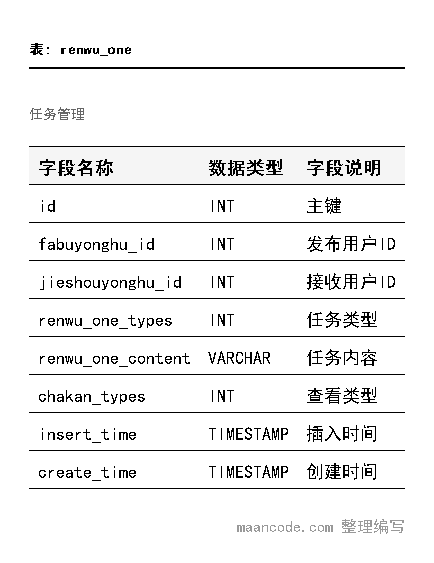
任务管理表 - 业务流程追踪
CREATE TABLE `renwu_one` (
`id` int(11) NOT NULL AUTO_INCREMENT COMMENT '主键',
`fabuyonghu_id` int(11) DEFAULT NULL COMMENT '发布用户ID',
`jieshouyonghu_id` int(11) DEFAULT NULL COMMENT '接收用户ID',
`renwu_one_types` int(11) DEFAULT NULL COMMENT '任务类型',
`renwu_one_content` varchar(200) DEFAULT NULL COMMENT '任务内容',
`chakan_types` int(11) DEFAULT NULL COMMENT '查看类型',
`insert_time` timestamp NULL DEFAULT NULL COMMENT '插入时间',
`create_time` timestamp NULL DEFAULT NULL COMMENT '创建时间',
PRIMARY KEY (`id`)
) ENGINE=InnoDB AUTO_INCREMENT=5 DEFAULT CHARSET=utf8 COLLATE=utf8_general_ci COMMENT='任务管理'
任务表设计特点:
- 双向关联:通过发布用户ID和接收用户ID建立任务分配关系
- 状态跟踪:
chakan_types字段记录任务查看状态,实现进度监控 - 时间维度:插入时间和创建时间分别记录业务时间和系统时间,便于审计
核心功能实现
用户登录与身份验证
系统采用基于Session的认证机制,结合百度AI人脸识别技术提供双重验证保障。
@RestController
public class LoginController {
@Autowired
private YonghuService yonghuService;
@RequestMapping("/login")
public R login(@RequestBody Map<String, String> params) {
String username = params.get("username");
String password = params.get("password");
// 验证用户凭证
YonghuEntity user = yonghuService.selectOne(
new EntityWrapper<YonghuEntity>()
.eq("username", username)
.eq("password", password) // 实际项目中应使用加密验证
);
if(user != null) {
// 设置session
request.getSession().setAttribute("userId", user.getId());
request.getSession().setAttribute("role", user.getRoleTypes());
return R.ok().put("data", user);
} else {
return R.error("用户名或密码错误");
}
}
// 人脸识别登录
@RequestMapping("/faceLogin")
public R faceLogin(String faceImage, HttpServletRequest request) {
if(client == null) {
String APIKey = configService.selectOne(
new EntityWrapper<ConfigEntity>().eq("name", "APIKey")).getValue();
String SecretKey = configService.selectOne(
new EntityWrapper<ConfigEntity>().eq("name", "SecretKey")).getValue();
client = new AipFace(null, APIKey, SecretKey);
}
// 人脸比对逻辑
JSONObject result = client.match(faceImage, storedFaceImage);
if(result.getDouble("score") > 80) {
return R.ok().put("msg", "人脸识别成功");
}
return R.error("人脸识别失败");
}
}

会议文件管理模块
会议文件管理支持文档上传、版本控制和权限管理,确保会议资料的完整性和安全性。
@Service
public class HuiyiwenjianService extends ServiceImpl<HuiyiwenjianDao, HuiyiwenjianEntity> {
/**
* 保存会议文件
*/
public R saveHuiyiwenjian(HuiyiwenjianEntity huiyiwenjian,
MultipartFile file, HttpServletRequest request) {
try {
// 文件上传处理
if(file != null && !file.isEmpty()) {
String originalFilename = file.getOriginalFilename();
String filePath = request.getSession().getServletContext()
.getRealPath("/upload/huiyiwenjian/");
// 生成唯一文件名
String fileName = UUID.randomUUID() +
originalFilename.substring(originalFilename.lastIndexOf("."));
File dest = new File(filePath + fileName);
file.transferTo(dest);
huiyiwenjian.setHuiyiwenjianFile(fileName);
}
huiyiwenjian.setInsertTime(new Date());
huiyiwenjian.setCreateTime(new Date());
this.insert(huiyiwenjian);
return R.ok();
} catch (Exception e) {
return R.error("文件上传失败");
}
}
/**
* 根据会议ID查询相关文件
*/
public List<HuiyiwenjianEntity> getFilesByHuiyiId(Integer huiyiId) {
return this.selectList(new EntityWrapper<HuiyiwenjianEntity>()
.eq("huiyi_id", huiyiId)
.orderBy("create_time", false));
}
}
对应的实体类设计:
@TableName("huiyiwenjian")
public class HuiyiwenjianEntity implements Serializable {
private static final long serialVersionUID = 1L;
@TableId(type = IdType.AUTO)
private Integer id;
/**
* 会议ID
*/
private Integer huiyiId;
/**
* 文件名称
*/
private String huiyiwenjianName;
/**
* 文件内容简介
*/
private String huiyiwenjianContent;
/**
* 会议文件
*/
private String huiyiwenjianFile;
/**
* 插入时间
*/
private Date insertTime;
/**
* 创建时间
*/
private Date createTime;
// getter和setter方法
public Integer getId() { return id; }
public void setId(Integer id) { this.id = id; }
// ... 其他getter/setter
}

任务分配与跟踪系统
任务管理模块实现任务的创建、分配、执行和跟踪全流程管理。
@Controller
@RequestMapping("/renwuone")
public class RenwuOneController {
@Autowired
private RenwuOneService renwuOneService;
/**
* 分配新任务
*/
@RequestMapping("/assign")
public R assignTask(@RequestBody RenwuOneEntity renwuOne,
HttpServletRequest request) {
// 获取当前用户ID
Integer currentUserId = (Integer) request.getSession().getAttribute("userId");
renwuOne.setFabuyonghuId(currentUserId);
renwuOne.setInsertTime(new Date());
renwuOne.setCreateTime(new Date());
renwuOne.setChakanTypes(1); // 1-未查看
renwuOneService.insert(renwuOne);
// 发送通知
sendNotification(renwuOne.getJieshouyonghuId(), "您有新的任务待处理");
return R.ok().put("data", renwuOne);
}
/**
* 获取用户任务列表
*/
@RequestMapping("/mytasks")
public R getMyTasks(HttpServletRequest request) {
Integer userId = (Integer) request.getSession().getAttribute("userId");
List<RenwuOneEntity> tasks = renwuOneService.selectList(
new EntityWrapper<RenwuOneEntity>()
.eq("jieshouyonghu_id", userId)
.orderBy("create_time", false)
);
return R.ok().put("data", tasks);
}
/**
* 更新任务状态
*/
@RequestMapping("/updateStatus")
public R updateTaskStatus(Integer taskId, Integer status) {
RenwuOneEntity task = renwuOneService.selectById(taskId);
if(task != null) {
task.setChakanTypes(status);
renwuOneService.updateById(task);
return R.ok();
}
return R.error("任务不存在");
}
}

系统公告管理
公告模块支持富文本编辑和定时发布功能,确保信息传达的及时性和准确性。
@Service
public class XitonggonggaoService extends ServiceImpl<XitonggonggaoDao, XitonggonggaoEntity> {
/**
* 发布新公告
*/
public R publishGonggao(XitonggonggaoEntity gonggao) {
gonggao.setAddtime(new Date());
if(gonggao.getRiqi() == null) {
gonggao.setRiqi(new Date());
}
this.insert(gonggao);
// 记录操作日志
logService.recordLog("发布系统公告", gonggao.getBiaoti());
return R.ok();
}
/**
* 获取最新公告列表
*/
public List<XitonggonggaoEntity> getLatestGonggao(int limit) {
return this.selectList(
new EntityWrapper<XitonggonggaoEntity>()
.orderBy("riqi", false)
.last("LIMIT " + limit)
);
}
/**
* 根据类型筛选公告
*/
public List<XitonggonggaoEntity> getGonggaoByType(String leixing) {
return this.selectList(
new EntityWrapper<XitonggonggaoEntity>()
.eq("leixing", leixing)
.orderBy("riqi", false)
);
}
}
通用工具类设计
系统提供了丰富的工具类支持,包括文件处理、百度地图集成、数据验证等功能。
@Component
public class BaiduUtil {
/**
* 根据经纬度获取城市信息
*/
public static Map<String, String> getCityByLonLat(String ak, String lng, String lat) {
Map<String, String> result = new HashMap<>();
try {
String url = "http://api.map.baidu.com/reverse_geocoding/v3/?ak=" + ak +
"&output=json&coordtype=wgs84ll&location=" + lat + "," + lng;
String response = HttpUtil.get(url);
JSONObject json = new JSONObject(response);
if(json.getInt("status") == 0) {
JSONObject addressComponent = json.getJSONObject("result")
.getJSONObject("addressComponent");
result.put("city", addressComponent.getString("city"));
result.put("district", addressComponent.getString("district"));
}
} catch (Exception e) {
e.printStackTrace();
}
return result;
}
/**
* 获取百度API认证token
*/
public static String getAuth(String ak, String sk) {
String authHost = "https://aip.baidubce.com/oauth/2.0/token?";
String getAccessTokenUrl = authHost
+ "grant_type=client_credentials"
+ "&client_id=" + ak
+ "&client_secret=" + sk;
try {
String response = HttpUtil.get(getAccessTokenUrl);
JSONObject json = new JSONObject(response);
return json.getString("access_token");
} catch (Exception e) {
return null;
}
}
}
实体模型设计
系统采用MyBatis-Plus作为ORM框架,实体类设计遵循JavaBean规范,支持自动化的CRUD操作。
@TableName("config")
public class ConfigEntity implements Serializable {
private static final long serialVersionUID = 1L;
@TableId(type = IdType.AUTO)
private Long id;
/**
* 配置键
*/
private String name;
/**
* 配置值
*/
private String value;
public Long getId() { return id; }
public void setId(Long id) { this.id = id; }
public String getName() { return name; }
public void setName(String name) { this.name = name; }
public String getValue() { return value; }
public void setValue(String value) { this.value = value; }
@Override
public String toString() {
return "ConfigEntity{" +
"id=" + id +
", name='" + name + '\'' +
", value='" + value + '\'' +
'}';
}
}
数据访问层采用MyBatis-Plus的通用Mapper,大幅减少重复代码:
@Mapper
public interface ConfigDao extends BaseMapper<ConfigEntity> {
// 自定义复杂查询方法
@Select("SELECT * FROM config WHERE name LIKE CONCAT(#{prefix}, '%')")
List<ConfigEntity> selectByPrefix(String prefix);
}
功能展望与优化方向
1. 引入Redis缓存提升性能
当前系统频繁查询字典表、用户信息等基础数据,可通过Redis缓存大幅提升响应速度。
@Service
public class CacheableUserService {
@Autowired
private RedisTemplate<String, Object> redisTemplate;
@Autowired
private YonghuService yonghuService;
public YonghuEntity getUserByIdWithCache(Integer userId) {
String cacheKey = "user:" + userId;
YonghuEntity user = (YonghuEntity) redisTemplate.opsForValue().get(cacheKey);
if(user == null) {
user = yonghuService.selectById(userId);
if(user != null) {
redisTemplate.opsForValue().set(cacheKey, user, Duration.ofHours(2));
}
}
return user;
}
}
2. 消息队列实现异步通知
将邮件通知、短信提醒等耗时操作异步化,提升系统响应能力。
@Component
public class NotificationService {
@Autowired
private AmqpTemplate rabbitTemplate;
public void sendMeetingNotification(MeetingEntity meeting) {
Map<String, Object> message = new HashMap<>();