在高校环境中,学生群体由于课程更替、毕业离校或个人消费升级,频繁产生闲置物品处理需求。传统的线下交易模式,如校园公告栏、微信群聊等,存在信息传播范围有限、沟通效率低下、缺乏交易保障机制等固有弊端。针对这一痛点,基于SSM(Spring + SpringMVC + MyBatis)框架开发的“校园易市”平台应运而生,旨在构建一个安全、便捷、高效的校园内部二手商品在线交易生态系统。该平台通过标准化的商品信息发布、智能搜索、在线议价及订单管理流程,将零散的线下交易行为系统化地整合至线上,显著降低了交易成本,提升了资源循环利用效率。
平台采用经典的三层架构设计。Spring框架作为核心控制容器,负责管理所有业务组件的生命周期与依赖注入,其声明式事务管理机制确保了数据库操作在复杂业务场景下的原子性与一致性。SpringMVC承担Web请求调度职责,通过清晰的控制器映射与视图解析策略,实现了用户请求与业务逻辑的高效分离。MyBatis作为持久层框架,借助灵活的XML配置与注解方式,完成了Java对象与关系型数据库的ORM映射,其动态SQL能力为多条件商品检索提供了强大支持。前端界面采用JSP结合JSTL标签库进行数据渲染,并集成jQuery库实现异步交互功能,如商品列表的局部刷新与用户登录状态的实时验证。
数据库架构设计与核心表分析
系统采用MySQL关系型数据库,共设计11张数据表,围绕用户、商品、订单、评论等核心实体构建了完整的数据模型。以下重点分析三个核心表的结构设计亮点。
user 表存储平台所有注册用户的基本信息,其设计充分考虑了校园环境的实名特性与安全需求:
CREATE TABLE `user` (
  `id` int(11) NOT NULL AUTO_INCREMENT,
  `username` varchar(50) NOT NULL UNIQUE,
  `password` varchar(255) NOT NULL,
  `email` varchar(100) NOT NULL UNIQUE,
  `phone` varchar(20) DEFAULT NULL,
  `real_name` varchar(50) DEFAULT NULL,
  `student_id` varchar(20) UNIQUE,
  `avatar` varchar(255) DEFAULT 'default_avatar.png',
  `create_time` datetime DEFAULT CURRENT_TIMESTAMP,
  `update_time` datetime DEFAULT CURRENT_TIMESTAMP ON UPDATE CURRENT_TIMESTAMP,
  `status` tinyint(1) DEFAULT '1',
  PRIMARY KEY (`id`),
  KEY `idx_username` (`username`),
  KEY `idx_email` (`email`)
) ENGINE=InnoDB DEFAULT CHARSET=utf8mb4;
该表设计的精妙之处体现在多个方面:student_id字段设置唯一约束,为后续实现校园实名认证奠定了基础;password字段采用varchar(255)长度,为使用BCrypt等强哈希算法加密存储预留充足空间;status状态位支持账户的软删除与冻结操作;联合索引的创建显著提升了基于用户名和邮箱的查询效率。这些设计细节共同保障了用户数据的安全性、完整性与访问性能。
product 表作为平台的核心数据载体,其结构设计需要兼顾商品信息的完整性与查询效率:
CREATE TABLE `product` (
  `id` int(11) NOT NULL AUTO_INCREMENT,
  `title` varchar(200) NOT NULL,
  `description` text,
  `price` decimal(10,2) NOT NULL,
  `original_price` decimal(10,2) DEFAULT NULL,
  `category_id` int(11) NOT NULL,
  `seller_id` int(11) NOT NULL,
  `cover_image` varchar(255) NOT NULL,
  `image_list` json DEFAULT NULL,
  `view_count` int(11) DEFAULT '0',
  `like_count` int(11) DEFAULT '0',
  `status` enum('pending','approved','sold','rejected') DEFAULT 'pending',
  `is_negotiable` tinyint(1) DEFAULT '1',
  `create_time` datetime DEFAULT CURRENT_TIMESTAMP,
  `update_time` datetime DEFAULT CURRENT_TIMESTAMP ON UPDATE CURRENT_TIMESTAMP,
  PRIMARY KEY (`id`),
  KEY `idx_category_id` (`category_id`),
  KEY `idx_seller_id` (`seller_id`),
  KEY `idx_status` (`status`),
  KEY `idx_create_time` (`create_time`),
  CONSTRAINT `fk_product_category` FOREIGN KEY (`category_id`) REFERENCES `category` (`id`),
  CONSTRAINT `fk_product_seller` FOREIGN KEY (`seller_id`) REFERENCES `user` (`id`)
) ENGINE=InnoDB DEFAULT CHARSET=utf8mb4;
该表设计中,status字段使用ENUM类型严格约束商品状态流转,确保业务逻辑的严谨性;image_list字段采用JSON数据类型,高效存储商品多图信息,便于前端直接解析渲染;view_count与like_count的计数器设计支持热门商品排序算法;多字段索引策略(如分类ID、卖家ID、状态、创建时间)全面优化了各类商品查询场景的性能。外键约束保证了分类与卖家信息的参照完整性。
orders 表记录了完整的交易流程,其设计体现了复杂业务状态的管理能力:
CREATE TABLE `orders` (
  `id` int(11) NOT NULL AUTO_INCREMENT,
  `order_number` varchar(32) NOT NULL UNIQUE,
  `product_id` int(11) NOT NULL,
  `buyer_id` int(11) NOT NULL,
  `seller_id` int(11) NOT NULL,
  `final_price` decimal(10,2) NOT NULL,
  `status` enum('pending','paid','shipped','completed','cancelled') DEFAULT 'pending',
  `buyer_message` varchar(500) DEFAULT NULL,
  `seller_message` varchar(500) DEFAULT NULL,
  `create_time` datetime DEFAULT CURRENT_TIMESTAMP,
  `update_time` datetime DEFAULT CURRENT_TIMESTAMP ON UPDATE CURRENT_TIMESTAMP,
  PRIMARY KEY (`id`),
  KEY `idx_buyer_id` (`buyer_id`),
  KEY `idx_seller_id` (`seller_id`),
  KEY `idx_product_id` (`product_id`),
  KEY `idx_order_number` (`order_number`),
  CONSTRAINT `fk_orders_product` FOREIGN KEY (`product_id`) REFERENCES `product` (`id`),
  CONSTRAINT `fk_orders_buyer` FOREIGN KEY (`buyer_id`) REFERENCES `user` (`id`),
  CONSTRAINT `fk_orders_seller` FOREIGN KEY (`seller_id`) REFERENCES `user` (`id`)
) ENGINE=InnoDB DEFAULT CHARSET=utf8mb4;
该表的亮点在于:采用独立的order_number字段作为业务唯一标识,避免自增ID暴露业务量信息;买卖双方消息字段分离存储,清晰记录沟通过程;订单状态枚举定义了完整的交易生命周期;多外键关联确保了订单与商品、买卖双方的数据一致性。这种设计为后续扩展退款、评价等业务流程提供了良好的基础。
核心功能模块实现解析
- 用户认证与权限控制 系统通过SpringMVC拦截器实现统一的访问控制。以下拦截器代码检查用户会话状态,对未登录请求进行拦截:
@Component
public class AuthInterceptor implements HandlerInterceptor {
    @Override
    public boolean preHandle(HttpServletRequest request,
                           HttpServletResponse response,
                           Object handler) throws Exception {
        HttpSession session = request.getSession();
        User user = (User) session.getAttribute("currentUser");

        if (user == null) {
            response.sendRedirect(request.getContextPath() + "/login");
            return false;
        }
        return true;
    }
}
配置类中将拦截器注册到需要保护的URL模式:
@Configuration
public class WebMvcConfig implements WebMvcConfigurer {
    @Autowired
    private AuthInterceptor authInterceptor;

    @Override
    public void addInterceptors(InterceptorRegistry registry) {
        registry.addInterceptor(authInterceptor)
                .addPathPatterns("/user/**", "/product/publish", "/order/**")
                .excludePathPatterns("/login", "/register", "/css/**", "/js/**");
    }
}
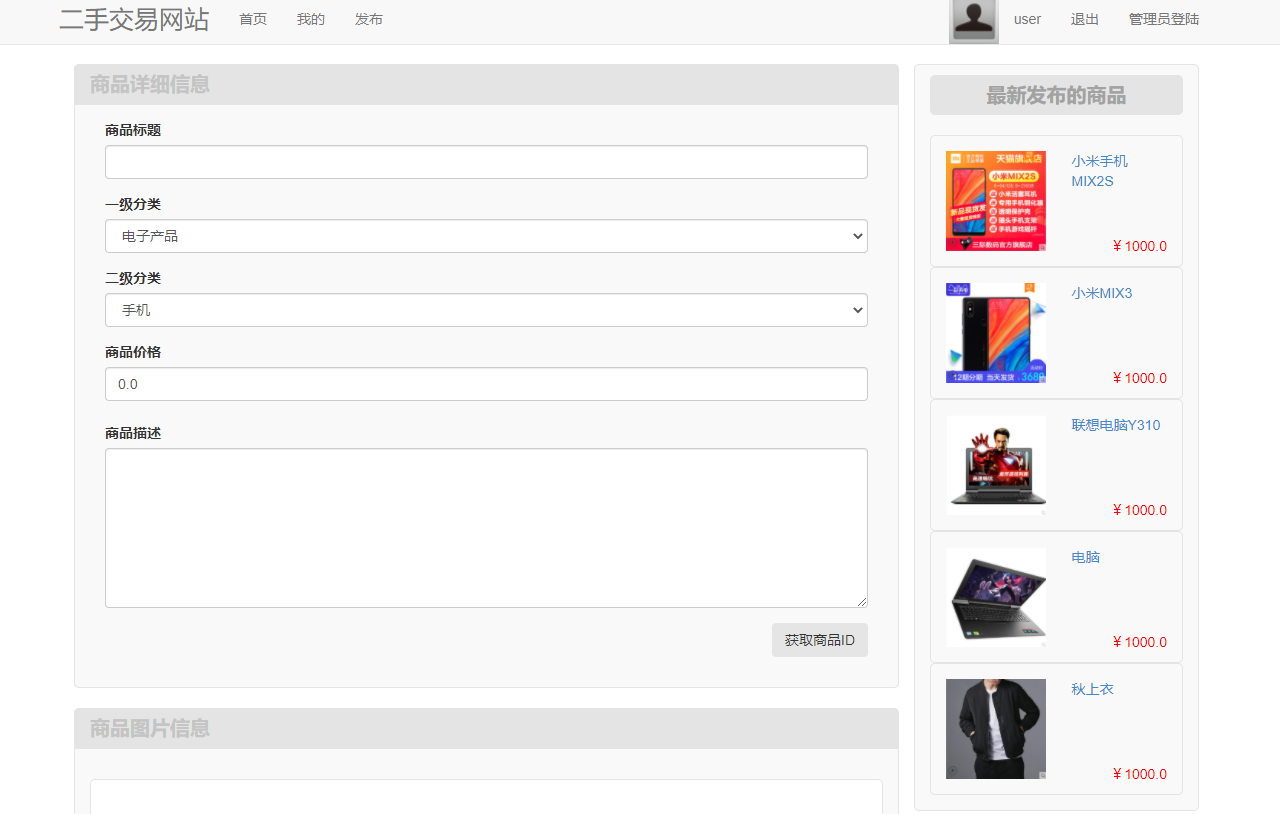
- 商品发布与图片上传
商品发布功能整合了表单验证、图片处理与事务管理。服务层方法使用Spring的
@Transactional注解确保数据一致性:
@Service
@Transactional
public class ProductService {
    @Autowired
    private ProductMapper productMapper;

    public void publishProduct(Product product, MultipartFile coverImage,
                             MultipartFile[] additionalImages) {
        // 处理封面图片上传
        if (!coverImage.isEmpty()) {
            String coverPath = fileService.saveImage(coverImage);
            product.setCoverImage(coverPath);
        }

        // 处理多图上传并生成JSON数组
        List<String> imageUrls = new ArrayList<>();
        for (MultipartFile image : additionalImages) {
            if (!image.isEmpty()) {
                String imagePath = fileService.saveImage(image);
                imageUrls.add(imagePath);
            }
        }
        product.setImageList(JSON.toJSONString(imageUrls));

        // 设置默认状态并保存商品
        product.setStatus(ProductStatus.PENDING);
        productMapper.insert(product);
    }
}
文件上传工具类封装了图片格式验证与存储逻辑:
@Component
public class FileService {
    private final String uploadDir = "/uploads/";

    public String saveImage(MultipartFile file) throws IOException {
        // 验证文件类型
        String contentType = file.getContentType();
        if (!contentType.startsWith("image/")) {
            throw new IllegalArgumentException("仅支持图片文件上传");
        }

        // 生成唯一文件名
        String originalFilename = file.getOriginalFilename();
        String fileExtension = originalFilename.substring(originalFilename.lastIndexOf("."));
        String newFilename = UUID.randomUUID().toString() + fileExtension;

        // 保存文件
        Path filePath = Paths.get(uploadDir, newFilename);
        Files.createDirectories(filePath.getParent());
        file.transferTo(filePath.toFile());

        return newFilename;
    }
}
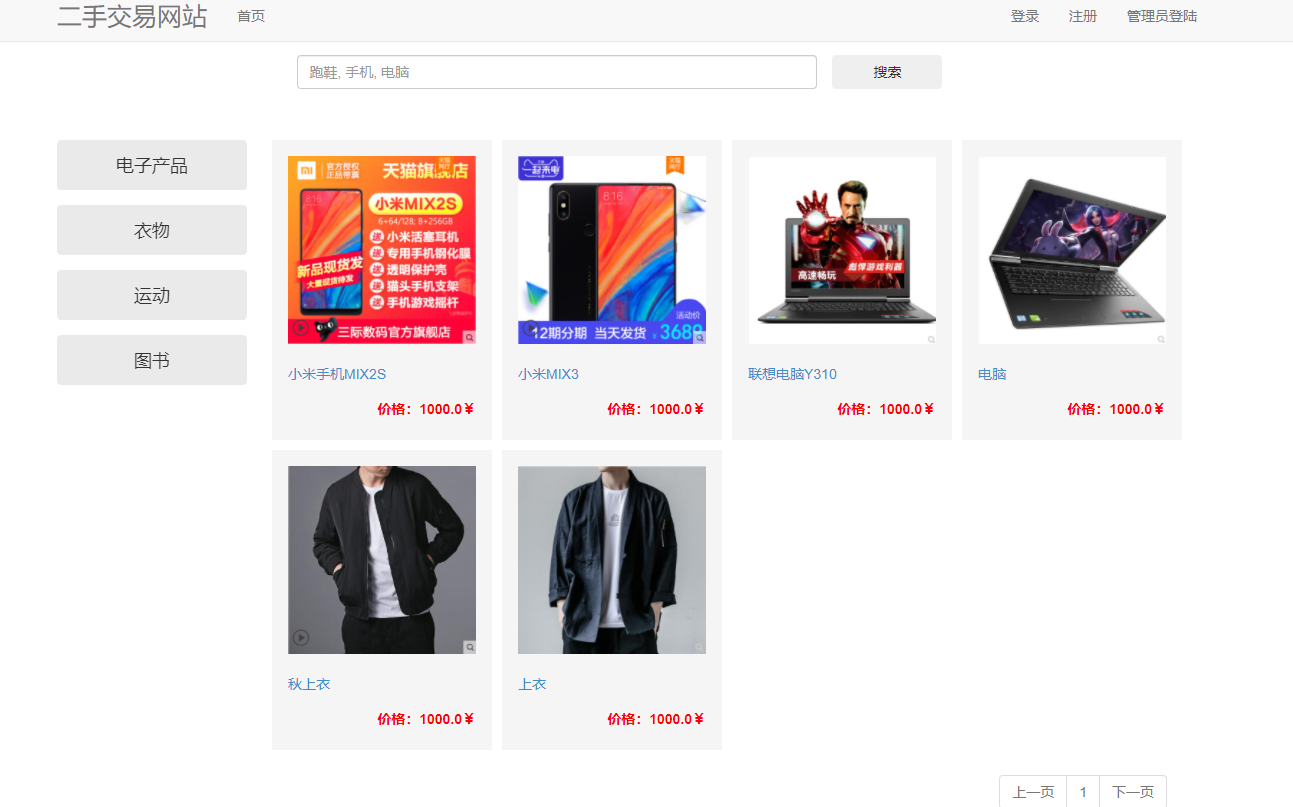
- 智能商品搜索与分页 商品搜索功能结合MyBatis动态SQL实现多条件查询,支持按分类、价格区间、关键词等条件筛选:
<!-- ProductMapper.xml -->
<select id="selectByCondition" parameterType="map" resultType="Product">
    SELECT p.*, u.username as seller_name, c.name as category_name
    FROM product p
    LEFT JOIN user u ON p.seller_id = u.id
    LEFT JOIN category c ON p.category_id = c.id
    WHERE p.status = 'approved'
    <if test="categoryId != null">
        AND p.category_id = #{categoryId}
    </if>
    <if test="minPrice != null">
        AND p.price >= #{minPrice}
    </if>
    <if test="maxPrice != null">
        AND p.price <= #{maxPrice}
    </if>
    <if test="keyword != null and keyword != ''">
        AND (p.title LIKE CONCAT('%', #{keyword}, '%')
             OR p.description LIKE CONCAT('%', #{keyword}, '%'))
    </if>
    <if test="orderBy != null">
        ORDER BY
        <choose>
            <when test="orderBy == 'price_asc'">p.price ASC</when>
            <when test="orderBy == 'price_desc'">p.price DESC</when>
            <when test="orderBy == 'latest'">p.create_time DESC</when>
            <when test="orderBy == 'popular'">p.view_count DESC</when>
        </choose>
    </if>
    LIMIT #{offset}, #{pageSize}
</select>
控制器中处理分页参数并返回Pagination对象:
@Controller
public class ProductController {
    @Autowired
    private ProductService productService;

    @GetMapping("/products")
    public String listProducts(@RequestParam(defaultValue = "1") int page,
                             @RequestParam(defaultValue = "12") int size,
                             @RequestParam(required = false) Integer categoryId,
                             @RequestParam(required = false) String keyword,
                             Model model) {
        Map<String, Object> params = new HashMap<>();
        params.put("categoryId", categoryId);
        params.put("keyword", keyword);
        params.put("offset", (page - 1) * size);
        params.put("pageSize", size);

        List<Product> products = productService.findByCondition(params);
        int total = productService.countByCondition(params);

        Pagination pagination = new Pagination(page, size, total);
        model.addAttribute("products", products);
        model.addAttribute("pagination", pagination);

        return "product/list";
    }
}
- 订单状态机与业务逻辑 订单服务层实现了完整的订单状态流转逻辑,确保状态变更符合业务规则:
@Service
@Transactional
public class OrderService {
    @Autowired
    private OrderMapper orderMapper;

    public void updateOrderStatus(Long orderId, OrderStatus newStatus, Long userId) {
        Order order = orderMapper.selectById(orderId);
        if (order == null) {
            throw new OrderNotFoundException("订单不存在");
        }

        // 验证操作权限
        if (!order.getBuyerId().equals(userId) && !order.getSellerId().equals(userId)) {
            throw new UnauthorizedOperationException("无权操作此订单");
        }

        // 状态机验证
        if (!isValidStatusTransition(order.getStatus(), newStatus)) {
            throw new InvalidStatusTransitionException("非法的状态变更");
        }

        order.setStatus(newStatus);
        orderMapper.updateStatus(order);

        // 记录状态变更日志
        logStatusChange(orderId, order.getStatus(), newStatus, userId);
    }

    private boolean isValidStatusTransition(OrderStatus current, OrderStatus next) {
        // 定义允许的状态转换规则
        Map<OrderStatus, Set<OrderStatus>> transitions = new HashMap<>();
        transitions.put(OrderStatus.PENDING, Set.of(OrderStatus.PAID, OrderStatus.CANCELLED));
        transitions.put(OrderStatus.PAID, Set.of(OrderStatus.SHIPPED, OrderStatus.CANCELLED));
        transitions.put(OrderStatus.SHIPPED, Set.of(OrderStatus.COMPLETED));

        return transitions.getOrDefault(current, Collections.emptySet()).contains(next);
    }
}
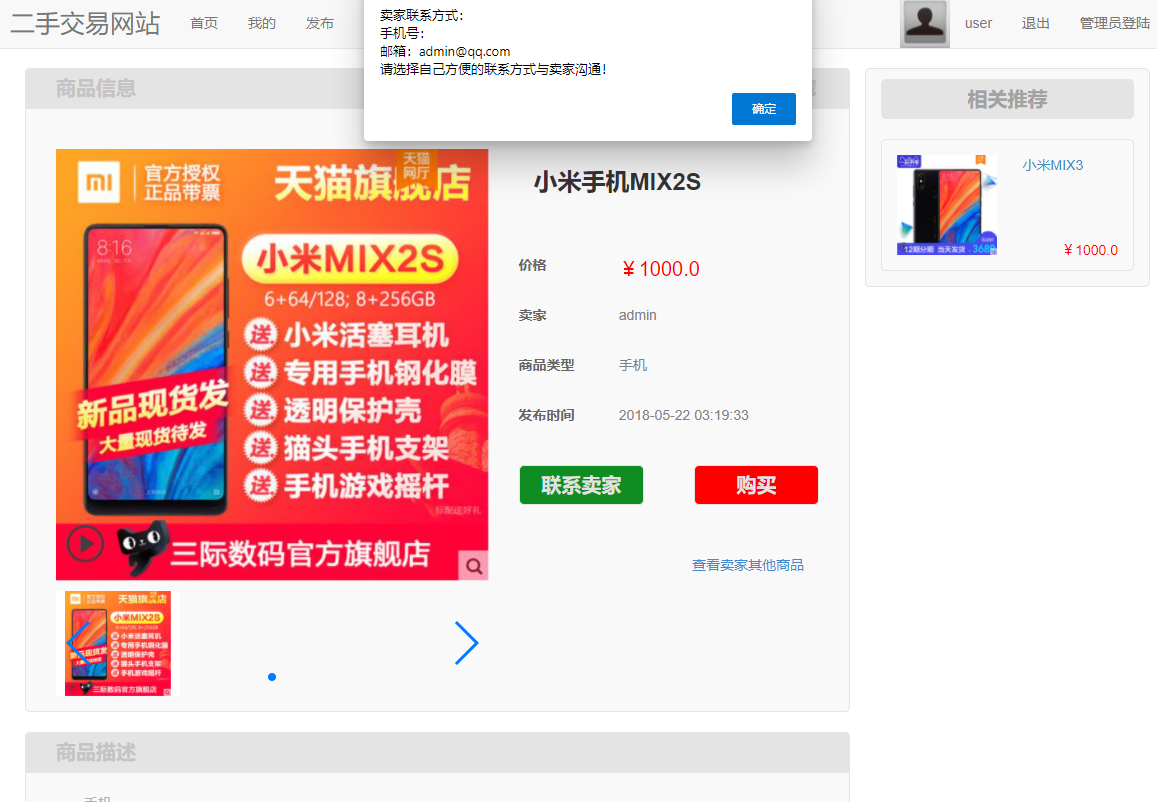
- 商品详情页与卖家联系功能 商品详情页通过JSP标签库动态渲染商品信息,并提供安全的卖家联系方式展示:
<%@ taglib prefix="c" uri="http://java.sun.com/jsp/jstl/core" %>
<div class="product-detail">
    <div class="product-images">
        <img src="${product.coverImage}" alt="${product.title}">
        <c:forEach items="${product.imageList}" var="image">
            <img src="${image}" alt="附加图片">
        </c:forEach>
    </div>

    <div class="product-info">
        <h1>${product.title}</h1>
        <p class="price">¥${product.price}</p>
        <p class="original-price">原价: ¥${product.originalPrice}</p>

        <div class="seller-info">
            <h3>卖家信息</h3>
            <img src="${seller.avatar}" alt="卖家头像">
            <span>${seller.username}</span>
            <c:if test="${not empty currentUser && currentUser.id != product.sellerId}">
                <button onclick="contactSeller(${product.sellerId})">联系卖家</button>
            </c:if>
        </div>
    </div>
</div>

<script>
function contactSeller(sellerId) {
    $.ajax({
        url: '/message/contact',
        method: 'POST',
        data: {sellerId: sellerId},
        success: function(response) {
            if (response.success) {
                window.location.href = '/chat/' + response.chatId;
            }
        }
    });
}
</script>
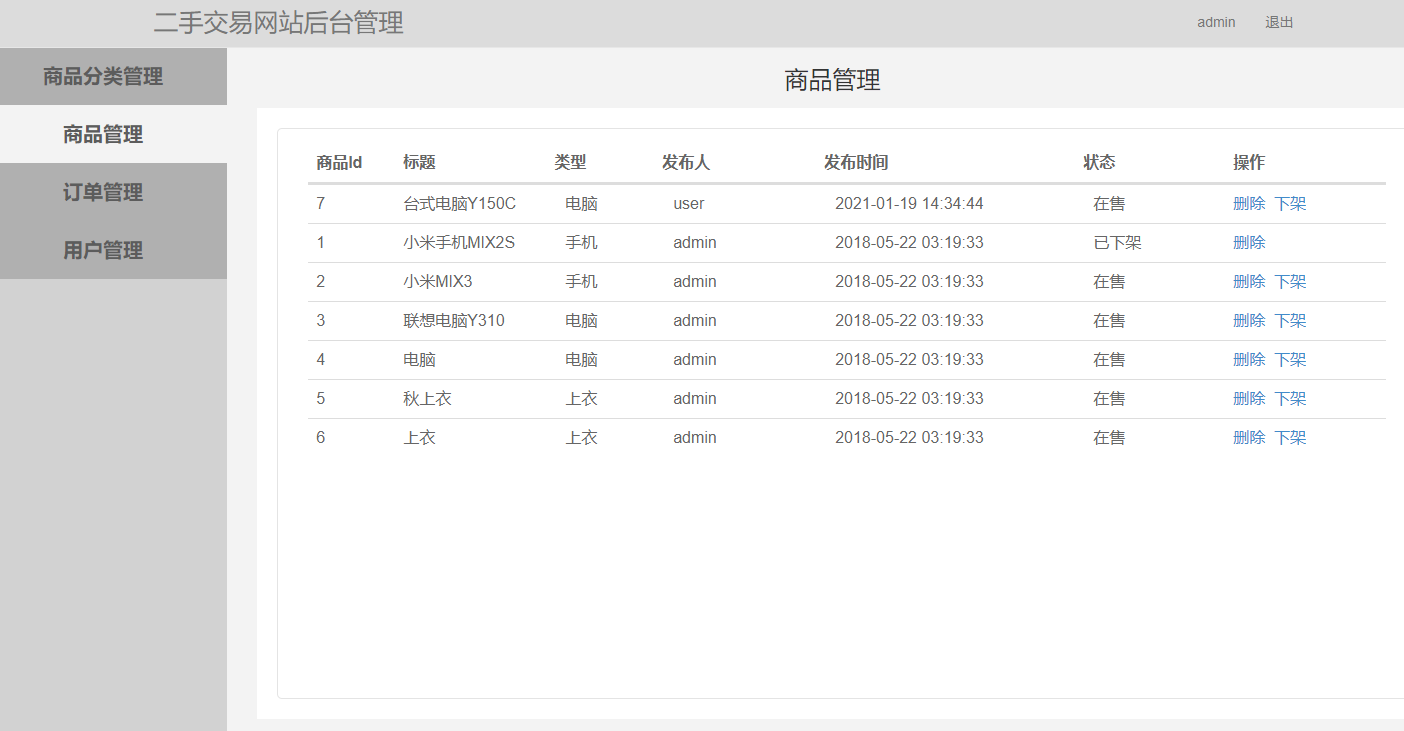
- 后台管理系统的商品审核机制 管理员后台通过Spring Security实现角色权限控制,商品审核功能包含批量操作与异步处理:
@Controller
@RequestMapping("/admin")
@PreAuthorize("hasRole('ADMIN')")
public class AdminProductController {

    @PostMapping("/products/approve")
    @ResponseBody
    public ResponseEntity<?> approveProducts(@RequestBody List<Long> productIds) {
        try {
            productService.batchUpdateStatus(productIds, ProductStatus.APPROVED);
            return ResponseEntity.ok().body(
                Map.of("success", true, "message", "商品审核通过")
            );
        } catch (Exception e) {
            return ResponseEntity.badRequest().body(
                Map.of("success", false, "message", "操作失败")
            );
        }
    }

    @GetMapping("/products/pending")
    public String pendingProducts(Model model,
                                @RequestParam(defaultValue = "1") int page) {
        Pageable pageable = PageRequest.of(page - 1, 10);
        Page<Product> productPage = productService.findByStatus(
            ProductStatus.PENDING, pageable
        );
        model.addAttribute("products", productPage);
        return "admin/product-pending";
    }
}
实体模型设计与业务逻辑封装
系统核心实体模型通过Java Bean规范定义,结合MyBatis注解实现OR映射。以User实体为例:
public class User {
    private Long id;
    private String username;
    private String password;
    private String email;
    private String phone;
    private String realName;
    private String studentId;
    private String avatar;
    private Date createTime;
    private Date updateTime;
    private Boolean status;

    // 关联实体
    private List<Product> publishedProducts;
    private List<Order> buyOrders;
    private List<Order> sellOrders;

    // 业务逻辑方法
    public boolean isEligibleToSell() {
        return status && StringUtils.isNotBlank(realName)
               && StringUtils.isNotBlank(studentId);
    }

    // Getter/Setter省略
}
商品实体包含复杂的业务状态验证逻辑:
public class Product {
    private Long id;
    private String title;
    private String