在现代农业生产中,农具的购置成本高、季节性使用率低、资源闲置浪费等问题一直是困扰农户和农业合作社的痛点。针对这一市场需求,我们开发了一款农业装备共享服务平台,采用SpringBoot与Vue技术栈构建,实现了农具在线租赁的全流程数字化管理。
系统架构与技术栈
该平台采用前后端分离的架构设计,后端基于SpringBoot框架搭建RESTful API服务,前端使用Vue.js构建单页面应用。技术栈选择具有以下优势:
后端技术栈:
- SpringBoot 2.x:快速构建微服务架构
- Spring Security:完善的用户认证与权限控制
- Spring Data JPA:简化数据持久化操作
- MyBatis-Plus:增强的ORM框架,提供丰富的查询功能
- MySQL 8.0:稳定可靠的关系型数据库
- Redis:缓存和会话管理
前端技术栈:
- Vue.js 3.x:响应式前端框架
- Vue Router:单页面应用路由管理
- Vuex:全局状态管理
- Axios:HTTP请求库
- Element Plus:UI组件库
项目配置文件展示了核心的技术参数设置:
# 数据库连接配置
spring.datasource.url=jdbc:mysql://192.168.99.4:3306/vue_nongjuzulin?useSSL=false&serverTimezone=Asia/Shanghai&useUnicode=true&characterEncoding=utf-8&allowPublicKeyRetrieval=true
spring.datasource.username=vue_nongjuzulin
spring.datasource.password=vue_nongjuzulin

# 服务器配置
server.port=8080
server.servlet.context-path=/vue_nongjuzulin

# MyBatis-Plus配置
mybatis-plus.global-config.db-config.table-prefix=t_
mybatis-plus.configuration.log-impl=org.apache.ibatis.logging.stdout.StdOutImpl

# Redis缓存配置
spring.redis.port=6379
spring.redis.host=java.envdown.site
spring.redis.password=1234

# 文件上传配置
spring.servlet.multipart.max-file-size=1000MB
spring.servlet.multipart.max-request-size=1000MB
spring.servlet.multipart.location=/tmp
数据库设计亮点分析
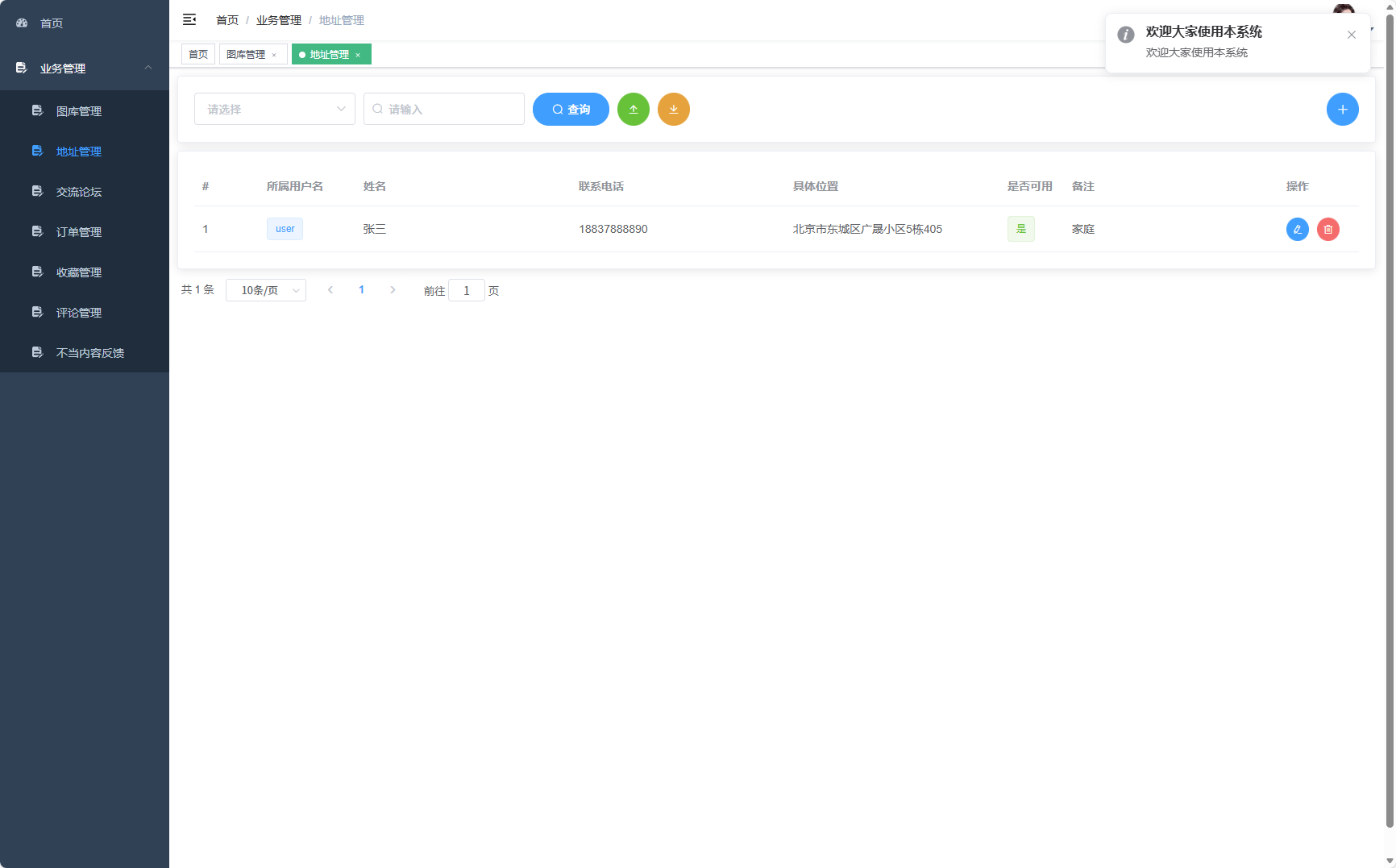
地址管理表设计
CREATE TABLE `t_address` (
  `id` int(11) NOT NULL AUTO_INCREMENT COMMENT 'ID',
  `name` varchar(255) DEFAULT NULL COMMENT '姓名',
  `phone` varchar(255) DEFAULT NULL COMMENT '联系电话',
  `address` varchar(255) DEFAULT NULL COMMENT '具体位置',
  `keyong` tinyint(1) DEFAULT NULL COMMENT '是否可用',
  `bz` varchar(255) DEFAULT NULL COMMENT '备注',
  `user_id` int(11) DEFAULT NULL COMMENT '所属用户',
  `add_time` datetime DEFAULT NULL COMMENT '插入数据库时间',
  PRIMARY KEY (`id`),
  KEY `FK7405570827030431531` (`user_id`),
  CONSTRAINT `FK7405570827030431531` FOREIGN KEY (`user_id`) REFERENCES `t_user` (`id`)
) ENGINE=InnoDB AUTO_INCREMENT=2 DEFAULT CHARSET=utf8mb4 COLLATE=utf8mb4_unicode_ci COMMENT='地址管理'
该表设计体现了良好的数据库规范化原则:
- 使用
utf8mb4_unicode_ci字符集,支持完整的Unicode字符,包括emoji表情 tinyint(1)类型用于布尔值存储,节省空间- 外键约束确保数据完整性
- 添加时间字段便于审计和数据分析
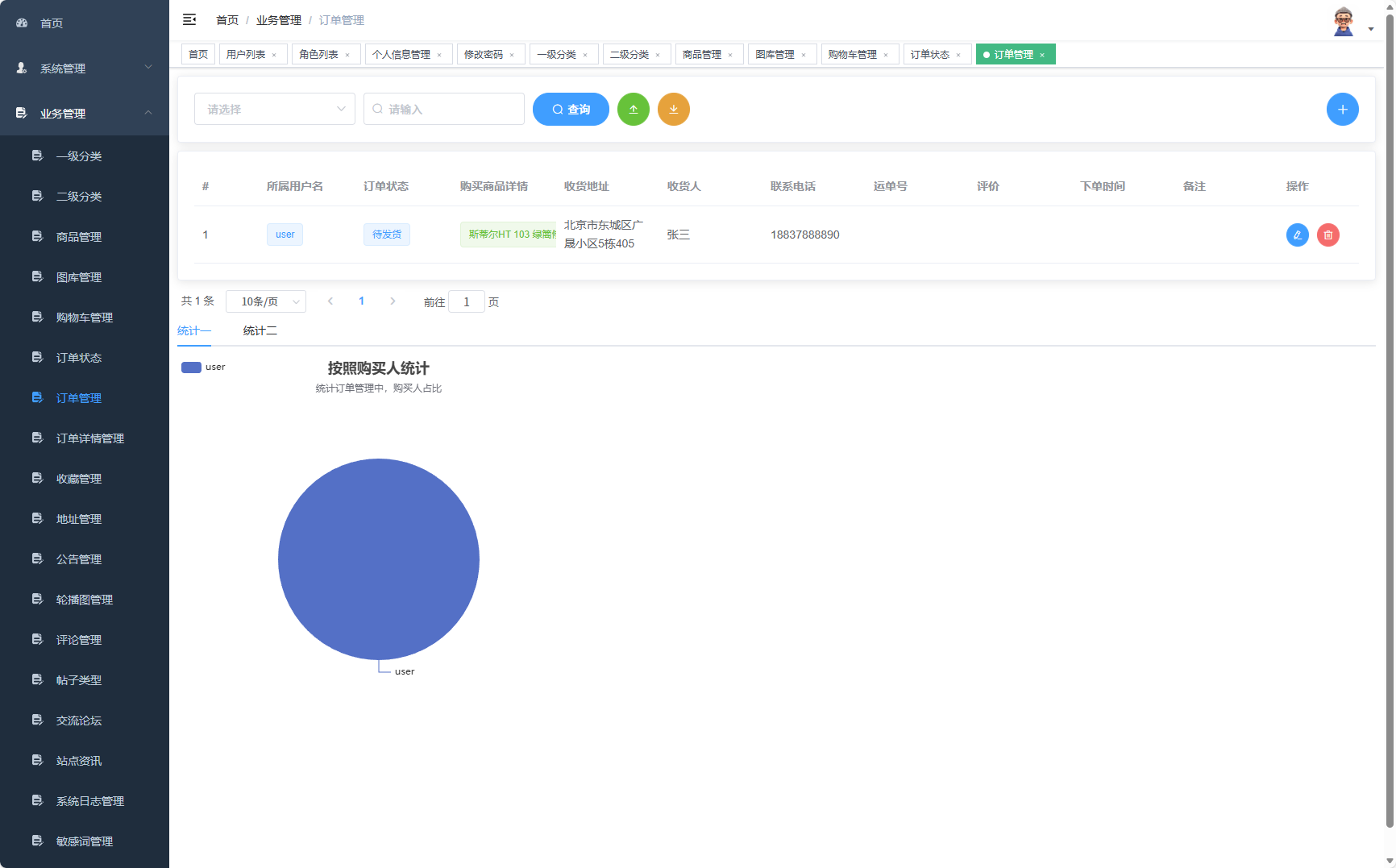
订单管理表设计
CREATE TABLE `t_orders` (
  `id` int(11) NOT NULL AUTO_INCREMENT COMMENT 'ID',
  `pdetail` varchar(255) DEFAULT NULL COMMENT '购买商品详情',
  `address` varchar(255) DEFAULT NULL COMMENT '收货地址',
  `keeper` varchar(255) DEFAULT NULL COMMENT '收货人',
  `phone` varchar(255) DEFAULT NULL COMMENT '联系电话',
  `ydanhao` varchar(255) DEFAULT NULL COMMENT '运单号',
  `comment` varchar(255) DEFAULT NULL COMMENT '评价',
  `stime` varchar(255) DEFAULT NULL COMMENT '下单时间',
  `bz` varchar(255) DEFAULT NULL COMMENT '备注',
  `user_id` int(11) DEFAULT NULL COMMENT '购买人',
  `orderStatus_id` int(11) DEFAULT NULL COMMENT '订单状态',
  `add_time` datetime DEFAULT NULL COMMENT '插入数据库时间',
  PRIMARY KEY (`id`),
  KEY `FK7958618149719430513` (`user_id`),
  KEY `FK7262144286277377152` (`orderStatus_id`),
  CONSTRAINT `FK7262144286277377152` FOREIGN KEY (`orderStatus_id`) REFERENCES `t_orderstatus` (`id`),
  CONSTRAINT `FK7958618149719430513` FOREIGN KEY (`user_id`) REFERENCES `t_user` (`id`)
) ENGINE=InnoDB AUTO_INCREMENT=2 DEFAULT CHARSET=utf8mb4 COLLATE=utf8mb4_unicode_ci COMMENT='订单管理'
订单表的设计特点:
- 双外键设计,关联用户和订单状态表
- 冗余字段设计(如address、keeper等)提高查询性能
- 运单号字段支持物流跟踪
- 评价字段与订单绑定,便于后续数据分析
核心功能实现
地址管理功能
地址管理控制器采用注解驱动的开发模式,实现了完整的CRUD操作:
@Controller
@RequestMapping("/address")
public class AddressController {
    @Resource
    private LogService logService;
    @Resource
    AddressService addressService;
    @Resource
    private CommentService commentService;
    @Resource
    private UserService userService;

    @RequestMapping("/list")
    @ResponseBody
    @RequireLoginWithToken
    public Result list(Address address, @RequestHeader("X-Token") String token,
                      @RequestParam(value = "pageNo", defaultValue = "1") Integer pageNo,
                      @RequestParam(value = "pageSize", defaultValue = "10") Integer pageSize) {
        User temp = userService.getUser(token);
        // 构建查询条件
        MPJLambdaWrapper<Address> wrapper = new MPJLambdaWrapper<>();
        if (StringUtils.isNotBlank(address.getName())) {
            wrapper.like(Address::getName, address.getName());
        }
        if (address.getKeyong() != null) {
            wrapper.eq(Address::getKeyong, address.getKeyong());
        }
        // 分页查询
        Page<Address> page = new Page<>(pageNo, pageSize);
        Page<Address> pageResult = addressService.page(page, wrapper);
        return Result.success(pageResult);
    }

    @PostMapping("/add")
    @ResponseBody
    @RequireLoginWithToken
    public Result add(@RequestBody Address address, @RequestHeader("X-Token") String token) {
        User user = userService.getUser(token);
        address.setUserId(user.getId());
        address.setAddTime(new Timestamp(System.currentTimeMillis()));
        try {
            addressService.save(address);
            // 记录操作日志
            logService.saveLog(user.getId(), "新增地址", "地址ID:" + address.getId());
            return Result.success("添加成功");
        } catch (DataIntegrityViolationException e) {
            return Result.failure(ResultCode.DATA_INTEGRITY_ERROR, "数据完整性错误");
        }
    }

    @PostMapping("/update")
    @ResponseBody
    @RequireLoginWithToken
    public Result update(@RequestBody Address address) {
        if (address.getId() == null) {
            return Result.failure(ResultCode.PARAM_IS_BLANK, "ID不能为空");
        }
        addressService.updateById(address);
        return Result.success("修改成功");
    }

    @PostMapping("/delete/{id}")
    @ResponseBody
    @RequireLoginWithToken
    public Result delete(@PathVariable Integer id) {
        addressService.removeById(id);
        return Result.success("删除成功");
    }
}
用户权限管理
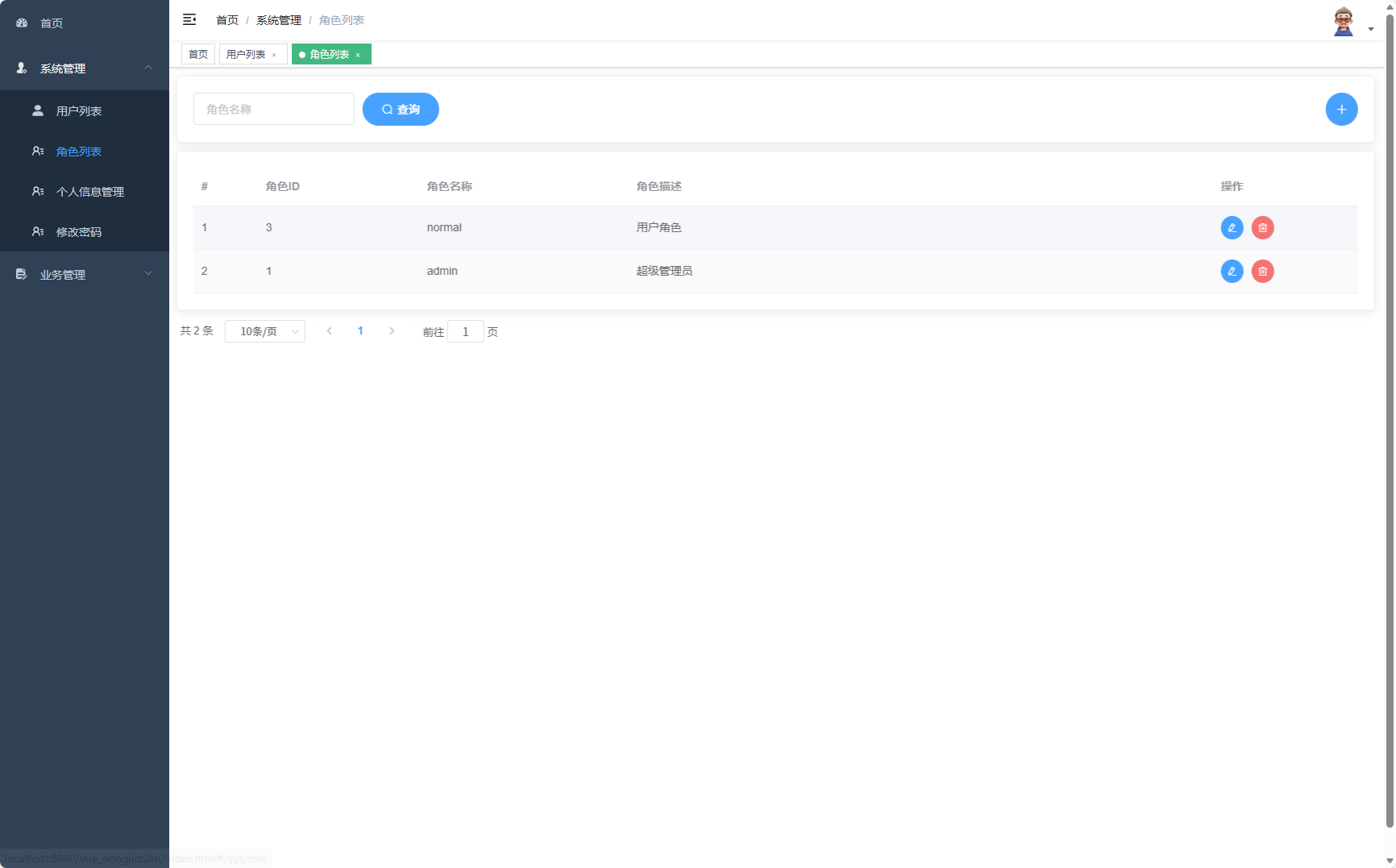
系统采用基于角色的访问控制(RBAC)模型,通过用户-角色-权限的三层结构实现精细化的权限管理:
-- 角色表
CREATE TABLE `t_role` (
  `role_id` int(11) NOT NULL AUTO_INCREMENT COMMENT '角色ID',
  `role_name` varchar(50) DEFAULT NULL COMMENT '角色名字',
  `role_desc` varchar(100) DEFAULT NULL COMMENT '角色备注',
  PRIMARY KEY (`role_id`)
) ENGINE=InnoDB AUTO_INCREMENT=4 DEFAULT CHARSET=utf8mb4 COLLATE=utf8mb4_general_ci COMMENT='角色表'

-- 用户角色关联表
CREATE TABLE `t_user_role` (
  `id` int(11) NOT NULL AUTO_INCREMENT COMMENT '关联ID',
  `user_id` int(11) DEFAULT NULL COMMENT '用户ID',
  `role_id` int(11) DEFAULT NULL COMMENT '角色ID',
  PRIMARY KEY (`id`)
) ENGINE=InnoDB AUTO_INCREMENT=14 DEFAULT CHARSET=utf8mb4 COLLATE=utf8mb4_general_ci COMMENT='用户角色表'
权限控制的核心实现:
@RequireLoginWithToken
public @interface RequireLoginWithToken {
    // 注解用于标记需要登录才能访问的方法
}

@Component
public class JwtTokenUtil {
    private static final String SECRET_KEY = "agriculture-rental-platform-secret-key";

    public String generateToken(User user) {
        Map<String, Object> claims = new HashMap<>();
        claims.put("userId", user.getId());
        claims.put("username", user.getUsername());
        claims.put("roles", user.getRoles());

        return Jwts.builder()
                .setClaims(claims)
                .setIssuedAt(new Date())
                .setExpiration(new Date(System.currentTimeMillis() + 3600000)) // 1小时过期
                .signWith(SignatureAlgorithm.HS256, SECRET_KEY)
                .compact();
    }

    public boolean validateToken(String token) {
        try {
            Jwts.parser().setSigningKey(SECRET_KEY).parseClaimsJws(token);
            return true;
        } catch (Exception e) {
            return false;
        }
    }
}
商品分类管理
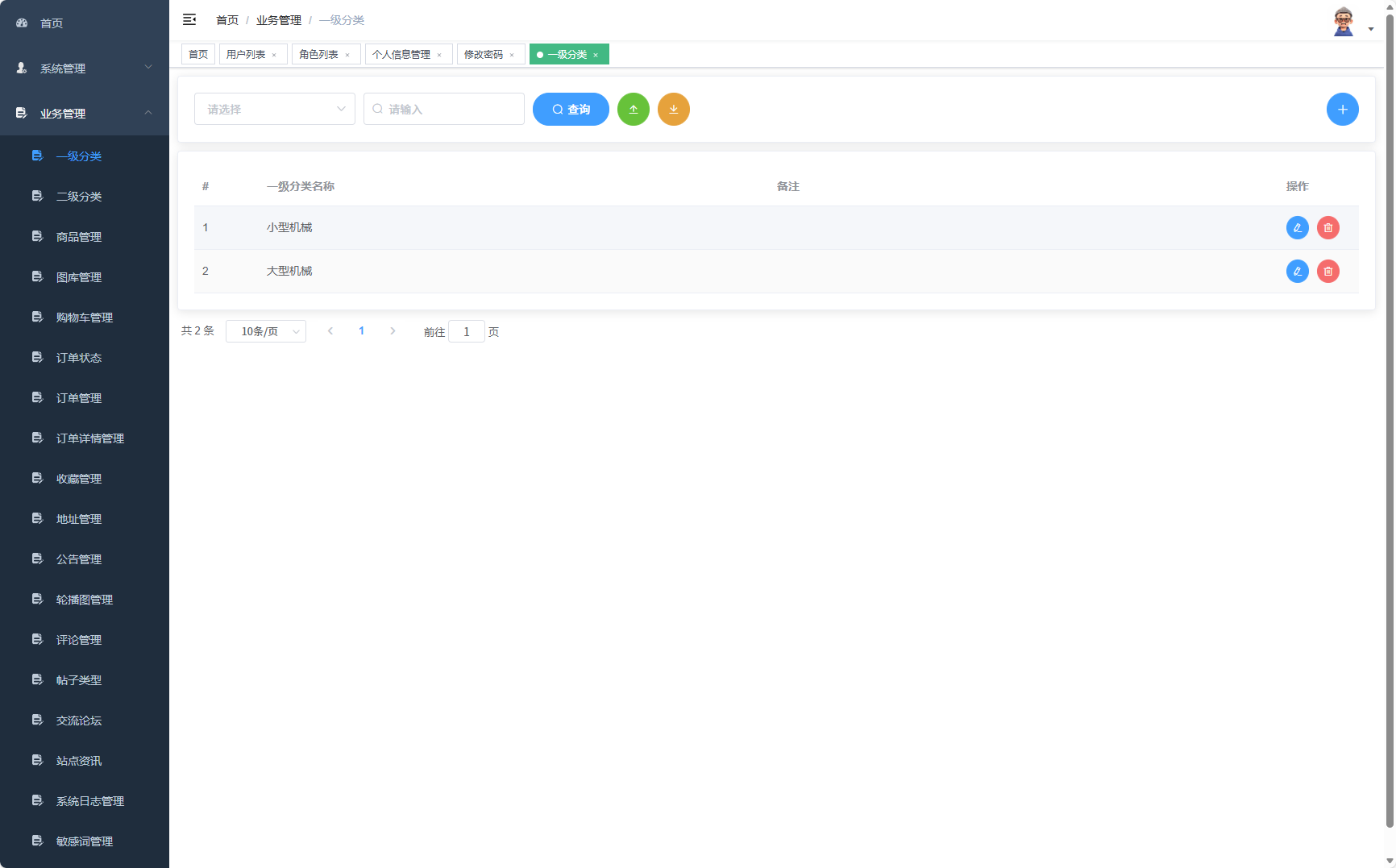
系统采用两级分类体系,支持灵活的农具分类管理:
-- 一级分类表
CREATE TABLE `t_firsttype` (
  `id` int(11) NOT NULL AUTO_INCREMENT COMMENT 'ID',
  `name` varchar(255) DEFAULT NULL COMMENT '一级分类名称',
  `bz` varchar(255) DEFAULT NULL COMMENT '备注',
  `add_time` datetime DEFAULT NULL COMMENT '插入数据库时间',
  PRIMARY KEY (`id`)
) ENGINE=InnoDB AUTO_INCREMENT=3 DEFAULT CHARSET=utf8mb4 COLLATE=utf8mb4_unicode_ci COMMENT='一级分类'
分类管理服务层实现:
@Service
public class CategoryService {
    @Resource
    private FirstTypeMapper firstTypeMapper;
    @Resource
    private SecondTypeMapper secondTypeMapper;

    /**
     * 获取完整的分类树
     */
    public List<CategoryTreeVO> getCategoryTree() {
        List<FirstType> firstTypes = firstTypeMapper.selectList(null);
        List<CategoryTreeVO> tree = new ArrayList<>();

        for (FirstType firstType : firstTypes) {
            CategoryTreeVO firstNode = new CategoryTreeVO();
            firstNode.setId(firstType.getId());
            firstNode.setName(firstType.getName());
            firstNode.setType("first");

            // 查询二级分类
            LambdaQueryWrapper<SecondType> wrapper = new LambdaQueryWrapper<>();
            wrapper.eq(SecondType::getFirstTypeId, firstType.getId());
            List<SecondType> secondTypes = secondTypeMapper.selectList(wrapper);

            List<CategoryTreeVO> children = new ArrayList<>();
            for (SecondType secondType : secondTypes) {
                CategoryTreeVO secondNode = new CategoryTreeVO();
                secondNode.setId(secondType.getId());
                secondNode.setName(secondType.getName());
                secondNode.setType("second");
                secondNode.setParentId(firstType.getId());
                children.add(secondNode);
            }

            firstNode.setChildren(children);
            tree.add(firstNode);
        }

        return tree;
    }

    /**
     * 根据分类ID获取商品列表
     */
    public Page<Product> getProductsByCategory(Integer categoryId, Integer pageNo, Integer pageSize) {
        Page<Product> page = new Page<>(pageNo, pageSize);
        LambdaQueryWrapper<Product> wrapper = new LambdaQueryWrapper<>();
        wrapper.eq(Product::getSecondTypeId, categoryId)
               .eq(Product::getStatus, 1); // 只查询上架商品

        return productMapper.selectPage(page, wrapper);
    }
}
订单业务流程
订单处理采用状态机模式,确保业务流程的完整性:
@Service
public class OrderService {
    @Resource
    private OrderMapper orderMapper;
    @Resource
    private OrderStatusMapper statusMapper;
    @Resource
    private ProductMapper productMapper;

    /**
     * 创建租赁订单
     */
    @Transactional
    public Result createOrder(OrderCreateDTO orderDTO, Integer userId) {
        // 验证商品库存
        Product product = productMapper.selectById(orderDTO.getProductId());
        if (product == null || product.getStock() < orderDTO.getQuantity()) {
            return Result.failure(ResultCode.PRODUCT_STOCK_INSUFFICIENT);
        }

        // 创建订单
        Order order = new Order();
        order.setUserId(userId);
        order.setPdetail(buildProductDetail(product, orderDTO));
        order.setAddress(orderDTO.getAddress());
        order.setKeeper(orderDTO.getKeeper());
        order.setPhone(orderDTO.getPhone());
        order.setOrderStatusId(1); // 待付款状态
        order.setStime(DateUtil.format(new Date(), "yyyy-MM-dd HH:mm:ss"));
        order.setAddTime(new Timestamp(System.currentTimeMillis()));

        orderMapper.insert(order);

        // 更新商品库存
        product.setStock(product.getStock() - orderDTO.getQuantity());
        productMapper.updateById(product);

        return Result.success("订单创建成功", order.getId());
    }

    /**
     * 订单状态流转
     */
    @Transactional
    public Result updateOrderStatus(Integer orderId, Integer newStatus) {
        Order order = orderMapper.selectById(orderId);
        if (order == null) {
            return Result.failure(ResultCode.ORDER_NOT_EXIST);
        }

        // 状态机验证
        if (!isValidStatusTransition(order.getOrderStatusId(), newStatus)) {
            return Result.failure(ResultCode.INVALID_STATUS_TRANSITION);
        }

        order.setOrderStatusId(newStatus);
        orderMapper.updateById(order);

        // 记录状态变更日志
        logStatusChange(orderId, order.getOrderStatusId(), newStatus);

        return Result.success("状态更新成功");
    }

    private boolean isValidStatusTransition(Integer currentStatus, Integer newStatus) {
        // 定义允许的状态转换规则
        Map<Integer, List<Integer>> transitionRules = new HashMap<>();
        transitionRules.put(1, Arrays.asList(2, 5)); // 待付款 -> 已付款、已取消
        transitionRules.put(2, Arrays.asList(3, 5)); // 已付款 -> 已发货、已取消
        transitionRules.put(3, Arrays.asList(4));    // 已发货 -> 已完成
        // ... 其他状态转换规则

        List<Integer> allowedTransitions = transitionRules.get(currentStatus);
        return allowedTransitions != null && allowedTransitions.contains(newStatus);
    }
}
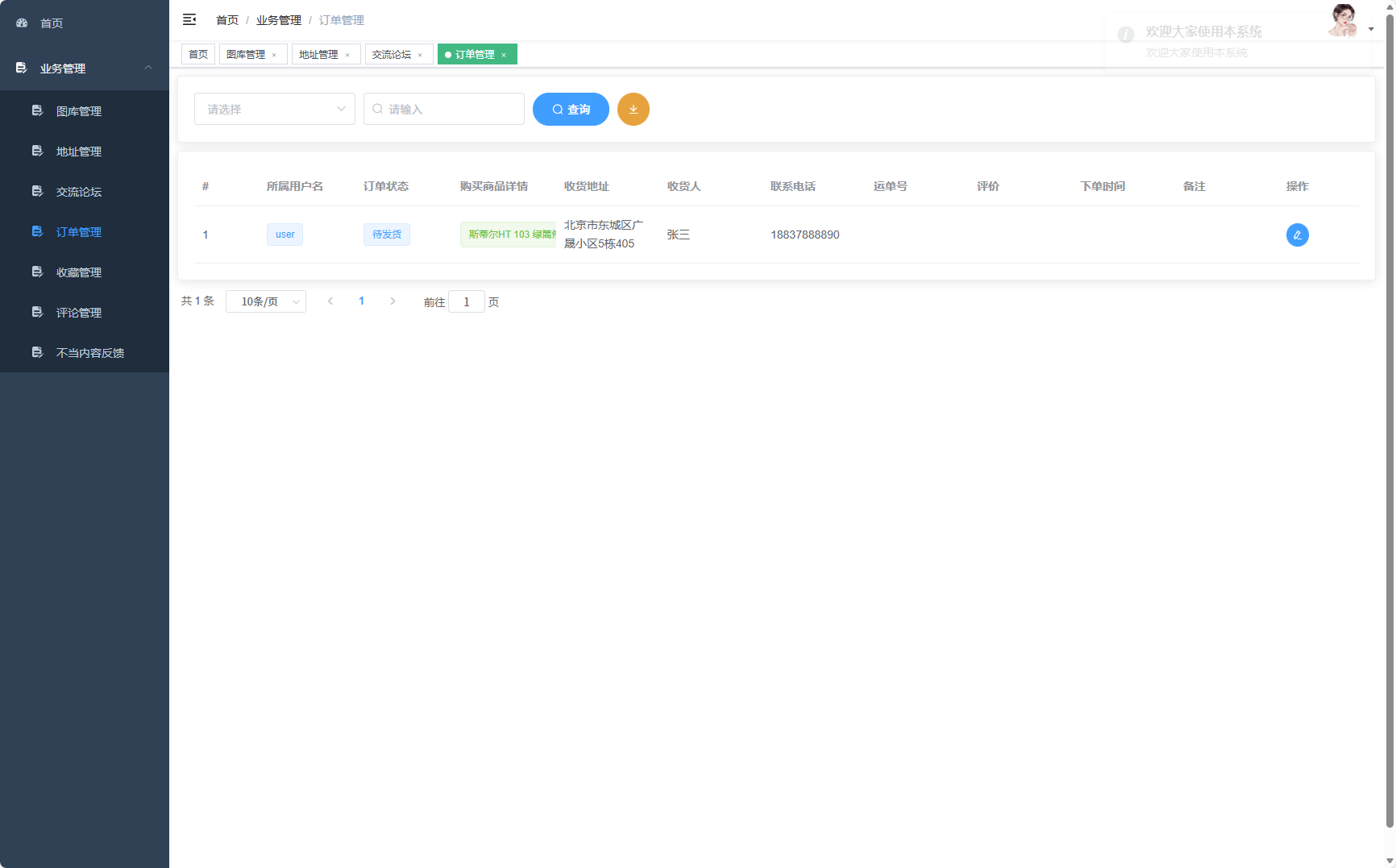
实体模型设计
系统采用领域驱动设计(DDD)的思想,构建了丰富的实体模型:
@Data
@TableName("t_user")
public class User {
    @TableId(type = IdType.AUTO)
    private Integer id;
    private String username;
    private String password;
    private String email;
    private String phone;
    private Integer status;
    private Timestamp createTime;
    private Timestamp updateTime;

    @TableField(exist = false)
    private List<Role> roles;

    @TableField(exist = false)
    private List<Address> addresses;
}

@Data
@TableName("t_product")
public class Product {
    @TableId(type = IdType.AUTO)
    private Integer id;
    private String name;
    private String description;
    private BigDecimal price;
    private Integer stock;
    private Integer secondTypeId;
    private String images;
    private Integer status;
    private String specs; // 规格参数JSON
    private Timestamp addTime;

    @TableField(exist = false)
    private SecondType category;

    @TableField(exist = false)
    private List<Comment> comments;
}
功能展望与优化方向
1. 引入智能推荐算法
基于用户租赁历史和浏览行为,构建农具推荐系统。可采用协同过滤算法,实现个性化推荐:
@Service
public class RecommendationService {
    /**
     * 基于用户行为的协同过滤推荐
     */
    public List<Product> recommendProducts(Integer userId, int limit) {
        // 获取相似用户
        List<Integer> similarUsers = findSimilarUsers(userId);

        // 获取相似用户喜欢的商品
        List<Product> candidateProducts = getProductsFromSimilarUsers(similarUsers);

        // 过滤已租赁商品,排序返回
        return candidateProducts.stream()
                .filter(product -> !hasRented(userId, product.getId()))
                .sorted(Comparator.comparingDouble(Product::getPopularity).reversed())
                .limit(limit)
                .collect(Collectors.toList());
    }
}
2. 微服务架构改造
将单体应用拆分为多个微服务