智能图书推荐与销售平台的技术实现与架构设计
项目背景与意义
随着数字化阅读时代的到来,传统图书销售模式面临着信息不对称、用户选择成本高以及缺乏个性化服务等挑战。本项目通过构建一个智能化的图书销售与推荐平台,为读者和图书商家搭建了一个高效、智能的在线交易生态系统。平台不仅实现了传统的图书浏览、搜索、下单、支付等核心电商功能,更重要的是引入了基于用户行为的智能推荐算法,显著提升了图书发现效率和销售转化率。
该系统特别适合中小型书店、出版社的线上直销业务,以及希望建立自有图书电商品牌的企业。通过数据驱动的个性化推荐,平台能够有效提升用户粘性和复购率,为商家创造持续增长的收入渠道。
系统架构与技术栈
平台采用经典的三层架构设计,后端基于SpringBoot框架构建,前端使用JSP模板引擎进行页面渲染。整个技术栈体现了现代Java Web开发的成熟实践:
后端技术栈:
- SpringBoot 2.x:作为核心框架,提供自动配置和起步依赖
- Spring Data JPA:实现数据持久化操作
- MySQL 8.0:关系型数据库存储
- Maven:项目构建和依赖管理
前端技术栈:
- HTML5 + CSS3 + JavaScript:基础前端技术
- JSP:服务端页面渲染
- Bootstrap:响应式UI框架
配置文件示例:
# 数据库连接配置
spring.datasource.url=jdbc:mysql://www.csbishe.cn/boot_tushutuijian_sys?useSSL=false&serverTimezone=Asia/Shanghai&useUnicode=true&characterEncoding=utf-8&allowPublicKeyRetrieval=true
spring.datasource.username=boot_tushutuijian_sys
spring.datasource.password=boot_tushutuijian_sys
spring.datasource.driverClassName=com.mysql.cj.jdbc.Driver

# JPA配置
spring.jpa.show-sql=true
logging.level.com.soft.demo.dao=debug

# 文件上传配置
spring.servlet.multipart.maxFileSize=100MB
spring.servlet.multipart.maxRequestSize=100MB

# MyBatis配置
mybatis.mapper-locations=classpath:mybatis/mapper/*.xml
mybatis.type-aliases-package=com.soft.demo.domain
数据库设计亮点分析
商品表(goods)设计深度解析
商品表作为系统的核心数据表,其设计体现了电商系统的基本要求:
CREATE TABLE `goods` (
  `goods_id` int(11) NOT NULL AUTO_INCREMENT COMMENT '商品ID',
  `goods_type_id` int(11) DEFAULT 0 COMMENT '商品类型ID',
  `goods_no` varchar(50) DEFAULT NULL COMMENT '商品编号',
  `goods_name` varchar(225) DEFAULT NULL COMMENT '商品名称',
  `goods_pic` varchar(225) DEFAULT NULL COMMENT '商品图片',
  `goods_publisher` varchar(225) DEFAULT NULL COMMENT '商品发布者',
  `goods_price` double DEFAULT 0 COMMENT '商品价格',
  `goods_discount` double DEFAULT NULL COMMENT '商品折扣',
  `goods_date` varchar(50) DEFAULT NULL COMMENT '商品日期',
  `goods_desc` text DEFAULT NULL COMMENT '商品描述',
  PRIMARY KEY (`goods_id`) USING BTREE
) ENGINE=InnoDB AUTO_INCREMENT=22 DEFAULT CHARSET=utf8 COLLATE=utf8_general_ci ROW_FORMAT=DYNAMIC COMMENT='商品表'
设计亮点分析:
- 主键设计:使用自增整数作为主键,既保证了唯一性又提高了查询性能
- 字段长度优化:商品名称和描述字段长度合理,
varchar(225)适应大多数图书名称长度,text类型满足详细描述需求 - 价格字段设计:使用
double类型存储价格,支持小数精度,同时设置默认值为0避免空值异常 - 索引策略:虽然没有显式的外键约束,但通过
goods_type_id建立了商品与分类的关联,为后续查询优化奠定了基础
购物车表(gouwuche)的业务逻辑设计
CREATE TABLE `gouwuche` (
  `id` int(11) NOT NULL AUTO_INCREMENT COMMENT '主键ID',
  `goods_id` int(11) DEFAULT NULL COMMENT '商品ID',
  `user_id` int(11) DEFAULT NULL COMMENT '用户ID',
  `time` date DEFAULT NULL COMMENT '添加时间',
  `count` int(11) NOT NULL DEFAULT 1 COMMENT '商品数量',
  PRIMARY KEY (`id`)
) ENGINE=InnoDB AUTO_INCREMENT=167 DEFAULT CHARSET=utf8 COLLATE=utf8_unicode_ci COMMENT='购物车表'
设计特点:
- 关系映射:通过
goods_id和user_id建立了用户与商品的多对多关系 - 数量控制:
count字段设置默认值为1,符合购物车添加商品的常规逻辑 - 时间记录:
time字段记录添加时间,支持按时间排序和清理过期商品 - 字符集统一:使用
utf8字符集确保多语言支持
订单表(dingdan)的交易完整性设计
CREATE TABLE `dingdan` (
  `id` int(11) NOT NULL AUTO_INCREMENT COMMENT '主键ID',
  `goods_id` int(11) DEFAULT NULL COMMENT '商品ID',
  `user_id` int(11) DEFAULT NULL COMMENT '用户ID',
  `time` date DEFAULT NULL COMMENT '订单时间',
  PRIMARY KEY (`id`)
) ENGINE=InnoDB AUTO_INCREMENT=62 DEFAULT CHARSET=utf8 COLLATE=utf8_unicode_ci COMMENT='订单表'
优化建议: 虽然当前设计满足了基本需求,但实际电商系统中订单表通常需要更丰富的字段,如订单状态、支付信息、收货地址等。建议扩展如下字段:
order_status:订单状态(待支付、已支付、已发货等)total_amount:订单总金额payment_method:支付方式shipping_address:收货地址
核心功能实现详解
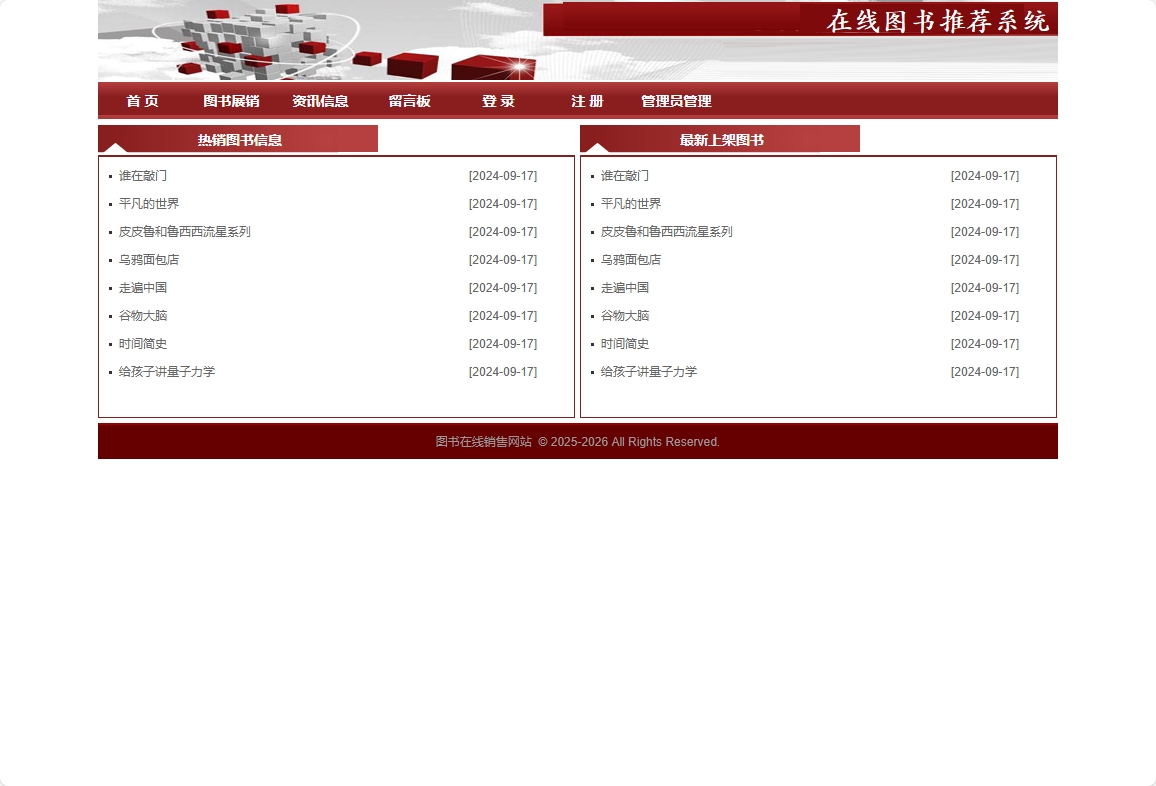
1. 智能图书推荐引擎
推荐功能是平台的核心竞争力,基于用户的历史行为数据实现个性化推荐:
@Service
public class BookRecommendationService {

    @Autowired
    private UserBehaviorRepository behaviorRepository;

    @Autowired
    private BookRepository bookRepository;

    /**
     * 基于协同过滤的图书推荐
     */
    public List<Book> recommendBooksByCF(Integer userId, int limit) {
        // 获取用户的历史行为数据
        List<UserBehavior> userBehaviors = behaviorRepository.findByUserId(userId);

        // 找到相似用户
        List<Integer> similarUsers = findSimilarUsers(userId);

        // 基于相似用户的偏好推荐图书
        return generateRecommendations(userId, similarUsers, limit);
    }

    /**
     * 基于内容相似度的推荐
     */
    public List<Book> recommendBooksByContent(Integer bookId, int limit) {
        Book targetBook = bookRepository.findById(bookId).orElse(null);
        if (targetBook == null) {
            return Collections.emptyList();
        }

        // 计算图书之间的内容相似度
        return bookRepository.findSimilarBooks(
            targetBook.getGoodsTypeId(),
            targetBook.getGoodsPublisher(),
            limit
        );
    }

    private List<Integer> findSimilarUsers(Integer userId) {
        // 实现用户相似度计算逻辑
        // 基于用户的行为模式(浏览、购买、收藏等)
        return behaviorRepository.findSimilarUsers(userId);
    }

    private List<Book> generateRecommendations(Integer userId,
                                             List<Integer> similarUsers,
                                             int limit) {
        // 生成最终推荐列表
        return bookRepository.findRecommendedBooks(similarUsers, limit);
    }
}
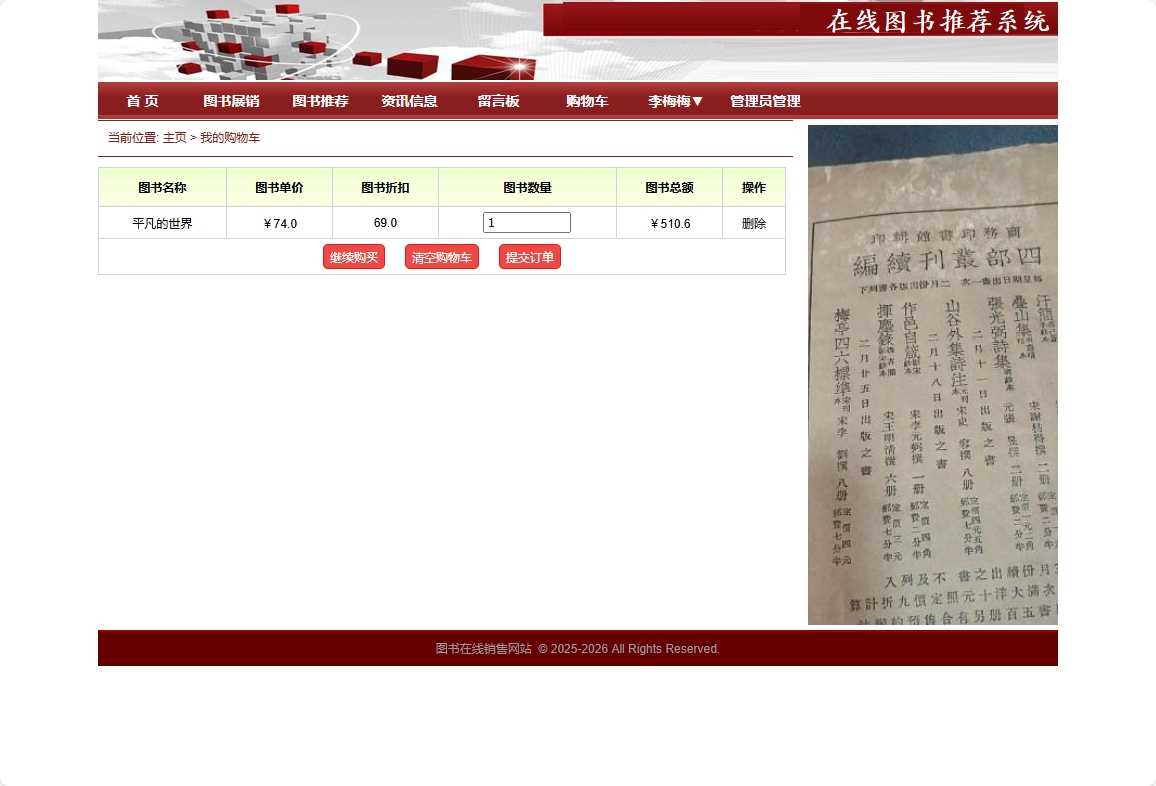
2. 购物车管理功能
购物车功能实现了完整的商品添加、数量修改、删除等操作:
@Controller
@RequestMapping("/cart")
public class ShoppingCartController {

    @Autowired
    private ShoppingCartService cartService;

    @PostMapping("/add")
    public String addToCart(@RequestParam Integer goodsId,
                           @RequestParam Integer quantity,
                           HttpSession session) {
        User user = (User) session.getAttribute("currentUser");
        if (user == null) {
            return "redirect:/user/login";
        }

        cartService.addToCart(user.getUserId(), goodsId, quantity);
        return "redirect:/cart/view";
    }

    @GetMapping("/view")
    public String viewCart(Model model, HttpSession session) {
        User user = (User) session.getAttribute("currentUser");
        if (user == null) {
            return "redirect:/user/login";
        }

        List<CartItem> cartItems = cartService.getCartItems(user.getUserId());
        model.addAttribute("cartItems", cartItems);
        model.addAttribute("totalAmount", calculateTotalAmount(cartItems));

        return "cart/view";
    }

    @PostMapping("/update")
    public String updateCartItem(@RequestParam Integer cartId,
                                @RequestParam Integer quantity) {
        cartService.updateQuantity(cartId, quantity);
        return "redirect:/cart/view";
    }

    @PostMapping("/remove")
    public String removeFromCart(@RequestParam Integer cartId) {
        cartService.removeFromCart(cartId);
        return "redirect:/cart/view";
    }

    private Double calculateTotalAmount(List<CartItem> cartItems) {
        return cartItems.stream()
                .mapToDouble(item -> item.getBook().getGoodsPrice() * item.getQuantity())
                .sum();
    }
}
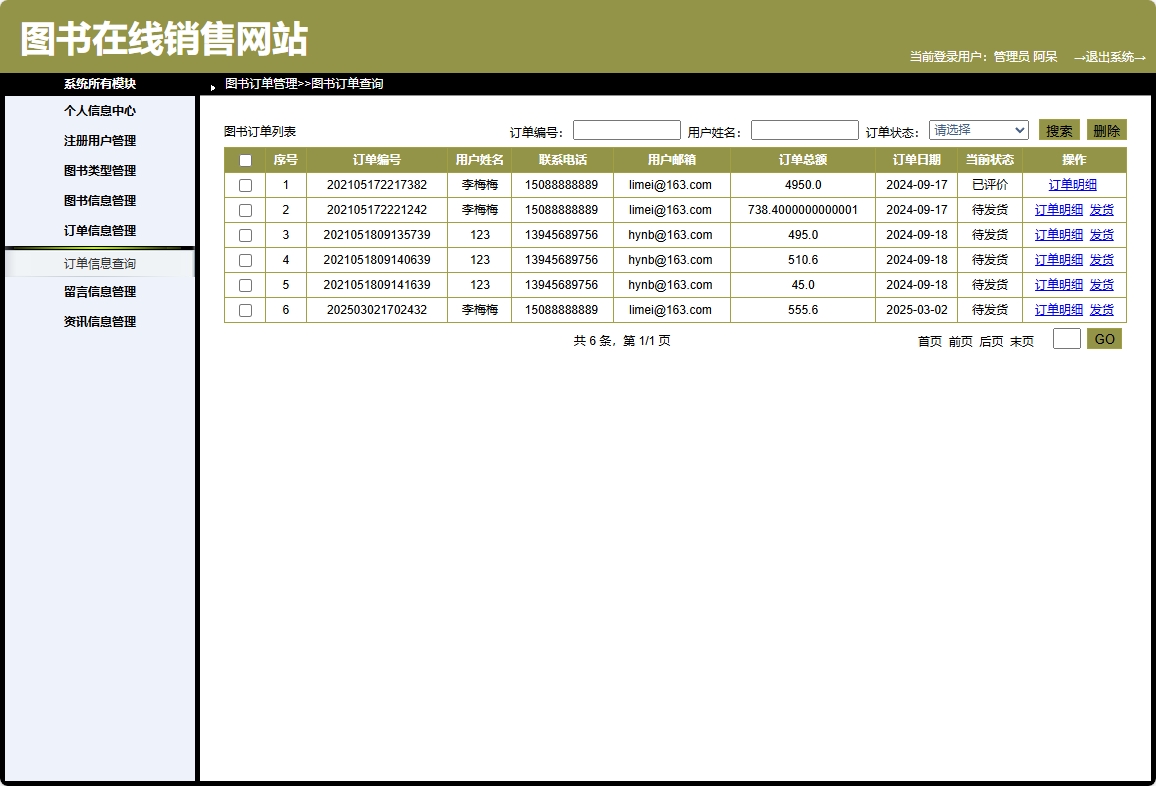
3. 订单处理流程
订单处理涵盖了从购物车到完成交易的完整业务流程:
@Service
@Transactional
public class OrderService {

    @Autowired
    private OrderRepository orderRepository;

    @Autowired
    private ShoppingCartService cartService;

    @Autowired
    private BookInventoryService inventoryService;

    public Order createOrder(Integer userId, String shippingAddress) {
        // 获取用户购物车商品
        List<CartItem> cartItems = cartService.getCartItems(userId);

        if (cartItems.isEmpty()) {
            throw new RuntimeException("购物车为空");
        }

        // 检查库存
        checkInventory(cartItems);

        // 创建订单
        Order order = new Order();
        order.setUserId(userId);
        order.setOrderDate(new Date());
        order.setShippingAddress(shippingAddress);
        order.setStatus(OrderStatus.PENDING_PAYMENT);
        order.setTotalAmount(calculateOrderTotal(cartItems));

        Order savedOrder = orderRepository.save(order);

        // 创建订单项
        createOrderItems(savedOrder.getOrderId(), cartItems);

        // 清空购物车
        cartService.clearCart(userId);

        return savedOrder;
    }

    private void checkInventory(List<CartItem> cartItems) {
        for (CartItem item : cartItems) {
            if (!inventoryService.isAvailable(item.getGoodsId(), item.getQuantity())) {
                throw new RuntimeException("商品库存不足: " + item.getBook().getGoodsName());
            }
        }
    }

    private Double calculateOrderTotal(List<CartItem> cartItems) {
        return cartItems.stream()
                .mapToDouble(item ->
                    item.getBook().getGoodsPrice() *
                    (item.getBook().getGoodsDiscount() != null ?
                     item.getBook().getGoodsDiscount() : 1) *
                    item.getQuantity())
                .sum();
    }

    private void createOrderItems(Integer orderId, List<CartItem> cartItems) {
        // 创建订单明细记录
        for (CartItem item : cartItems) {
            OrderItem orderItem = new OrderItem();
            orderItem.setOrderId(orderId);
            orderItem.setGoodsId(item.getGoodsId());
            orderItem.setQuantity(item.getQuantity());
            orderItem.setUnitPrice(item.getBook().getGoodsPrice());
            // 保存订单项
            orderItemRepository.save(orderItem);

            // 更新库存
            inventoryService.decreaseStock(item.getGoodsId(), item.getQuantity());
        }
    }
}
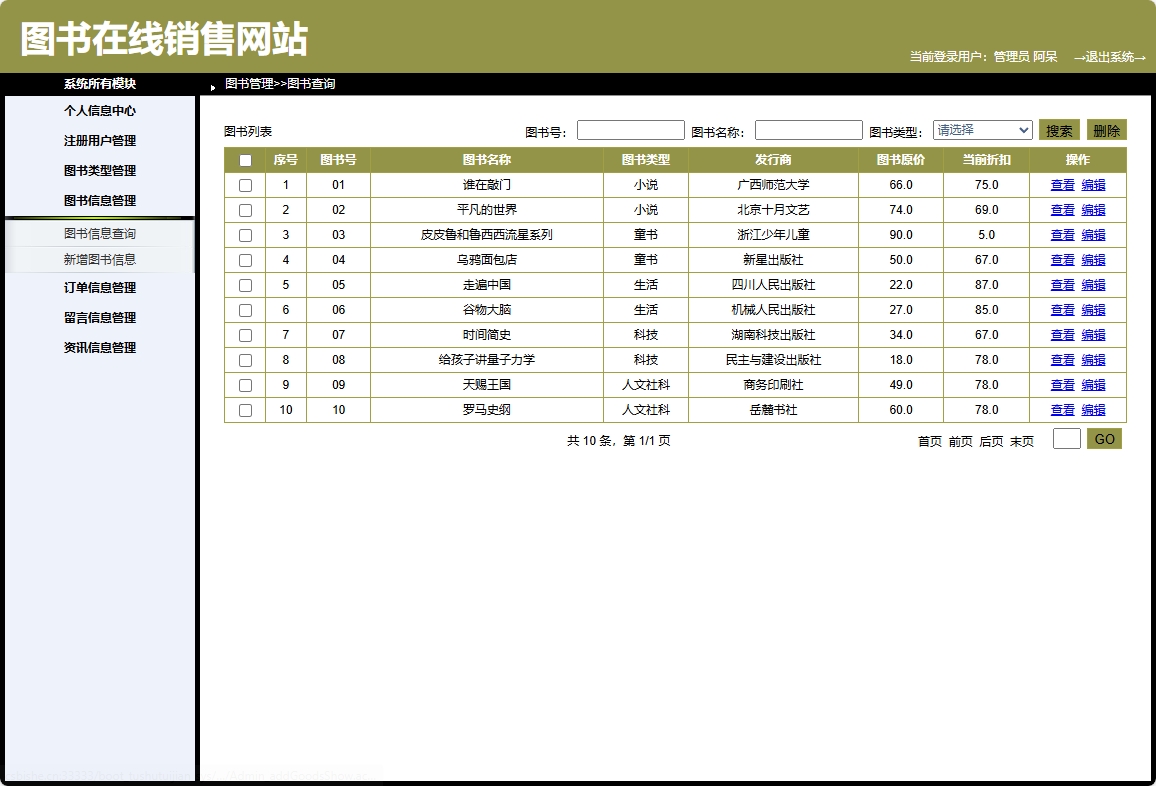
4. 管理员图书管理功能
管理员模块提供了完整的图书CRUD操作和库存管理:
@RestController
@RequestMapping("/admin/books")
public class AdminBookController {

    @Autowired
    private BookService bookService;

    @GetMapping
    public PageResult<Book> getBooks(
            @RequestParam(defaultValue = "1") Integer page,
            @RequestParam(defaultValue = "10") Integer size,
            @RequestParam(required = false) String keyword) {

        return bookService.getBooksByPage(page, size, keyword);
    }

    @PostMapping
    public ResponseEntity<?> addBook(@RequestBody Book book) {
        try {
            Book savedBook = bookService.addBook(book);
            return ResponseEntity.ok(savedBook);
        } catch (Exception e) {
            return ResponseEntity.badRequest().body("添加图书失败: " + e.getMessage());
        }
    }

    @PutMapping("/{id}")
    public ResponseEntity<?> updateBook(@PathVariable Integer id,
                                       @RequestBody Book book) {
        try {
            book.setGoodsId(id);
            Book updatedBook = bookService.updateBook(book);
            return ResponseEntity.ok(updatedBook);
        } catch (Exception e) {
            return ResponseEntity.badRequest().body("更新图书失败: " + e.getMessage());
        }
    }

    @DeleteMapping("/{id}")
    public ResponseEntity<?> deleteBook(@PathVariable Integer id) {
        try {
            bookService.deleteBook(id);
            return ResponseEntity.ok("删除成功");
        } catch (Exception e) {
            return ResponseEntity.badRequest().body("删除图书失败: " + e.getMessage());
        }
    }

    @PostMapping("/{id}/inventory")
    public ResponseEntity<?> updateInventory(@PathVariable Integer id,
                                           @RequestParam Integer quantity) {
        try {
            bookService.updateInventory(id, quantity);
            return ResponseEntity.ok("库存更新成功");
        } catch (Exception e) {
            return ResponseEntity.badRequest().body("库存更新失败: " + e.getMessage());
        }
    }
}
实体模型设计
系统采用面向对象的设计思想,通过实体类映射数据库表结构:
package com.soft.demo.common.domain;

import java.io.Serializable;

public abstract class BaseDomain implements Serializable {

    private static final long serialVersionUID = -3308831596689250063L;

    private int start;
    private int limit = 20;
    private int end;
    private String sort;
    private String order;
    private String dir;

    // Getter和Setter方法
    public int getStart() {
        return start;
    }

    public void setStart(int start) {
        this.start = start;
    }

    public int getEnd() {
        return end;
    }

    public void setEnd(int end) {
        this.end = end;
    }

    public String getOrder() {
        return order;
    }

    public void setOrder(String order) {
        this.order = order;
    }

    public String getSort() {
        return sort;
    }

    public void setSort(String sort) {
        this.sort = sort;
    }

    public void setDir(String dir) {
        this.dir = dir;
    }

    public String getDir() {
        return dir;
    }

    public int getLimit() {
        return limit;
    }

    public void setLimit(int limit) {
        this.limit = limit;
    }
}
商品实体类设计示例:
@Entity
@Table(name = "goods")
public class Book extends BaseDomain {

    @Id
    @GeneratedValue(strategy = GenerationType.IDENTITY)
    @Column(name = "goods_id")
    private Integer goodsId;

    @Column(name = "goods_type_id")
    private Integer goodsTypeId;

    @Column(name = "goods_no")
    private String goodsNo;

    @Column(name = "goods_name")
    private String goodsName;

    @Column(name = "goods_pic")
    private String goodsPic;

    @Column(name = "goods_publisher")
    private String goodsPublisher;

    @Column(name = "goods_price")
    private Double goodsPrice;

    @Column(name = "goods_discount")
    private Double goodsDiscount;

    @Column(name = "goods_date")
    private String goodsDate;

    @Column(name = "goods_desc")
    private String goodsDesc;

    // 关联关系
    @OneToMany(mappedBy = "book")
    private List<CartItem> cartItems;

    @OneToMany(mappedBy = "book")
    private List<OrderItem> orderItems;

    // Getter和Setter方法
    public Integer getGoodsId() {
        return goodsId;
    }

    public void setGoodsId(Integer goodsId) {
        this.goodsId = goodsId;
    }

    // 其他getter/setter方法...
}
功能展望与优化方向
1. 引入Redis缓存提升性能
优化方案:
@Service
public class BookServiceWithCache {

    @Autowired
    private BookRepository bookRepository;

    @Autowired
    private RedisTemplate<String, Object> redisTemplate;

    private static final String BOOK_CACHE_KEY = "book:";
    private static final long CACHE_EXPIRE_TIME = 3600; // 1小时

    public Book getBookById(Integer id) {
        String cacheKey = BOOK_CACHE_KEY + id;

        // 先从缓存获取
        Book book = (Book) redisTemplate.opsForValue().get(cacheKey);
        if (book != null) {
            return book;
        }

        // 缓存未命中,查询数据库
        book = bookRepository.findById(id).orElse(null);
        if (book != null) {
            // 写入缓存
            redisTemplate.opsForValue().set(cacheKey, book, CACHE_EXPIRE