在旅游行业数字化浪潮中,传统依赖手工记录或分散式电子表格的管理方式已难以应对日益增长的产品种类、订单量和数据分析需求。针对这一行业痛点,我们设计并实现了一套基于JSP与Servlet技术的旅游产品销售管理平台,命名为“智旅通”。该系统为中小型旅行社及产品供应商提供了一个全流程、一体化的业务运营解决方案,有效提升了产品管理、订单处理及数据分析的效率与准确性。
系统架构严格遵循J2EE经典的MVC设计模式。Servlet作为核心控制器,负责拦截并处理所有前端HTTP请求,进行业务逻辑的调度与路由;JSP页面则承担视图渲染的职责,通过EL表达式和JSTL标签库动态展示数据,确保了前后端逻辑的清晰分离。数据持久层采用JDBC技术直接与MySQL数据库进行交互,完成对产品、订单、用户等核心数据的增删改查操作。整个系统部署于Tomcat服务器之上,形成了结构清晰、易于维护的三层架构。
数据库架构设计与核心表分析
数据库设计是系统稳定性的基石。本系统共设计了6张核心数据表,以下重点分析其中三张关键表的结构与设计亮点。
1. 旅游产品表(tour_route) 该表是整个系统的数据核心,存储了所有旅游线路的详细信息。其设计充分考虑了旅游产品的业务特性。
CREATE TABLE `tour_route` (
  `routeId` int(11) NOT NULL AUTO_INCREMENT,
  `routeName` varchar(100) NOT NULL,
  `price` double(10,2) NOT NULL,
  `routeIntroduce` text,
  `flag` char(1) DEFAULT '1',
  `rdate` date DEFAULT NULL,
  `isThemeTour` char(1) DEFAULT '0',
  `count` int(11) DEFAULT '0',
  `cid` int(11) DEFAULT NULL,
  `rimage` varchar(200) DEFAULT NULL,
  `sid` int(11) DEFAULT NULL,
  `sourceId` int(11) DEFAULT NULL,
  PRIMARY KEY (`routeId`),
  KEY `cid` (`cid`),
  KEY `sid` (`sid`),
  KEY `sourceId` (`sourceId`),
  CONSTRAINT `tour_route_ibfk_1` FOREIGN KEY (`cid`) REFERENCES `category` (`cid`),
  CONSTRAINT `tour_route_ibfk_2` FOREIGN KEY (`sid`) REFERENCES `seller` (`sid`),
  CONSTRAINT `tour_route_ibfk_3` FOREIGN KEY (`sourceId`) REFERENCES `tab_route` (`rid`)
) ENGINE=InnoDB AUTO_INCREMENT=17 DEFAULT CHARSET=utf8;
设计亮点分析:
- 扩展性设计:通过
cid(分类ID)、sid(供应商ID)等外键关联,支持产品的多级分类管理和多供应商体系,为业务扩展预留了空间。 - 状态管理:
flag字段采用字符标记(如'1'有效,'0'无效)实现软删除,避免物理删除导致的数据丢失问题。 - 业务统计:
count字段记录产品销量,为热门推荐和销售分析提供数据支持。 - 多媒体支持:
rimage字段存储产品图片路径,支持产品可视化展示。
2. 订单主表(tab_order) 订单表的设计体现了电商系统的典型特征,确保交易数据的完整性和可追溯性。
CREATE TABLE `tab_order` (
  `oid` int(11) NOT NULL AUTO_INCREMENT,
  `ordertime` date DEFAULT NULL,
  `total` double(10,2) DEFAULT NULL,
  `state` int(11) DEFAULT NULL,
  `address` varchar(30) DEFAULT NULL,
  `contact` varchar(20) DEFAULT NULL,
  `telephone` varchar(20) DEFAULT NULL,
  `uid` int(11) DEFAULT NULL,
  `username` varchar(20) DEFAULT NULL,
  `method` int(11) DEFAULT NULL,
  PRIMARY KEY (`oid`),
  KEY `uid` (`uid`),
  CONSTRAINT `tab_order_ibfk_1` FOREIGN KEY (`uid`) REFERENCES `tab_user` (`uid`)
) ENGINE=InnoDB AUTO_INCREMENT=9 DEFAULT CHARSET=utf8;
设计亮点分析:
- 状态机设计:
state字段用整型数值表示订单生命周期(如0待付款、1已付款、2已发货等),便于订单状态跟踪和管理。 - 反范式优化:虽然通过
uid关联用户表,但仍冗余存储了username等用户信息,避免用户信息变更对历史订单显示的影响。 - 支付扩展:
method字段支持多种支付方式的记录和扩展。
3. 用户表(tab_user) 用户表设计兼顾了系统安全性和用户体验。
CREATE TABLE `tab_user` (
  `uid` int(11) NOT NULL AUTO_INCREMENT,
  `username` varchar(20) NOT NULL,
  `password` varchar(32) NOT NULL,
  `realname` varchar(10) DEFAULT NULL,
  `birthday` date DEFAULT NULL,
  `sex` char(1) DEFAULT NULL,
  `telephone` varchar(11) DEFAULT NULL,
  `email` varchar(30) DEFAULT NULL,
  `status` char(1) DEFAULT NULL,
  `code` varchar(50) DEFAULT NULL,
  `role` int(11) DEFAULT NULL,
  PRIMARY KEY (`uid`),
  UNIQUE KEY `username` (`username`)
) ENGINE=InnoDB AUTO_INCREMENT=8 DEFAULT CHARSET=utf8;
安全设计亮点:
- 密码安全:
password字段采用32位MD5加密存储,增强系统安全性。 - 账户状态管理:
status字段支持账户激活/禁用状态控制。 - 权限控制:
role字段实现用户角色区分,支持管理员和普通用户的不同权限。
核心功能模块深度解析
1. 产品管理子系统
产品管理是系统的核心功能,实现了旅游产品的全生命周期管理。
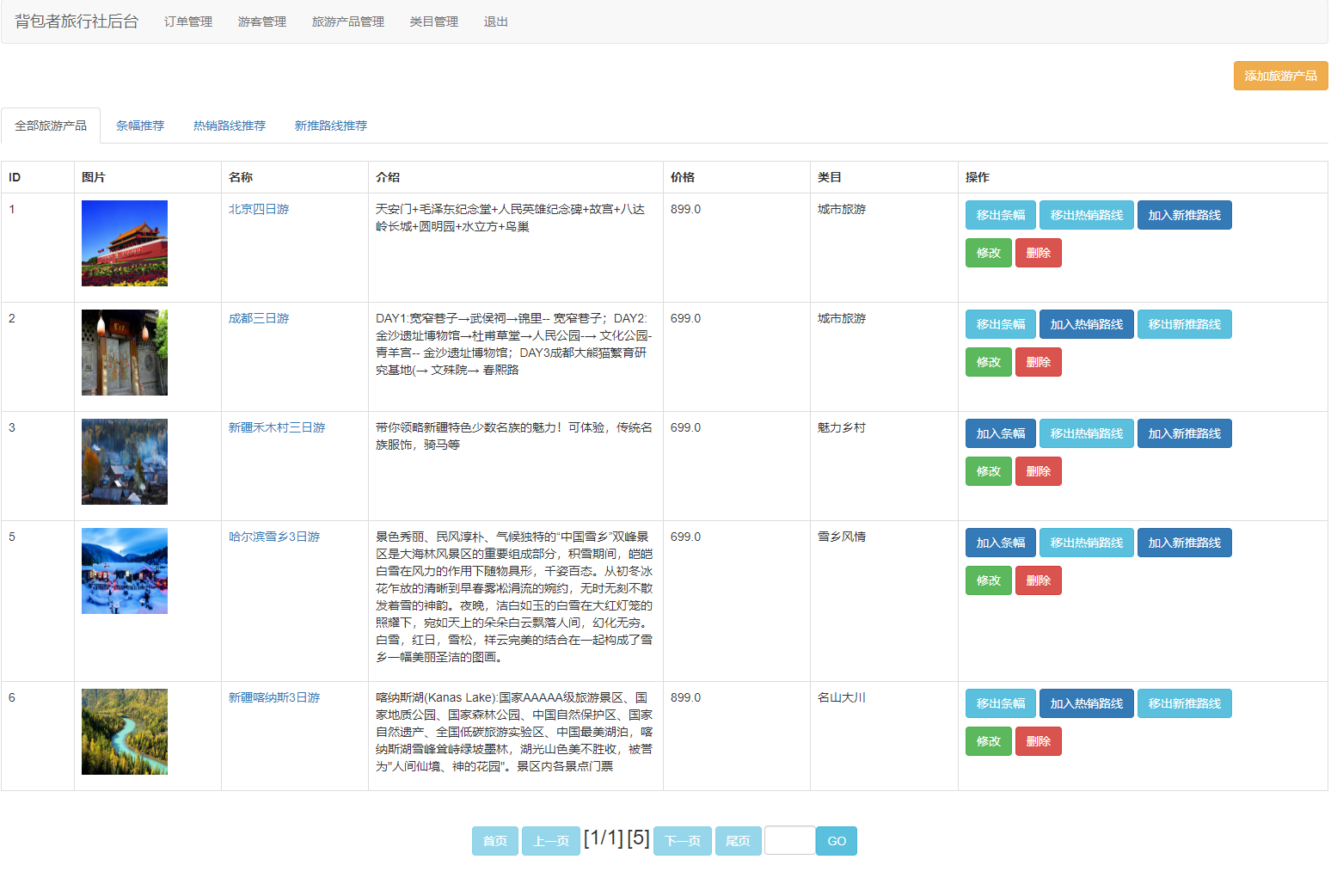
产品列表查询与分页实现 后端Servlet通过接收分页参数,计算起始位置,执行数据库查询并返回分页数据。
// ProductQueryServlet.java - 产品分页查询核心逻辑
public class ProductQueryServlet extends HttpServlet {
    protected void doGet(HttpServletRequest request, HttpServletResponse response)
            throws ServletException, IOException {

        int currentPage = 1;
        int pageSize = 10;

        // 获取前端传递的分页参数
        String currentPageStr = request.getParameter("currentPage");
        if (currentPageStr != null && !"".equals(currentPageStr)) {
            currentPage = Integer.parseInt(currentPageStr);
        }

        // 计算起始索引
        int start = (currentPage - 1) * pageSize;

        // 创建产品服务实例
        ProductService productService = new ProductServiceImpl();

        try {
            // 查询分页数据
            PageBean<Product> pageBean = productService.findProductByPage(
                currentPage, pageSize, getQueryCondition(request));

            // 将数据设置到request域中
            request.setAttribute("pageBean", pageBean);
            request.setAttribute("condition", getQueryCondition(request));

            // 转发到JSP页面显示
            request.getRequestDispatcher("/admin/product_list.jsp").forward(request, response);

        } catch (SQLException e) {
            e.printStackTrace();
            // 错误处理逻辑
        }
    }

    private Map<String, String> getQueryCondition(HttpServletRequest request) {
        Map<String, String> condition = new HashMap<>();
        // 从request中获取查询条件参数
        condition.put("productName", request.getParameter("productName"));
        condition.put("categoryId", request.getParameter("categoryId"));
        condition.put("minPrice", request.getParameter("minPrice"));
        condition.put("maxPrice", request.getParameter("maxPrice"));
        return condition;
    }
}
前端JSP页面使用JSTL标签库循环展示产品列表,并实现分页控件:
<%-- product_list.jsp 产品列表展示 --%>
<table class="table table-striped">
    <thead>
        <tr>
            <th>产品ID</th>
            <th>产品名称</th>
            <th>分类</th>
            <th>价格</th>
            <th>上架时间</th>
            <th>操作</th>
        </tr>
    </thead>
    <tbody>
        <c:forEach items="${pageBean.list}" var="product" varStatus="status">
            <tr>
                <td>${product.routeId}</td>
                <td>${product.routeName}</td>
                <td>${product.category.cname}</td>
                <td>¥${product.price}</td>
                <td><fmt:formatDate value="${product.rdate}" pattern="yyyy-MM-dd"/></td>
                <td>
                    <a href="product_edit.jsp?id=${product.routeId}" class="btn btn-primary btn-sm">编辑</a>
                    <a href="javascript:deleteProduct(${product.routeId})" class="btn btn-danger btn-sm">删除</a>
                </td>
            </tr>
        </c:forEach>
    </tbody>
</table>

<%-- 分页控件 --%>
<nav>
    <ul class="pagination">
        <c:if test="${pageBean.currentPage > 1}">
            <li class="page-item">
                <a class="page-link" href="productQuery?currentPage=${pageBean.currentPage-1}">上一页</a>
            </li>
        </c:if>

        <c:forEach begin="1" end="${pageBean.totalPage}" var="i">
            <li class="page-item ${pageBean.currentPage == i ? 'active' : ''}">
                <a class="page-link" href="productQuery?currentPage=${i}">${i}</a>
            </li>
        </c:forEach>

        <c:if test="${pageBean.currentPage < pageBean.totalPage}">
            <li class="page-item">
                <a class="page-link" href="productQuery?currentPage=${pageBean.currentPage+1}">下一页</a>
            </li>
        </c:if>
    </ul>
</nav>
2. 购物车与订单处理系统
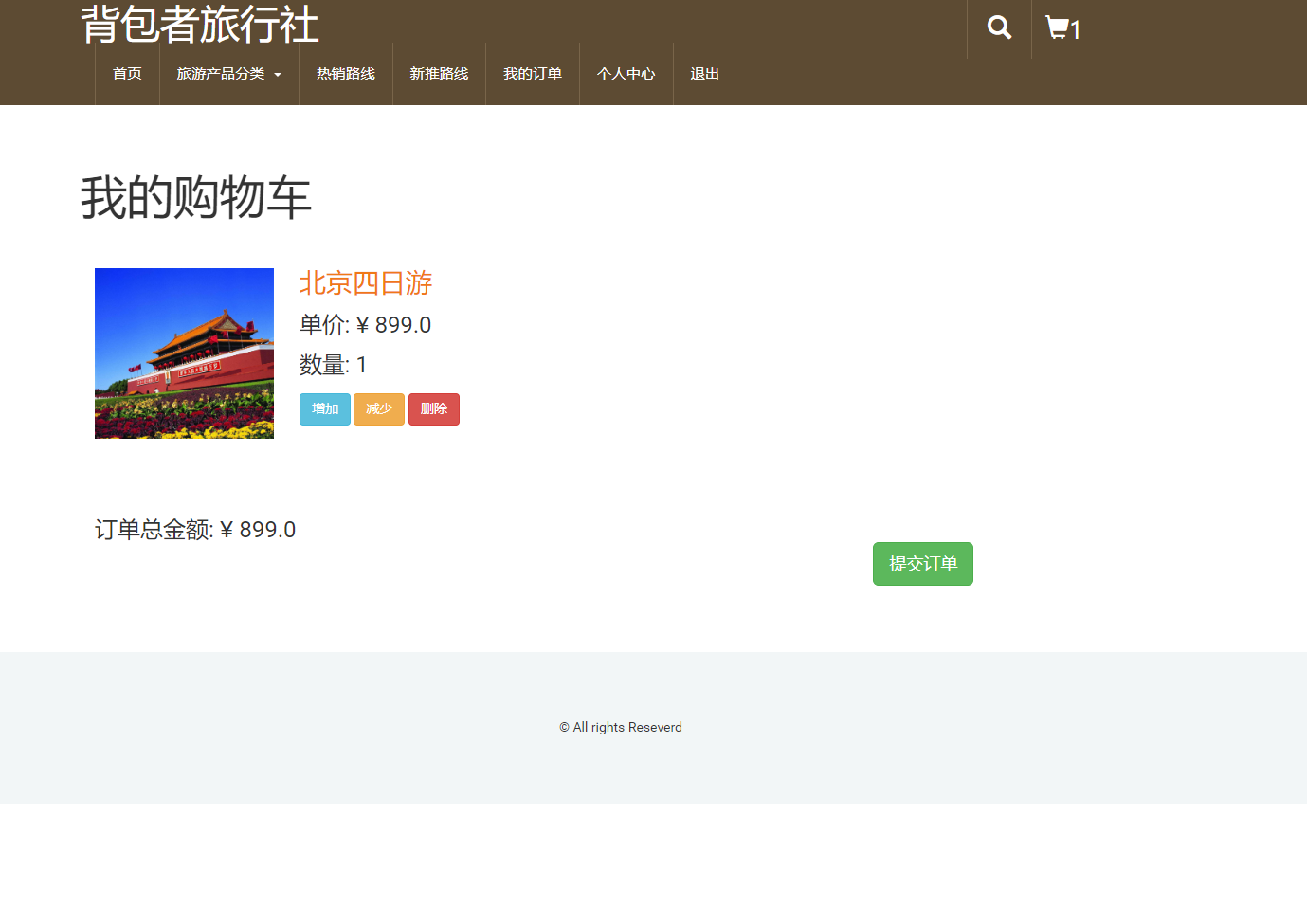
购物车功能采用Session技术实现,确保用户数据的临时存储和快速访问。
购物车业务逻辑实现
// CartServlet.java - 购物车核心操作
@WebServlet("/cart")
public class CartServlet extends HttpServlet {
    private ProductService productService = new ProductServiceImpl();

    protected void doGet(HttpServletRequest request, HttpServletResponse response)
            throws ServletException, IOException {
        String action = request.getParameter("action");

        if ("add".equals(action)) {
            addToCart(request, response);
        } else if ("remove".equals(action)) {
            removeFromCart(request, response);
        } else if ("clear".equals(action)) {
            clearCart(request, response);
        } else {
            showCart(request, response);
        }
    }

    private void addToCart(HttpServletRequest request, HttpServletResponse response)
            throws IOException {
        String productId = request.getParameter("productId");
        String quantityStr = request.getParameter("quantity");
        int quantity = 1;

        if (quantityStr != null && !quantityStr.isEmpty()) {
            quantity = Integer.parseInt(quantityStr);
        }

        HttpSession session = request.getSession();
        Map<String, CartItem> cart = getCartFromSession(session);

        try {
            Product product = productService.findProductById(Integer.parseInt(productId));
            if (product != null) {
                CartItem item = cart.get(productId);
                if (item != null) {
                    // 商品已存在,增加数量
                    item.setQuantity(item.getQuantity() + quantity);
                } else {
                    // 新增商品到购物车
                    item = new CartItem(product, quantity);
                    cart.put(productId, item);
                }
                session.setAttribute("cart", cart);
            }
            response.sendRedirect("cart?action=show");
        } catch (Exception e) {
            e.printStackTrace();
            response.sendRedirect("error.jsp");
        }
    }

    private Map<String, CartItem> getCartFromSession(HttpSession session) {
        @SuppressWarnings("unchecked")
        Map<String, CartItem> cart = (Map<String, CartItem>) session.getAttribute("cart");
        if (cart == null) {
            cart = new HashMap<>();
        }
        return cart;
    }
}
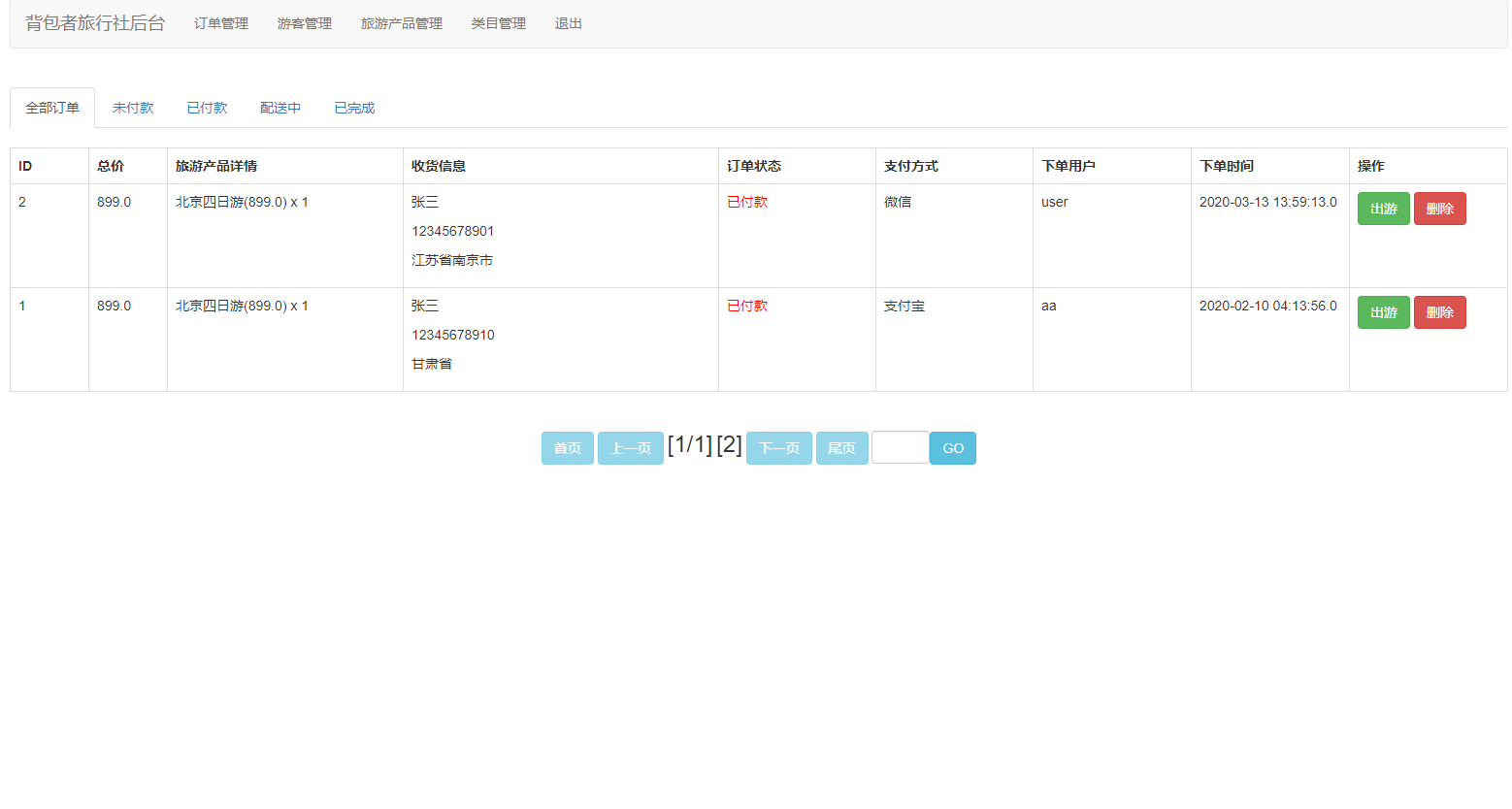
订单提交与库存检查 订单提交过程需要保证数据的一致性和完整性,特别是库存检查。
// OrderService.java - 订单服务核心逻辑
public class OrderService {
    private OrderDao orderDao = new OrderDaoImpl();
    private ProductDao productDao = new ProductDaoImpl();

    public boolean submitOrder(Order order, Map<String, CartItem> cart) {
        Connection conn = null;
        try {
            conn = DataSourceUtil.getConnection();
            conn.setAutoCommit(false); // 开启事务

            // 1. 检查库存
            for (CartItem item : cart.values()) {
                Product product = productDao.findById(conn, item.getProduct().getRouteId());
                if (product.getStock() < item.getQuantity()) {
                    throw new RuntimeException("商品【" + product.getRouteName() + "】库存不足");
                }
            }

            // 2. 插入订单主表
            int orderId = orderDao.insertOrder(conn, order);
            order.setOid(orderId);

            // 3. 插入订单明细并更新库存
            for (CartItem item : cart.values()) {
                OrderItem orderItem = new OrderItem();
                orderItem.setOrder(order);
                orderItem.setProduct(item.getProduct());
                orderItem.setQuantity(item.getQuantity());
                orderItem.setSubtotal(item.getSubtotal());

                orderDao.insertOrderItem(conn, orderItem);

                // 更新商品库存
                productDao.updateStock(conn, item.getProduct().getRouteId(),
                    item.getProduct().getStock() - item.getQuantity());
            }

            conn.commit(); // 提交事务
            return true;

        } catch (Exception e) {
            if (conn != null) {
                try {
                    conn.rollback(); // 回滚事务
                } catch (SQLException ex) {
                    ex.printStackTrace();
                }
            }
            e.printStackTrace();
            return false;
        } finally {
            DataSourceUtil.closeConnection(conn);
        }
    }
}
3. 权限管理与安全控制
系统采用基于角色的访问控制(RBAC)模型,确保不同用户只能访问其权限范围内的功能。
登录验证与权限过滤
// LoginServlet.java - 用户登录验证
public class LoginServlet extends HttpServlet {
    private UserService userService = new UserServiceImpl();

    protected void doPost(HttpServletRequest request, HttpServletResponse response)
            throws ServletException, IOException {

        String username = request.getParameter("username");
        String password = request.getParameter("password");

        try {
            // MD5加密密码
            String encryptedPwd = MD5Util.encode(password);
            User user = userService.login(username, encryptedPwd);

            if (user != null) {
                if ("1".equals(user.getStatus())) {
                    // 登录成功,将用户信息存入session
                    HttpSession session = request.getSession();
                    session.setAttribute("user", user);

                    // 根据角色跳转到不同页面
                    if (user.getRole() == 1) {
                        response.sendRedirect("admin/index.jsp");
                    } else {
                        response.sendRedirect("index.jsp");
                    }
                } else {
                    request.setAttribute("login_msg", "账户未激活,请联系管理员");
                    request.getRequestDispatcher("login.jsp").forward(request, response);
                }
            } else {
                request.setAttribute("login_msg", "用户名或密码错误");
                request.getRequestDispatcher("login.jsp").forward(request, response);
            }
        } catch (Exception e) {
            e.printStackTrace();
            request.setAttribute("login_msg", "系统错误,请稍后重试");
            request.getRequestDispatcher("login.jsp").forward(request, response);
        }
    }
}
权限过滤器实现
// AuthFilter.java - 权限控制过滤器
@WebFilter("/*")
public class AuthFilter implements Filter {

    private static final String[] EXCLUDE_URLS = {
        "/login.jsp", "/login", "/register.jsp", "/register",
        "/css/", "/js/", "/images/", "/index.jsp"
    };

    public void doFilter(ServletRequest req, ServletResponse resp, FilterChain chain)
            throws IOException, ServletException {

        HttpServletRequest request = (HttpServletRequest) req;
        HttpServletResponse response = (HttpServletResponse) resp;
        String path = request.getRequestURI().substring(request.getContextPath().length());

        // 检查是否为排除路径
        if (isExcludeUrl(path)) {
            chain.doFilter(req, resp);
            return;
        }

        HttpSession session = request.getSession(false);
        if (session == null || session.getAttribute("user") == null) {
            // 未登录,跳转到登录页
            response.sendRedirect(request.getContextPath() + "/login.jsp");
            return;
        }

        User user = (User) session.getAttribute("user");

        // 管理员路径权限检查
        if (path.startsWith("/admin/") && user.getRole() != 1) {
            response.sendError(403, "权限不足");
            return;
        }

        chain.doFilter(req, resp);
    }

    private boolean isExcludeUrl(String url) {
        for (String excludeUrl : EXCLUDE_URLS) {
            if (url.startsWith(excludeUrl)) {
                return true;
            }
        }
        return false;
    }
}
实体模型与业务对象设计
系统采用面向对象的设计思想,构建了完整的实体模型体系。以下是核心实体类的设计:
// Product.java - 旅游产品实体类
public class Product {
    private Integer routeId;
    private String routeName;
    private Double price;
    private String routeIntroduce;
    private String flag;
    private Date rdate;
    private String isThemeTour;
    private Integer count;