九宫格日记管理系统技术解析
项目背景与架构设计
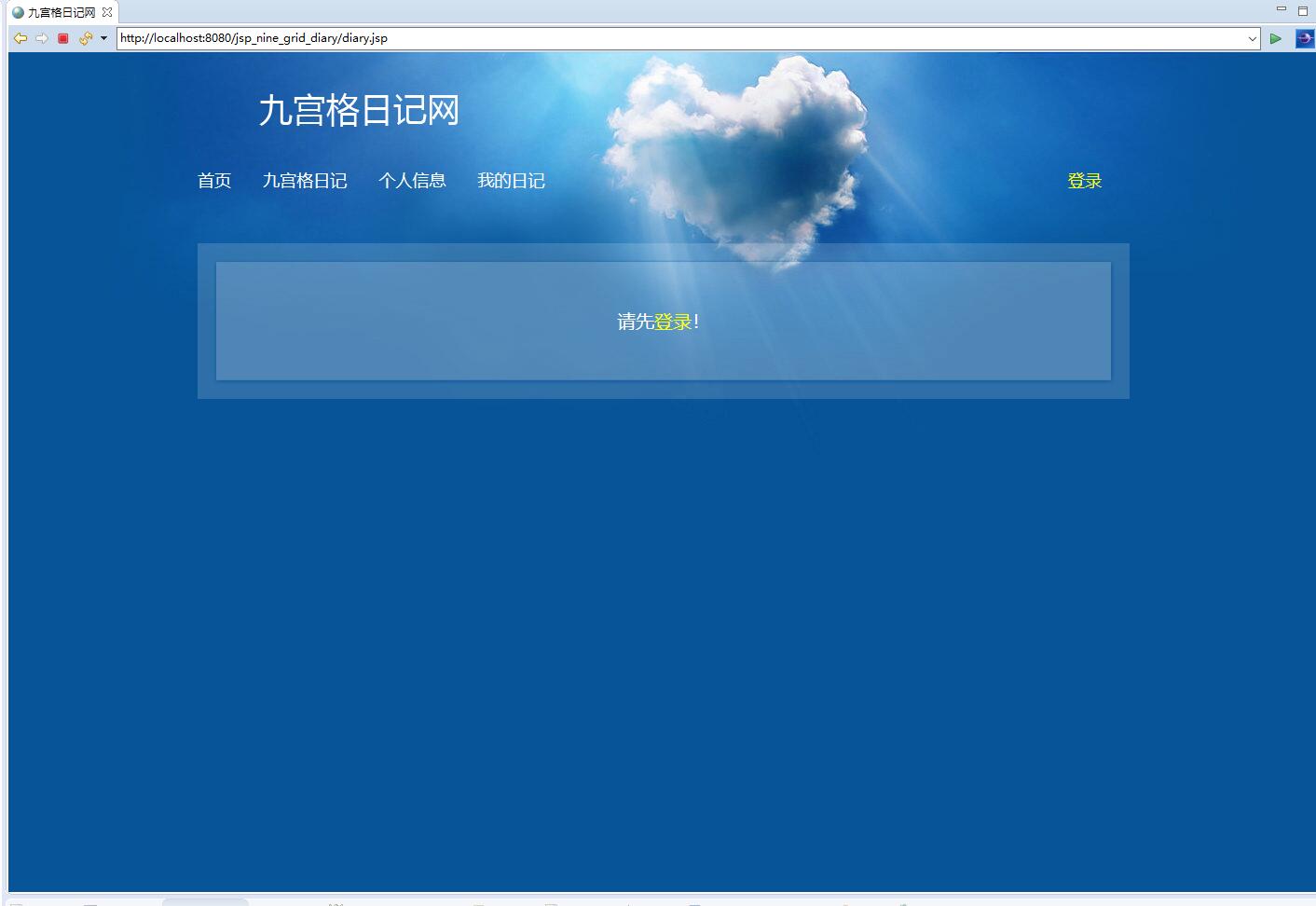
在数字化时代,个人情感记录与知识管理需求日益增长。传统的线性日记系统存在交互单调、结构化程度低等痛点。九宫格日记管理系统采用创新的网格化布局,将日记内容按主题或时间维度进行可视化分区,实现了碎片化信息的有效整合。
系统采用经典的JSP+Servlet技术架构,前端使用JSP页面实现动态渲染,后端基于Servlet作为请求控制器。架构采用分层设计模式:Servlet层负责HTTP请求处理,Service层封装核心业务逻辑,DAO层实现数据持久化操作。这种分层架构确保了代码的可维护性和扩展性。
数据库设计深度解析
系统采用MySQL数据库,设计了两个核心数据表:用户表(tb_user)和日记表(tb_diary)。这种简洁而高效的表结构设计确保了系统的稳定运行和数据一致性。
用户表设计分析
CREATE TABLE tb_user (
    id INT PRIMARY KEY AUTO_INCREMENT,
    username VARCHAR(50) UNIQUE NOT NULL,
    password VARCHAR(100) NOT NULL,
    email VARCHAR(100),
    create_time TIMESTAMP DEFAULT CURRENT_TIMESTAMP,
    last_login_time TIMESTAMP,
    status TINYINT DEFAULT 1
);
用户表设计体现了多个技术亮点:
- 唯一性约束:username字段设置UNIQUE约束,防止用户重复注册
- 安全性设计:password字段预留100字符长度,为密码加密算法留足空间
- 时间戳管理:create_time和last_login_time字段自动记录用户行为时间
- 状态管理:status字段支持用户账号的启用/禁用状态控制
日记表设计优化
CREATE TABLE tb_diary (
    id INT PRIMARY KEY AUTO_INCREMENT,
    user_id INT NOT NULL,
    title VARCHAR(200) NOT NULL,
    content TEXT,
    grid_data JSON,
    create_time TIMESTAMP DEFAULT CURRENT_TIMESTAMP,
    update_time TIMESTAMP DEFAULT CURRENT_TIMESTAMP ON UPDATE CURRENT_TIMESTAMP,
    weather VARCHAR(50),
    mood VARCHAR(50),
    FOREIGN KEY (user_id) REFERENCES tb_user(id) ON DELETE CASCADE
);
日记表设计具有以下技术特色:
- 外键关联:通过user_id与用户表建立外键关系,确保数据完整性
- JSON数据支持:grid_data字段使用JSON格式存储九宫格数据,支持灵活的数据结构
- 自动时间更新:update_time字段自动记录最后修改时间
- 情感元数据:weather和mood字段丰富日记的情感维度
核心功能实现深度解析
用户认证与会话管理
系统采用基于Servlet的会话管理机制,确保用户身份安全验证。登录功能通过Session实现状态保持:
@WebServlet("/login")
public class LoginServlet extends HttpServlet {
    protected void doPost(HttpServletRequest request, HttpServletResponse response)
            throws ServletException, IOException {
        String username = request.getParameter("username");
        String password = request.getParameter("password");

        UserService userService = new UserService();
        User user = userService.authenticate(username, password);

        if (user != null) {
            HttpSession session = request.getSession();
            session.setAttribute("currentUser", user);
            session.setMaxInactiveInterval(30 * 60); // 30分钟超时

            response.sendRedirect("diary/home.jsp");
        } else {
            request.setAttribute("errorMsg", "用户名或密码错误");
            request.getRequestDispatcher("login.jsp").forward(request, response);
        }
    }
}
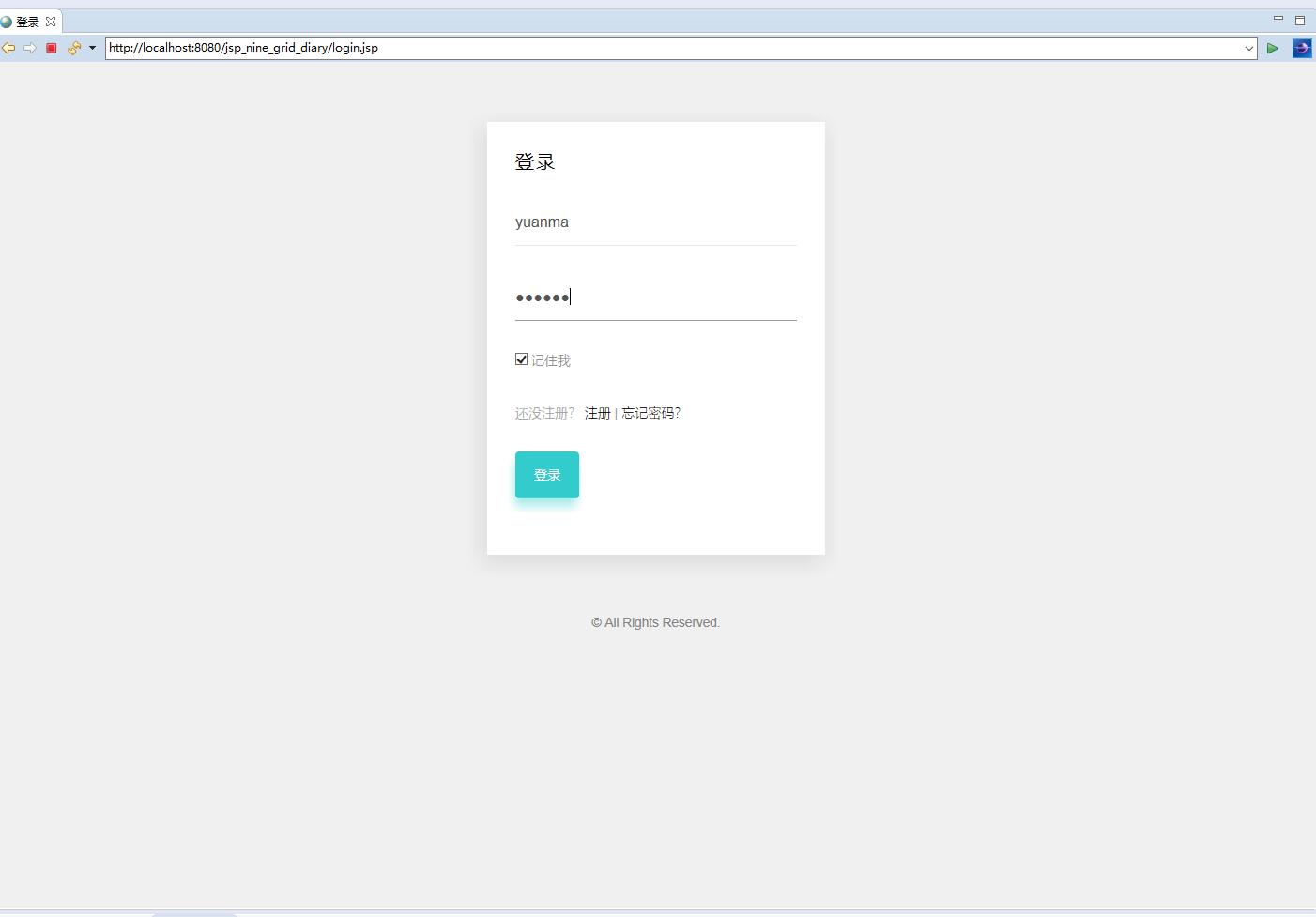
认证模块实现了完整的异常处理机制,包括密码加密验证、会话超时管理和安全退出功能。密码采用BCrypt加密算法存储,确保即使数据库泄露也不会导致明文密码泄漏。
九宫格数据渲染与交互
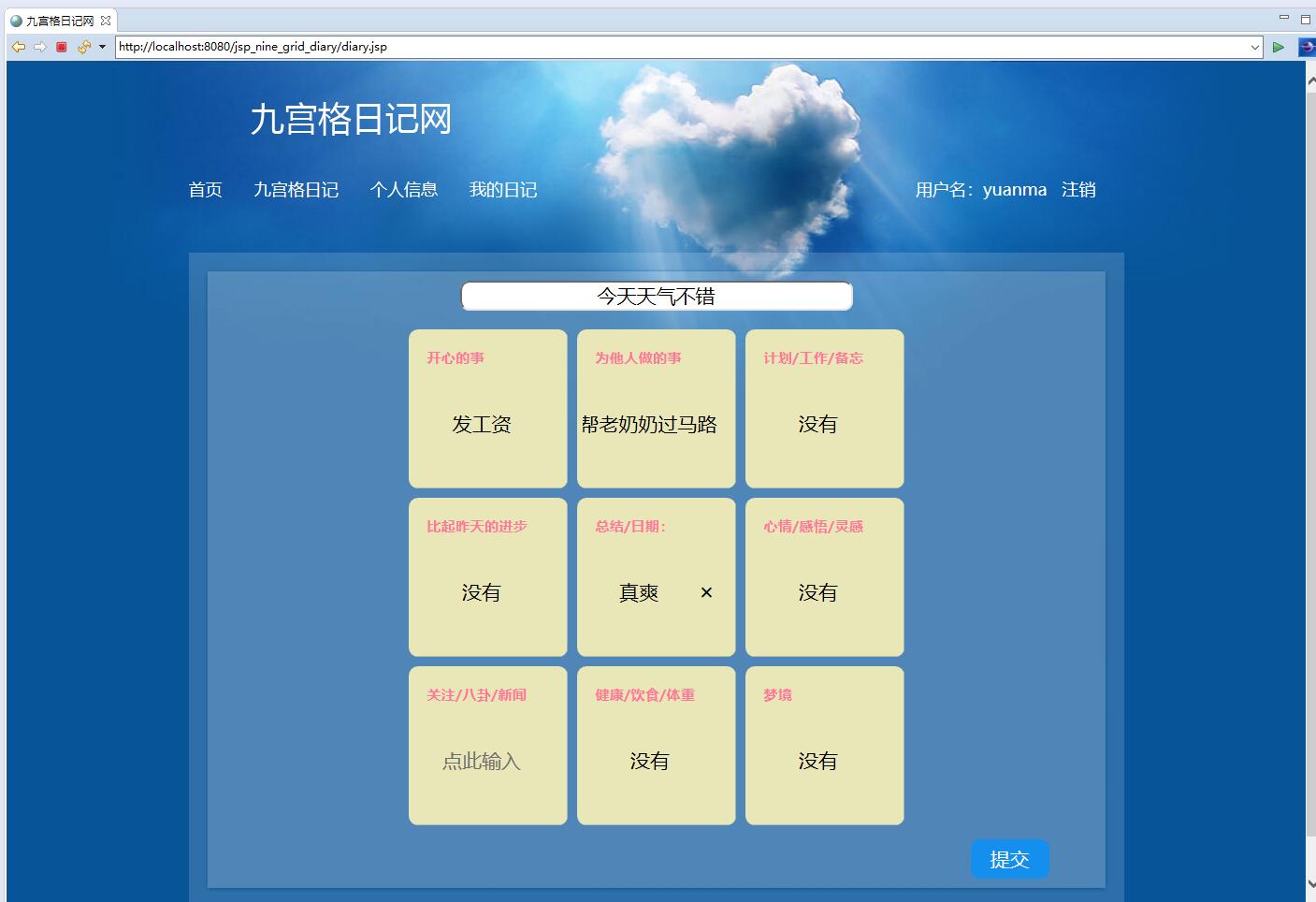
前端JSP页面通过动态生成网格布局,每个格子对应独立的日记模块:
<div class="diary-grid">
    <c:forEach var="i" begin="1" end="9">
        <div class="grid-cell" data-cell="${i}">
            <textarea class="grid-content" name="content_${i}"
                      placeholder="记录第${i}个时刻的心情..."></textarea>
            <div class="grid-meta">
                <select name="mood_${i}">
                    <option value="happy">开心</option>
                    <option value="sad">难过</option>
                    <option value="excited">兴奋</option>
                </select>
            </div>
        </div>
    </c:forEach>
</div>
网格布局采用CSS Grid技术实现响应式设计,确保在不同设备上都能获得良好的视觉体验:
.diary-grid {
    display: grid;
    grid-template-columns: repeat(3, 1fr);
    grid-gap: 10px;
    max-width: 800px;
    margin: 0 auto;
}

.grid-cell {
    border: 1px solid #ddd;
    border-radius: 8px;
    padding: 15px;
    min-height: 120px;
    background: #f9f9f9;
    transition: all 0.3s ease;
}

.grid-cell:hover {
    transform: translateY(-2px);
    box-shadow: 0 4px 8px rgba(0,0,0,0.1);
}
数据持久化与事务管理
DAO层采用JDBC实现数据持久化,通过连接池管理数据库连接,确保高性能的数据访问:
public class DiaryDAO {
    private DataSource dataSource;

    public DiaryDAO() {
        // 初始化数据源
        this.dataSource = DatabaseUtil.getDataSource();
    }

    public boolean saveDiary(Diary diary) throws SQLException {
        String sql = "INSERT INTO tb_diary (user_id, title, content, grid_data, weather, mood) VALUES (?, ?, ?, ?, ?, ?)";

        try (Connection conn = dataSource.getConnection();
             PreparedStatement pstmt = conn.prepareStatement(sql, Statement.RETURN_GENERATED_KEYS)) {

            conn.setAutoCommit(false);

            pstmt.setInt(1, diary.getUserId());
            pstmt.setString(2, diary.getTitle());
            pstmt.setString(3, diary.getContent());
            pstmt.setString(4, diary.getGridData());
            pstmt.setString(5, diary.getWeather());
            pstmt.setString(6, diary.getMood());

            int affectedRows = pstmt.executeUpdate();

            if (affectedRows > 0) {
                try (ResultGeneratedKeys rs = pstmt.getGeneratedKeys()) {
                    if (rs.next()) {
                        diary.setId(rs.getInt(1));
                    }
                }
                conn.commit();
                return true;
            } else {
                conn.rollback();
                return false;
            }
        }
    }
}
事务管理确保数据操作的原子性,特别是在处理复杂的九宫格数据时,保证所有网格数据要么全部保存成功,要么全部回滚。
时间线视图与数据检索
系统提供时间线视图功能,允许用户按时间维度浏览历史日记:
public class DiaryService {
    public List<Diary> getDiariesByTimeRange(int userId, Date startDate, Date endDate, int page, int size) {
        String sql = "SELECT * FROM tb_diary WHERE user_id = ? AND create_time BETWEEN ? AND ? ORDER BY create_time DESC LIMIT ? OFFSET ?";

        List<Diary> diaries = new ArrayList<>();
        try (Connection conn = dataSource.getConnection();
             PreparedStatement pstmt = conn.prepareStatement(sql)) {

            pstmt.setInt(1, userId);
            pstmt.setTimestamp(2, new Timestamp(startDate.getTime()));
            pstmt.setTimestamp(3, new Timestamp(endDate.getTime()));
            pstmt.setInt(4, size);
            pstmt.setInt(5, (page - 1) * size);

            ResultSet rs = pstmt.executeQuery();
            while (rs.next()) {
                Diary diary = mapResultSetToDiary(rs);
                diaries.add(diary);
            }
        } catch (SQLException e) {
            logger.error("查询日记列表失败", e);
        }
        return diaries;
    }

    private Diary mapResultSetToDiary(ResultSet rs) throws SQLException {
        Diary diary = new Diary();
        diary.setId(rs.getInt("id"));
        diary.setUserId(rs.getInt("user_id"));
        diary.setTitle(rs.getString("title"));
        diary.setContent(rs.getString("content"));
        diary.setGridData(rs.getString("grid_data"));
        diary.setCreateTime(rs.getTimestamp("create_time"));
        diary.setWeather(rs.getString("weather"));
        diary.setMood(rs.getString("mood"));
        return diary;
    }
}
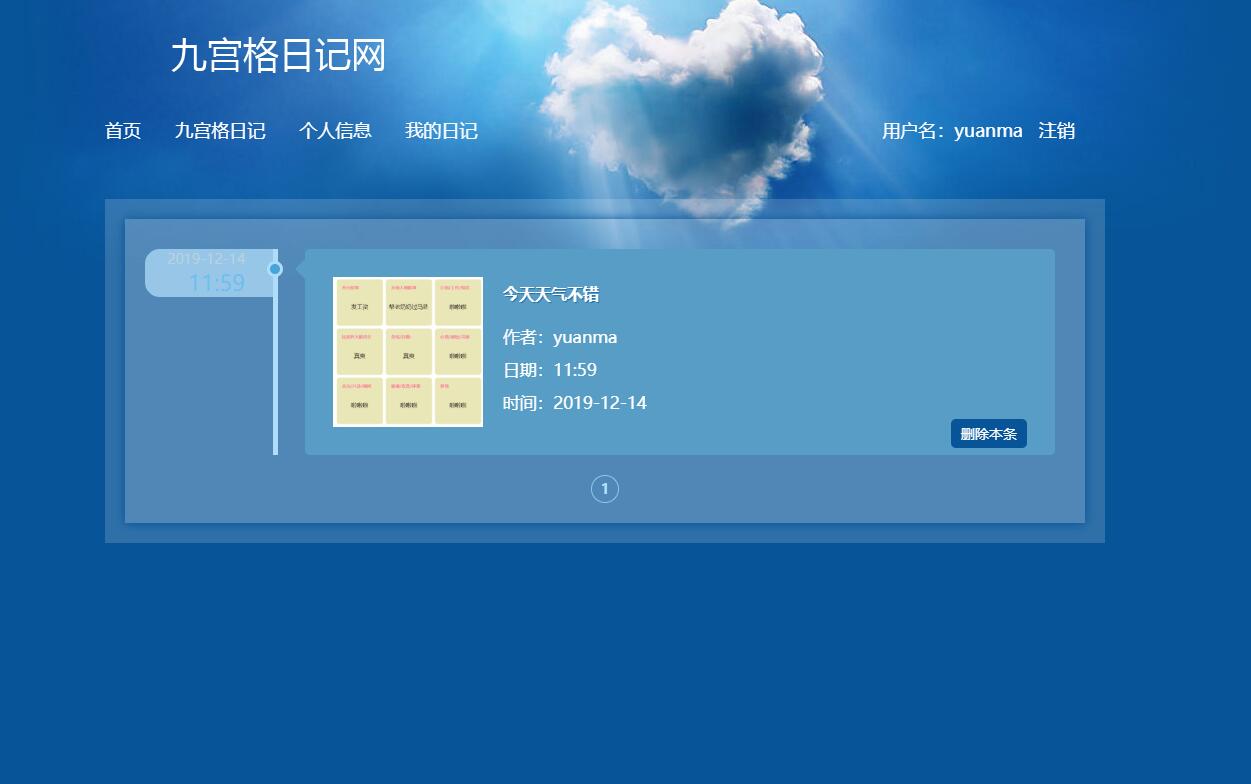
时间线视图实现了分页查询和条件过滤,支持按心情、天气等多维度检索,大大提升了日记回顾的效率。
实体模型设计与业务逻辑
用户实体模型
public class User {
    private int id;
    private String username;
    private String password;
    private String email;
    private Date createTime;
    private Date lastLoginTime;
    private int status;

    // 构造函数、getter和setter方法
    public User() {}

    public User(int id, String username, String email) {
        this.id = id;
        this.username = username;
        this.email = email;
    }

    // 密码加密验证
    public boolean checkPassword(String plainPassword) {
        return BCrypt.checkpw(plainPassword, this.password);
    }

    // 密码加密存储
    public void setEncryptedPassword(String plainPassword) {
        this.password = BCrypt.hashpw(plainPassword, BCrypt.gensalt());
    }
}
日记实体模型
public class Diary {
    private int id;
    private int userId;
    private String title;
    private String content;
    private String gridData; // JSON格式的九宫格数据
    private Date createTime;
    private Date updateTime;
    private String weather;
    private String mood;
    private User user; // 关联用户对象

    public JSONObject getGridDataAsJSON() {
        try {
            return new JSONObject(this.gridData);
        } catch (JSONException e) {
            return new JSONObject();
        }
    }

    public void setGridDataFromJSON(JSONObject json) {
        this.gridData = json.toString();
    }

    // 获取特定网格的内容
    public String getGridContent(int gridIndex) {
        JSONObject gridJSON = getGridDataAsJSON();
        return gridJSON.optString("grid_" + gridIndex, "");
    }
}
性能优化与安全考虑
数据库连接池优化
系统采用HikariCP连接池管理数据库连接,显著提升并发处理能力:
public class DatabaseUtil {
    private static HikariDataSource dataSource;

    static {
        HikariConfig config = new HikariConfig();
        config.setJdbcUrl("jdbc:mysql://localhost:3306/diary_db");
        config.setUsername("username");
        config.setPassword("password");
        config.setMaximumPoolSize(20);
        config.setMinimumIdle(5);
        config.setConnectionTimeout(30000);
        config.setIdleTimeout(600000);
        config.setMaxLifetime(1800000);

        dataSource = new HikariDataSource(config);
    }

    public static DataSource getDataSource() {
        return dataSource;
    }
}
XSS防护与输入验证
系统对所有用户输入进行严格的验证和过滤,防止XSS攻击:
public class SecurityUtil {
public static String escapeHtml(String input) {
if (input == null) return "";
return input.replace("&", "&")
.replace("<", "<")
.replace(">", ">")
.replace("\"", """)
.replace("'", "'");
}
public static boolean isValidDiaryContent(String content) {
if (content == null) return false;
if (content.length() > 5000) return false; // 内容长度限制
// 检查是否包含潜在的危险脚本
Pattern scriptPattern = Pattern.compile("<script.*?>", Pattern.CASE_INSENSITIVE);
return !scriptPattern.matcher(content).find();
}
}
功能扩展与技术展望
1. 智能情感分析功能
集成自然语言处理技术,自动分析日记内容的情感倾向:
public class SentimentAnalysis {
    public Map<String, Object> analyzeDiarySentiment(String content) {
        // 调用情感分析API或本地模型
        // 返回情感得分、关键词提取、主题分类等结果
        return sentimentResult;
    }
}
实现思路:集成Stanford CoreNLP或调用云服务API,对日记文本进行情感分析,生成情感趋势图表。
2. 多端同步与数据导出
支持Web端与移动端数据同步,提供多种格式的数据导出:
public class ExportService {
    public void exportToPDF(Diary diary, HttpServletResponse response) {
        // 使用iText或Flying Saucer将日记转换为PDF格式
    }

    public void exportToWord(Diary diary, HttpServletResponse response) {
        // 使用Apache POI生成Word文档
    }
}
3. 社交化功能扩展
在保护隐私的前提下,提供有限的日记分享功能:
public class SharingService {
    public String generateShareableLink(int diaryId, int expireHours) {
        // 生成有时效性的分享链接
        // 使用JWT令牌实现安全的临时访问权限
    }
}
4. 高级搜索与标签系统
实现基于Lucene的全文检索和标签分类系统:
public class AdvancedSearchService {
    public List<Diary> searchByMultipleCriteria(SearchCriteria criteria) {
        // 支持关键词、时间范围、心情、天气等多条件组合搜索
    }
}
5. 数据可视化与统计报表
生成个人日记的统计分析和可视化报表:
public class AnalyticsService {
    public DiaryStatistics generateMonthlyReport(int userId, int year, int month) {
        // 统计每月日记数量、心情分布、写作时间规律等
    }
}
技术总结
九宫格日记管理系统通过创新的网格化交互设计,结合成熟的JSP+Servlet技术栈,实现了个人情感记录的结构化管理。系统在数据库设计、业务逻辑处理、安全防护等方面都体现了专业的技术考量。
分层架构确保了系统的可维护性,JSON格式的网格数据存储提供了良好的扩展性,而完善的用户认证和数据验证机制保障了系统安全性。未来通过集成人工智能分析和多端同步等高级功能,可以进一步提升系统的实用价值和用户体验。
该系统不仅是一个技术实现的范例,更为个人知识管理和情感记录提供了创新的解决方案,展示了传统Java Web技术在现代化应用中的持续生命力。