在电子商务蓬勃发展的今天,传统零售行业面临着数字化转型的迫切需求。鞋类商品因其标准化程度高、展示需求强等特点,非常适合在线销售。本系统采用经典的J2EE技术栈,构建了一个功能完备的B2C鞋类零售平台,我们可将其命名为“步云鞋城”。
系统采用典型的三层架构模式,严格遵循MVC设计范式。Servlet作为核心控制器,负责处理所有HTTP请求和业务逻辑;JSP页面专注于视图渲染,通过JSTL和EL表达式实现数据动态展示;JavaBean则作为模型层,封装核心业务实体。数据持久化通过JDBC实现,连接MySQL数据库进行数据存储与管理。
数据库设计亮点分析
系统数据库包含6张核心表,设计合理,关系清晰。以下重点分析用户表和商品表的设计。
用户表(users)的设计充分考虑了系统安全性和扩展性:
CREATE TABLE users (
    user_id INT AUTO_INCREMENT PRIMARY KEY,
    username VARCHAR(50) UNIQUE NOT NULL,
    password VARCHAR(100) NOT NULL,
    email VARCHAR(100) UNIQUE NOT NULL,
    phone VARCHAR(20),
    address TEXT,
    role ENUM('customer', 'admin') DEFAULT 'customer',
    created_at TIMESTAMP DEFAULT CURRENT_TIMESTAMP,
    last_login TIMESTAMP NULL
);
该表设计的亮点在于:使用AUTO_INCREMENT自增主键确保唯一性;username和email字段设置UNIQUE约束防止重复注册;role字段使用ENUM类型明确区分用户角色;created_at和last_login时间戳字段为后续用户行为分析提供数据支撑。
商品表(shoes)的设计则体现了商品管理的专业性:
CREATE TABLE shoes (
    shoe_id INT AUTO_INCREMENT PRIMARY KEY,
    name VARCHAR(200) NOT NULL,
    description TEXT,
    price DECIMAL(10,2) NOT NULL,
    stock_quantity INT NOT NULL DEFAULT 0,
    category VARCHAR(50),
    brand VARCHAR(50),
    size_range VARCHAR(100),
    color VARCHAR(30),
    image_url VARCHAR(500),
    created_at TIMESTAMP DEFAULT CURRENT_TIMESTAMP,
    updated_at TIMESTAMP DEFAULT CURRENT_TIMESTAMP ON UPDATE CURRENT_TIMESTAMP
);
此表设计的精妙之处在于:price字段使用DECIMAL类型精确存储金额;stock_quantity字段实时跟踪库存状态;image_url字段存储商品图片路径;updated_at字段通过ON UPDATE CURRENT_TIMESTAMP自动记录最后修改时间,便于库存管理和商品追踪。
核心功能实现深度解析
- 用户身份认证与会话管理
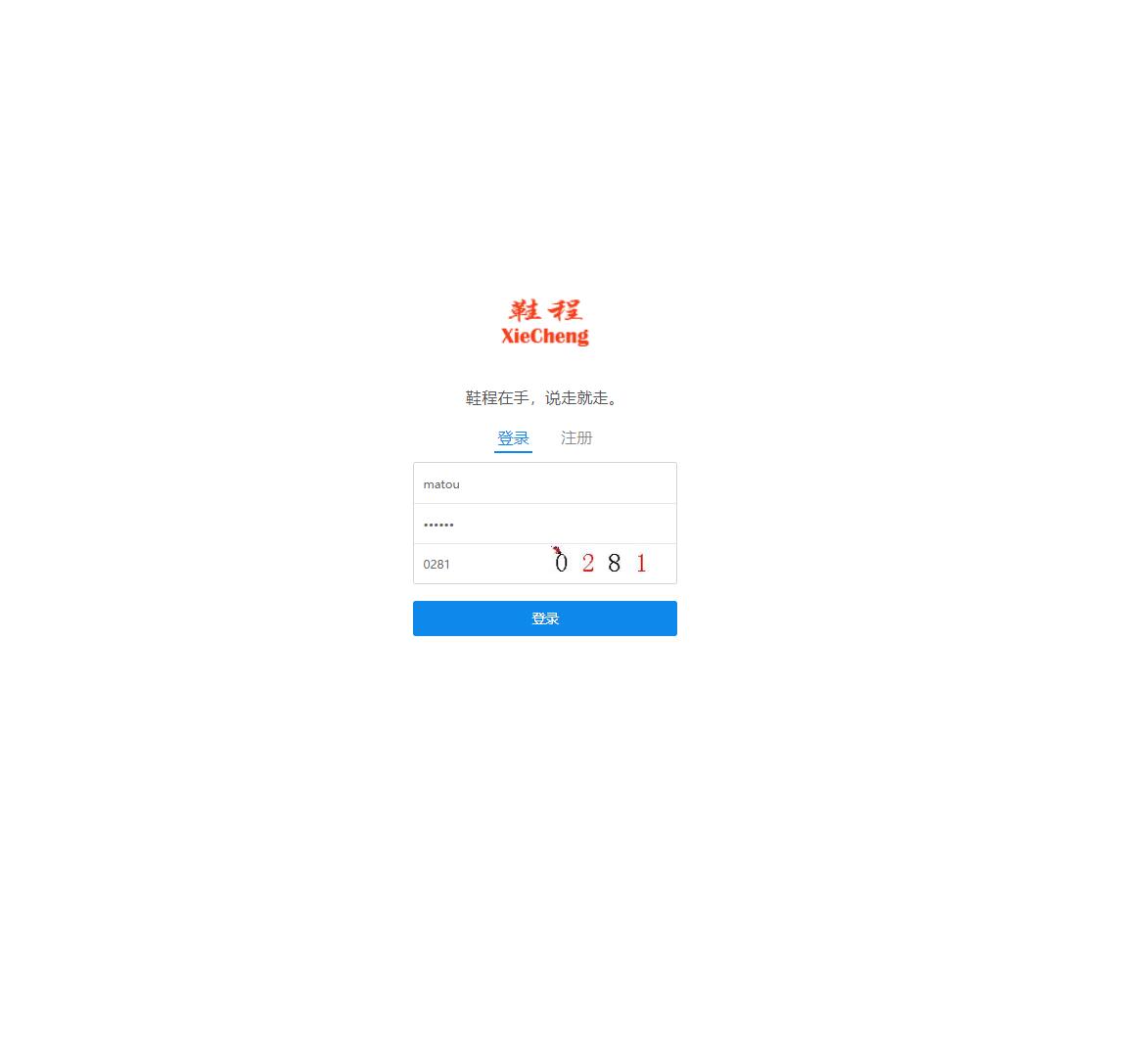
用户登录功能通过LoginServlet实现,采用安全的密码验证机制:
@WebServlet("/login")
public class LoginServlet extends HttpServlet {
    protected void doPost(HttpServletRequest request, HttpServletResponse response)
            throws ServletException, IOException {
        String username = request.getParameter("username");
        String password = request.getParameter("password");

        UserDAO userDAO = new UserDAO();
        User user = userDAO.authenticate(username, password);

        if (user != null) {
            HttpSession session = request.getSession();
            session.setAttribute("user", user);
            session.setMaxInactiveInterval(30 * 60); // 30分钟超时

            if ("admin".equals(user.getRole())) {
                response.sendRedirect("admin/dashboard.jsp");
            } else {
                response.sendRedirect("user/home.jsp");
            }
        } else {
            request.setAttribute("errorMessage", "用户名或密码错误");
            request.getRequestDispatcher("login.jsp").forward(request, response);
        }
    }
}
该实现通过Session机制维持用户登录状态,并根据用户角色进行路由分发,确保系统安全性。
- 商品展示与分页查询
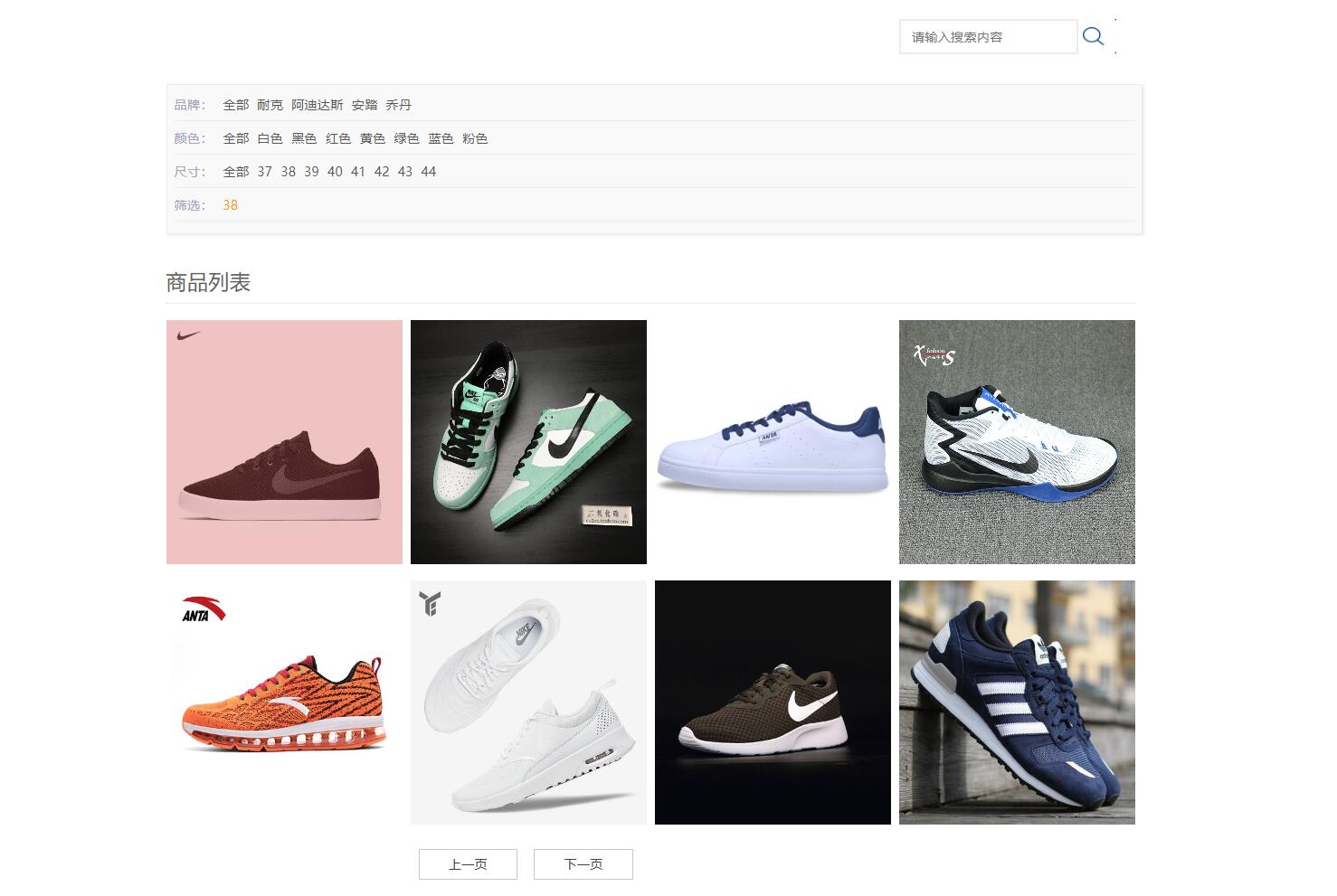
商品列表展示采用分页技术,提升用户体验:
public class ShoeDAO {
    public List<Shoe> getShoesByPage(int page, int pageSize, String category) {
        List<Shoe> shoes = new ArrayList<>();
        String sql = "SELECT * FROM shoes WHERE 1=1";

        if (category != null && !category.isEmpty()) {
            sql += " AND category = ?";
        }
        sql += " LIMIT ? OFFSET ?";

        try (Connection conn = DBUtil.getConnection();
             PreparedStatement stmt = conn.prepareStatement(sql)) {

            int paramIndex = 1;
            if (category != null && !category.isEmpty()) {
                stmt.setString(paramIndex++, category);
            }
            stmt.setInt(paramIndex++, pageSize);
            stmt.setInt(paramIndex, (page - 1) * pageSize);

            ResultSet rs = stmt.executeQuery();
            while (rs.next()) {
                Shoe shoe = extractShoeFromResultSet(rs);
                shoes.add(shoe);
            }
        } catch (SQLException e) {
            e.printStackTrace();
        }
        return shoes;
    }
}
- 购物车与订单处理
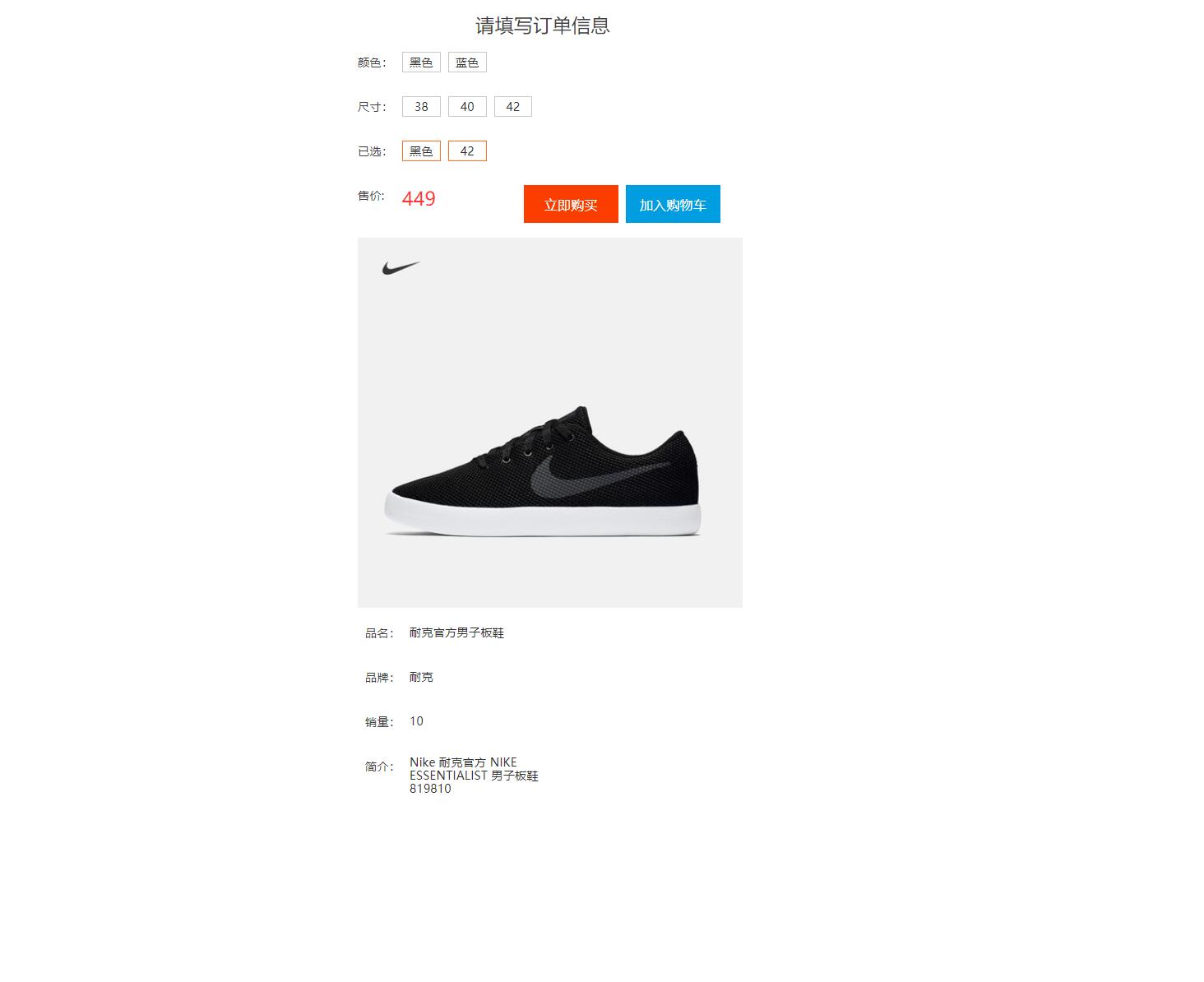
购物车功能通过Session实现临时存储,订单处理确保事务完整性:
@WebServlet("/addToCart")
public class AddToCartServlet extends HttpServlet {
    protected void doPost(HttpServletRequest request, HttpServletResponse response)
            throws ServletException, IOException {
        int shoeId = Integer.parseInt(request.getParameter("shoeId"));
        int quantity = Integer.parseInt(request.getParameter("quantity"));

        HttpSession session = request.getSession();
        Map<Integer, Integer> cart = (Map<Integer, Integer>) session.getAttribute("cart");

        if (cart == null) {
            cart = new HashMap<>();
            session.setAttribute("cart", cart);
        }

        cart.put(shoeId, cart.getOrDefault(shoeId, 0) + quantity);
        response.sendRedirect("cart.jsp");
    }
}

@WebServlet("/placeOrder")
public class PlaceOrderServlet extends HttpServlet {
    protected void doPost(HttpServletRequest request, HttpServletResponse response)
            throws ServletException, IOException {
        Connection conn = null;
        try {
            conn = DBUtil.getConnection();
            conn.setAutoCommit(false); // 开启事务

            // 插入订单主信息
            String orderSql = "INSERT INTO orders (user_id, total_amount, status) VALUES (?, ?, 'pending')";
            PreparedStatement orderStmt = conn.prepareStatement(orderSql, Statement.RETURN_GENERATED_KEYS);
            orderStmt.setInt(1, userId);
            orderStmt.setBigDecimal(2, totalAmount);
            orderStmt.executeUpdate();

            // 获取生成的订单ID
            ResultSet rs = orderStmt.getGeneratedKeys();
            int orderId = rs.next() ? rs.getInt(1) : -1;

            // 插入订单明细
            String detailSql = "INSERT INTO order_items (order_id, shoe_id, quantity, price) VALUES (?, ?, ?, ?)";
            PreparedStatement detailStmt = conn.prepareStatement(detailSql);

            for (CartItem item : cartItems) {
                detailStmt.setInt(1, orderId);
                detailStmt.setInt(2, item.getShoeId());
                detailStmt.setInt(3, item.getQuantity());
                detailStmt.setBigDecimal(4, item.getPrice());
                detailStmt.addBatch();
            }
            detailStmt.executeBatch();

            conn.commit(); // 提交事务
            response.sendRedirect("orderSuccess.jsp");

        } catch (SQLException e) {
            try {
                if (conn != null) conn.rollback();
            } catch (SQLException ex) {
                ex.printStackTrace();
            }
            throw new ServletException("订单处理失败", e);
        } finally {
            DBUtil.closeConnection(conn);
        }
    }
}
- 后台管理功能
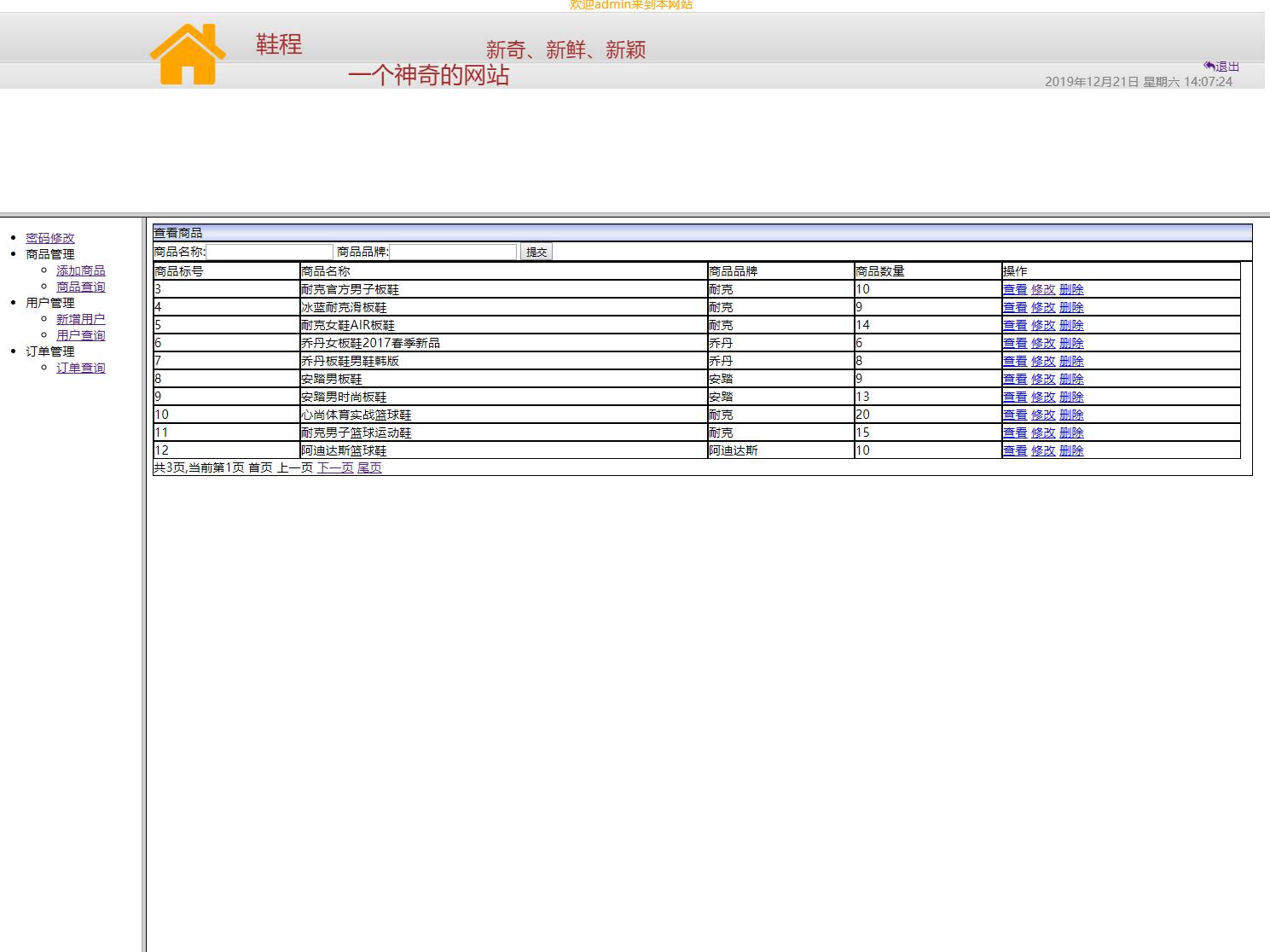
管理员后台提供完整的商品和订单管理能力:
@WebServlet("/admin/updateShoe")
public class UpdateShoeServlet extends HttpServlet {
    protected void doPost(HttpServletRequest request, HttpServletResponse response)
            throws ServletException, IOException {
        String shoeId = request.getParameter("shoeId");
        String name = request.getParameter("name");
        String price = request.getParameter("price");
        String stock = request.getParameter("stock");

        ShoeDAO shoeDAO = new ShoeDAO();
        boolean success = shoeDAO.updateShoe(shoeId, name, price, stock);

        if (success) {
            response.sendRedirect("productManagement.jsp?message=更新成功");
        } else {
            response.sendRedirect("productManagement.jsp?error=更新失败");
        }
    }
}
实体模型设计
系统核心实体模型采用标准的JavaBean规范设计,以用户实体为例:
public class User {
    private int userId;
    private String username;
    private String password;
    private String email;
    private String phone;
    private String address;
    private String role;
    private Date createdAt;
    private Date lastLogin;

    // 标准的getter和setter方法
    public int getUserId() { return userId; }
    public void setUserId(int userId) { this.userId = userId; }

    public String getUsername() { return username; }
    public void setUsername(String username) { this.username = username; }

    // 其他getter/setter方法...

    // 业务逻辑方法
    public boolean isAdmin() {
        return "admin".equals(this.role);
    }

    public boolean validatePassword(String inputPassword) {
        // 实际项目中应使用加密验证
        return this.password.equals(inputPassword);
    }
}
商品实体模型包含完整的商品属性和业务逻辑:
public class Shoe {
    private int shoeId;
    private String name;
    private String description;
    private BigDecimal price;
    private int stockQuantity;
    private String category;
    private String brand;
    private String sizeRange;
    private String color;
    private String imageUrl;
    private Date createdAt;
    private Date updatedAt;

    // getter和setter方法
    public BigDecimal getPrice() { return price; }
    public void setPrice(BigDecimal price) { this.price = price; }

    public int getStockQuantity() { return stockQuantity; }
    public void setStockQuantity(int stockQuantity) { this.stockQuantity = stockQuantity; }

    // 业务方法
    public boolean isInStock() {
        return stockQuantity > 0;
    }

    public boolean isLowStock() {
        return stockQuantity > 0 && stockQuantity <= 10;
    }

    public BigDecimal calculateDiscountPrice(BigDecimal discountRate) {
        return price.multiply(discountRate);
    }
}
数据库连接与工具类
系统通过专门的数据库工具类管理连接资源:
public class DBUtil {
    private static final String URL = "jdbc:mysql://localhost:3306/shoe_mall?useSSL=false&serverTimezone=UTC";
    private static final String USERNAME = "root";
    private static final String PASSWORD = "password";

    static {
        try {
            Class.forName("com.mysql.cj.jdbc.Driver");
        } catch (ClassNotFoundException e) {
            e.printStackTrace();
        }
    }

    public static Connection getConnection() throws SQLException {
        return DriverManager.getConnection(URL, USERNAME, PASSWORD);
    }

    public static void closeConnection(Connection conn) {
        if (conn != null) {
            try {
                conn.close();
            } catch (SQLException e) {
                e.printStackTrace();
            }
        }
    }

    public static void closeStatement(Statement stmt) {
        if (stmt != null) {
            try {
                stmt.close();
            } catch (SQLException e) {
                e.printStackTrace();
            }
        }
    }

    public static void closeResultSet(ResultSet rs) {
        if (rs != null) {
            try {
                rs.close();
            } catch (SQLException e) {
                e.printStackTrace();
            }
        }
    }
}
前端页面技术实现
JSP页面通过EL表达式和JSTL标签库实现数据动态展示:
<%@ page contentType="text/html;charset=UTF-8" language="java" %>
<%@ taglib prefix="c" uri="http://java.sun.com/jsp/jstl/core" %>
<!DOCTYPE html>
<html>
<head>
    <title>商品列表 - 步云鞋城</title>
    <link rel="stylesheet" href="${pageContext.request.contextPath}/css/style.css">
</head>
<body>
    <header>
        <nav>
            <c:if test="${not empty sessionScope.user}">
                <span>欢迎,${sessionScope.user.username}</span>
                <a href="${pageContext.request.contextPath}/logout">退出</a>
                <a href="${pageContext.request.contextPath}/cart">购物车</a>
            </c:if>
        </nav>
    </header>

    <main>
        <div class="product-filters">
            <form action="${pageContext.request.contextPath}/shoes" method="get">
                <select name="category">
                    <option value="">所有分类</option>
                    <option value="sports" <c:if test="${param.category == 'sports'}">selected</c:if>>运动鞋</option>
                    <option value="casual" <c:if test="${param.category == 'casual'}">selected</c:if>>休闲鞋</option>
                </select>
                <button type="submit">筛选</button>
            </form>
        </div>

        <div class="product-grid">
            <c:forEach var="shoe" items="${shoes}">
                <div class="product-card">
                    <img src="${pageContext.request.contextPath}/images/${shoe.imageUrl}"
                         alt="${shoe.name}" class="product-image">
                    <h3>${shoe.name}</h3>
                    <p class="price">¥${shoe.price}</p>
                    <c:choose>
                        <c:when test="${shoe.stockQuantity > 0}">
                            <form action="${pageContext.request.contextPath}/addToCart" method="post">
                                <input type="hidden" name="shoeId" value="${shoe.shoeId}">
                                <input type="number" name="quantity" value="1" min="1" max="${shoe.stockQuantity}">
                                <button type="submit">加入购物车</button>
                            </form>
                        </c:when>
                        <c:otherwise>
                            <button disabled>缺货</button>
                        </c:otherwise>
                    </c:choose>
                </div>
            </c:forEach>
        </div>

        <!-- 分页控件 -->
        <div class="pagination">
            <c:if test="${currentPage > 1}">
                <a href="?page=${currentPage - 1}&category=${param.category}">上一页</a>
            </c:if>

            <c:forEach begin="1" end="${totalPages}" var="page">
                <c:choose>
                    <c:when test="${page == currentPage}">
                        <span class="current">${page}</span>
                    </c:when>
                    <c:otherwise>
                        <a href="?page=${page}&category=${param.category}">${page}</a>
                    </c:otherwise>
                </c:choose>
            </c:forEach>

            <c:if test="${currentPage < totalPages}">
                <a href="?page=${currentPage + 1}&category=${param.category}">下一页</a>
            </c:if>
        </div>
    </main>
</body>
</html>
系统优化与功能扩展方向
性能优化:引入数据库连接池(如HikariCP)替代直接连接,大幅提升数据库访问性能。实现商品详情页的静态化处理,通过定时任务生成静态HTML页面,减轻服务器压力。
安全增强:对用户密码进行BCrypt加密存储,防止明文密码泄露。实施CSRF令牌验证,在所有表单提交操作中加入防跨站请求伪造保护。增加SQL注入过滤器和XSS防护机制。
搜索功能优化:集成Elasticsearch实现商品全文检索,支持拼音搜索、同义词扩展和搜索词纠错。实现基于用户行为的个性化推荐算法。
支付集成扩展:在现有基础上集成支付宝、微信支付等多种支付方式,使用支付SDK实现安全的支付流程。增加支付结果异步通知机制,确保交易状态同步。
移动端适配:开发响应式前端界面,确保在手机和平板设备上的良好体验。考虑开发独立的移动App版本,使用React Native或Flutter技术实现跨平台开发。
数据分析功能:构建数据统计模块,通过ECharts等可视化库展示销售数据、用户行为分析。实现商品销售排行榜、用户购买偏好分析等商业智能功能。
该系统作为传统JSP/Servlet技术的典型应用,展示了如何通过经典技术栈构建稳定可靠的电商平台。其清晰的架构设计和完整的业务功能实现,为后续的技术升级和功能扩展奠定了坚实基础。