在当今数字化消费时代,闲置资源的有效流通已成为促进可持续消费的重要环节。传统线下二手交易存在信息不对称、交易效率低下、信任机制不完善等痛点,亟需通过技术手段构建标准化、可信赖的线上交易环境。本项目采用经典的JSP+Servlet技术栈,构建了一个功能完备的二手商品交易平台,实现了从商品展示、交易协商到订单管理的全流程数字化。
系统采用典型的三层架构模式,表现层由JSP页面负责数据渲染和用户交互,业务逻辑层通过Servlet控制器处理核心业务流程,数据持久层使用JDBC进行数据库操作。这种分层设计使得系统具有良好的可维护性和扩展性,各层之间职责分明,耦合度低。
在安全机制方面,系统全面采用PreparedStatement防止SQL注入攻击,对用户输入进行严格校验,敏感操作要求权限验证。交易流程中引入了多重状态管理机制,确保每个交易环节的可追溯性和安全性。
数据库架构设计与核心表分析
系统共设计8张核心数据表,涵盖了用户管理、商品交易、订单处理等核心业务模块。其中用户表、商品表和订单表的设计尤为关键,直接决定了系统的数据完整性和业务稳定性。
用户表(users)采用分级权限设计:
CREATE TABLE users (
    user_id INT AUTO_INCREMENT PRIMARY KEY,
    username VARCHAR(50) UNIQUE NOT NULL,
    password VARCHAR(100) NOT NULL,
    email VARCHAR(100) UNIQUE NOT NULL,
    phone VARCHAR(20),
    address TEXT,
    user_type ENUM('admin','user') DEFAULT 'user',
    registration_date TIMESTAMP DEFAULT CURRENT_TIMESTAMP,
    last_login TIMESTAMP,
    status ENUM('active','inactive') DEFAULT 'active'
);
该表设计的亮点在于通过user_type字段实现角色分离,管理员与普通用户共享同一张表但具有不同的操作权限。registration_date和last_login时间戳字段为用户行为分析提供了数据基础,而status字段支持灵活的账户状态管理。
商品表(products)支持多维度分类:
CREATE TABLE products (
    product_id INT AUTO_INCREMENT PRIMARY KEY,
    product_name VARCHAR(200) NOT NULL,
    description TEXT,
    price DECIMAL(10,2) NOT NULL,
    category_id INT NOT NULL,
    seller_id INT NOT NULL,
    image_url VARCHAR(500),
    stock_quantity INT DEFAULT 1,
    condition ENUM('new','like_new','good','fair') NOT NULL,
    status ENUM('available','sold','removed') DEFAULT 'available',
    created_date TIMESTAMP DEFAULT CURRENT_TIMESTAMP,
    view_count INT DEFAULT 0,
    FOREIGN KEY (category_id) REFERENCES categories(category_id),
    FOREIGN KEY (seller_id) REFERENCES users(user_id)
);
商品表通过condition字段标准化商品成色描述,避免买卖双方对商品状态的认知差异。view_count字段为热门商品推荐提供数据支持,而状态字段确保已售商品不会继续出现在交易流程中。外键约束保证了数据的一致性和完整性。
订单表(orders)设计体现交易完整性:
CREATE TABLE orders (
    order_id INT AUTO_INCREMENT PRIMARY KEY,
    order_number VARCHAR(50) UNIQUE NOT NULL,
    buyer_id INT NOT NULL,
    total_amount DECIMAL(10,2) NOT NULL,
    status ENUM('pending','confirmed','shipped','completed','cancelled') DEFAULT 'pending',
    order_date TIMESTAMP DEFAULT CURRENT_TIMESTAMP,
    payment_method VARCHAR(50),
    shipping_address TEXT NOT NULL,
    contact_phone VARCHAR(20) NOT NULL,
    FOREIGN KEY (buyer_id) REFERENCES users(user_id)
);
订单表采用多状态管理机制,完整覆盖从下单到交易完成的整个生命周期。order_number字段使用唯一标识符便于订单追踪,而total_amount字段确保金额计算的准确性。支付方式和配送信息的独立存储为后续功能扩展奠定了基础。
核心业务功能实现解析
用户认证与权限控制系统
系统采用基于Session的用户认证机制,通过统一的登录验证Servlet处理各类用户的认证请求。登录过程包含密码加密验证和权限识别两个关键环节。
@WebServlet("/login")
public class LoginServlet extends HttpServlet {
    protected void doPost(HttpServletRequest request, HttpServletResponse response)
            throws ServletException, IOException {
        String username = request.getParameter("username");
        String password = request.getParameter("password");

        UserDAO userDAO = new UserDAO();
        User user = userDAO.authenticate(username, password);

        if (user != null) {
            HttpSession session = request.getSession();
            session.setAttribute("currentUser", user);
            session.setMaxInactiveInterval(30 * 60); // 30分钟超时

            if ("admin".equals(user.getUserType())) {
                response.sendRedirect("admin/dashboard.jsp");
            } else {
                response.sendRedirect("user/home.jsp");
            }
        } else {
            request.setAttribute("errorMessage", "用户名或密码错误");
            request.getRequestDispatcher("login.jsp").forward(request, response);
        }
    }
}
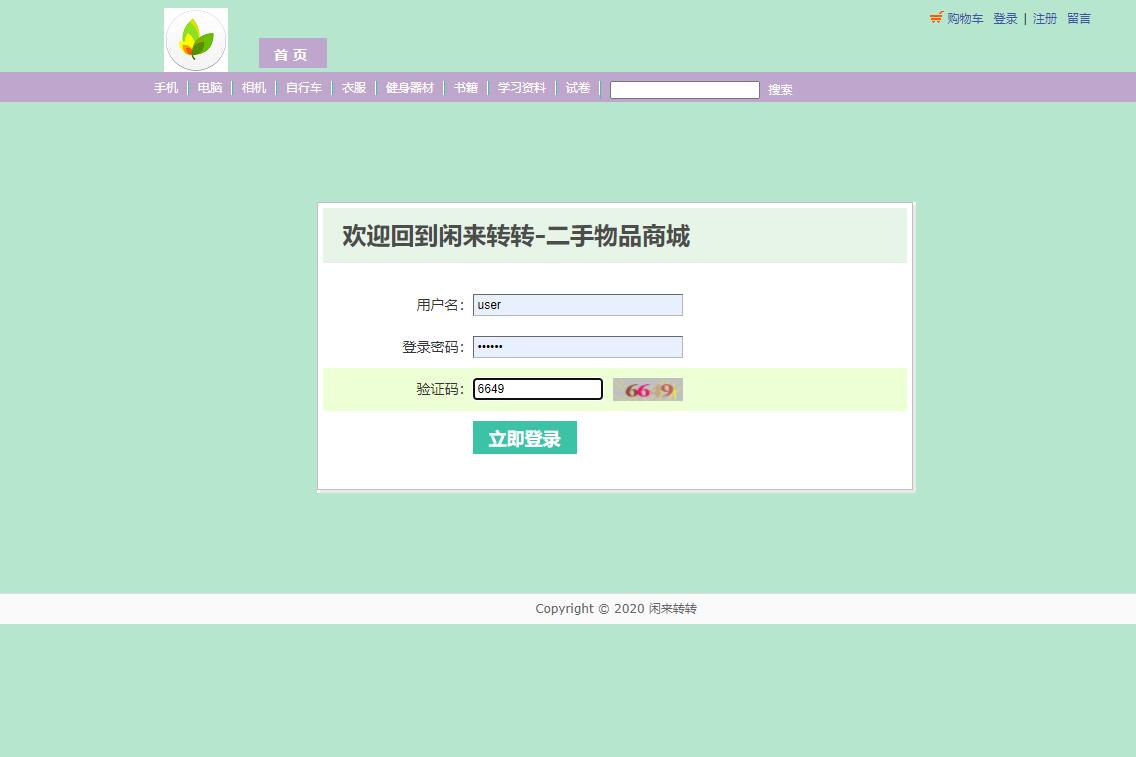
认证模块通过MD5加密存储用户密码,确保即使数据库泄露也不会直接暴露用户密码。Session超时机制有效防止用户长时间不操作导致的安全风险。基于用户类型的重定向逻辑实现了管理员与普通用户的界面分离。
商品管理与展示系统
商品管理模块支持卖家自主发布商品,系统自动生成商品列表并按分类展示。商品发布过程包含完整的表单验证和图片上传功能。
@WebServlet("/product/add")
public class AddProductServlet extends HttpServlet {
    protected void doPost(HttpServletRequest request, HttpServletResponse response)
            throws ServletException, IOException {
        // 验证用户登录状态
        HttpSession session = request.getSession();
        User user = (User) session.getAttribute("currentUser");
        if (user == null) {
            response.sendRedirect("../login.jsp");
            return;
        }

        // 获取表单数据
        String productName = request.getParameter("productName");
        String description = request.getParameter("description");
        BigDecimal price = new BigDecimal(request.getParameter("price"));
        int categoryId = Integer.parseInt(request.getParameter("categoryId"));
        String condition = request.getParameter("condition");

        // 处理图片上传
        Part filePart = request.getPart("image");
        String imageUrl = null;
        if (filePart != null && filePart.getSize() > 0) {
            imageUrl = FileUploadUtil.saveFile(filePart, "product_images");
        }

        // 创建商品对象并保存
        Product product = new Product();
        product.setProductName(productName);
        product.setDescription(description);
        product.setPrice(price);
        product.setCategoryId(categoryId);
        product.setSellerId(user.getUserId());
        product.setCondition(condition);
        product.setImageUrl(imageUrl);

        ProductDAO productDAO = new ProductDAO();
        boolean success = productDAO.addProduct(product);

        if (success) {
            response.sendRedirect("../user/my-products.jsp?message=add_success");
        } else {
            request.setAttribute("error", "商品发布失败,请重试");
            request.getRequestDispatcher("add-product.jsp").forward(request, response);
        }
    }
}
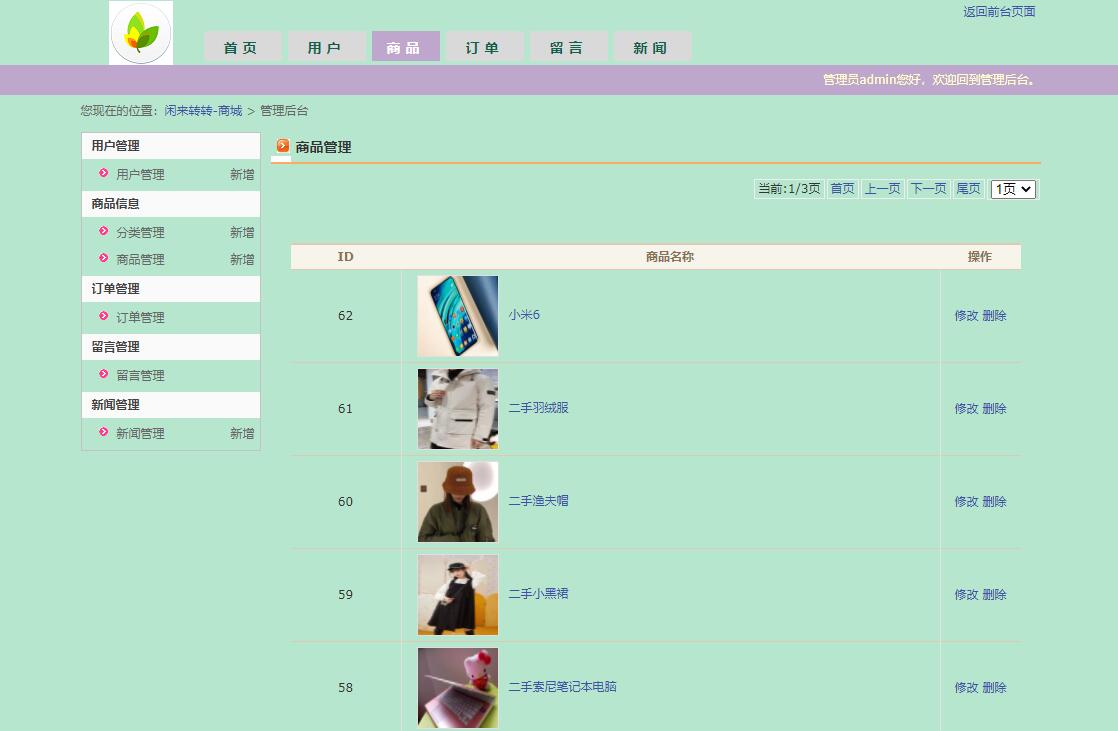
商品展示页面采用分页技术处理大量商品数据,通过JSTL标签库动态渲染商品信息。每个商品卡片包含图片、标题、价格和卖家信息等关键数据。
<%@ taglib prefix="c" uri="http://java.sun.com/jsp/jstl/core" %>
<div class="product-grid">
    <c:forEach var="product" items="${productList}">
        <div class="product-card">
            <img src="${product.imageUrl}" alt="${product.productName}"
                 onerror="this.src='images/default-product.png'">
            <div class="product-info">
                <h3>${product.productName}</h3>
                <p class="price">¥${product.price}</p>
                <p class="condition">成色:${product.condition}</p>
                <p class="seller">卖家:${product.seller.username}</p>
                <a href="product-detail.jsp?id=${product.productId}"
                   class="view-detail-btn">查看详情</a>
            </div>
        </div>
    </c:forEach>
</div>

<!-- 分页控件 -->
<div class="pagination">
    <c:if test="${currentPage > 1}">
        <a href="?page=${currentPage - 1}">上一页</a>
    </c:if>

    <c:forEach begin="1" end="${totalPages}" var="i">
        <a href="?page=${i}" class="${i == currentPage ? 'active' : ''}">${i}</a>
    </c:forEach>

    <c:if test="${currentPage < totalPages}">
        <a href="?page=${currentPage + 1}">下一页</a>
    </c:if>
</div>
购物车与订单处理流程
购物车功能采用Session存储临时数据,用户可以将心仪商品加入购物车,统一结算。订单生成过程包含库存检查、金额计算和状态初始化。
@WebServlet("/cart/add")
public class AddToCartServlet extends HttpServlet {
    protected void doPost(HttpServletRequest request, HttpServletResponse response)
            throws ServletException, IOException {
        int productId = Integer.parseInt(request.getParameter("productId"));
        int quantity = Integer.parseInt(request.getParameter("quantity"));

        // 验证商品存在性和库存
        ProductDAO productDAO = new ProductDAO();
        Product product = productDAO.getProductById(productId);

        if (product == null || product.getStockQuantity() < quantity) {
            response.sendError(HttpServletResponse.SC_BAD_REQUEST, "商品不存在或库存不足");
            return;
        }

        // 获取或创建购物车
        HttpSession session = request.getSession();
        Map<Integer, CartItem> cart = (Map<Integer, CartItem>) session.getAttribute("cart");
        if (cart == null) {
            cart = new HashMap<>();
        }

        // 添加商品到购物车
        if (cart.containsKey(productId)) {
            CartItem item = cart.get(productId);
            item.setQuantity(item.getQuantity() + quantity);
        } else {
            CartItem newItem = new CartItem(product, quantity);
            cart.put(productId, newItem);
        }

        session.setAttribute("cart", cart);
        response.sendRedirect("cart.jsp?message=add_success");
    }
}
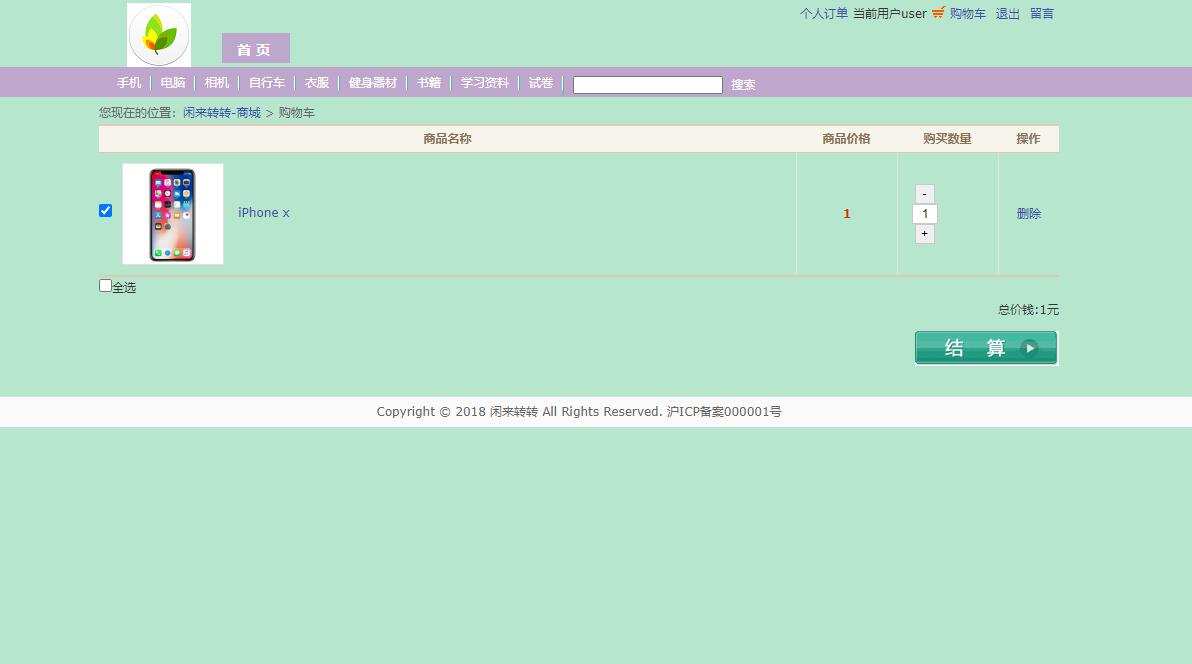
订单生成模块处理购物车中的商品集合,创建完整的订单记录并更新商品库存:
@WebServlet("/order/create")
public class CreateOrderServlet extends HttpServlet {
    protected void doPost(HttpServletRequest request, HttpServletResponse response)
            throws ServletException, IOException {
        HttpSession session = request.getSession();
        User user = (User) session.getAttribute("currentUser");
        Map<Integer, CartItem> cart = (Map<Integer, CartItem>) session.getAttribute("cart");

        if (user == null || cart == null || cart.isEmpty()) {
            response.sendRedirect("../login.jsp");
            return;
        }

        try {
            OrderDAO orderDAO = new OrderDAO();
            Order order = new Order();
            order.setBuyerId(user.getUserId());
            order.setOrderNumber(generateOrderNumber());
            order.setShippingAddress(request.getParameter("shippingAddress"));
            order.setContactPhone(request.getParameter("contactPhone"));
            order.setPaymentMethod(request.getParameter("paymentMethod"));

            // 计算总金额
            BigDecimal totalAmount = BigDecimal.ZERO;
            for (CartItem item : cart.values()) {
                totalAmount = totalAmount.add(item.getProduct().getPrice()
                    .multiply(new BigDecimal(item.getQuantity())));
            }
            order.setTotalAmount(totalAmount);

            // 创建订单和订单项
            boolean success = orderDAO.createOrder(order, cart);

            if (success) {
                session.removeAttribute("cart"); // 清空购物车
                response.sendRedirect("order-success.jsp?orderId=" + order.getOrderId());
            } else {
                throw new Exception("订单创建失败");
            }

        } catch (Exception e) {
            request.setAttribute("error", "订单创建失败: " + e.getMessage());
            request.getRequestDispatcher("checkout.jsp").forward(request, response);
        }
    }

    private String generateOrderNumber() {
        return "ORD" + System.currentTimeMillis() + (int)(Math.random() * 1000);
    }
}
管理员后台管理系统
管理员后台提供全面的系统管理功能,包括用户管理、商品审核、订单处理等。采用基于过滤器(Filter)的权限控制机制确保管理功能的安全性。
@WebFilter("/admin/*")
public class AdminAuthFilter implements Filter {
    public void doFilter(ServletRequest request, ServletResponse response,
            FilterChain chain) throws IOException, ServletException {
        HttpServletRequest httpRequest = (HttpServletRequest) request;
        HttpServletResponse httpResponse = (HttpServletResponse) response;

        HttpSession session = httpRequest.getSession(false);
        if (session == null || session.getAttribute("currentUser") == null) {
            httpResponse.sendRedirect(httpRequest.getContextPath() + "/login.jsp");
            return;
        }

        User user = (User) session.getAttribute("currentUser");
        if (!"admin".equals(user.getUserType())) {
            httpResponse.sendError(HttpServletResponse.SC_FORBIDDEN, "无权访问管理员功能");
            return;
        }

        chain.doFilter(request, response);
    }
}
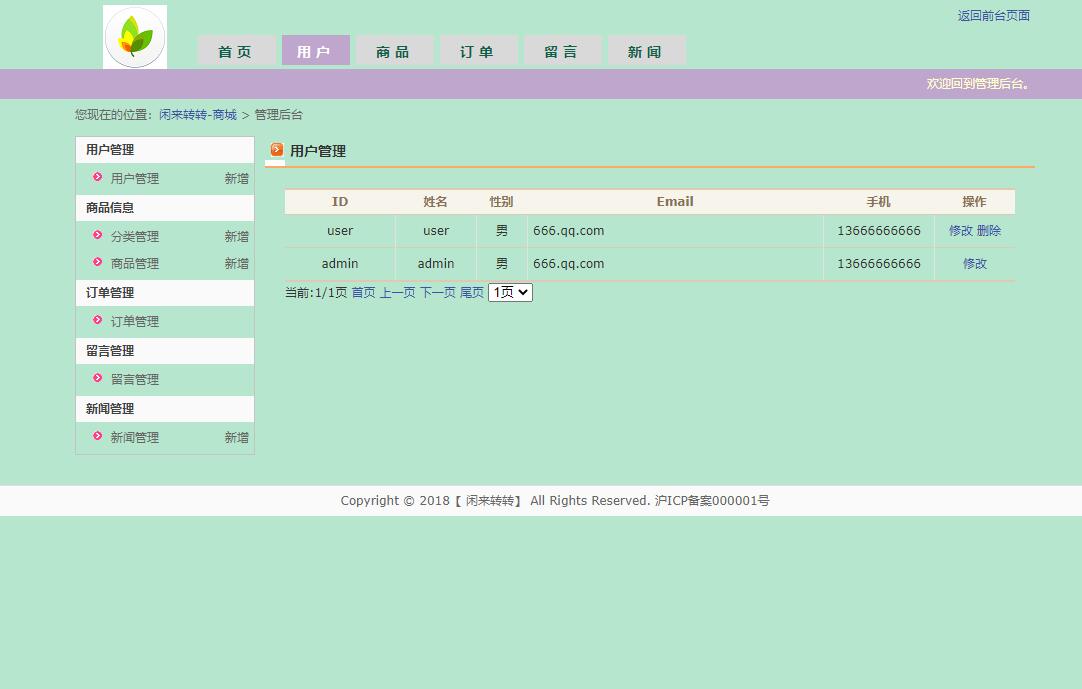
管理员商品管理界面提供批量操作和高级搜索功能:
<%@ page import="java.util.List" %>
<%@ page import="com.market.model.Product" %>
<%
// 获取搜索参数
String keyword = request.getParameter("keyword");
String categoryId = request.getParameter("categoryId");
String status = request.getParameter("status");

ProductDAO productDAO = new ProductDAO();
List<Product> products = productDAO.searchProducts(keyword, categoryId, status);
request.setAttribute("products", products);
%>

<div class="admin-toolbar">
    <form method="get" class="search-form">
        <input type="text" name="keyword" placeholder="搜索商品名称..."
               value="${param.keyword}">
        <select name="categoryId">
            <option value="">全部分类</option>
            <!-- 分类选项 -->
        </select>
        <select name="status">
            <option value="">全部状态</option>
            <option value="available">在售</option>
            <option value="sold">已售</option>
        </select>
        <button type="submit">搜索</button>
    </form>

    <div class="batch-actions">
        <button onclick="batchDelete()">批量删除</button>
        <button onclick="batchUpdateStatus('available')">批量上架</button>
    </div>
</div>

<table class="admin-table">
    <thead>
        <tr>
            <th><input type="checkbox" id="selectAll"></th>
            <th>商品ID</th>
            <th>商品名称</th>
            <th>价格</th>
            <th>卖家</th>
            <th>状态</th>
            <th>操作</th>
        </tr>
    </thead>
    <tbody>
        <c:forEach var="product" items="${products}">
        <tr>
            <td><input type="checkbox" name="productIds" value="${product.productId}"></td>
            <td>${product.productId}</td>
            <td>${product.productName}</td>
            <td>¥${product.price}</td>
            <td>${product.seller.username}</td>
            <td>
                <span class="status-${product.status}">${product.status}</span>
            </td>
            <td>
                <a href="product-edit.jsp?id=${product.productId}">编辑</a>
                <a href="#" onclick="deleteProduct(${product.productId})">删除</a>
            </td>
        </tr>
        </c:forEach>
    </tbody>
</table>
数据模型与业务逻辑实体
系统核心业务实体通过JavaBean进行建模,每个实体类包含完整的属性定义和业务方法:
public class Product {
    private int productId;
    private String productName;
    private String description;
    private BigDecimal price;
    private int categoryId;
    private int sellerId;
    private String imageUrl;
    private int stockQuantity;
    private String condition;
    private String status;
    private Date createdDate;
    private int viewCount;
    private User seller; // 关联对象
    private Category category;

    // 构造方法、getter和setter
    public Product() {}

    public Product(int productId, String productName, BigDecimal price) {
        this.productId = productId;
        this.productName = productName;
        this.price = price;
    }

    // 业务方法
    public boolean isAvailable() {
        return "available".equals(status) && stockQuantity > 0;
    }

    public void incrementViewCount() {
        this.viewCount++;
    }
}

public class Order {
    private int orderId;
    private String orderNumber;
    private int buyerId;
    private BigDecimal totalAmount;
    private String status;
    private Date orderDate;
    private String paymentMethod;
    private String shippingAddress;
    private String contactPhone;
    private User buyer;
    private List<OrderItem> orderItems;

    // 状态转换方法
    public boolean canBeCancelled() {
        return "pending".equals(status) || "confirmed".equals(status);
    }

    public void cancel() {
        if (canBeCancelled()) {
            this.status = "cancelled";
        }
    }
}
数据访问层采用DAO模式,提供统一的数据操作接口:
public class ProductDAO {
    private Connection connection;

    public ProductDAO() {
        this.connection = DatabaseConnection.getConnection();
    }

    public List<Product> getProductsByCategory(int categoryId, int limit, int offset) {
        List<Product> products = new ArrayList<>();
        String sql = "SELECT * FROM products WHERE category_id = ? AND status = 'available' " +
                    "ORDER BY created_date DESC LIMIT ? OFFSET ?";