美食社区平台技术架构与实现深度解析
项目背景与技术选型
在数字化生活日益普及的今天,传统纸质菜谱和零散的烹饪记录方式已无法满足现代美食爱好者的需求。美食社区平台应运而生,采用经典的J2EE技术栈构建,为烹饪爱好者提供了一个集中化、系统化的菜谱管理与分享解决方案。
该平台基于JSP+Servlet技术架构,严格遵循MVC设计模式。Servlet作为控制器层负责业务逻辑处理,JSP承担视图展示职责,JavaBean模型组件封装数据操作。这种分层架构确保了代码的可维护性和可扩展性。数据库采用MySQL,通过JDBC进行数据持久化操作,整体部署在Tomcat服务器环境中。
系统架构与技术栈深度剖析
MVC架构实现
平台采用经典的Model-View-Controller架构模式,各层职责分明:
**控制器层(Servlet)**处理所有HTTP请求,进行参数验证、业务逻辑调度和页面跳转控制。每个功能模块都有对应的Servlet处理类,确保单一职责原则。
@WebServlet("/RecipeServlet")
public class RecipeServlet extends HttpServlet {
    protected void doPost(HttpServletRequest request, HttpServletResponse response)
        throws ServletException, IOException {

        String action = request.getParameter("action");
        RecipeDAO recipeDAO = new RecipeDAO();

        switch(action) {
            case "publish":
                String title = request.getParameter("title");
                String ingredients = request.getParameter("ingredients");
                String steps = request.getParameter("steps");
                int userId = Integer.parseInt(request.getParameter("userId"));

                Recipe recipe = new Recipe();
                recipe.setTitle(title);
                recipe.setIngredients(ingredients);
                recipe.setSteps(steps);
                recipe.setUserId(userId);

                boolean success = recipeDAO.addRecipe(recipe);
                if(success) {
                    response.sendRedirect("view-recipes.jsp?message=published");
                }
                break;

            case "search":
                String keyword = request.getParameter("keyword");
                List<Recipe> recipes = recipeDAO.searchRecipes(keyword);
                request.setAttribute("recipes", recipes);
                request.getRequestDispatcher("search-results.jsp").forward(request, response);
                break;
        }
    }
}
**视图层(JSP)**使用JSTL标签和EL表达式进行数据展示,避免了在页面中嵌入Java代码,提高了可读性和维护性。
<%@ taglib prefix="c" uri="http://java.sun.com/jsp/jstl/core" %>
<div class="recipe-container">
    <c:forEach var="recipe" items="${recipes}">
        <div class="recipe-card">
            <h3>${recipe.title}</h3>
            <p class="ingredients">${recipe.ingredients}</p>
            <div class="steps">${recipe.steps}</div>
            <span class="author">发布者: ${recipe.userName}</span>
            <c:if test="${not empty sessionScope.user}">
                <button onclick="addToFavorites(${recipe.id})">收藏</button>
            </c:if>
        </div>
    </c:forEach>
</div>
**模型层(JavaBean)**封装业务数据和操作逻辑,通过DAO模式实现数据持久化。
public class Recipe {
    private int id;
    private String title;
    private String ingredients;
    private String steps;
    private int userId;
    private Date createTime;
    private String userName;

    // 标准的getter和setter方法
    public int getId() { return id; }
    public void setId(int id) { this.id = id; }

    public String getTitle() { return title; }
    public void setTitle(String title) { this.title = title; }

    // 其他getter/setter方法...
}
数据访问层设计
数据访问层采用DAO模式,封装了所有数据库操作细节,提供了清晰的数据操作接口。
public class RecipeDAO {
    private Connection getConnection() throws SQLException {
        return DriverManager.getConnection(
            "jdbc:mysql://localhost:3306/recipe_platform",
            "username", "password");
    }

    public boolean addRecipe(Recipe recipe) {
        String sql = "INSERT INTO recipes (title, ingredients, steps, user_id, create_time) VALUES (?, ?, ?, ?, NOW())";

        try (Connection conn = getConnection();
             PreparedStatement stmt = conn.prepareStatement(sql)) {

            stmt.setString(1, recipe.getTitle());
            stmt.setString(2, recipe.getIngredients());
            stmt.setString(3, recipe.getSteps());
            stmt.setInt(4, recipe.getUserId());

            return stmt.executeUpdate() > 0;
        } catch (SQLException e) {
            e.printStackTrace();
            return false;
        }
    }

    public List<Recipe> searchRecipes(String keyword) {
        List<Recipe> recipes = new ArrayList<>();
        String sql = "SELECT r.*, u.username FROM recipes r JOIN users u ON r.user_id = u.id " +
                    "WHERE r.title LIKE ? OR r.ingredients LIKE ? ORDER BY r.create_time DESC";

        try (Connection conn = getConnection();
             PreparedStatement stmt = conn.prepareStatement(sql)) {

            stmt.setString(1, "%" + keyword + "%");
            stmt.setString(2, "%" + keyword + "%");

            ResultSet rs = stmt.executeQuery();
            while (rs.next()) {
                Recipe recipe = new Recipe();
                recipe.setId(rs.getInt("id"));
                recipe.setTitle(rs.getString("title"));
                recipe.setIngredients(rs.getString("ingredients"));
                recipe.setSteps(rs.getString("steps"));
                recipe.setUserId(rs.getInt("user_id"));
                recipe.setUserName(rs.getString("username"));
                recipe.setCreateTime(rs.getDate("create_time"));
                recipes.add(recipe);
            }
        } catch (SQLException e) {
            e.printStackTrace();
        }
        return recipes;
    }
}
数据库设计精要
核心表结构分析
平台数据库包含7张核心表,其中用户表(users)、菜谱表(recipes)和收藏表(favorites)构成了系统的基础数据模型。
**用户表(users)**设计注重安全性和扩展性:
CREATE TABLE users (
    id INT PRIMARY KEY AUTO_INCREMENT,
    username VARCHAR(50) UNIQUE NOT NULL,
    email VARCHAR(100) UNIQUE NOT NULL,
    password_hash VARCHAR(255) NOT NULL,
    avatar_url VARCHAR(255),
    bio TEXT,
    created_at TIMESTAMP DEFAULT CURRENT_TIMESTAMP,
    last_login TIMESTAMP,
    status ENUM('active', 'inactive') DEFAULT 'active'
);
该表设计的亮点包括:
- 使用密码哈希存储而非明文,增强安全性
- 唯一约束确保用户名和邮箱不重复
- 状态字段支持用户账户管理
- 时间戳记录支持用户行为分析
**菜谱表(recipes)**设计支持丰富的菜谱信息:
CREATE TABLE recipes (
    id INT PRIMARY KEY AUTO_INCREMENT,
    title VARCHAR(200) NOT NULL,
    description TEXT,
    ingredients TEXT NOT NULL,
    steps TEXT NOT NULL,
    cooking_time INT,
    difficulty ENUM('easy', 'medium', 'hard') DEFAULT 'medium',
    servings INT,
    user_id INT NOT NULL,
    category_id INT,
    image_url VARCHAR(255),
    create_time TIMESTAMP DEFAULT CURRENT_TIMESTAMP,
    update_time TIMESTAMP DEFAULT CURRENT_TIMESTAMP ON UPDATE CURRENT_TIMESTAMP,
    view_count INT DEFAULT 0,
    status ENUM('published', 'draft', 'deleted') DEFAULT 'published',
    FOREIGN KEY (user_id) REFERENCES users(id) ON DELETE CASCADE,
    FOREIGN KEY (category_id) REFERENCES categories(id) ON DELETE SET NULL
);
此表设计的精妙之处:
- 文本字段使用TEXT类型,支持长篇菜谱内容
- 外键约束确保数据完整性
- 状态字段支持菜谱生命周期管理
- 自动更新时间戳便于内容 freshness 排序
- 浏览量统计支持热门推荐算法扩展
**收藏表(favorites)**实现多对多关系:
CREATE TABLE favorites (
    id INT PRIMARY KEY AUTO_INCREMENT,
    user_id INT NOT NULL,
    recipe_id INT NOT NULL,
    created_at TIMESTAMP DEFAULT CURRENT_TIMESTAMP,
    notes TEXT,
    FOREIGN KEY (user_id) REFERENCES users(id) ON DELETE CASCADE,
    FOREIGN KEY (recipe_id) REFERENCES recipes(id) ON DELETE CASCADE,
    UNIQUE KEY unique_favorite (user_id, recipe_id)
);
独特设计特点:
- 唯一约束防止重复收藏
- 级联删除确保数据一致性
- 备注字段增强用户体验
- 简洁的关系模型支持高效查询
核心功能实现深度解析
用户认证与授权系统
用户登录功能采用Session-based认证机制,确保安全性和用户体验。
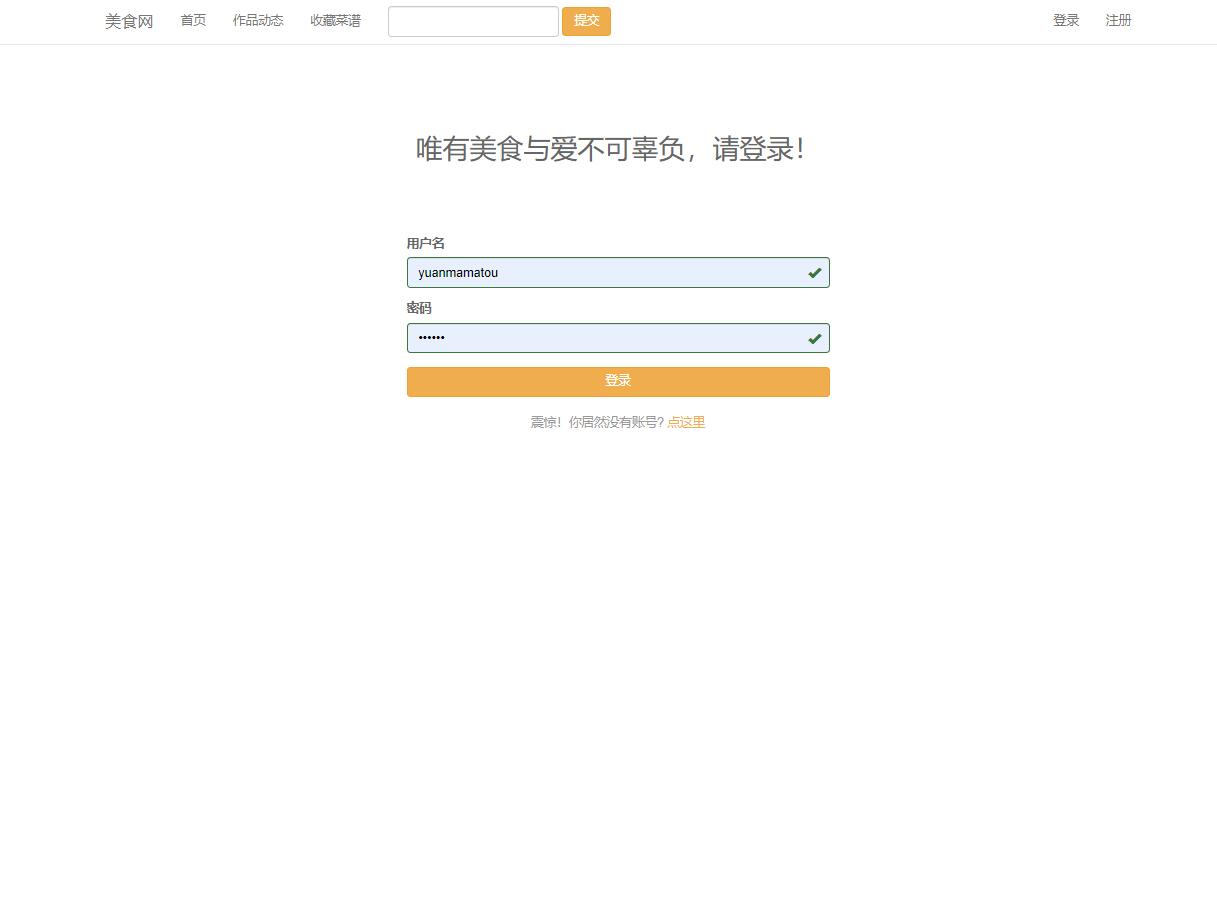
登录Servlet处理逻辑:
@WebServlet("/LoginServlet")
public class LoginServlet extends HttpServlet {
    protected void doPost(HttpServletRequest request, HttpServletResponse response)
        throws ServletException, IOException {

        String username = request.getParameter("username");
        String password = request.getParameter("password");

        UserDAO userDAO = new UserDAO();
        User user = userDAO.authenticate(username, password);

        if (user != null && user.getStatus().equals("active")) {
            HttpSession session = request.getSession();
            session.setAttribute("user", user);
            session.setMaxInactiveInterval(30 * 60); // 30分钟超时

            // 更新最后登录时间
            userDAO.updateLastLogin(user.getId());

            response.sendRedirect("home.jsp");
        } else {
            request.setAttribute("error", "用户名或密码错误");
            request.getRequestDispatcher("login.jsp").forward(request, response);
        }
    }
}
密码加密验证实现:
public class PasswordUtil {
    private static final int SALT_LENGTH = 16;
    private static final int HASH_ITERATIONS = 10000;

    public static String hashPassword(String password) {
        byte[] salt = generateSalt();
        byte[] hash = pbkdf2(password.toCharArray(), salt, HASH_ITERATIONS, 32);
        return HASH_ITERATIONS + ":" + toHex(salt) + ":" + toHex(hash);
    }

    public static boolean verifyPassword(String password, String storedHash) {
        String[] parts = storedHash.split(":");
        int iterations = Integer.parseInt(parts[0]);
        byte[] salt = fromHex(parts[1]);
        byte[] hash = fromHex(parts[2]);

        byte[] testHash = pbkdf2(password.toCharArray(), salt, iterations, hash.length);
        return slowEquals(hash, testHash);
    }

    private static byte[] generateSalt() {
        SecureRandom random = new SecureRandom();
        byte[] salt = new byte[SALT_LENGTH];
        random.nextBytes(salt);
        return salt;
    }
}
菜谱发布与管理功能
菜谱发布界面设计直观易用,支持富文本编辑和图片上传。
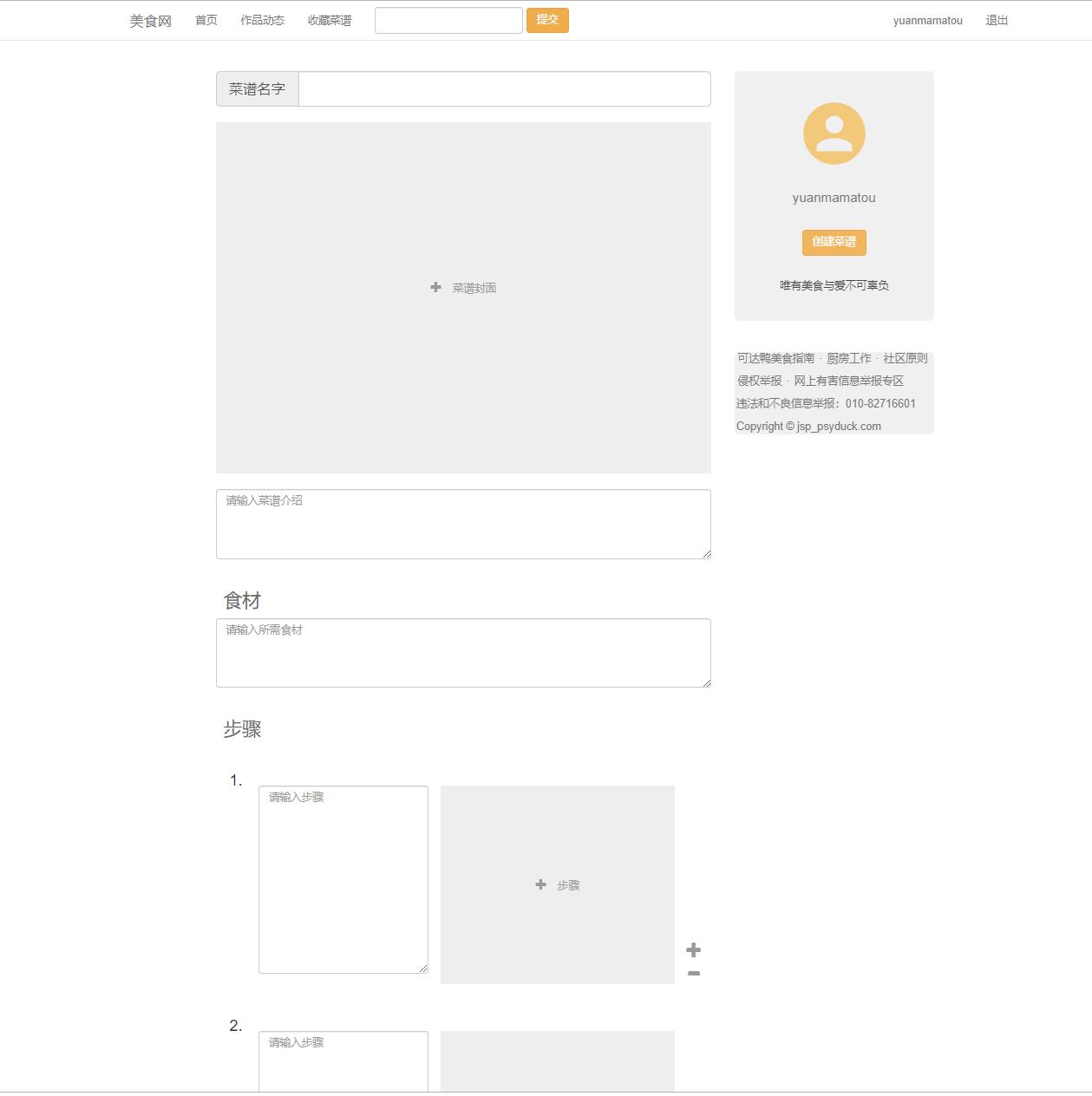
文件上传处理Servlet:
@WebServlet("/FileUploadServlet")
@MultipartConfig(
    maxFileSize = 1024 * 1024 * 5,      // 5MB
    maxRequestSize = 1024 * 1024 * 10   // 10MB
)
public class FileUploadServlet extends HttpServlet {
    protected void doPost(HttpServletRequest request, HttpServletResponse response)
        throws ServletException, IOException {

        Part filePart = request.getPart("recipeImage");
        String fileName = getFileName(filePart);

        if (fileName != null && !fileName.isEmpty()) {
            String uploadPath = getServletContext().getRealPath("") + File.separator + "uploads";
            File uploadDir = new File(uploadPath);
            if (!uploadDir.exists()) uploadDir.mkdir();

            // 生成唯一文件名防止冲突
            String fileExtension = fileName.substring(fileName.lastIndexOf("."));
            String uniqueFileName = System.currentTimeMillis() + "_" +
                                   UUID.randomUUID().toString() + fileExtension;

            String filePath = uploadPath + File.separator + uniqueFileName;
            filePart.write(filePath);

            // 保存文件路径到数据库
            String imageUrl = "uploads/" + uniqueFileName;
            request.setAttribute("imageUrl", imageUrl);
        }

        request.getRequestDispatcher("RecipeServlet").forward(request, response);
    }

    private String getFileName(Part part) {
        String contentDisp = part.getHeader("content-disposition");
        String[] tokens = contentDisp.split(";");
        for (String token : tokens) {
            if (token.trim().startsWith("filename")) {
                return token.substring(token.indexOf("=") + 2, token.length() - 1);
            }
        }
        return null;
    }
}
菜谱浏览与搜索系统
平台首页展示最新和最受欢迎的菜谱,提供多种浏览方式。
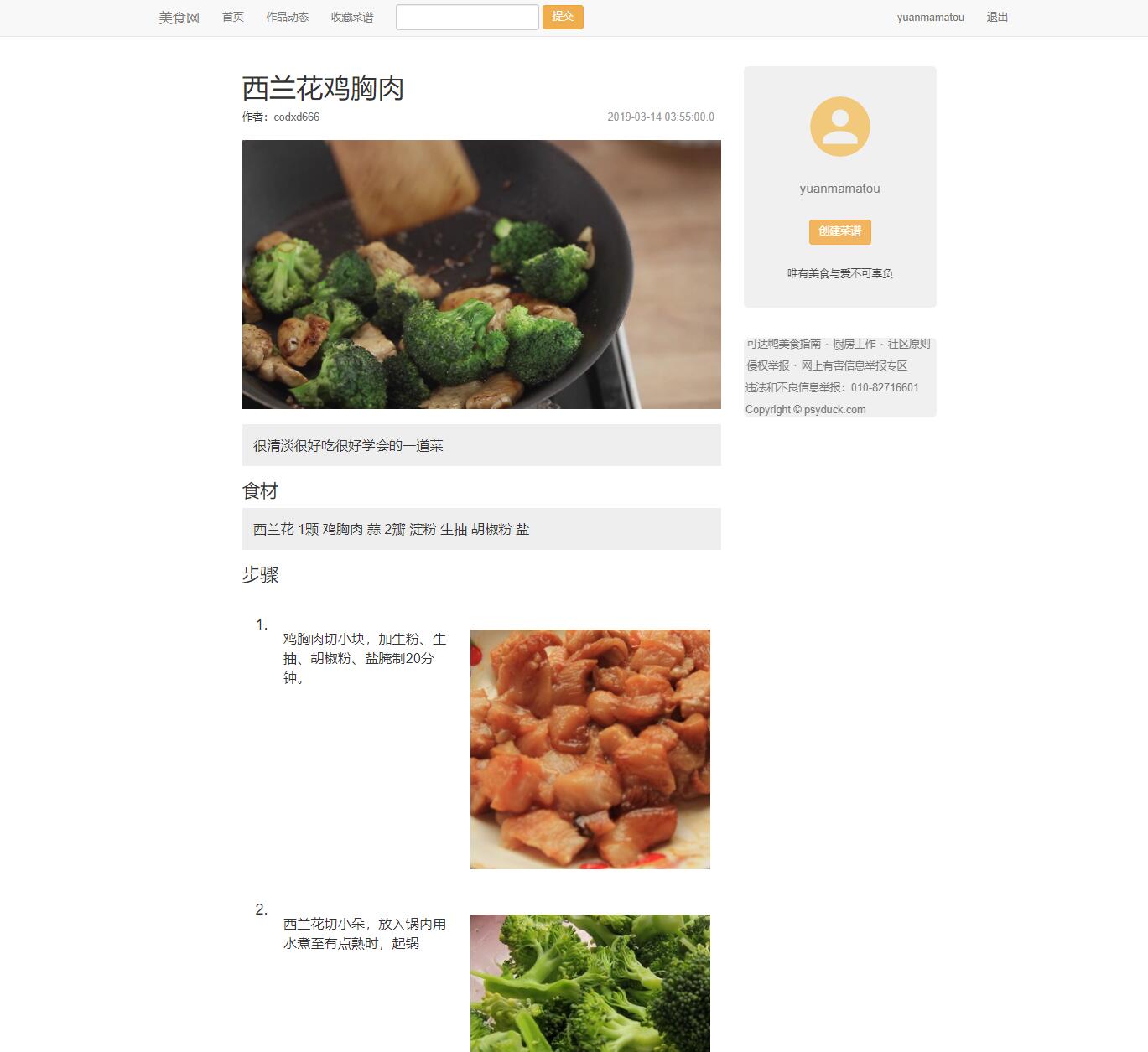
高级搜索功能实现:
public class AdvancedRecipeSearch {
    public List<Recipe> searchRecipes(SearchCriteria criteria) {
        StringBuilder sql = new StringBuilder(
            "SELECT r.*, u.username, c.name as category_name " +
            "FROM recipes r " +
            "JOIN users u ON r.user_id = u.id " +
            "LEFT JOIN categories c ON r.category_id = c.id " +
            "WHERE r.status = 'published'"
        );

        List<Object> parameters = new ArrayList<>();

        if (criteria.getKeyword() != null && !criteria.getKeyword().isEmpty()) {
            sql.append(" AND (r.title LIKE ? OR r.ingredients LIKE ? OR r.description LIKE ?)");
            String likePattern = "%" + criteria.getKeyword() + "%";
            parameters.add(likePattern);
            parameters.add(likePattern);
            parameters.add(likePattern);
        }

        if (criteria.getCategoryId() != null) {
            sql.append(" AND r.category_id = ?");
            parameters.add(criteria.getCategoryId());
        }

        if (criteria.getMaxCookingTime() != null) {
            sql.append(" AND r.cooking_time <= ?");
            parameters.add(criteria.getMaxCookingTime());
        }

        if (criteria.getDifficulty() != null) {
            sql.append(" AND r.difficulty = ?");
            parameters.add(criteria.getDifficulty());
        }

        // 排序逻辑
        switch (criteria.getSortBy()) {
            case "latest":
                sql.append(" ORDER BY r.create_time DESC");
                break;
            case "popular":
                sql.append(" ORDER BY r.view_count DESC");
                break;
            case "cooking_time":
                sql.append(" ORDER BY r.cooking_time ASC");
                break;
            default:
                sql.append(" ORDER BY r.create_time DESC");
        }

        // 分页逻辑
        if (criteria.getPage() != null && criteria.getPageSize() != null) {
            int offset = (criteria.getPage() - 1) * criteria.getPageSize();
            sql.append(" LIMIT ? OFFSET ?");
            parameters.add(criteria.getPageSize());
            parameters.add(offset);
        }

        return executeQuery(sql.toString(), parameters);
    }
}
个人收藏管理系统
收藏功能让用户可以保存感兴趣的菜谱,形成个人知识库。
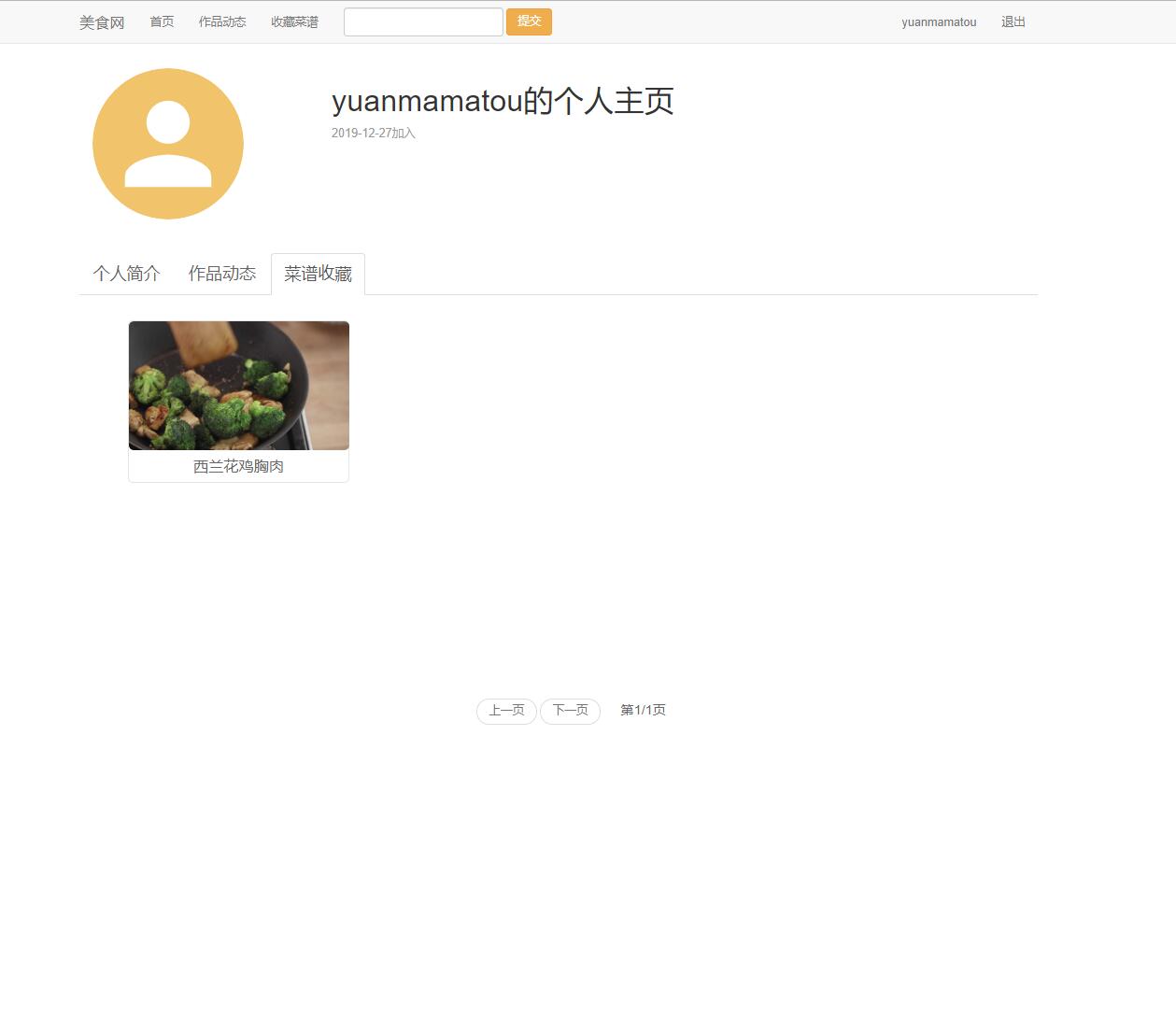
收藏业务逻辑实现:
public class FavoriteService {
    private FavoriteDAO favoriteDAO = new FavoriteDAO();
    private RecipeDAO recipeDAO = new RecipeDAO();

    public boolean addToFavorites(int userId, int recipeId, String notes) {
        // 检查菜谱是否存在
        Recipe recipe = recipeDAO.getRecipeById(recipeId);
        if (recipe == null || !recipe.getStatus().equals("published")) {
            return false;
        }

        // 检查是否已收藏
        if (favoriteDAO.isFavoriteExists(userId, recipeId)) {
            return false;
        }

        return favoriteDAO.addFavorite(userId, recipeId, notes);
    }

    public PaginatedResult<FavoriteRecipe> getUserFavorites(int userId, int page, int pageSize) {
        int offset = (page - 1) * pageSize;
        List<FavoriteRecipe> favorites = favoriteDAO.getUserFavorites(userId, pageSize, offset);
        int totalCount = favoriteDAO.getUserFavoriteCount(userId);
        int totalPages = (int) Math.ceil((double) totalCount / pageSize);

        return new PaginatedResult<>(favorites, page, pageSize, totalCount, totalPages);
    }

    public boolean removeFavorite(int userId, int recipeId) {
        return favoriteDAO.removeFavorite(userId, recipeId);
    }
}
实体模型与业务逻辑
核心业务对象关系
平台的核心业务模型围绕用户、菜谱、收藏三个主要实体展开,形成清晰的业务关系网:
// 用户实体扩展
public class UserProfile extends User {
    private int recipeCount;
    private int favoriteCount;
    private int followerCount;
    private int followingCount;
    private Date memberSince;
    private List<Recipe> recentRecipes;

    public double getCompletionRate() {
        int filledFields = 0;
        if (getBio() != null && !getBio().isEmpty()) filledFields++;
        if (getAvatarUrl() != null && !getAvatarUrl().isEmpty()) filledFields++;
        return (filledFields / 2.0) * 100;
    }
}

// 菜谱详情实体
public class RecipeDetail extends Recipe {
    private User author;
    private Category category;
    private boolean isFavorite;
    private double averageRating;
    private int ratingCount;
    private List<RecipeComment> comments;
    private List<Recipe> relatedRecipes;

    public String getFormattedCookingTime() {
        if (getCookingTime() < 60) {
            return getCookingTime() + "分钟";
        } else {
            int hours = getCookingTime() / 60;
            int minutes = getCookingTime() % 60;
            return hours + "小时" + (minutes > 0 ? minutes + "分钟" : "");
        }
    }
}
业务服务层设计
服务层封装复杂业务逻辑,提供统一的业务接口: