在医疗信息化快速发展的今天,传统线下挂号模式因其耗时耗力、信息不透明等痛点,已难以满足现代患者对高效便捷医疗服务的需求。针对这一现状,一个基于JSP+Servlet技术栈构建的在线医疗预约挂号平台应运而生,我们可称其为“医捷通”预约系统。该系统通过数字化手段重构了医患连接方式,实现了医疗资源的优化配置与就诊流程的线上化闭环。
系统采用经典的三层架构模式,清晰地将应用划分为表示层、业务逻辑层和数据持久层。表示层由JSP(JavaServer Pages)负责,利用其动态页面生成能力,结合HTML、CSS和JavaScript构建用户界面,实现数据的可视化展示与交互。业务逻辑层以Servlet为核心,作为系统的控制中枢,处理所有来自前端的HTTP请求,如用户认证、预约提交、数据查询等,并调用相应的业务组件完成处理。数据持久层则通过JDBC(Java Database Connectivity)与MySQL数据库进行交互,确保患者信息、医生排班、预约记录等关键数据的可靠存储与高效访问。项目采用Maven进行依赖管理,保证了第三方库版本的一致性和项目构建的标准化。
数据库设计是系统稳定运行的基石,其核心表结构的设计直接关系到业务逻辑的复杂度和数据一致性。系统共设计了9张核心数据表,以下是几个关键表的结构分析:
患者表(patient) 的设计不仅涵盖了基本的身份信息,还通过status字段实现了账户的状态管理(如激活、禁用),增强了系统的管理灵活性。verification_code和code_expiry字段的引入,为基于邮箱的注册验证流程提供了数据支撑,体现了对安全性的考虑。
CREATE TABLE patient (
  patient_id int NOT NULL AUTO_INCREMENT,
  username varchar(50) NOT NULL,
  password varchar(255) NOT NULL,
  email varchar(100) NOT NULL,
  full_name varchar(100) NOT NULL,
  date_of_birth date DEFAULT NULL,
  gender enum('Male','Female','Other') DEFAULT NULL,
  phone_number varchar(20) DEFAULT NULL,
  address text,
  verification_code varchar(10) DEFAULT NULL,
  code_expiry datetime DEFAULT NULL,
  status enum('Active','Inactive') DEFAULT 'Inactive',
  created_at timestamp NULL DEFAULT CURRENT_TIMESTAMP,
  PRIMARY KEY (patient_id),
  UNIQUE KEY username (username),
  UNIQUE KEY email (email)
);
预约表(appointment) 的设计是业务逻辑的核心。它通过外键patient_id和schedule_id分别关联患者与医生排班,明确了预约关系的实体。status字段使用枚举类型定义了预约的生命周期状态(如待确认、已预约、已完成、已取消),是驱动系统流程状态转换的关键。appointment_date和symptoms等字段则记录了具体的就诊信息。
CREATE TABLE appointment (
  appointment_id int NOT NULL AUTO_INCREMENT,
  patient_id int NOT NULL,
  schedule_id int NOT NULL,
  appointment_date date NOT NULL,
  symptoms text,
  status enum('Pending','Confirmed','Completed','Cancelled') DEFAULT 'Pending',
  created_at timestamp NULL DEFAULT CURRENT_TIMESTAMP,
  PRIMARY KEY (appointment_id),
  KEY patient_id (patient_id),
  KEY schedule_id (schedule_id),
  CONSTRAINT appointment_ibfk_1 FOREIGN KEY (patient_id) REFERENCES patient (patient_id),
  CONSTRAINT appointment_ibfk_2 FOREIGN KEY (schedule_id) REFERENCES doctor_schedule (schedule_id)
);
医生排班表(doctor_schedule) 的设计巧妙地将医生、科室和可预约时段进行绑定。date和available_slots字段共同决定了某天某医生的号源总量,而booked_slots字段则实时反映了已被预约的数量,二者之差即为剩余可预约号源,这是实现号源控制的基础。status字段允许管理员对排班进行启用或停用操作。
CREATE TABLE doctor_schedule (
  schedule_id int NOT NULL AUTO_INCREMENT,
  doctor_id int NOT NULL,
  department_id int NOT NULL,
  date date NOT NULL,
  available_slots int NOT NULL,
  booked_slots int DEFAULT '0',
  status enum('Available','Full','Cancelled') DEFAULT 'Available',
  created_at timestamp NULL DEFAULT CURRENT_TIMESTAMP,
  PRIMARY KEY (schedule_id),
  KEY doctor_id (doctor_id),
  KEY department_id (department_id),
  CONSTRAINT doctor_schedule_ibfk_1 FOREIGN KEY (doctor_id) REFERENCES doctor (doctor_id),
  CONSTRAINT doctor_schedule_ibfk_2 FOREIGN KEY (department_id) REFERENCES department (department_id)
);
系统的核心功能围绕不同角色的用户展开,主要包括患者端、医生端和管理员端。
1. 患者注册与认证
患者通过注册功能创建账户。前端表单收集用户名、密码、邮箱等信息,提交至PatientRegisterServlet。该Servlet负责数据验证、密码加密(通常使用MD5或BCrypt),并生成随机验证码发送至用户邮箱。只有邮箱验证成功后,账户状态才会被激活。登录功能则由LoginServlet处理,它核对凭证后,将用户对象存入HttpSession,为后续的权限控制提供依据。
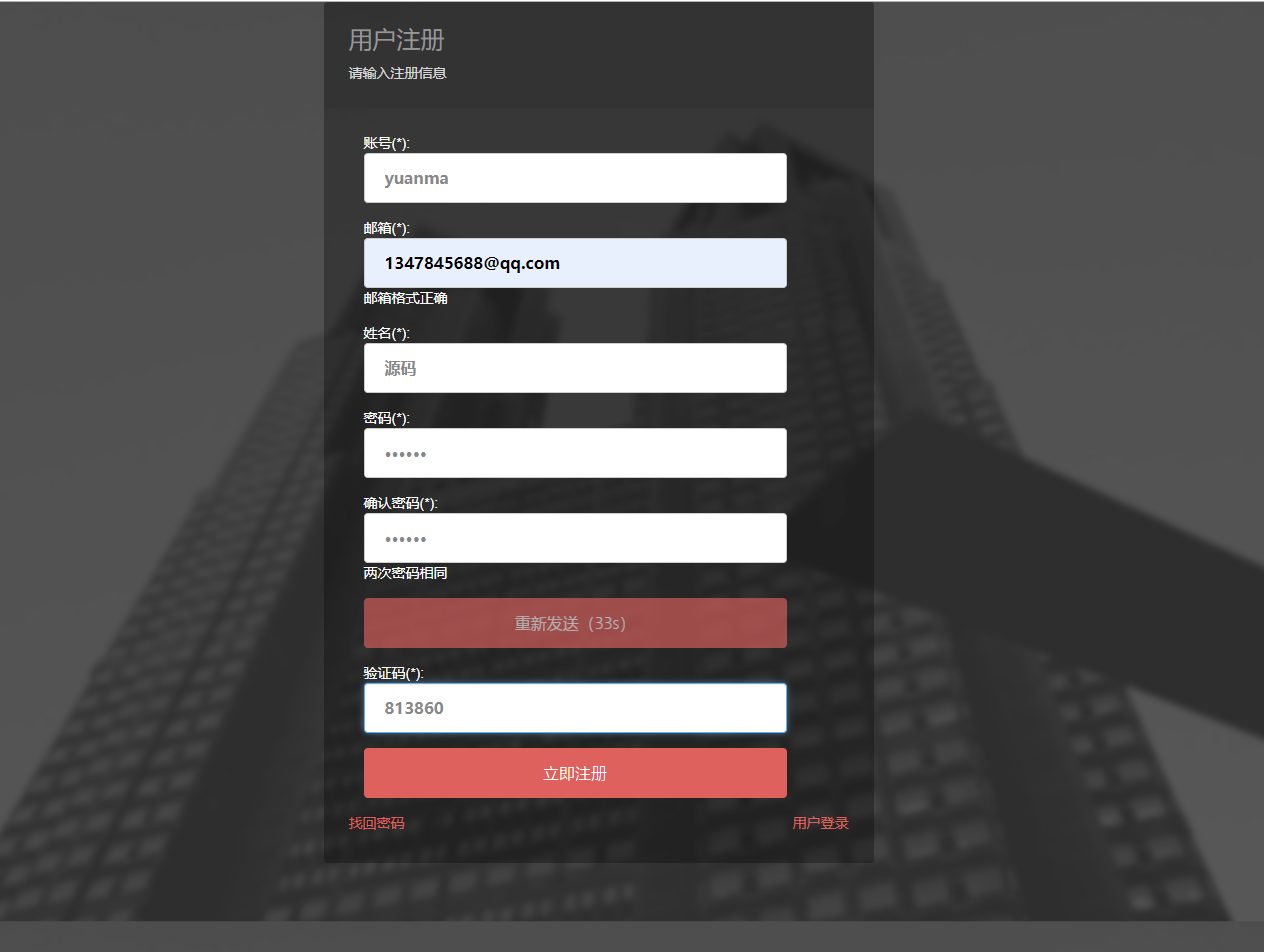
核心代码:用户注册Servlet片段
// PatientRegisterServlet.java
protected void doPost(HttpServletRequest request, HttpServletResponse response) throws ServletException, IOException {
    String username = request.getParameter("username");
    String password = request.getParameter("password");
    String email = request.getParameter("email");
    String fullName = request.getParameter("full_name");

    // 检查用户名和邮箱是否已存在
    PatientDAO patientDAO = new PatientDAO();
    if (patientDAO.isUsernameExists(username)) {
        request.setAttribute("errorMessage", "用户名已存在");
        request.getRequestDispatcher("/register.jsp").forward(request, response);
        return;
    }
    if (patientDAO.isEmailExists(email)) {
        request.setAttribute("errorMessage", "邮箱已被注册");
        request.getRequestDispatcher("/register.jsp").forward(request, response);
        return;
    }

    // 加密密码
    String encryptedPassword = HashUtil.md5(password);

    // 生成验证码
    String verificationCode = generateVerificationCode();
    Date expiryTime = new Date(System.currentTimeMillis() + 30 * 60 * 1000); // 30分钟后过期

    Patient patient = new Patient();
    patient.setUsername(username);
    patient.setPassword(encryptedPassword);
    patient.setEmail(email);
    patient.setFullName(fullName);
    patient.setVerificationCode(verificationCode);
    patient.setCodeExpiry(new java.sql.Timestamp(expiryTime.getTime()));
    patient.setStatus("Inactive");

    if (patientDAO.addPatient(patient)) {
        // 发送验证邮件
        EmailUtil.sendVerificationEmail(email, verificationCode);
        response.sendRedirect("register-success.jsp");
    } else {
        request.setAttribute("errorMessage", "注册失败,请重试");
        request.getRequestDispatcher("/register.jsp").forward(request, response);
    }
}
2. 智能预约与号源管理
这是系统的核心价值所在。患者登录后,可浏览科室列表和医生介绍。
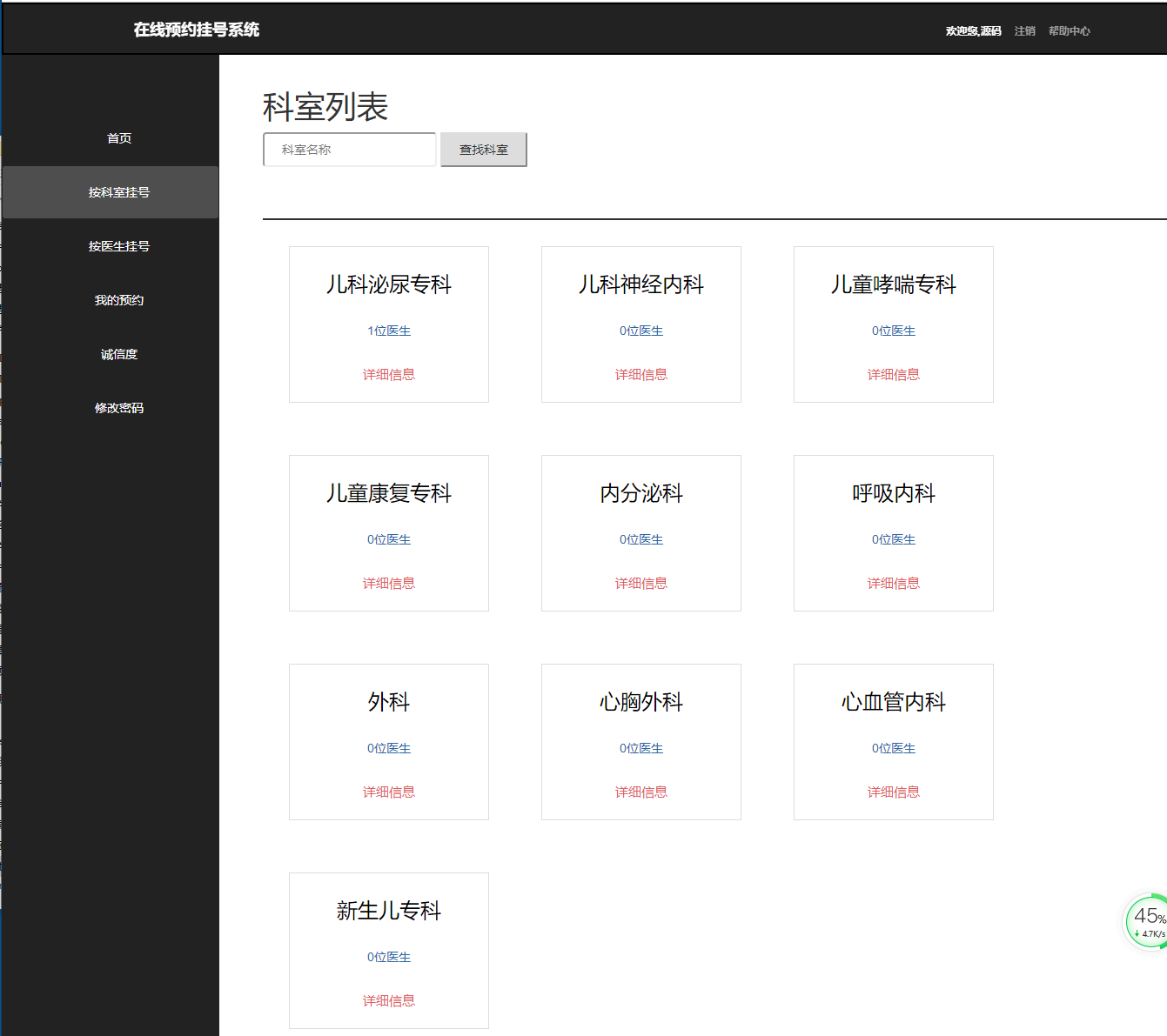 选择目标科室后,系统展示该科室下所有医生的近期排班。
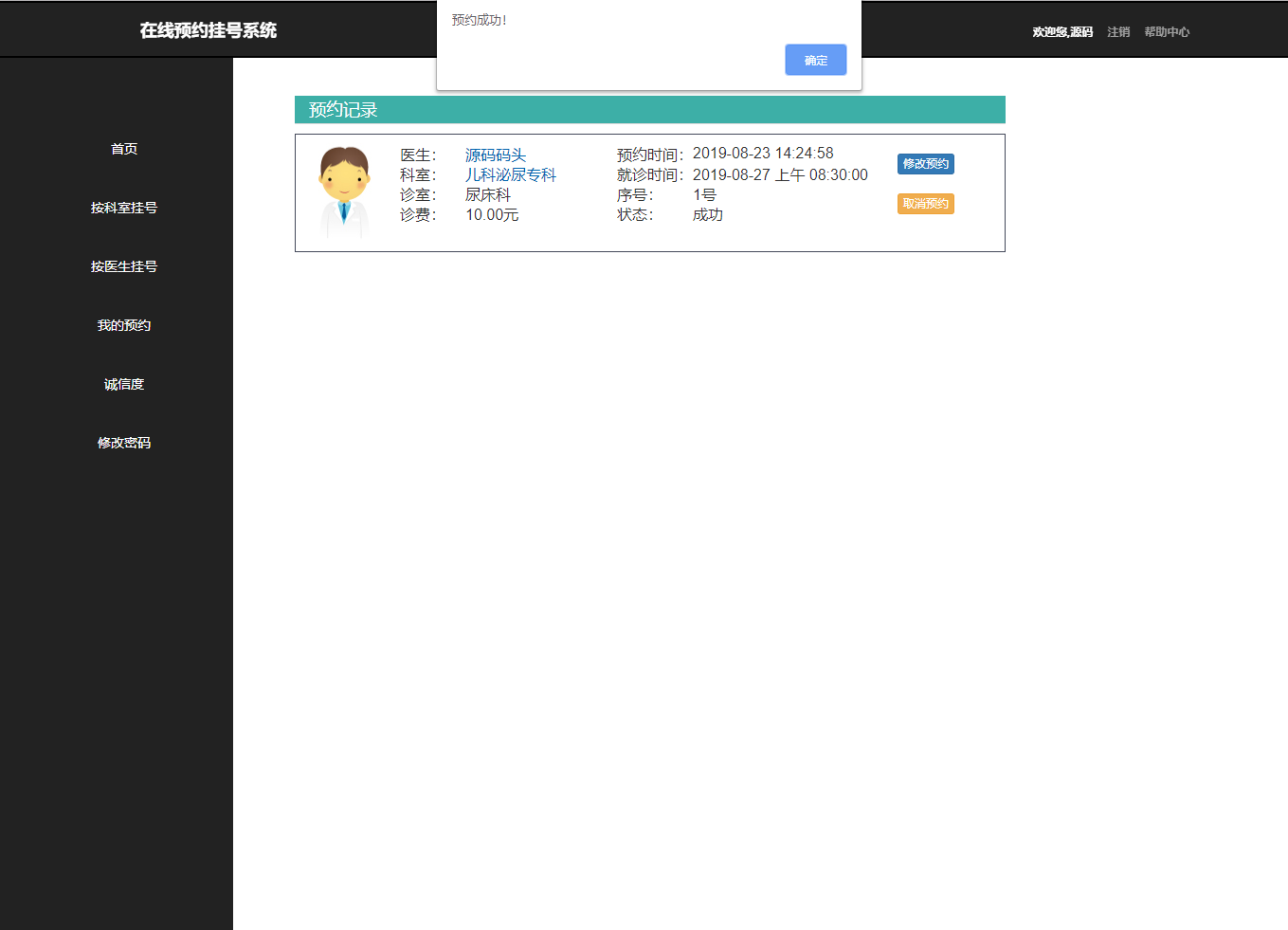
AppointmentServlet处理预约请求,其关键逻辑是并发控制:在患者提交预约时,需要原子性地检查并更新doctor_schedule表中的booked_slots,确保不会出现超售现象。这通常通过数据库的乐观锁或悲观锁机制实现。
核心代码:预约提交Servlet片段
// AppointmentServlet.java
protected void doPost(HttpServletRequest request, HttpServletResponse response) throws ServletException, IOException {
    HttpSession session = request.getSession();
    Patient patient = (Patient) session.getAttribute("patient");
    if (patient == null) {
        response.sendRedirect("login.jsp");
        return;
    }

    int scheduleId = Integer.parseInt(request.getParameter("schedule_id"));
    String symptoms = request.getParameter("symptoms");
    Date appointmentDate = new Date(); // 实际应从请求中获取

    AppointmentDAO appointmentDAO = new AppointmentDAO();
    DoctorScheduleDAO scheduleDAO = new DoctorScheduleDAO();

    Connection conn = null;
    try {
        conn = DatabaseConnection.getConnection();
        conn.setAutoCommit(false); // 开启事务

        // 1. 检查号源是否充足(使用行级锁)
        DoctorSchedule schedule = scheduleDAO.getScheduleByIdForUpdate(scheduleId, conn);
        if (schedule == null || schedule.getBookedSlots() >= schedule.getAvailableSlots()) {
            request.setAttribute("errorMessage", "号源已满,预约失败");
            request.getRequestDispatcher("/appointment.jsp").forward(request, response);
            conn.rollback();
            return;
        }

        // 2. 创建预约记录
        Appointment appointment = new Appointment();
        appointment.setPatientId(patient.getPatientId());
        appointment.setScheduleId(scheduleId);
        appointment.setAppointmentDate(new java.sql.Date(appointmentDate.getTime()));
        appointment.setSymptoms(symptoms);
        appointment.setStatus("Pending");

        boolean appointmentSuccess = appointmentDAO.addAppointment(appointment, conn);

        // 3. 更新已预约数量
        boolean updateSuccess = scheduleDAO.incrementBookedSlots(scheduleId, conn);

        if (appointmentSuccess && updateSuccess) {
            conn.commit(); // 提交事务
            response.sendRedirect("booking-success.jsp");
        } else {
            conn.rollback(); // 回滚事务
            request.setAttribute("errorMessage", "预约失败,请重试");
            request.getRequestDispatcher("/appointment.jsp").forward(request, response);
        }
    } catch (Exception e) {
        if (conn != null) {
            try { conn.rollback(); } catch (SQLException ex) {}
        }
        e.printStackTrace();
        // 处理异常
    } finally {
        // 关闭连接
    }
}
3. 医生工作台与队列管理
医生登录系统后,可以查看自己的排班信息和当日就诊队列。ViewScheduleServlet负责查询并展示医生的未来排班。PatientQueueServlet则根据当前日期和医生ID,从appointment表中检索状态为“已确认”的预约,并按时间顺序生成候诊队列,极大方便了医生规划诊疗顺序。
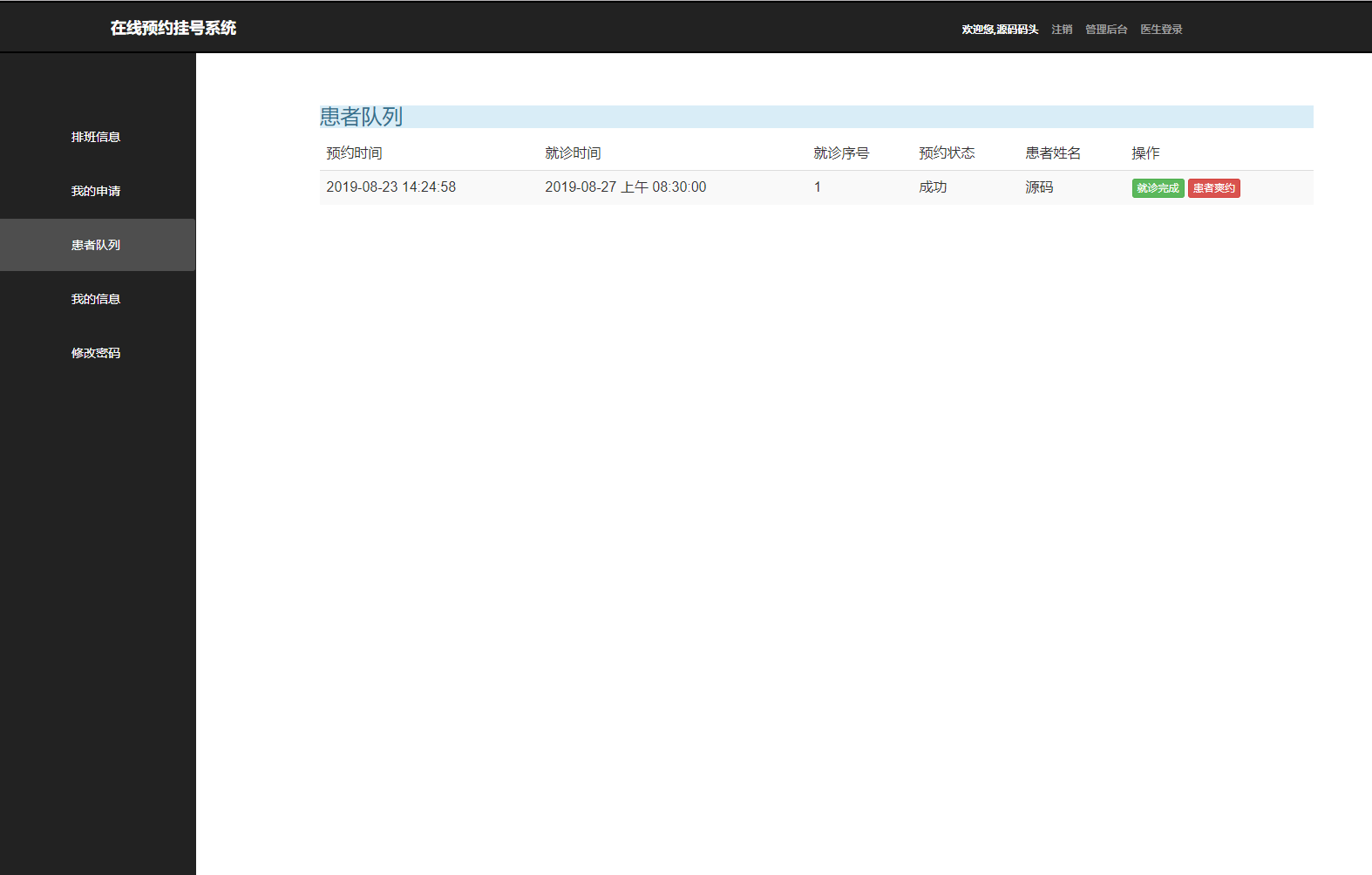
核心代码:医生查看患者队列Servlet片段
// PatientQueueServlet.java
protected void doGet(HttpServletRequest request, HttpServletResponse response) throws ServletException, IOException {
    HttpSession session = request.getSession();
    Doctor doctor = (Doctor) session.getAttribute("doctor");
    if (doctor == null) {
        response.sendRedirect("doctor-login.jsp");
        return;
    }

    String dateStr = request.getParameter("date");
    Date targetDate;
    if (dateStr != null && !dateStr.isEmpty()) {
        try {
            targetDate = new SimpleDateFormat("yyyy-MM-dd").parse(dateStr);
        } catch (ParseException e) {
            targetDate = new Date(); // 默认今天
        }
    } else {
        targetDate = new Date();
    }

    AppointmentDAO appointmentDAO = new AppointmentDAO();
    List<AppointmentDetail> queueList = appointmentDAO.getAppointmentsByDoctorAndDate(doctor.getDoctorId(), new java.sql.Date(targetDate.getTime()));

    request.setAttribute("queueList", queueList);
    request.setAttribute("selectedDate", new SimpleDateFormat("yyyy-MM-dd").format(targetDate));
    request.getRequestDispatcher("/doctor/patient-queue.jsp").forward(request, response);
}
4. 管理员数据看板与资源调配
管理员拥有最高权限,可以管理医生、科室、患者信息,并查看全局数据报表。AdminDashboardServlet会聚合来自多张表的数据,生成可视化的图表,如按科室统计的预约量趋势图,为医院管理层决策提供数据支持。
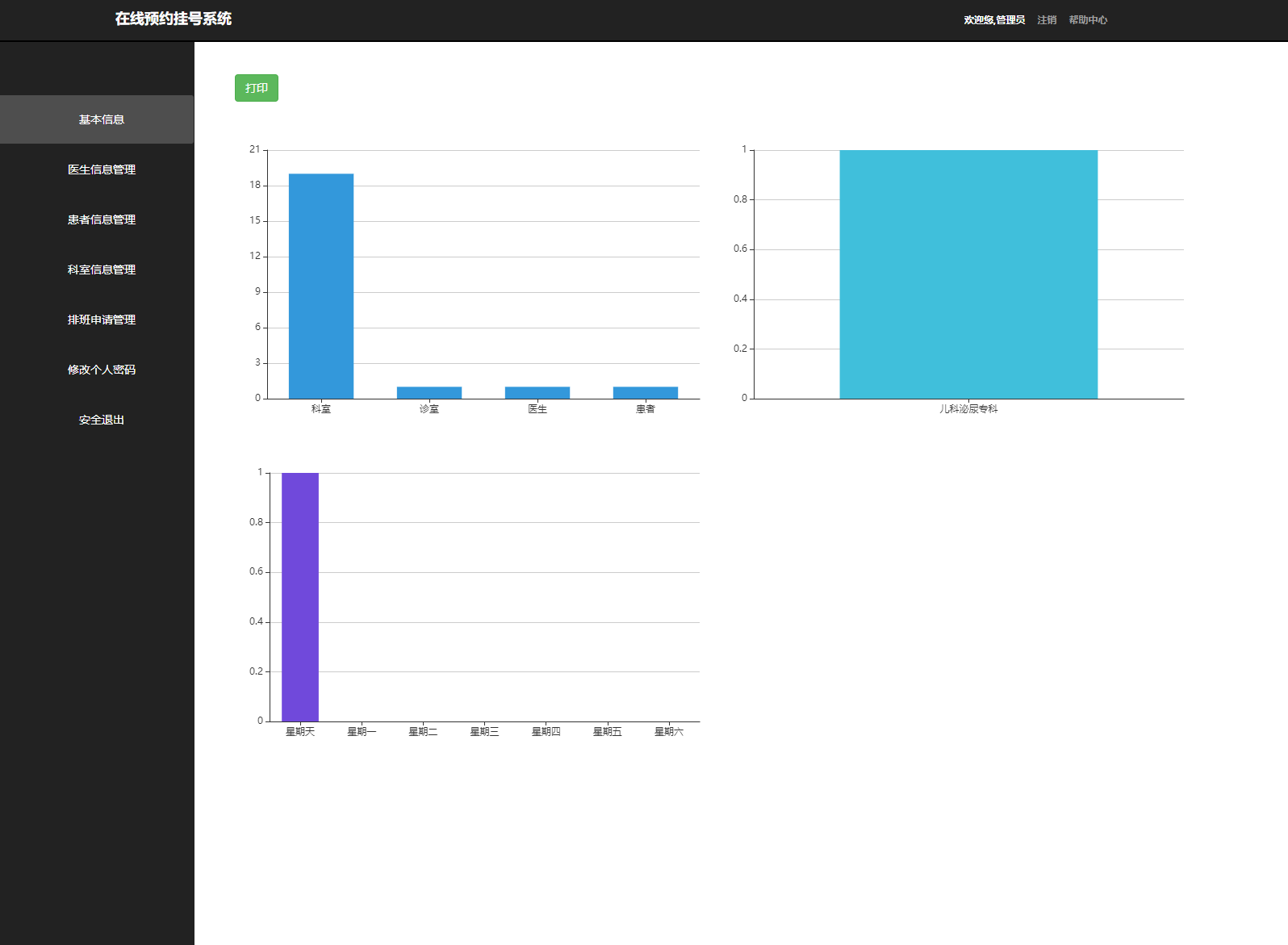
核心代码:数据统计Servlet片段
// AdminDashboardServlet.java
protected void doGet(HttpServletRequest request, HttpServletResponse response) throws ServletException, IOException {
    AdminDAO adminDAO = new AdminDAO();

    // 获取近期预约趋势(最近7天)
    Map<String, Integer> appointmentTrend = adminDAO.getAppointmentTrend(7);

    // 获取各科室预约占比
    Map<String, Integer> departmentDistribution = adminDAO.getAppointmentDistributionByDepartment();

    // 获取医生工作量排名
    List<DoctorWorkload> doctorWorkload = adminDAO.getDoctorWorkloadTopN(10);

    request.setAttribute("appointmentTrend", appointmentTrend);
    request.setAttribute("departmentDistribution", departmentDistribution);
    request.setAttribute("doctorWorkload", doctorWorkload);
    request.getRequestDispatcher("/admin/dashboard.jsp").forward(request, response);
}
系统的实体模型清晰地定义了业务对象及其关系。核心实体如Patient、Doctor、Department、Appointment、DoctorSchedule等,通过DAO(Data Access Object)模式进行持久化操作。每个DAO类封装了对应实体的CRUD(增删改查)操作,并通过DatabaseUtil类获取数据库连接,确保数据访问层的一致性。
核心代码:数据库连接工具类
// DatabaseConnection.java
public class DatabaseConnection {
    private static final String URL = "jdbc:mysql://localhost:3306/medical_appointment?useSSL=false&serverTimezone=UTC";
    private static final String USERNAME = "root";
    private static final String PASSWORD = "password";

    public static Connection getConnection() {
        Connection conn = null;
        try {
            Class.forName("com.mysql.cj.jdbc.Driver");
            conn = DriverManager.getConnection(URL, USERNAME, PASSWORD);
        } catch (ClassNotFoundException | SQLException e) {
            e.printStackTrace();
        }
        return conn;
    }

    public static void closeConnection(Connection conn) {
        if (conn != null) {
            try {
                conn.close();
            } catch (SQLException e) {
                e.printStackTrace();
            }
        }
    }
}
核心代码:患者实体类
// Patient.java
public class Patient {
    private int patientId;
    private String username;
    private String password;
    private String email;
    private String fullName;
    private Date dateOfBirth;
    private String gender;
    private String phoneNumber;
    private String address;
    private String verificationCode;
    private Timestamp codeExpiry;
    private String status;
    private Timestamp createdAt;

    // 无参构造器、全参构造器、getter和setter方法
    public Patient() {}

    public Patient(int patientId, String username, String password, String email, String fullName, Date dateOfBirth, String gender, String phoneNumber, String address, String verificationCode, Timestamp codeExpiry, String status, Timestamp createdAt) {
        this.patientId = patientId;
        this.username = username;
        this.password = password;
        this.email = email;
        this.fullName = fullName;
        this.dateOfBirth = dateOfBirth;
        this.gender = gender;
        this.phoneNumber = phoneNumber;
        this.address = address;
        this.verificationCode = verificationCode;
        this.codeExpiry = codeExpiry;
        this.status = status;
        this.createdAt = createdAt;
    }

    // Getter and Setter methods...
    public int getPatientId() { return patientId; }
    public void setPatientId(int patientId) { this.patientId = patientId; }
    // ... 其他getter/setter
}
尽管“医捷通”系统已经实现了核心的预约功能,但在以下方面仍有优化和扩展空间:
高并发号源处理:在号源释放(如早上8点开放未来一周的号源)时,可能会面临极高的并发请求。当前基于数据库行锁的方案可能成为瓶颈。未来可引入Redis等内存数据库,利用其原子操作(如DECR)实现号源库存的缓存与高速扣减,再将结果异步持久化到MySQL,从而大幅提升系统吞吐量。
消息推送与智能提醒:集成短信或微信模板消息服务,在预约成功、就诊前一日、医生停诊等关键节点主动推送提醒给患者,提升用户体验,减少爽约率。可使用消息队列(如RabbitMQ)异步处理发送任务,避免阻塞主业务流程。
分库分表与读写分离:随着医院规模和用户量的增长,单一的MySQL数据库可能面临性能压力。未来可根据业务特性进行垂直分库(如用户库、预约库),并对数据量大的表(如
appointment)进行水平分表(按时间范围)。同时,配置主从复制,实现读写分离,减轻主库压力。微服务架构重构:当前单体架构在功能复杂后,会面临模块耦合、部署不灵活等问题。可考虑将系统拆分为用户中心、预约服务、排班服务、消息服务等独立的微服务。每个服务使用Spring Boot开发,通过Spring Cloud套件(Eureka, Feign, Gateway等)进行服务治理,提升系统的弹性、可维护性和可扩展性。
数据分析与智能推荐:在积累足够多的预约数据后,可以构建数据分析模块。利用大数据技术分析各科室、医生的就诊高峰时段、患者偏好等,进而为患者提供智能化的医生推荐,或为医院管理层的资源调配提供更深入的决策支持。
该系统通过严谨的MVC架构、合理的数据库设计以及清晰的业务逻辑实现,成功地将传统的线下挂号流程迁移至线上,有效提升了医疗服务的效率与透明度。其技术选型成熟稳定,代码结构清晰,为后续的功能增强和性能优化奠定了坚实的基础。随着医疗信息化的深入发展,此类平台将在优化医疗资源配置、改善患者就医体验方面发挥越来越重要的作用。