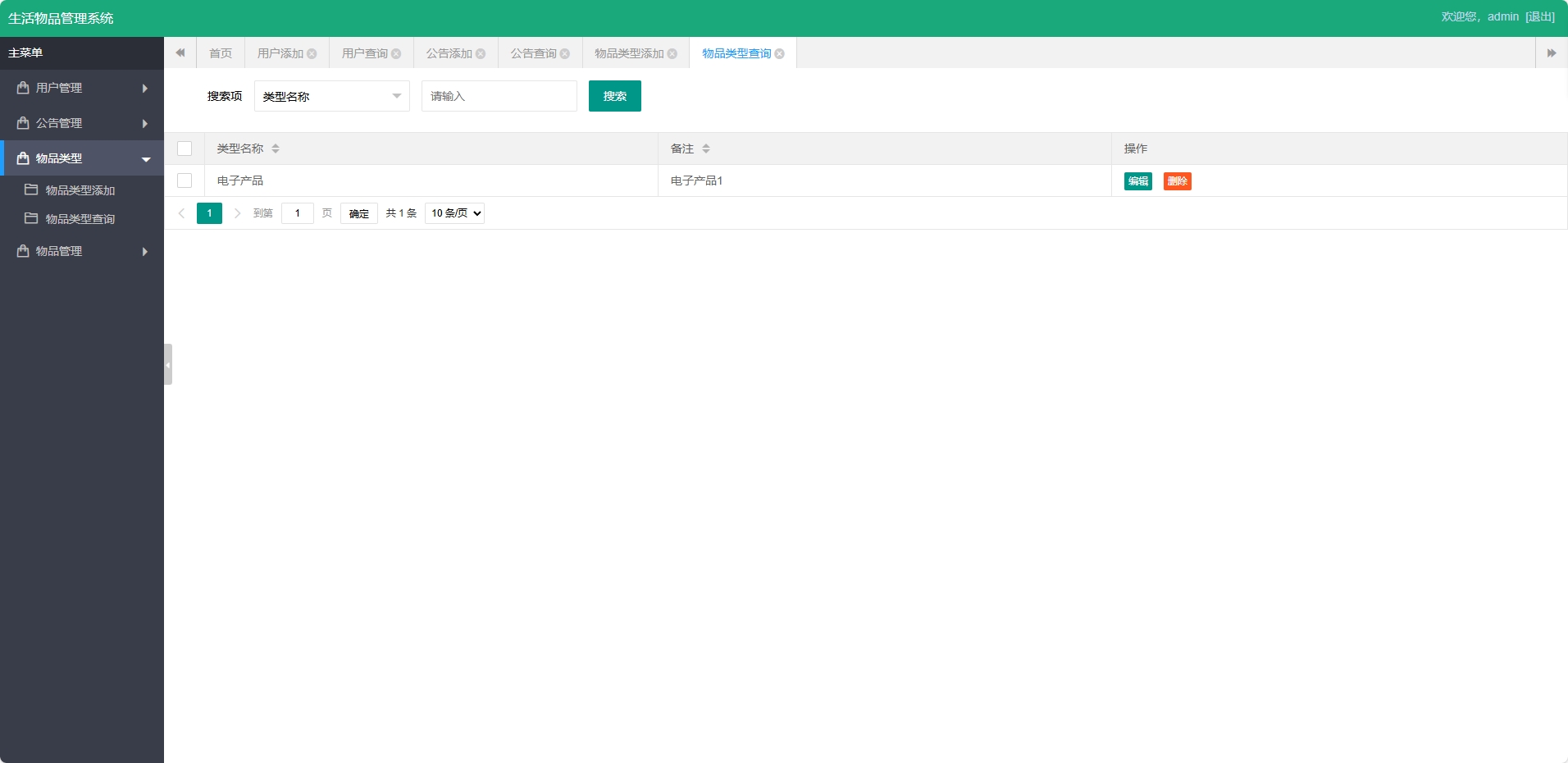
在现代生活中,个人和家庭积累的物品数量日益增多,如何有效管理这些实体资产成为普遍存在的痛点。传统的纸质记录或零散的电子表格方式存在信息更新不及时、查找困难、缺乏统一视图等问题。针对这一需求,我们设计并实现了一个基于JSP+Servlet技术栈的生活物品智能管理平台,通过数字化手段为用户提供完整的物品生命周期管理解决方案。
系统架构与技术栈
该平台采用经典的J2EE MVC架构模式,前端使用JSP进行页面渲染,结合JSTL标签库和EL表达式实现动态内容展示。Servlet作为核心控制器层,负责处理所有HTTP请求,进行业务逻辑调度和数据持久化操作。数据持久层基于JDBC技术直接连接MySQL数据库,通过规范的DAO模式封装所有数据访问逻辑。
技术栈配置如下:
- 后端框架:Servlet 3.0 + JSP 2.2
- 数据持久化:JDBC + MySQL Connector
- 项目管理:Maven 3.0+
- 前端技术:HTML5 + CSS3 + JavaScript
- 服务器环境:Tomcat 8.0+
<!-- Maven依赖配置示例 -->
<dependencies>
<dependency>
<groupId>javax.servlet</groupId>
<artifactId>javax.servlet-api</artifactId>
<version>3.1.0</version>
<scope>provided</scope>
</dependency>
<dependency>
<groupId>javax.servlet.jsp</groupId>
<artifactId>javax.servlet.jsp-api</artifactId>
<version>2.3.1</version>
<scope>provided</scope>
</dependency>
<dependency>
<groupId>mysql</groupId>
<artifactId>mysql-connector-java</artifactId>
<version>8.0.25</version>
</dependency>
</dependencies>
数据库设计亮点分析
物品分类与关联设计
系统采用规范化的数据库设计,其中t_ptype表作为物品类型的主表,t_product表通过外键关联实现分类管理。这种设计体现了良好的数据库范式原则。
CREATE TABLE `t_ptype` (
`id` int(11) NOT NULL AUTO_INCREMENT,
`name` varchar(255) DEFAULT NULL COMMENT '类型名称',
`bz` varchar(255) DEFAULT NULL COMMENT '备注',
PRIMARY KEY (`id`)
) ENGINE=InnoDB AUTO_INCREMENT=2 DEFAULT CHARSET=utf8mb4 COLLATE=utf8mb4_unicode_ci COMMENT='物品类型'
t_ptype表采用自增主键设计,确保类型标识的唯一性。name字段长度设置为255字符,充分考虑了分类名称的扩展性。备注字段bz为可选字段,用于记录分类的详细说明。

物品管理表的关联优化
t_product表的设计体现了关系数据库的外键约束优势:
CREATE TABLE `t_product` (
`id` int(11) NOT NULL AUTO_INCREMENT,
`name` varchar(255) DEFAULT NULL COMMENT '物品名称',
`using` varchar(255) DEFAULT NULL COMMENT '用途',
`num` varchar(255) DEFAULT NULL COMMENT '数量',
`location` varchar(255) DEFAULT NULL COMMENT '位置',
`buytime` varchar(255) DEFAULT NULL COMMENT '购买日期',
`bz` varchar(255) DEFAULT NULL COMMENT '备注',
`ptype_id` int(11) DEFAULT NULL COMMENT '物品类型',
PRIMARY KEY (`id`),
KEY `FK4090156058182055089` (`ptype_id`),
CONSTRAINT `FK4090156058182055089` FOREIGN KEY (`ptype_id`) REFERENCES `t_ptype` (`id`)
) ENGINE=InnoDB AUTO_INCREMENT=2 DEFAULT CHARSET=utf8mb4 COLLATE=utf8mb4_unicode_ci COMMENT='物品管理'
关键设计亮点:
- 外键约束:通过
ptype_id字段建立与类型表的外键关系,确保数据完整性 - 索引优化:为外键字段建立索引,提升联表查询性能
- 字段设计:
buytime采用varchar类型存储日期,便于灵活处理各种日期格式 - 字符集配置:使用utf8mb4字符集,全面支持emoji等特殊字符
用户权限管理设计
t_user表支持多类型用户管理,为系统扩展奠定基础:
CREATE TABLE `t_user` (
`id` int(11) NOT NULL AUTO_INCREMENT,
`username` varchar(255) DEFAULT NULL COMMENT '用户名',
`password` varchar(255) DEFAULT NULL COMMENT '密码',
`type` varchar(255) DEFAULT NULL COMMENT '类型',
`phone` varchar(255) DEFAULT NULL COMMENT '电话',
`bz` varchar(255) DEFAULT NULL COMMENT '备注',
PRIMARY KEY (`id`)
) ENGINE=InnoDB AUTO_INCREMENT=3 DEFAULT CHARSET=utf8mb4 COLLATE=utf8mb4_unicode_ci COMMENT='用户管理'
核心功能实现详解
分页查询功能实现
系统实现了高效的分页查询机制,通过PageBean实体类封装分页逻辑:
package com.edu.bean;
public class PageBean {
private int curPage;//当前页
private int prePage;//上一页
private int nextPage;//下一页
private int maxSize;//每页最大数
private int pageCount;//总页数
private long readCount;//查询总记录数
public PageBean(int curPage, int maxSize, long readCount) {
super();
this.curPage = curPage;
this.maxSize = maxSize;
this.readCount = readCount;
updatePage();
}
public void updatePage(){
//总页数计算
this.pageCount = (int) (this.readCount/this.maxSize +
(this.readCount % this.maxSize == 0 ? 0 : 1));
//上一页计算
this.prePage = this.curPage > 1 ? (this.curPage - 1) : 1;
//下一页计算
this.nextPage = this.curPage >= this.pageCount ?
this.pageCount : (this.curPage + 1);
}
// Getter和Setter方法
public int getCurPage() { return curPage; }
public void setCurPage(int curPage) {
this.curPage = curPage;
updatePage();
}
@Override
public String toString() {
return "PageBean [curPage=" + curPage + ", prePage=" + prePage +
", nextPage=" + nextPage + ", maxSize=" + maxSize +
", pageCount=" + pageCount + ", readCount=" + readCount + "]";
}
}
在Servlet中的分页查询实现:
public class ProductQueryServlet extends HttpServlet {
protected void doGet(HttpServletRequest request, HttpServletResponse response)
throws ServletException, IOException {
int curPage = 1;
int pageSize = 10;
// 获取当前页码参数
String pageParam = request.getParameter("page");
if (pageParam != null && !pageParam.isEmpty()) {
curPage = Integer.parseInt(pageParam);
}
// 创建分页对象
long totalCount = productDao.getTotalCount();
PageBean pageBean = new PageBean(curPage, pageSize, totalCount);
// 查询当前页数据
List<Product> productList = productDao.findByPage(
pageBean.getCurPage(), pageBean.getMaxSize());
// 设置请求属性
request.setAttribute("pageBean", pageBean);
request.setAttribute("productList", productList);
// 转发到JSP页面
request.getRequestDispatcher("/product_list.jsp").forward(request, response);
}
}
物品管理功能实现
物品添加功能包含完整的表单验证和数据处理逻辑:

public class ProductAddServlet extends HttpServlet {
protected void doPost(HttpServletRequest request, HttpServletResponse response)
throws ServletException, IOException {
request.setCharacterEncoding("UTF-8");
// 获取表单参数
String name = request.getParameter("name");
String usage = request.getParameter("using");
String num = request.getParameter("num");
String location = request.getParameter("location");
String buyTime = request.getParameter("buytime");
String bz = request.getParameter("bz");
String ptypeId = request.getParameter("ptype_id");
// 参数验证
if (name == null || name.trim().isEmpty()) {
request.setAttribute("error", "物品名称不能为空");
request.getRequestDispatcher("/product_add.jsp").forward(request, response);
return;
}
// 创建物品对象
Product product = new Product();
product.setName(name);
product.setUsing(usage);
product.setNum(num);
product.setLocation(location);
product.setBuytime(buyTime);
product.setBz(bz);
if (ptypeId != null && !ptypeId.isEmpty()) {
product.setPtypeId(Integer.parseInt(ptypeId));
}
// 保存到数据库
try {
ProductDao productDao = new ProductDao();
boolean success = productDao.addProduct(product);
if (success) {
response.sendRedirect("product_query?msg=add_success");
} else {
request.setAttribute("error", "添加物品失败");
request.getRequestDispatcher("/product_add.jsp").forward(request, response);
}
} catch (Exception e) {
e.printStackTrace();
request.setAttribute("error", "系统错误:" + e.getMessage());
request.getRequestDispatcher("/product_add.jsp").forward(request, response);
}
}
}
对应的JSP页面实现表单展示:
<%@ page contentType="text/html;charset=UTF-8" language="java" %>
<%@ taglib prefix="c" uri="http://java.sun.com/jsp/jstl/core" %>
<html>
<head>
<title>添加物品</title>
<style>
.form-group { margin-bottom: 15px; }
label { display: inline-block; width: 100px; }
input, select { width: 200px; padding: 5px; }
.error { color: red; margin-bottom: 10px; }
</style>
</head>
<body>
<h2>添加新物品</h2>
<c:if test="${not empty error}">
<div class="error">${error}</div>
</c:if>
<form action="product_add" method="post">
<div class="form-group">
<label for="name">物品名称:</label>
<input type="text" id="name" name="name" required>
</div>
<div class="form-group">
<label for="ptype_id">物品类型:</label>
<select id="ptype_id" name="ptype_id">
<option value="">--请选择类型--</option>
<c:forEach items="${ptypeList}" var="ptype">
<option value="${ptype.id}">${ptype.name}</option>
</c:forEach>
</select>
</div>
<div class="form-group">
<label for="using">用途:</label>
<input type="text" id="using" name="using">
</div>
<div class="form-group">
<label for="num">数量:</label>
<input type="number" id="num" name="num" min="1" value="1">
</div>
<div class="form-group">
<label for="location">存放位置:</label>
<input type="text" id="location" name="location">
</div>
<div class="form-group">
<label for="buytime">购买日期:</label>
<input type="date" id="buytime" name="buytime">
</div>
<div class="form-group">
<label for="bz">备注:</label>
<textarea id="bz" name="bz" rows="3" cols="30"></textarea>
</div>
<div class="form-group">
<input type="submit" value="添加物品">
<input type="button" value="返回" onclick="history.back()">
</div>
</form>
</body>
</html>
用户管理功能实现
系统支持多类型用户管理,包括管理员和普通用户:

用户登录验证Servlet实现:
public class LoginServlet extends HttpServlet {
protected void doPost(HttpServletRequest request, HttpServletResponse response)
throws ServletException, IOException {
String username = request.getParameter("username");
String password = request.getParameter("password");
UserDao userDao = new UserDao();
User user = userDao.findByUsernameAndPassword(username, password);
if (user != null) {
// 登录成功,设置session
HttpSession session = request.getSession();
session.setAttribute("currentUser", user);
session.setAttribute("userType", user.getType());
// 根据用户类型跳转到不同页面
if ("admin".equals(user.getType())) {
response.sendRedirect("admin/index.jsp");
} else {
response.sendRedirect("user/index.jsp");
}
} else {
request.setAttribute("error", "用户名或密码错误");
request.getRequestDispatcher("/login.jsp").forward(request, response);
}
}
}
用户数据访问层实现:
public class UserDao {
private Connection getConnection() throws SQLException {
// 获取数据库连接
return DriverManager.getConnection(
"jdbc:mysql://localhost:3306/item_db", "username", "password");
}
public User findByUsernameAndPassword(String username, String password) {
String sql = "SELECT id, username, type, phone, bz FROM t_user " +
"WHERE username = ? AND password = ?";
try (Connection conn = getConnection();
PreparedStatement pstmt = conn.prepareStatement(sql)) {
pstmt.setString(1, username);
pstmt.setString(2, password);
try (ResultSet rs = pstmt.executeQuery()) {
if (rs.next()) {
User user = new User();
user.setId(rs.getInt("id"));
user.setUsername(rs.getString("username"));
user.setType(rs.getString("type"));
user.setPhone(rs.getString("phone"));
user.setBz(rs.getString("bz"));
return user;
}
}
} catch (SQLException e) {
e.printStackTrace();
}
return null;
}
public List<User> findAllUsers() {
List<User> userList = new ArrayList<>();
String sql = "SELECT * FROM t_user ORDER BY id DESC";
try (Connection conn = getConnection();
Statement stmt = conn.createStatement();
ResultSet rs = stmt.executeQuery(sql)) {
while (rs.next()) {
User user = new User();
user.setId(rs.getInt("id"));
user.setUsername(rs.getString("username"));
user.setType(rs.getString("type"));
user.setPhone(rs.getString("phone"));
user.setBz(rs.getString("bz"));
userList.add(user);
}
} catch (SQLException e) {
e.printStackTrace();
}
return userList;
}
}
公告管理功能
系统提供公告发布和查询功能,支持管理员向所有用户发布重要通知:

公告实体类和DAO实现:
public class Gonggao {
private int id;
private String title;
private String content;
private String shijian;
private String bz;
// Getter和Setter方法
public int getId() { return id; }
public void setId(int id) { this.id = id; }
public String getTitle() { return title; }
public void setTitle(String title) { this.title = title; }
public String getContent() { return content; }
public void setContent(String content) { this.content = content; }
public String getShijian() { return shijian; }
public void setShijian(String shijian) { this.shijian = shijian; }
public String getBz() { return bz; }
public void setBz(String bz) { this.bz = bz; }
}
public class GonggaoDao {
public boolean addGonggao(Gonggao gonggao) {
String sql = "INSERT INTO t_gonggao (title, content, shijian, bz) VALUES (?, ?, ?, ?)";
try (Connection conn = getConnection();
PreparedStatement pstmt = conn.prepareStatement(sql)) {
pstmt.setString(1, gonggao.getTitle());
pstmt.setString(2, gonggao.getContent());
pstmt.setString(3, new SimpleDateFormat("yyyy-MM-dd HH:mm:ss").format(new Date()));
pstmt.setString(4, gonggao.getBz());
return pstmt.executeUpdate() > 0;
} catch (SQLException e) {
e.printStackTrace();
return false;
}
}
public List<Gonggao> findLatestGonggaos(int limit) {
List<Gonggao> gonggaoList = new ArrayList<>();
String sql = "SELECT * FROM t_gonggao ORDER BY shijian DESC LIMIT ?";
try (Connection conn = getConnection();
PreparedStatement pstmt = conn.prepareStatement(sql)) {
pstmt.setInt(1, limit);
try (ResultSet rs = pstmt.executeQuery()) {
while (rs.next()) {
Gonggao gonggao =