在当今数字化浪潮中,传统图书零售业面临着转型升级的关键时期。实体书店受限于营业时间和地理位置的约束,难以满足现代消费者随时随地的购物需求。针对这一市场痛点,我们设计并实现了一个采用经典J2EE架构的企业级图书电商平台,通过技术创新为图书行业提供完整的线上销售解决方案。
系统架构与技术栈
该平台采用成熟稳定的MVC设计模式,技术架构层次分明。Servlet作为核心控制器负责处理所有HTTP请求,实现业务逻辑的统一调度;JSP页面专注于数据展示层,通过JSTL标签和EL表达式实现动态内容渲染;JavaBean构成模型层,封装核心业务实体和数据访问逻辑。数据库采用MySQL,通过JDBC进行数据持久化操作。
前端技术栈包含HTML、CSS和JavaScript,确保用户界面的美观性和交互体验。整个系统实现了业务逻辑、数据操作和前端展示的完全分离,显著提升了代码的可维护性和扩展性。
数据库设计亮点分析
商品表设计优化
CREATE TABLE `easybuy_product` (
  `EP_ID` int(10) NOT NULL AUTO_INCREMENT COMMENT '商品ID',
  `EP_NAME` varchar(128) NOT NULL COMMENT '商品名称',
  `EP_DESCRIPTION` varchar(512) DEFAULT NULL COMMENT '商品描述',
  `EP_PRICE` decimal(10,2) NOT NULL COMMENT '商品价格',
  `EP_STOCK` decimal(10,0) NOT NULL COMMENT '商品库存',
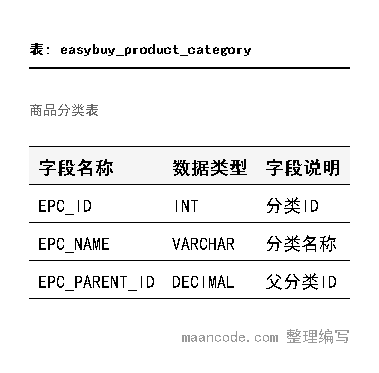
  `EPC_ID` decimal(10,0) DEFAULT NULL COMMENT '商品分类ID',
  `EPC_CHILD_ID` decimal(10,0) DEFAULT NULL COMMENT '商品子分类ID',
  `EP_FILE_NAME` varchar(200) DEFAULT NULL COMMENT '商品图片',
  PRIMARY KEY (`EP_ID`) USING BTREE
) ENGINE=InnoDB AUTO_INCREMENT=62 DEFAULT CHARSET=utf8 ROW_FORMAT=COMPACT
商品表的设计体现了多个优化考量:使用AUTO_INCREMENT确保主键的唯一性和连续性;decimal(10,2)类型精确处理金融计算;varchar(128)和varchar(512)的长度设置平衡了存储效率与业务需求;BTREE索引优化查询性能。分类ID的双层设计支持多级商品分类体系。
订单详情表的关系建模
CREATE TABLE `easybuy_order_detail` (
  `EOD_ID` int(10) NOT NULL AUTO_INCREMENT COMMENT '订单详情ID',
  `EO_ID` decimal(10,0) NOT NULL COMMENT '订单ID',
  `EP_ID` decimal(10,0) NOT NULL COMMENT '商品ID',
  `EOD_QUANTITY` decimal(6,0) NOT NULL COMMENT '商品数量',
  `EOD_COST` decimal(10,2) NOT NULL COMMENT '商品金额',
  PRIMARY KEY (`EOD_ID`) USING BTREE
) ENGINE=InnoDB AUTO_INCREMENT=16 DEFAULT CHARSET=utf8
订单详情表采用星型 schema 设计,通过EO_ID和EP_ID分别与订单主表和商品表建立关联。EOD_QUANTITY使用decimal(6,0)支持最大999999的购买数量,EOD_COST记录交易时的快照价格,确保历史订单价格的准确性。
购物车表的会话管理
CREATE TABLE `easybuy_shop` (
  `es_id` int(11) NOT NULL AUTO_INCREMENT COMMENT '购物车ID',
  `es_ep_file_name` varchar(128) DEFAULT NULL COMMENT '商品图片',
  `es_ep_name` varchar(64) DEFAULT NULL COMMENT '商品名称',
  `es_ep_price` decimal(10,0) DEFAULT NULL COMMENT '商品价格',
  `es_eod_quantity` int(11) DEFAULT NULL COMMENT '商品数量',
  `es_ep_stock` int(11) DEFAULT NULL COMMENT '商品库存',
  `es_ep_id` int(11) DEFAULT NULL COMMENT '商品ID',
  `es_eu_user_id` varchar(64) DEFAULT NULL COMMENT '用户ID',
  `es_valid` int(11) DEFAULT NULL COMMENT '是否有效',
  PRIMARY KEY (`es_id`) USING BTREE
) ENGINE=InnoDB AUTO_INCREMENT=21 DEFAULT CHARSET=utf8
购物车表设计支持多用户并发操作,通过es_eu_user_id关联用户会话。es_valid字段实现软删除功能,es_ep_stock实时同步库存信息防止超卖。这种设计既保证了数据一致性,又提供了良好的用户体验。
核心功能实现解析
用户认证与会话管理
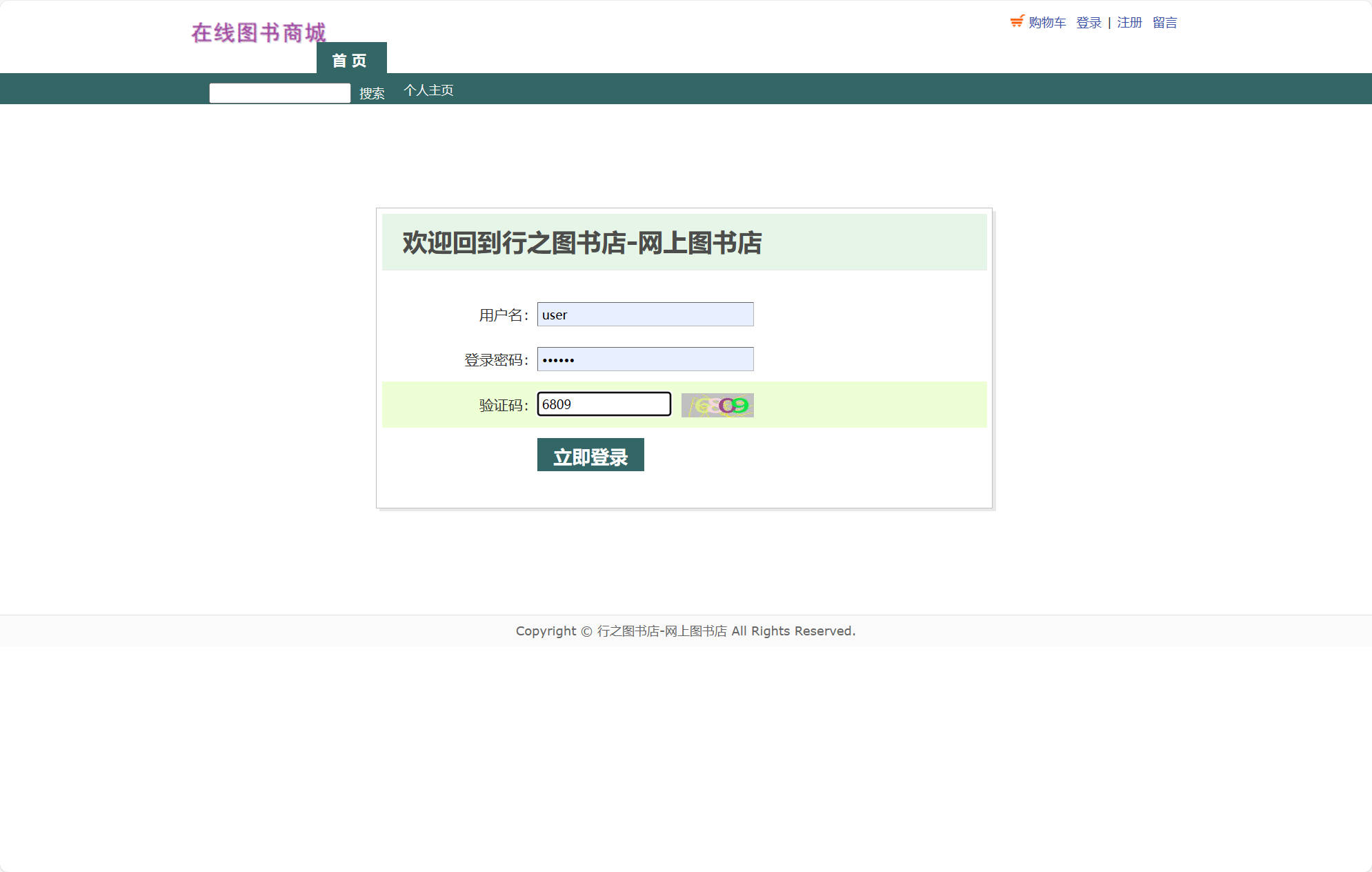
系统实现了一套完整的用户认证机制,支持注册、登录、权限验证等功能。Servlet控制器处理用户提交的认证信息,与数据库中的用户表进行比对。
public class UserServlet extends HttpServlet {
    protected void doPost(HttpServletRequest request, HttpServletResponse response)
        throws ServletException, IOException {

        String username = request.getParameter("EU_USER_NAME");
        String password = request.getParameter("EU_PASSWORD");

        UserDAO userDAO = new UserDAO();
        EasybuyUser user = userDAO.findByUsernameAndPassword(username, password);

        if (user != null) {
            HttpSession session = request.getSession();
            session.setAttribute("currentUser", user);
            session.setMaxInactiveInterval(30 * 60); // 30分钟超时

            if ("admin".equals(user.getEuStatus())) {
                response.sendRedirect("admin/index.jsp");
            } else {
                response.sendRedirect("index.jsp");
            }
        } else {
            request.setAttribute("errorMsg", "用户名或密码错误");
            request.getRequestDispatcher("login.jsp").forward(request, response);
        }
    }
}
商品浏览与搜索功能
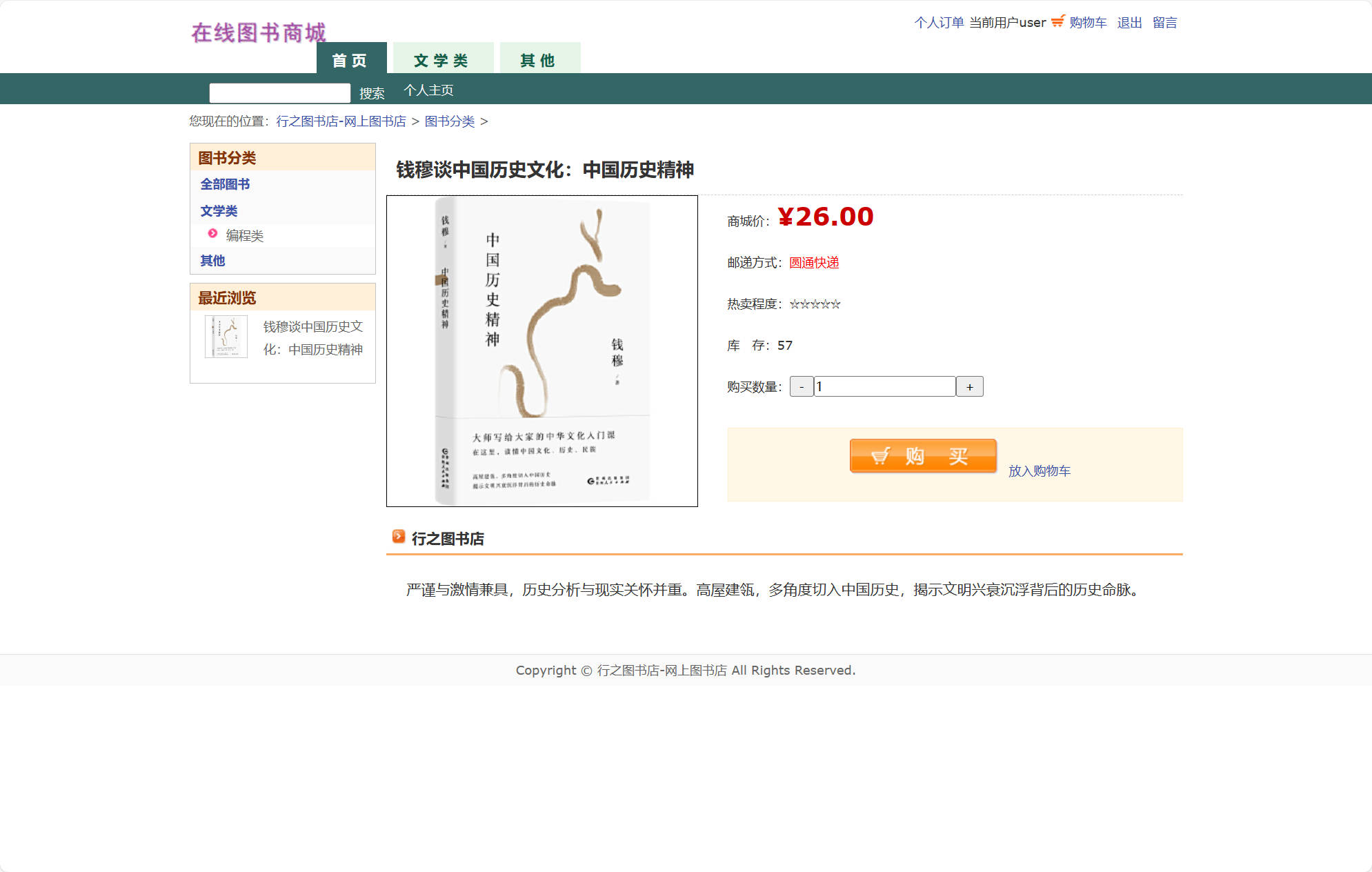
平台提供强大的商品检索能力,支持按分类、关键词等多维度搜索。商品列表页面采用分页显示,优化大数据量下的性能表现。
public class ProductServlet extends HttpServlet {
    protected void doGet(HttpServletRequest request, HttpServletResponse response)
        throws ServletException, IOException {

        String categoryId = request.getParameter("categoryId");
        String keyword = request.getParameter("keyword");
        String pageStr = request.getParameter("page");
        int page = (pageStr == null) ? 1 : Integer.parseInt(pageStr);
        int pageSize = 12;

        ProductDAO productDAO = new ProductDAO();
        List<EasybuyProduct> products;
        int totalCount;

        if (categoryId != null && !categoryId.isEmpty()) {
            products = productDAO.findByCategory(categoryId, page, pageSize);
            totalCount = productDAO.countByCategory(categoryId);
        } else if (keyword != null && !keyword.isEmpty()) {
            products = productDAO.search(keyword, page, pageSize);
            totalCount = productDAO.countByKeyword(keyword);
        } else {
            products = productDAO.findAll(page, pageSize);
            totalCount = productDAO.countAll();
        }

        int totalPages = (int) Math.ceil((double) totalCount / pageSize);

        request.setAttribute("products", products);
        request.setAttribute("currentPage", page);
        request.setAttribute("totalPages", totalPages);
        request.setAttribute("keyword", keyword);
        request.getRequestDispatcher("product-list.jsp").forward(request, response);
    }
}
购物车管理实现
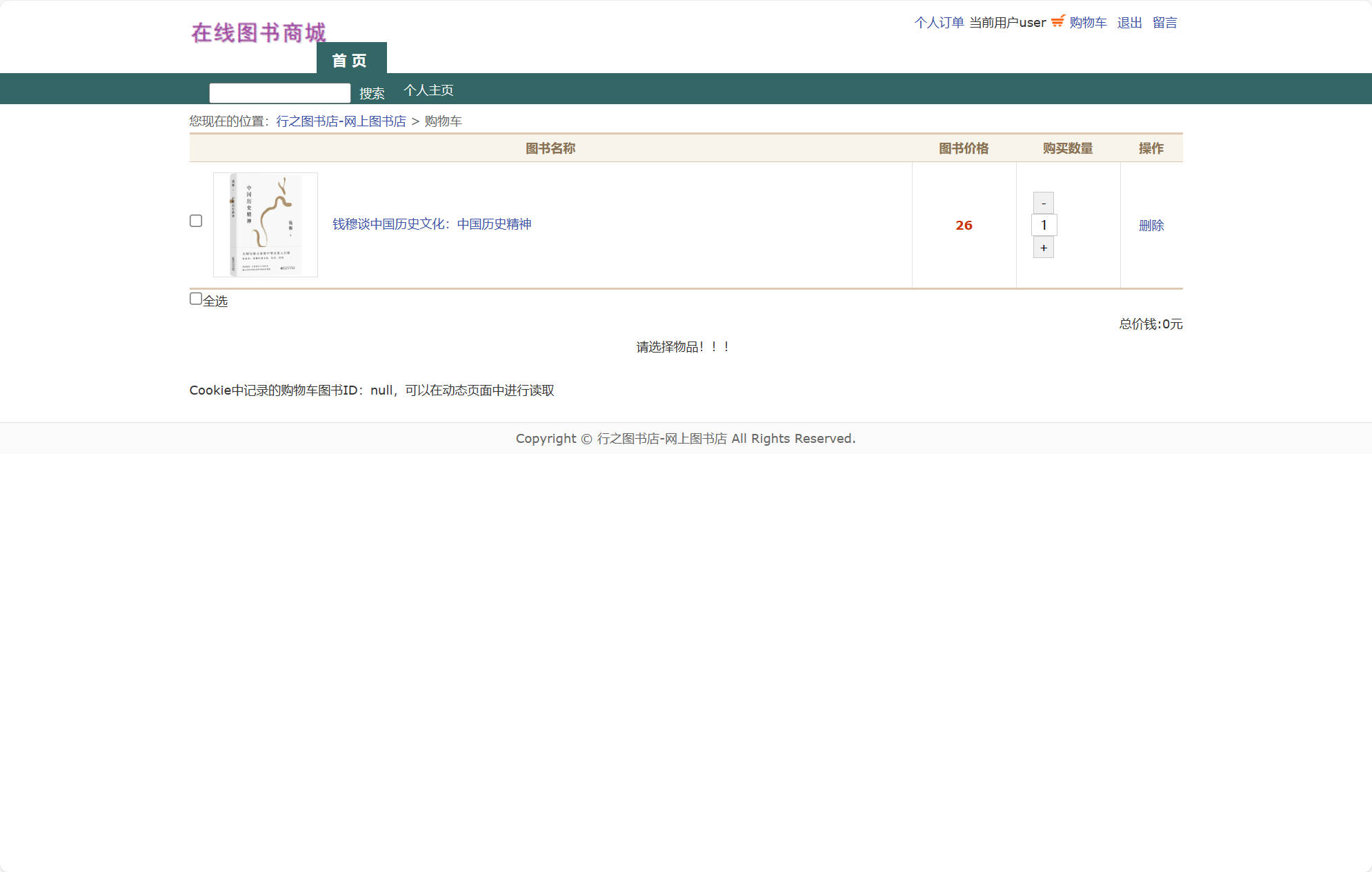
购物车功能支持商品的添加、删除、数量修改等操作,实时计算总金额并验证库存可用性。
public class CartServlet extends HttpServlet {
    protected void doPost(HttpServletRequest request, HttpServletResponse response)
        throws ServletException, IOException {

        String action = request.getParameter("action");
        String productId = request.getParameter("productId");
        HttpSession session = request.getSession();
        EasybuyUser user = (EasybuyUser) session.getAttribute("currentUser");

        CartService cartService = new CartService();

        if ("add".equals(action)) {
            int quantity = Integer.parseInt(request.getParameter("quantity"));
            cartService.addToCart(user.getEuUserId(), productId, quantity);
            response.getWriter().write("{\"success\": true, \"message\": \"添加成功\"}");

        } else if ("update".equals(action)) {
            int quantity = Integer.parseInt(request.getParameter("quantity"));
            cartService.updateQuantity(user.getEuUserId(), productId, quantity);
            response.getWriter().write("{\"success\": true, \"message\": \"更新成功\"}");

        } else if ("remove".equals(action)) {
            cartService.removeFromCart(user.getEuUserId(), productId);
            response.getWriter().write("{\"success\": true, \"message\": \"删除成功\"}");
        }
    }

    protected void doGet(HttpServletRequest request, HttpServletResponse response)
        throws ServletException, IOException {

        HttpSession session = request.getSession();
        EasybuyUser user = (EasybuyUser) session.getAttribute("currentUser");
        CartService cartService = new CartService();

        List<CartItem> cartItems = cartService.getCartItems(user.getEuUserId());
        BigDecimal totalAmount = cartService.calculateTotal(cartItems);

        request.setAttribute("cartItems", cartItems);
        request.setAttribute("totalAmount", totalAmount);
        request.getRequestDispatcher("cart.jsp").forward(request, response);
    }
}
订单处理流程
订单系统实现了从购物车到订单生成的完整业务流程,包括库存验证、价格计算、订单状态跟踪等功能。
public class OrderService {
    public String createOrder(String userId, List<CartItem> cartItems, String address) {
        Connection conn = null;
        try {
            conn = DatabaseUtil.getConnection();
            conn.setAutoCommit(false);

            // 验证库存
            for (CartItem item : cartItems) {
                if (!checkStock(item.getProductId(), item.getQuantity())) {
                    throw new RuntimeException("商品库存不足: " + item.getProductName());
                }
            }

            // 生成订单号
            String orderId = generateOrderId();

            // 创建订单主记录
            OrderDAO orderDAO = new OrderDAO();
            BigDecimal totalAmount = calculateTotalAmount(cartItems);
            orderDAO.createOrder(conn, orderId, userId, totalAmount, address);

            // 创建订单明细
            OrderDetailDAO detailDAO = new OrderDetailDAO();
            for (CartItem item : cartItems) {
                BigDecimal cost = item.getPrice().multiply(new BigDecimal(item.getQuantity()));
                detailDAO.createOrderDetail(conn, orderId, item.getProductId(),
                    item.getQuantity(), cost);

                // 扣减库存
                updateStock(conn, item.getProductId(), item.getQuantity());
            }

            // 清空购物车
            new CartDAO().clearCart(conn, userId);

            conn.commit();
            return orderId;

        } catch (Exception e) {
            if (conn != null) {
                try { conn.rollback(); } catch (SQLException ex) {}
            }
            throw new RuntimeException("订单创建失败: " + e.getMessage());
        } finally {
            DatabaseUtil.closeConnection(conn);
        }
    }

    private boolean checkStock(String productId, int quantity) {
        ProductDAO productDAO = new ProductDAO();
        EasybuyProduct product = productDAO.findById(productId);
        return product != null && product.getEpStock() >= quantity;
    }
}
后台管理系统
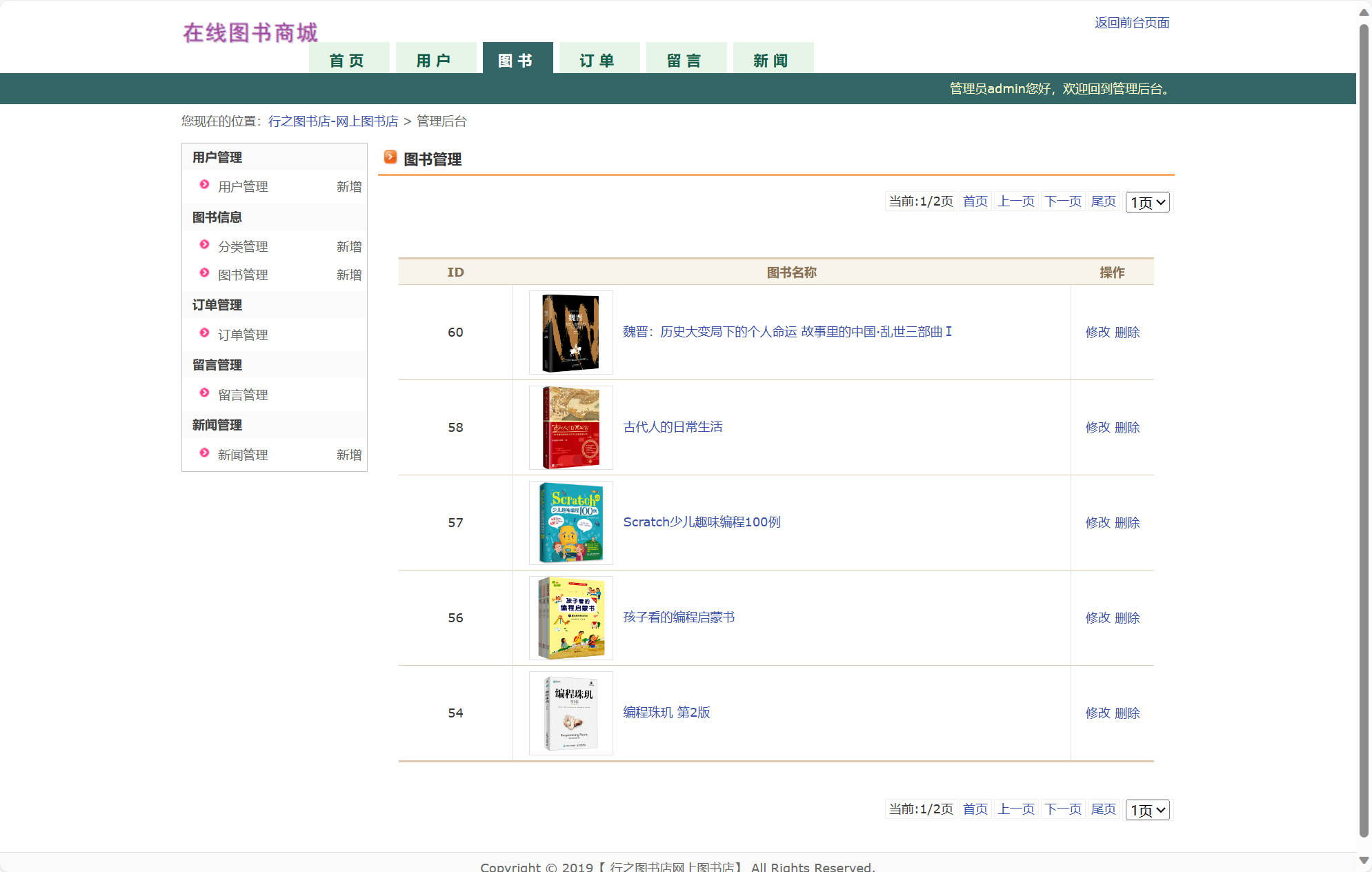
管理员后台提供完整的商品管理、用户管理、订单处理等功能,采用RBAC权限控制模型。
public class AdminProductServlet extends HttpServlet {
    protected void doPost(HttpServletRequest request, HttpServletResponse response)
        throws ServletException, IOException {

        // 权限验证
        HttpSession session = request.getSession();
        EasybuyUser admin = (EasybuyUser) session.getAttribute("currentUser");
        if (admin == null || !"admin".equals(admin.getEuStatus())) {
            response.sendError(403, "权限不足");
            return;
        }

        String action = request.getParameter("action");
        ProductDAO productDAO = new ProductDAO();

        if ("add".equals(action)) {
            EasybuyProduct product = new EasybuyProduct();
            product.setEpName(request.getParameter("epName"));
            product.setEpDescription(request.getParameter("epDescription"));
            product.setEpPrice(new BigDecimal(request.getParameter("epPrice")));
            product.setEpStock(Integer.parseInt(request.getParameter("epStock")));
            product.setEpcId(request.getParameter("epcId"));

            productDAO.save(product);
            response.sendRedirect("product-manage.jsp?message=添加成功");

        } else if ("update".equals(action)) {
            // 更新商品逻辑
        } else if ("delete".equals(action)) {
            String productId = request.getParameter("productId");
            productDAO.delete(productId);
            response.sendRedirect("product-manage.jsp?message=删除成功");
        }
    }
}
实体模型设计
系统采用标准的JavaBean实体类设计,每个实体类对应数据库中的一张表,提供完整的getter和setter方法。以下以留言实体为例展示实体类的设计模式:
package com.hr.entity;

public class EASYBUY_COMMENT {
    private int EC_ID;
    private String EC_CONTENT;
    private String EC_CREATE_TIME;
    private String EC_REPLY;
    private String EC_REPLY_TIME;
    private String EC_NICK_NAME;

    public EASYBUY_COMMENT(int eCID, String eCCONTENT, String eCCREATETIME,
            String eCREPLY, String eCREPLYTIME, String eCNICKNAME) {
        EC_ID = eCID;
        EC_CONTENT = eCCONTENT;
        EC_CREATE_TIME = eCCREATETIME;
        EC_REPLY = eCREPLY;
        EC_REPLY_TIME = eCREPLYTIME;
        EC_NICK_NAME = eCNICKNAME;
    }

    public EASYBUY_COMMENT() {
    }

    // Getter和Setter方法
    public int getEC_ID() {
        return EC_ID;
    }

    public void setEC_ID(int eCID) {
        EC_ID = eCID;
    }

    public String getEC_CONTENT() {
        return EC_CONTENT;
    }

    public void setEC_CONTENT(String eCCONTENT) {
        EC_CONTENT = eCCONTENT;
    }

    public String getEC_CREATE_TIME() {
        return EC_CREATE_TIME;
    }

    public void setEC_CREATE_TIME(String eCCREATETIME) {
        EC_CREATE_TIME = eCCREATETIME;
    }

    public String getEC_REPLY() {
        return EC_REPLY;
    }

    public void setEC_REPLY(String eCREPLY) {
        EC_REPLY = eCREPLY;
    }

    public String getEC_REPLY_TIME() {
        return EC_REPLY_TIME;
    }

    public void setEC_REPLY_TIME(String eCREPLYTIME) {
        EC_REPLY_TIME = eCREPLYTIME;
    }

    public String getEC_NICK_NAME() {
        return EC_NICK_NAME;
    }

    public void setEC_NICK_NAME(String eCNICKNAME) {
        EC_NICK_NAME = eCNICKNAME;
    }
}
这种实体类设计模式确保了数据封装性,便于与JSP页面的EL表达式集成,同时为后续可能引入的ORM框架提供了良好的基础。
功能展望与优化方向
性能优化策略
引入Redis作为缓存层,将热点数据如商品信息、用户会话等存储在内存中,显著降低数据库访问压力。实现代码示例:
public class ProductServiceWithCache {
    private Jedis redis;
    private ProductDAO productDAO;

    public EasybuyProduct findByIdWithCache(String productId) {
        String cacheKey = "product:" + productId;
        String cachedProduct = redis.get(cacheKey);

        if (cachedProduct != null) {
            return JSON.parseObject(cachedProduct, EasybuyProduct.class);
        } else {
            EasybuyProduct product = productDAO.findById(productId);
            if (product != null) {
                redis.setex(cacheKey, 3600, JSON.toJSONString(product)); // 缓存1小时
            }
            return product;
        }
    }
}
微服务架构改造
将单体应用拆分为商品服务、用户服务、订单服务等独立微服务,采用Spring Cloud框架实现服务治理。每个服务独立部署,提高系统可扩展性和容错能力。
移动端适配升级
开发响应式前端界面,支持PC、平板、手机等多终端访问。引入PWA技术,实现离线访问、推送通知等原生应用体验。
智能推荐系统
基于用户行为数据构建推荐引擎,实现个性化图书推荐。采用协同过滤和内容推荐算法,提升用户购物体验和转化率。
public class RecommendationService {
    public List<EasybuyProduct> getRecommendations(String userId) {
        // 基于用户历史行为计算相似度
        List<UserBehavior> behaviors = userBehaviorDAO.findByUserId(userId);
        Map<String, Double> itemSimilarities = calculateItemSimilarities(behaviors);

        // 生成推荐列表
        return generateRecommendationList(itemSimilarities, 10);
    }
}
支付系统集成
接入支付宝、微信支付等第三方支付平台,实现安全便捷的在线支付功能。采用支付网关模式,确保交易数据的安全性和完整性。
总结
该图书电商平台基于成熟的J2EE技术栈,构建了一个功能完整、性能稳定的在线销售系统。通过精心的数据库设计、清晰的架构分层、完善的业务逻辑实现,为传统图书零售商提供了可靠的数字化转型解决方案。系统具有良好的扩展性,为后续的技术升级和功能扩展奠定了坚实基础。
在电子商务快速发展的背景下,该平台不仅满足了当前图书线上销售的基本需求,更为未来向智能化、个性化方向的演进提供了技术支撑。通过持续优化和功能扩展,有望成为图书行业数字化转型的标杆产品。