图书商城管理系统:基于JSP+Servlet的电商解决方案
系统架构与技术选型
系统采用经典的MVC架构模式,通过JSP+Servlet技术栈实现业务逻辑与表现层的分离。Servlet作为控制器层,负责处理HTTP请求、业务逻辑调度和数据验证;JSP作为视图层,专注于页面渲染和用户交互;JavaBean作为模型层,封装业务数据和数据访问逻辑。
数据持久层采用JDBC技术直接操作MySQL数据库,通过数据库连接池管理数据库连接,确保系统的高效性和稳定性。前端使用HTML、CSS和JavaScript构建用户界面,结合JSTL标签库和EL表达式实现数据的动态展示。
// 数据库连接池配置示例
public class DBUtil {
    private static DataSource dataSource;

    static {
        try {
            Context initContext = new InitialContext();
            Context envContext = (Context) initContext.lookup("java:/comp/env");
            dataSource = (DataSource) envContext.lookup("jdbc/bookstore");
        } catch (NamingException e) {
            e.printStackTrace();
        }
    }

    public static Connection getConnection() throws SQLException {
        return dataSource.getConnection();
    }
}
数据库设计解析
系统数据库包含10个核心数据表,采用规范化的设计理念确保数据的一致性和完整性。以下是几个关键表的设计分析:
图书信息表设计
图书表的设计充分考虑了电商平台的业务需求,不仅包含基础的书目信息,还设置了丰富的业务字段支持复杂的查询和分类需求。
CREATE TABLE books (
    book_id INT AUTO_INCREMENT PRIMARY KEY,
    isbn VARCHAR(20) UNIQUE NOT NULL,
    title VARCHAR(200) NOT NULL,
    author VARCHAR(100) NOT NULL,
    publisher VARCHAR(100),
    publish_date DATE,
    category_id INT,
    price DECIMAL(10,2) NOT NULL,
    stock_quantity INT DEFAULT 0,
    sales_volume INT DEFAULT 0,
    description TEXT,
    cover_image VARCHAR(255),
    status ENUM('active', 'inactive') DEFAULT 'active',
    create_time TIMESTAMP DEFAULT CURRENT_TIMESTAMP,
    update_time TIMESTAMP DEFAULT CURRENT_TIMESTAMP ON UPDATE CURRENT_TIMESTAMP,
    FOREIGN KEY (category_id) REFERENCES categories(category_id)
) ENGINE=InnoDB DEFAULT CHARSET=utf8mb4;
该表设计的亮点包括:
- 使用ISBN作为唯一标识符,确保图书数据的准确性
- 价格字段采用DECIMAL类型,精确到分,避免浮点数计算误差
- 库存量和销售量字段支持库存预警和热销榜功能
- 状态字段实现软删除机制,保留历史数据
- 时间戳字段自动记录数据的创建和更新时间
订单表设计
订单表采用主从表结构设计,主表记录订单概要信息,从表记录商品明细,这种设计支持一个订单包含多个商品的需求。
CREATE TABLE orders (
    order_id VARCHAR(32) PRIMARY KEY,
    user_id INT NOT NULL,
    total_amount DECIMAL(10,2) NOT NULL,
    order_status ENUM('pending', 'confirmed', 'shipped', 'delivered', 'cancelled') DEFAULT 'pending',
    payment_status ENUM('unpaid', 'paid', 'refunded') DEFAULT 'unpaid',
    shipping_address TEXT NOT NULL,
    recipient_name VARCHAR(50) NOT NULL,
    recipient_phone VARCHAR(20) NOT NULL,
    payment_method ENUM('alipay', 'wechat', 'bank_transfer') DEFAULT 'alipay',
    order_notes TEXT,
    create_time TIMESTAMP DEFAULT CURRENT_TIMESTAMP,
    update_time TIMESTAMP DEFAULT CURRENT_TIMESTAMP ON UPDATE CURRENT_TIMESTAMP,
    FOREIGN KEY (user_id) REFERENCES users(user_id)
) ENGINE=InnoDB DEFAULT CHARSET=utf8mb4;

CREATE TABLE order_items (
    item_id INT AUTO_INCREMENT PRIMARY KEY,
    order_id VARCHAR(32) NOT NULL,
    book_id INT NOT NULL,
    quantity INT NOT NULL,
    unit_price DECIMAL(10,2) NOT NULL,
    subtotal DECIMAL(10,2) NOT NULL,
    FOREIGN KEY (order_id) REFERENCES orders(order_id),
    FOREIGN KEY (book_id) REFERENCES books(book_id)
) ENGINE=InnoDB DEFAULT CHARSET=utf8mb4;
订单表的设计特点:
- 使用自定义订单号而非自增ID,增强业务安全性
- 订单状态和支付状态分离,支持更精细的状态管理
- 收货信息冗余存储,避免用户修改信息影响历史订单
- 订单金额相关字段统一使用DECIMAL类型,确保计算精度
核心功能实现
用户认证与权限管理
系统采用基于角色的访问控制机制,区分普通用户和管理员两种角色。用户登录流程包含完整的表单验证、密码加密和会话管理。
// 用户登录Servlet实现
@WebServlet("/login")
public class LoginServlet extends HttpServlet {
    private UserService userService = new UserServiceImpl();

    protected void doPost(HttpServletRequest request, HttpServletResponse response)
            throws ServletException, IOException {

        String username = request.getParameter("username");
        String password = request.getParameter("password");
        String userType = request.getParameter("userType");

        // 参数验证
        if (StringUtils.isBlank(username) || StringUtils.isBlank(password)) {
            request.setAttribute("errorMsg", "用户名和密码不能为空");
            request.getRequestDispatcher("/login.jsp").forward(request, response);
            return;
        }

        try {
            User user = userService.authenticate(username, password, userType);
            if (user != null) {
                // 创建会话
                HttpSession session = request.getSession();
                session.setAttribute("currentUser", user);
                session.setMaxInactiveInterval(30 * 60); // 30分钟超时

                // 根据用户类型重定向
                if ("admin".equals(userType)) {
                    response.sendRedirect(request.getContextPath() + "/admin/dashboard");
                } else {
                    response.sendRedirect(request.getContextPath() + "/home");
                }
            } else {
                request.setAttribute("errorMsg", "用户名或密码错误");
                request.getRequestDispatcher("/login.jsp").forward(request, response);
            }
        } catch (Exception e) {
            e.printStackTrace();
            request.setAttribute("errorMsg", "系统错误,请稍后重试");
            request.getRequestDispatcher("/login.jsp").forward(request, response);
        }
    }
}

图书管理功能
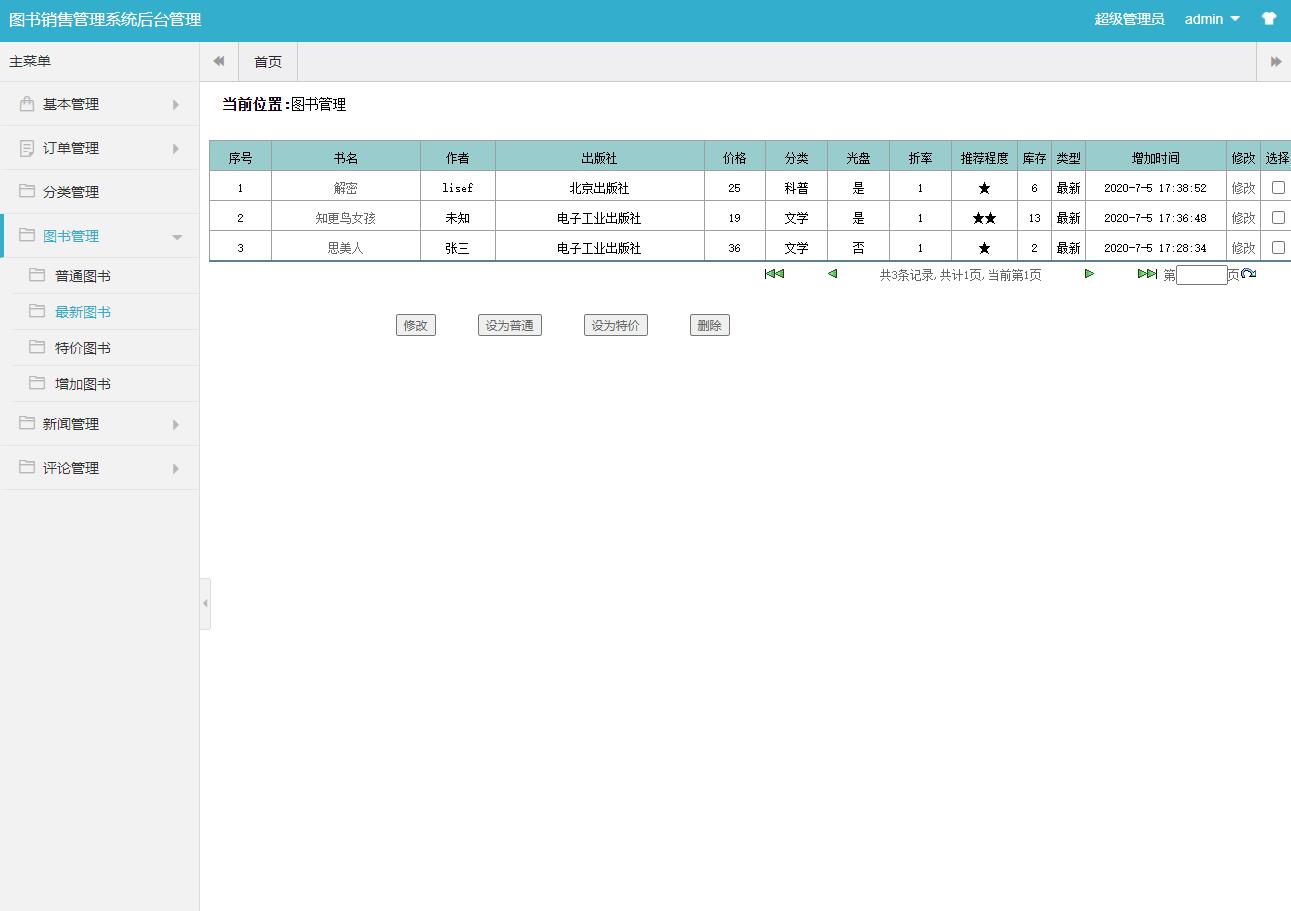
图书管理模块提供完整的CRUD操作,支持图书信息的增删改查、库存管理和分类维护。管理员可以便捷地上架新书、调整价格和库存。
// 图书添加Servlet实现
@WebServlet("/admin/book/add")
public class AddBookServlet extends HttpServlet {
    private BookService bookService = new BookServiceImpl();

    protected void doPost(HttpServletRequest request, HttpServletResponse response)
            throws ServletException, IOException {

        // 获取表单数据
        String isbn = request.getParameter("isbn");
        String title = request.getParameter("title");
        String author = request.getParameter("author");
        String publisher = request.getParameter("publisher");
        String publishDateStr = request.getParameter("publishDate");
        int categoryId = Integer.parseInt(request.getParameter("categoryId"));
        BigDecimal price = new BigDecimal(request.getParameter("price"));
        int stockQuantity = Integer.parseInt(request.getParameter("stockQuantity"));
        String description = request.getParameter("description");

        // 数据验证
        if (!validateBookData(isbn, title, author, price)) {
            request.setAttribute("errorMsg", "图书数据验证失败");
            request.getRequestDispatcher("/admin/book/add.jsp").forward(request, response);
            return;
        }

        try {
            Book book = new Book();
            book.setIsbn(isbn);
            book.setTitle(title);
            book.setAuthor(author);
            book.setPublisher(publisher);
            book.setPublishDate(Date.valueOf(publishDateStr));
            book.setCategoryId(categoryId);
            book.setPrice(price);
            book.setStockQuantity(stockQuantity);
            book.setDescription(description);

            // 处理文件上传
            Part coverPart = request.getPart("coverImage");
            if (coverPart != null && coverPart.getSize() > 0) {
                String fileName = saveUploadedFile(coverPart);
                book.setCoverImage(fileName);
            }

            boolean success = bookService.addBook(book);
            if (success) {
                response.sendRedirect(request.getContextPath() + "/admin/book/list?msg=add_success");
            } else {
                request.setAttribute("errorMsg", "添加图书失败");
                request.getRequestDispatcher("/admin/book/add.jsp").forward(request, response);
            }
        } catch (Exception e) {
            e.printStackTrace();
            request.setAttribute("errorMsg", "系统错误:" + e.getMessage());
            request.getRequestDispatcher("/admin/book/add.jsp").forward(request, response);
        }
    }

    private boolean validateBookData(String isbn, String title, String author, BigDecimal price) {
        // 实现数据验证逻辑
        return !StringUtils.isBlank(isbn) && !StringUtils.isBlank(title)
                && !StringUtils.isBlank(author) && price != null && price.compareTo(BigDecimal.ZERO) >= 0;
    }
}
购物车与订单处理
购物车功能采用Session存储临时数据,支持商品的添加、删除、数量修改和价格计算。订单处理流程包含库存检查、价格验证和事务管理。
// 购物车业务逻辑实现
public class ShoppingCart {
    private Map<Integer, CartItem> items = new HashMap<>();

    public void addItem(Book book, int quantity) {
        if (items.containsKey(book.getBookId())) {
            CartItem existingItem = items.get(book.getBookId());
            existingItem.setQuantity(existingItem.getQuantity() + quantity);
        } else {
            CartItem newItem = new CartItem(book, quantity);
            items.put(book.getBookId(), newItem);
        }
    }

    public void updateQuantity(int bookId, int quantity) {
        if (items.containsKey(bookId)) {
            if (quantity <= 0) {
                items.remove(bookId);
            } else {
                items.get(bookId).setQuantity(quantity);
            }
        }
    }

    public void removeItem(int bookId) {
        items.remove(bookId);
    }

    public BigDecimal getTotalAmount() {
        BigDecimal total = BigDecimal.ZERO;
        for (CartItem item : items.values()) {
            total = total.add(item.getSubtotal());
        }
        return total;
    }

    public int getTotalQuantity() {
        int total = 0;
        for (CartItem item : items.values()) {
            total += item.getQuantity();
        }
        return total;
    }

    // 清空购物车
    public void clear() {
        items.clear();
    }

    // Getter方法
    public Map<Integer, CartItem> getItems() {
        return Collections.unmodifiableMap(items);
    }
}
// 订单创建服务
@Service
public class OrderService {
    private OrderDAO orderDAO = new OrderDAOImpl();
    private BookDAO bookDAO = new BookDAOImpl();

    @Transactional
    public String createOrder(User user, ShoppingCart cart, String shippingAddress,
                             String recipientName, String recipientPhone) throws Exception {

        // 生成订单号
        String orderId = generateOrderId();

        // 验证库存
        for (CartItem item : cart.getItems().values()) {
            Book book = bookDAO.getBookById(item.getBookId());
            if (book.getStockQuantity() < item.getQuantity()) {
                throw new Exception("商品【" + book.getTitle() + "】库存不足");
            }
        }

        // 创建订单主记录
        Order order = new Order();
        order.setOrderId(orderId);
        order.setUserId(user.getUserId());
        order.setTotalAmount(cart.getTotalAmount());
        order.setShippingAddress(shippingAddress);
        order.setRecipientName(recipientName);
        order.setRecipientPhone(recipientPhone);

        boolean orderCreated = orderDAO.createOrder(order);
        if (!orderCreated) {
            throw new Exception("创建订单失败");
        }

        // 创建订单明细并扣减库存
        for (CartItem item : cart.getItems().values()) {
            OrderItem orderItem = new OrderItem();
            orderItem.setOrderId(orderId);
            orderItem.setBookId(item.getBookId());
            orderItem.setQuantity(item.getQuantity());
            orderItem.setUnitPrice(item.getBook().getPrice());
            orderItem.setSubtotal(item.getSubtotal());

            boolean itemAdded = orderDAO.addOrderItem(orderItem);
            if (!itemAdded) {
                throw new Exception("添加订单明细失败");
            }

            // 扣减库存
            boolean stockUpdated = bookDAO.updateStock(item.getBookId(), -item.getQuantity());
            if (!stockUpdated) {
                throw new Exception("更新库存失败");
            }
        }

        // 清空购物车
        cart.clear();

        return orderId;
    }

    private String generateOrderId() {
        SimpleDateFormat sdf = new SimpleDateFormat("yyyyMMddHHmmss");
        String timestamp = sdf.format(new Date());
        String random = String.valueOf((int)((Math.random() * 9 + 1) * 1000));
        return timestamp + random;
    }
}

图书搜索与分类浏览
系统提供强大的搜索功能,支持按书名、作者、ISBN等多条件查询,结合分页技术实现高效的数据检索。
// 图书搜索服务实现
public class BookSearchService {
    private BookDAO bookDAO = new BookDAOImpl();

    public PageResult<Book> searchBooks(String keyword, Integer categoryId,
                                      BigDecimal minPrice, BigDecimal maxPrice,
                                      int page, int pageSize) {

        // 构建查询条件
        BookQuery query = new BookQuery();
        query.setKeyword(keyword);
        query.setCategoryId(categoryId);
        query.setMinPrice(minPrice);
        query.setMaxPrice(maxPrice);
        query.setStatus("active");

        // 计算分页参数
        int offset = (page - 1) * pageSize;
        query.setOffset(offset);
        query.setLimit(pageSize);

        // 执行查询
        List<Book> books = bookDAO.searchBooks(query);
        int totalCount = bookDAO.countBooks(query);

        // 构建分页结果
        PageResult<Book> result = new PageResult<>();
        result.setData(books);
        result.setPage(page);
        result.setPageSize(pageSize);
        result.setTotalCount(totalCount);
        result.setTotalPages((int) Math.ceil((double) totalCount / pageSize));

        return result;
    }
}
<%-- 图书搜索JSP页面 --%>
<%@ page contentType="text/html;charset=UTF-8" language="java" %>
<%@ taglib prefix="c" uri="http://java.sun.com/jsp/jstl/core" %>
<html>
<head>
    <title>图书搜索</title>
    <link rel="stylesheet" href="${pageContext.request.contextPath}/css/style.css">
</head>
<body>
    <div class="container">
        <jsp:include page="/common/header.jsp"/>

        <div class="search-section">
            <form action="${pageContext.request.contextPath}/book/search" method="get" class="search-form">
                <input type="text" name="keyword" value="${param.keyword}" placeholder="输入书名、作者或ISBN">
                <select name="categoryId">
                    <option value="">全部分类</option>
                    <c:forEach var="category" items="${categories}">
                        <option value="${category.categoryId}"
                                <c:if test="${param.categoryId == category.categoryId}">selected</c:if>>
                            ${category.categoryName}
                        </option>
                    </c:forEach>
                </select>
                <input type="number" name="minPrice" value="${param.minPrice}" placeholder="最低价" step="0.01">
                <input type="number" name="maxPrice" value="${param.maxPrice}" placeholder="最高价" step="0.01">
                <button type="submit">搜索</button>
            </form>
        </div>

        <div class="book-list">
            <c:if test="${not empty pageResult.data}">
                <div class="result-info">
                    找到 ${pageResult.totalCount} 本图书
                </div>
                <div class="books-grid">
                    <c:forEach var="book" items="${pageResult.data}">
                        <div class="book-item">
                            <a href="${pageContext.request.contextPath}/book/detail?id=${book.bookId}">
                                <img src="${pageContext.request.contextPath}/images/books/${book.coverImage}"
                                     alt="${book.title}" onerror="this.src='${pageContext.request.contextPath}/images/default-book.png'">
                                <h3>${book.title}</h3>
                                <p class="author">${book.author}</p>
                                <p class="price">¥${book.price}</p>
                            </a>
                            <button class="add-to-cart" data-book-id="${book.bookId}">加入购物车</button>
                        </div>
                    </c:forEach>
                </div>

                <%-- 分页控件 --%>
                <div class="pagination">
                    <c:if test="${pageResult.page > 1}">
                        <a href="?keyword=${param.keyword}&categoryId=${param.categoryId}&minPrice=${param.minPrice}&maxPrice=${param.maxPrice}&page=${pageResult.page - 1}">上一页</a>
                    </c:if>

                    <c:forEach begin="1" end="${pageResult.totalPages}" var="i">
                        <c:choose>
                            <c:when test="${i == pageResult.page}">
                                <span class="current">${i}</span>
                            </c:when>
                            <c:otherwise>
                                <a href="?keyword=${param.keyword}&categoryId=${param.categoryId}&minPrice=${param.minPrice}&maxPrice=${param.maxPrice}&page=${i}">${i}</a>
                            </c:otherwise>
                        </c:choose>
                    </c:forEach>