在传统鲜花零售行业向数字化转型的过程中,许多中小型花店面临着线上线下业务脱节的挑战。前台销售系统与后台库存管理往往独立运行,导致数据同步延迟、超卖风险增加、运营效率低下。针对这一行业痛点,我们设计并实现了一套基于JSP+Servlet技术的鲜花在线销售与库存管理一体化平台,命名为"花易通"管理系统。
该系统采用经典的MVC架构模式,通过Servlet作为控制器统一处理业务逻辑,JSP页面负责视图展示,JavaBean封装数据模型,实现了从商品展示、购物车管理、订单处理到库存更新的完整电商业务流程。系统特别注重数据一致性保障,确保每一笔销售都能实时反映在库存变动中,为花店经营者提供准确的决策支持。
系统架构与技术栈
"花易通"管理系统采用分层架构设计,严格遵循MVC设计原则。表现层使用JSP技术结合JSTL标签库和EL表达式,实现了动态页面渲染而无需嵌入过多的Java脚本代码。控制层由Servlet组件承担,负责接收所有HTTP请求,进行参数验证、业务逻辑调度和页面跳转控制。模型层则通过JavaBean封装核心业务实体和数据处理逻辑,使用JDBC与MySQL数据库进行交互。
技术栈选择基于成熟稳定的Java EE技术体系:Servlet 3.0+规范提供请求处理能力,JSP 2.0+支持动态页面生成,MySQL 5.7+作为关系型数据库存储业务数据。前端采用HTML5、CSS3和JavaScript构建响应式用户界面,确保在不同设备上都能提供良好的用户体验。
数据访问层采用DAO模式进行封装,通过数据库连接池管理数据库连接,提高了系统性能和资源利用率。事务管理确保了业务操作的原子性和一致性,特别是在库存扣减和订单创建等关键业务流程中。
数据库设计精要
系统数据库设计包含8个核心表,涵盖了用户管理、商品管理、订单处理、库存控制等业务领域。以下是几个关键表的结构设计分析:
商品信息表(product)设计体现了完整的商品管理体系:
CREATE TABLE `product` (
  `productId` int(11) NOT NULL AUTO_INCREMENT,
  `productName` varchar(50) DEFAULT NULL,
  `categoryId` int(11) DEFAULT NULL,
  `price` double DEFAULT NULL,
  `productImg` varchar(100) DEFAULT NULL,
  `manufacturer` varchar(50) DEFAULT NULL,
  `stock` int(11) DEFAULT NULL,
  `remark` varchar(500) DEFAULT NULL,
  `sales` int(11) DEFAULT '0',
  `createTime` datetime DEFAULT NULL,
  PRIMARY KEY (`productId`),
  KEY `FK_product_categoryId` (`categoryId`),
  CONSTRAINT `FK_product_categoryId` FOREIGN KEY (`categoryId`)
  REFERENCES `category` (`categoryId`)
) ENGINE=InnoDB AUTO_INCREMENT=37 DEFAULT CHARSET=utf8;
该表设计具有多个亮点:通过productId作为自增主键确保唯一性;categoryId外键关联分类表,维护了数据参照完整性;stock字段实时记录库存数量,为库存预警提供数据基础;sales字段跟踪商品销量,支持销售分析;createTime记录商品上架时间,便于新品管理。适当的索引设计优化了查询性能。
订单表(orders)设计实现了复杂的业务状态管理:
CREATE TABLE `orders` (
  `orderId` varchar(50) NOT NULL,
  `userId` int(11) DEFAULT NULL,
  `total` double DEFAULT NULL,
  `amount` int(11) DEFAULT NULL,
  `status` tinyint(1) DEFAULT NULL,
  `paytype` tinyint(1) DEFAULT NULL,
  `name` varchar(20) DEFAULT NULL,
  `phone` varchar(20) DEFAULT NULL,
  `address` varchar(100) DEFAULT NULL,
  `systime` datetime DEFAULT NULL,
  PRIMARY KEY (`orderId`),
  KEY `FK_orders_userId` (`userId`),
  CONSTRAINT `FK_orders_userId` FOREIGN KEY (`userId`)
  REFERENCES `users` (`userId`)
) ENGINE=InnoDB DEFAULT CHARSET=utf8;
订单表采用字符串类型的orderId作为主键,便于生成包含时间戳信息的唯一订单号。status字段使用tinyint类型表示订单状态(待付款、已付款、已发货等),paytype字段记录支付方式。地址信息字段支持灵活的收货人管理,systime记录订单创建时间。这种设计支持完整的订单生命周期管理。
订单项表(item)实现了订单与商品的多对多关系:
CREATE TABLE `item` (
  `itemId` int(11) NOT NULL AUTO_INCREMENT,
  `price` double DEFAULT NULL,
  `amount` int(11) DEFAULT NULL,
  `productId` int(11) DEFAULT NULL,
  `orderId` varchar(50) DEFAULT NULL,
  PRIMARY KEY (`itemId`),
  KEY `FK_item_productId` (`productId`),
  KEY `FK_item_orderId` (`orderId`),
  CONSTRAINT `FK_item_orderId` FOREIGN KEY (`orderId`)
  REFERENCES `orders` (`orderId`),
  CONSTRAINT `FK_item_productId` FOREIGN KEY (`productId`)
  REFERENCES `product` (`productId`)
) ENGINE=InnoDB AUTO_INCREMENT=33 DEFAULT CHARSET=utf8;
该表作为订单和商品之间的关联表,记录了每个订单项的价格、数量等信息,解决了订单与商品的多对多关系。这种设计支持一个订单包含多个商品,每个商品独立记录购买时的价格,避免了因商品价格变动而影响历史订单数据。
核心功能实现解析
用户购物车管理
购物车功能是电商系统的核心组件,实现了商品的临时存储和批量结算。系统通过Session跟踪用户购物车状态,确保用户体验的连贯性。
购物车业务逻辑实现:
public class CartServlet extends HttpServlet {
    protected void doPost(HttpServletRequest request, HttpServletResponse response)
            throws ServletException, IOException {
        String action = request.getParameter("action");
        HttpSession session = request.getSession();
        Cart cart = (Cart) session.getAttribute("cart");

        if (cart == null) {
            cart = new Cart();
            session.setAttribute("cart", cart);
        }

        if ("add".equals(action)) {
            addToCart(request, cart);
        } else if ("delete".equals(action)) {
            deleteFromCart(request, cart);
        } else if ("update".equals(action)) {
            updateCart(request, cart);
        }

        response.sendRedirect("cart.jsp");
    }

    private void addToCart(HttpServletRequest request, Cart cart) {
        int productId = Integer.parseInt(request.getParameter("productId"));
        int quantity = Integer.parseInt(request.getParameter("quantity"));

        Product product = productService.getProductById(productId);
        if (product != null && product.getStock() >= quantity) {
            cart.addItem(product, quantity);
        }
    }
}
购物车数据模型设计:
public class Cart {
    private Map<Integer, CartItem> items = new HashMap<>();
    private double total;

    public void addItem(Product product, int quantity) {
        CartItem item = items.get(product.getProductId());
        if (item == null) {
            item = new CartItem(product, quantity);
            items.put(product.getProductId(), item);
        } else {
            item.setQuantity(item.getQuantity() + quantity);
        }
        calculateTotal();
    }

    public void removeItem(int productId) {
        items.remove(productId);
        calculateTotal();
    }

    private void calculateTotal() {
        total = 0;
        for (CartItem item : items.values()) {
            total += item.getSubtotal();
        }
    }

    // Getter methods
    public Map<Integer, CartItem> getItems() { return items; }
    public double getTotal() { return total; }
}
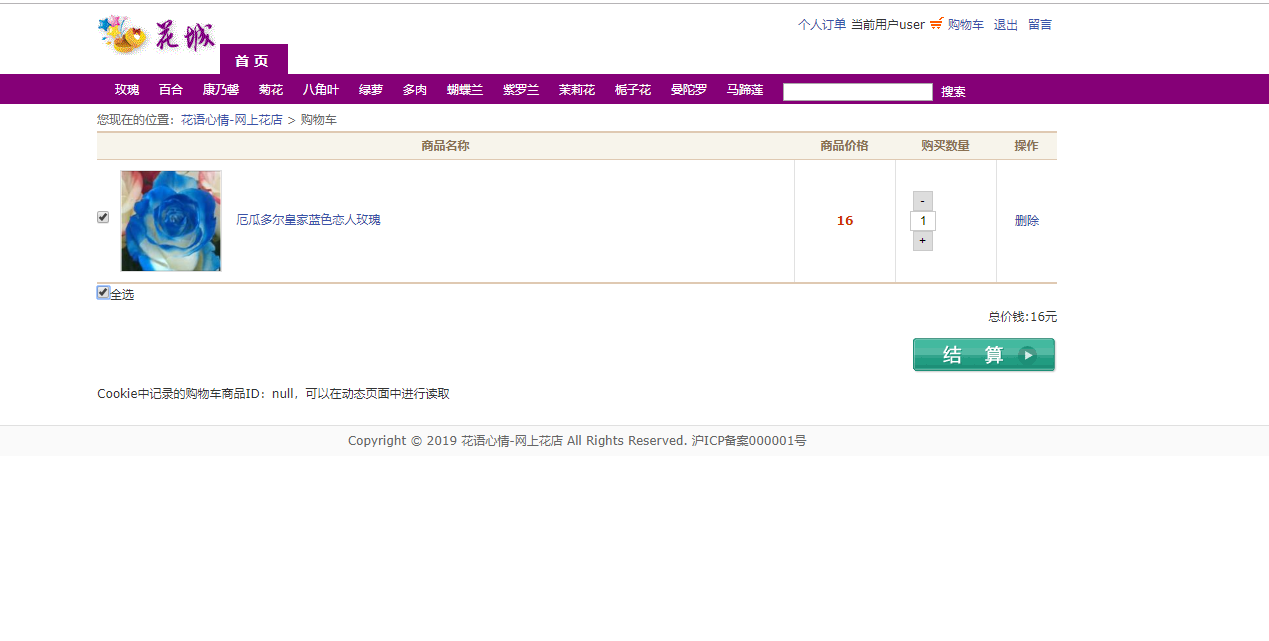
购物车界面清晰展示用户已选商品,包括商品图片、名称、单价、数量和小计信息。用户可以直接修改购买数量或删除商品,系统实时计算订单总金额。
订单处理与库存扣减
订单创建过程涉及多个数据表的协同操作,需要保证事务的原子性。系统通过数据库事务确保订单数据和库存数据的一致性。
订单创建核心逻辑:
public class OrderServlet extends HttpServlet {
    protected void doPost(HttpServletRequest request, HttpServletResponse response)
            throws ServletException, IOException {
        Connection conn = null;
        try {
            conn = dataSource.getConnection();
            conn.setAutoCommit(false); // 开启事务

            // 创建订单主记录
            Orders order = createOrder(request);
            orderDao.save(conn, order);

            // 处理订单项和库存扣减
            Cart cart = (Cart) request.getSession().getAttribute("cart");
            for (CartItem item : cart.getItems().values()) {
                Item orderItem = createOrderItem(order, item);
                itemDao.save(conn, orderItem);

                // 扣减库存
                productDao.updateStock(conn, item.getProduct().getProductId(),
                                     -item.getQuantity());
            }

            conn.commit(); // 提交事务
            cart.clear(); // 清空购物车
            response.sendRedirect("order_success.jsp");

        } catch (Exception e) {
            if (conn != null) {
                try { conn.rollback(); } catch (SQLException ex) {}
            }
            throw new ServletException("订单创建失败", e);
        } finally {
            if (conn != null) {
                try { conn.close(); } catch (SQLException e) {}
            }
        }
    }
}
库存验证与扣减服务:
public class InventoryService {
    public boolean checkStock(int productId, int requiredQuantity) {
        Product product = productDao.getProductById(productId);
        return product != null && product.getStock() >= requiredQuantity;
    }

    public synchronized boolean deductStock(int productId, int quantity) {
        Connection conn = null;
        try {
            conn = dataSource.getConnection();
            conn.setAutoCommit(false);

            // 使用悲观锁确保库存准确性
            Product product = productDao.getProductByIdForUpdate(conn, productId);
            if (product.getStock() < quantity) {
                conn.rollback();
                return false;
            }

            productDao.updateStock(conn, productId, -quantity);
            conn.commit();
            return true;

        } catch (SQLException e) {
            if (conn != null) {
                try { conn.rollback(); } catch (SQLException ex) {}
            }
            return false;
        } finally {
            if (conn != null) {
                try { conn.close(); } catch (SQLException e) {}
            }
        }
    }
}
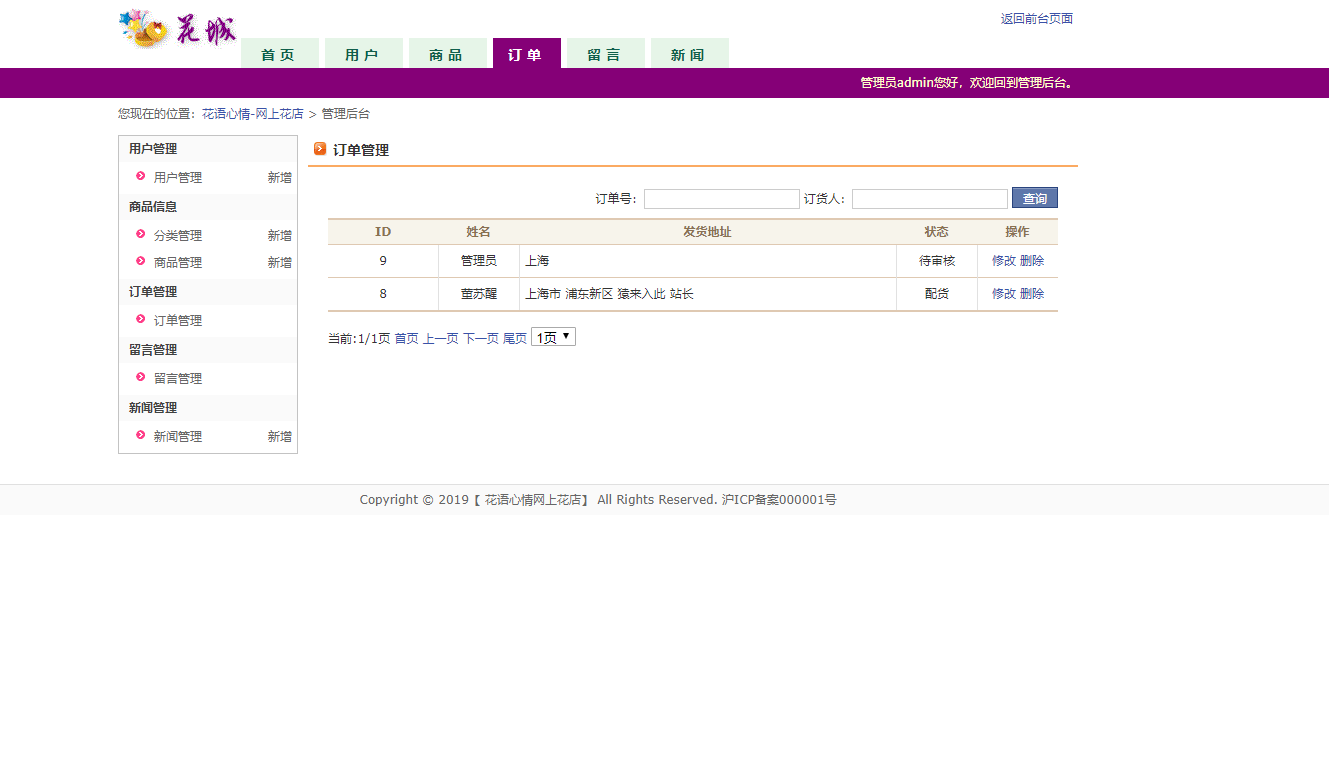
管理员可以查看详细的订单信息,包括订单状态、收货地址、购买商品明细等。系统提供完整的订单跟踪功能,支持订单状态更新和物流信息管理。
商品管理CRUD操作
商品管理模块支持管理员对鲜花商品进行全生命周期管理,包括商品上架、信息修改、库存调整和下架处理。
商品服务层实现:
public class ProductService {
    private ProductDao productDao = new ProductDao();

    public PaginationResult<Product> getProducts(int page, int pageSize,
                                               String keyword, Integer categoryId) {
        int total = productDao.countProducts(keyword, categoryId);
        List<Product> products = productDao.getProducts(page, pageSize, keyword, categoryId);

        return new PaginationResult<>(products, total, page, pageSize);
    }

    public boolean addProduct(Product product, InputStream imageStream) {
        Connection conn = null;
        try {
            conn = dataSource.getConnection();
            conn.setAutoCommit(false);

            // 保存商品基本信息
            int productId = productDao.save(conn, product);

            // 处理商品图片上传
            if (imageStream != null) {
                String imagePath = saveProductImage(productId, imageStream);
                productDao.updateImagePath(conn, productId, imagePath);
            }

            conn.commit();
            return true;

        } catch (Exception e) {
            if (conn != null) {
                try { conn.rollback(); } catch (SQLException ex) {}
            }
            return false;
        } finally {
            if (conn != null) {
                try { conn.close(); } catch (SQLException e) {}
            }
        }
    }

    public boolean updateProductStock(int productId, int newStock) {
        return productDao.updateStockDirectly(productId, newStock) > 0;
    }
}
商品分页查询数据访问层:
public class ProductDao {
    public List<Product> getProducts(int page, int pageSize, String keyword, Integer categoryId) {
        String sql = "SELECT p.*, c.categoryName FROM product p " +
                    "LEFT JOIN category c ON p.categoryId = c.categoryId " +
                    "WHERE 1=1";

        List<Object> params = new ArrayList<>();

        if (keyword != null && !keyword.trim().isEmpty()) {
            sql += " AND (p.productName LIKE ? OR p.manufacturer LIKE ?)";
            params.add("%" + keyword + "%");
            params.add("%" + keyword + "%");
        }

        if (categoryId != null && categoryId > 0) {
            sql += " AND p.categoryId = ?";
            params.add(categoryId);
        }

        sql += " ORDER BY p.createTime DESC LIMIT ?, ?";
        params.add((page - 1) * pageSize);
        params.add(pageSize);

        return queryRunner.query(sql, new BeanListHandler<>(Product.class),
                               params.toArray());
    }
}
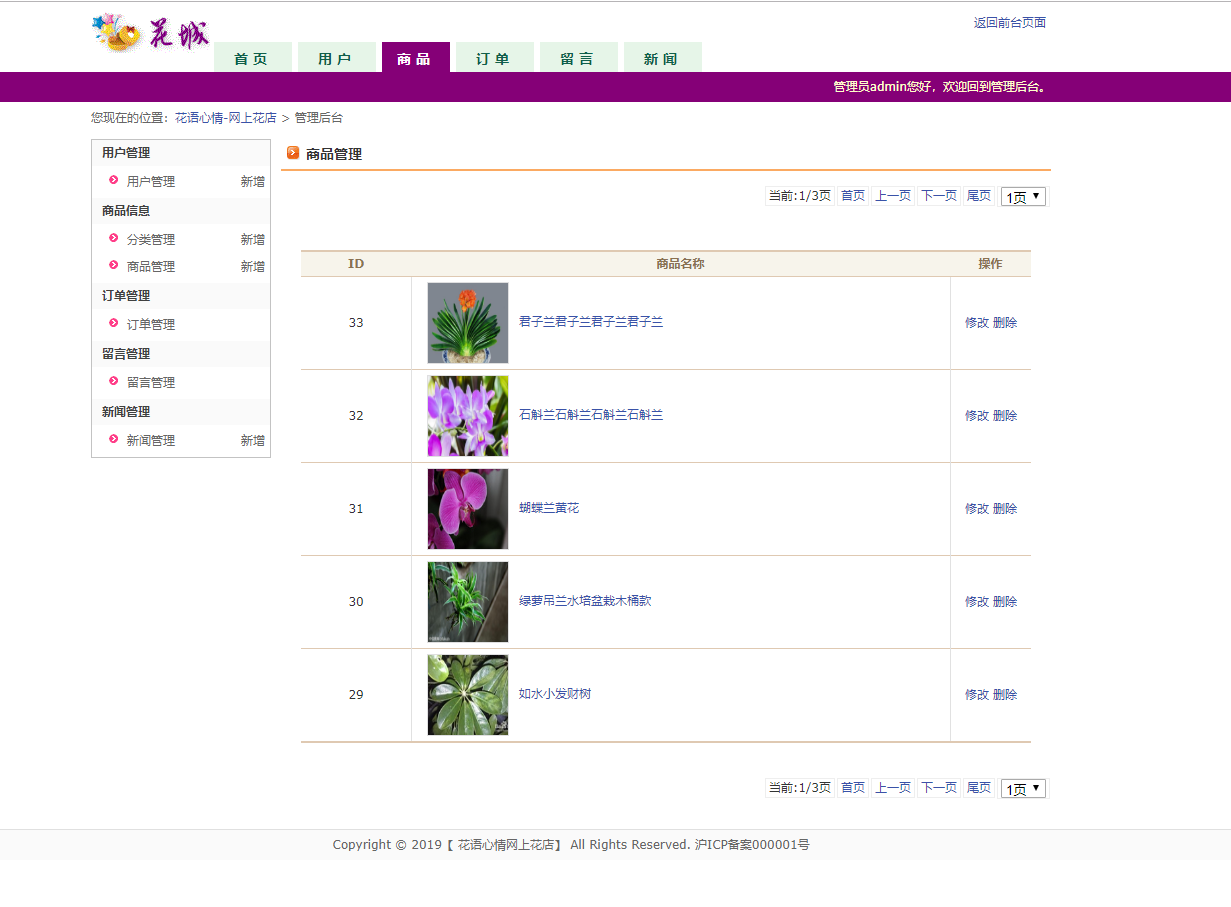
商品管理界面提供强大的搜索、筛选和批量操作功能。管理员可以按分类、关键词搜索商品,实时调整价格和库存,并查看商品销售统计数据。
用户认证与权限控制
系统实现基于角色的访问控制(RBAC),区分普通用户和管理员权限,确保数据安全性。
用户登录验证逻辑:
public class LoginServlet extends HttpServlet {
    protected void doPost(HttpServletRequest request, HttpServletResponse response)
            throws ServletException, IOException {
        String username = request.getParameter("username");
        String password = request.getParameter("password");

        User user = userService.authenticate(username, password);
        if (user != null) {
            HttpSession session = request.getSession();
            session.setAttribute("currentUser", user);
            session.setMaxInactiveInterval(30 * 60); // 30分钟超时

            // 根据用户角色重定向到不同页面
            if (user.getRole() == UserRole.ADMIN) {
                response.sendRedirect("admin/dashboard.jsp");
            } else {
                response.sendRedirect("index.jsp");
            }
        } else {
            request.setAttribute("error", "用户名或密码错误");
            request.getRequestDispatcher("login.jsp").forward(request, response);
        }
    }
}
权限拦截器实现:
public class AuthFilter implements Filter {
    public void doFilter(ServletRequest request, ServletResponse response,
                        FilterChain chain) throws IOException, ServletException {
        HttpServletRequest httpRequest = (HttpServletRequest) request;
        HttpServletResponse httpResponse = (HttpServletResponse) response;
        HttpSession session = httpRequest.getSession(false);

        String path = httpRequest.getRequestURI();

        // 检查管理员路径访问权限
        if (path.contains("/admin/")) {
            if (session == null || session.getAttribute("currentUser") == null) {
                httpResponse.sendRedirect(httpRequest.getContextPath() + "/login.jsp");
                return;
            }

            User user = (User) session.getAttribute("currentUser");
            if (user.getRole() != UserRole.ADMIN) {
                httpResponse.sendError(HttpServletResponse.SC_FORBIDDEN);
                return;
            }
        }

        chain.doFilter(request, response);
    }
}
实体模型设计
系统实体模型严格按照业务需求设计,每个实体类都封装了相应的属性和业务方法。
用户实体类:
public class User {
    private int userId;
    private String username;
    private String password;
    private String email;
    private String phone;
    private UserRole role;
    private Date createTime;
    private Date lastLoginTime;

    public enum UserRole {
        CUSTOMER, ADMIN
    }

    // 构造函数、getter和setter方法
    public User() {}

    public User(int userId, String username, String email, UserRole role) {
        this.userId = userId;
        this.username = username;
        this.email = email;
        this.role = role;
    }

    public boolean isAdmin() {
        return role == UserRole.ADMIN;
    }

    // 其他业务方法...
}
商品实体类扩展功能:
public class Product {
    private int productId;
    private String productName;
    private int categoryId;
    private String categoryName; // 关联查询字段
    private double price;
    private String productImg;
    private String manufacturer;
    private int stock;
    private String remark;
    private int sales;
    private Date createTime;

    // 库存状态检查方法
    public boolean isInStock() {
        return stock > 0;
    }

    public boolean hasSufficientStock(int quantity) {
        return stock >= quantity;
    }

    // 价格格式化显示
    public String getFormattedPrice() {
        return String.format("¥%.2f", price);
    }

    // 获取商品状态
    public String getStatus() {
        if (stock <= 0) return "缺货";
        if (stock < 10) return "库存紧张";
        return "有货";
    }
}
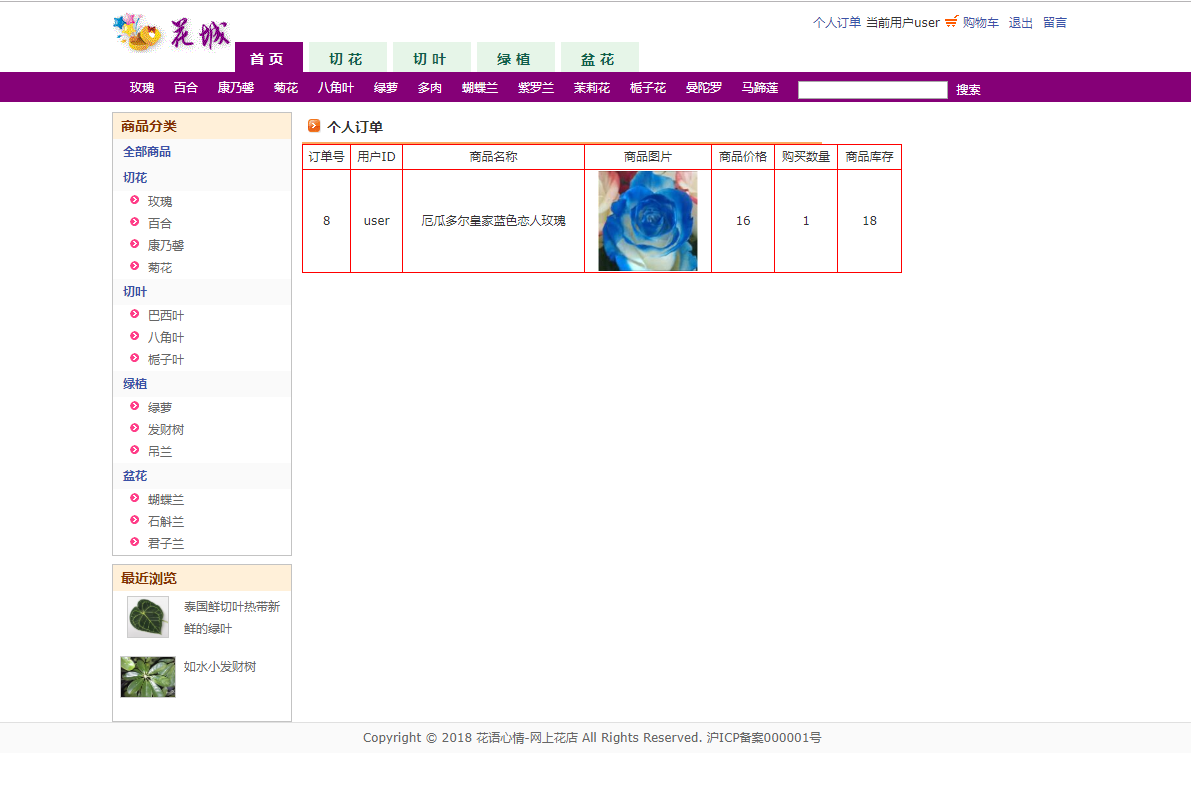
用户订单页面展示历史订单记录,支持按状态筛选和订单详情查看。每个订单清晰显示订单号、下单时间、总金额和当前状态,方便用户跟踪订单进度。
系统优化与扩展方向
基于当前系统架构和业务需求,可以从以下几个方向进行深度优化和功能扩展:
1. 性能优化与缓存策略