在高校环境中,物品的快速流转具有显著的时效性和地域性特征。每年毕业季和入学季,大量教材、家电、生活用品面临处置需求,而传统的线下跳蚤市场或校园BBS信息分散,存在信息不对称、交易效率低、信任度不足等问题。因此,一个专门服务于校园场景的线上二手交易平台应运而生。该系统采用经典的JSP+Servlet技术栈构建,严格遵循MVC设计模式,旨在通过集中化信息发布、实名制验证和流程化交易管理,构建一个安全、便捷、高效的校园闲置物品循环生态系统。
系统架构的核心是模型-视图-控制器分离。Servlet作为控制器层,统一拦截和处理所有HTTP请求,执行身份验证、参数校验、业务逻辑调度等核心职责。模型层由JavaBean实体类和数据库访问对象组成,封装了所有的数据结构和持久化操作。视图层则完全由JSP页面承担,通过JSTL标签库和EL表达式动态渲染数据,彻底避免了Java代码与HTML的混杂,保证了代码的可读性和可维护性。数据库选用MySQL,通过JDBC进行连接,并普遍使用PreparedStatement来防止SQL注入攻击,确保数据安全。
数据库设计是系统稳定运行的基石。系统共设计了12张数据表,支撑用户、商品、订单、评论等核心业务模块。其中,users表的设计充分考虑了校园环境的特殊性。
CREATE TABLE users (
    user_id INT AUTO_INCREMENT PRIMARY KEY,
    username VARCHAR(50) NOT NULL UNIQUE,
    password_hash VARCHAR(255) NOT NULL,
    email VARCHAR(100) NOT NULL UNIQUE,
    phone VARCHAR(20),
    real_name VARCHAR(50),
    student_id VARCHAR(20) UNIQUE,
    campus VARCHAR(100),
    dormitory VARCHAR(100),
    avatar_url VARCHAR(255),
    credit_rating INT DEFAULT 100,
    role ENUM('admin', 'user') DEFAULT 'user',
    created_at TIMESTAMP DEFAULT CURRENT_TIMESTAMP,
    updated_at TIMESTAMP DEFAULT CURRENT_TIMESTAMP ON UPDATE CURRENT_TIMESTAMP,
    is_active BOOLEAN DEFAULT TRUE
);
该表不仅包含基本的登录认证信息(username, password_hash, email),还引入了student_id(学号)、campus(校区)、dormitory(宿舍)等字段,为构建可信交易环境提供了数据基础。credit_rating(信用评分)字段为未来引入信用体系预留了扩展空间。role字段实现了用户权限分级,is_active字段允许进行软删除操作。
另一核心表items负责管理所有二手商品信息。
CREATE TABLE items (
    item_id INT AUTO_INCREMENT PRIMARY KEY,
    seller_id INT NOT NULL,
    category_id INT NOT NULL,
    title VARCHAR(200) NOT NULL,
    description TEXT,
    price DECIMAL(10, 2) NOT NULL,
    original_price DECIMAL(10, 2),
    condition ENUM('new', 'like_new', 'good', 'fair') NOT NULL,
    main_image_url VARCHAR(255) NOT NULL,
    image_urls JSON,
    status ENUM('pending', 'approved', 'sold', 'removed') DEFAULT 'pending',
    view_count INT DEFAULT 0,
    like_count INT DEFAULT 0,
    created_at TIMESTAMP DEFAULT CURRENT_TIMESTAMP,
    updated_at TIMESTAMP DEFAULT CURRENT_TIMESTAMP ON UPDATE CURRENT_TIMESTAMP,
    FOREIGN KEY (seller_id) REFERENCES users(user_id),
    FOREIGN KEY (category_id) REFERENCES categories(category_id)
);
该表设计中,condition字段通过枚举类型规范了商品成色描述,status字段实现了商品上架审核流程,image_urls字段使用JSON类型存储多图信息,适应了现代Web应用对灵活数据结构的需要。外键约束确保了数据的一致性和完整性。
用户认证与授权是系统安全的第一道防线。登录Servlet通过会话管理实现状态保持。
@WebServlet("/login")
public class LoginServlet extends HttpServlet {
    protected void doPost(HttpServletRequest request, HttpServletResponse response)
            throws ServletException, IOException {
        String username = request.getParameter("username");
        String password = request.getParameter("password");

        UserDAO userDAO = new UserDAO();
        User user = userDAO.findByUsername(username);

        if (user != null && PasswordUtil.verifyPassword(password, user.getPasswordHash())) {
            if (user.isActive()) {
                HttpSession session = request.getSession();
                session.setAttribute("currentUser", user);
                session.setMaxInactiveInterval(30 * 60); // 30分钟

                String redirectPath = user.getRole().equals("admin") ? "/admin/dashboard" : "/home";
                response.sendRedirect(request.getContextPath() + redirectPath);
            } else {
                request.setAttribute("errorMessage", "账户已被禁用,请联系管理员");
                request.getRequestDispatcher("/login.jsp").forward(request, response);
            }
        } else {
            request.setAttribute("errorMessage", "用户名或密码错误");
            request.getRequestDispatcher("/login.jsp").forward(request, response);
        }
    }
}
该代码展示了完整的认证流程:参数获取、数据库查询、密码验证、状态检查、会话设置和权限路由。密码采用哈希存储,会话超时时间设置为30分钟,平衡了安全性与用户体验。
商品发布功能允许用户快速上架闲置物品。相关的Servlet处理文件上传和表单数据。
@WebServlet("/items/publish")
@MultipartConfig
public class ItemPublishServlet extends HttpServlet {
    protected void doPost(HttpServletRequest request, HttpServletResponse response)
            throws ServletException, IOException {
        User seller = (User) request.getSession().getAttribute("currentUser");
        if (seller == null) {
            response.sendRedirect("/login");
            return;
        }

        String title = request.getParameter("title");
        String description = request.getParameter("description");
        BigDecimal price = new BigDecimal(request.getParameter("price"));
        int categoryId = Integer.parseInt(request.getParameter("categoryId"));
        String condition = request.getParameter("condition");

        Part mainImagePart = request.getPart("mainImage");
        String mainImageUrl = FileUploadUtil.saveImage(mainImagePart);

        List<String> additionalImageUrls = new ArrayList<>();
        for (Part part : request.getParts()) {
            if (part.getName().equals("additionalImages") && part.getSize() > 0) {
                additionalImageUrls.add(FileUploadUtil.saveImage(part));
            }
        }

        Item newItem = new Item();
        newItem.setSellerId(seller.getUserId());
        newItem.setTitle(title);
        newItem.setDescription(description);
        newItem.setPrice(price);
        newItem.setCategoryId(categoryId);
        newItem.setCondition(condition);
        newItem.setMainImageUrl(mainImageUrl);
        newItem.setImageUrls(additionalImageUrls);

        ItemDAO itemDAO = new ItemDAO();
        if (itemDAO.create(newItem)) {
            response.sendRedirect("/items/my");
        } else {
            request.setAttribute("errorMessage", "商品发布失败,请重试");
            request.getRequestDispatcher("/item_publish.jsp").forward(request, response);
        }
    }
}
该功能支持多图上传,通过@MultipartConfig注解处理文件数据,将上传的图片保存到服务器指定目录,并将URL路径存储到数据库。商品创建后默认处于待审核状态,等待管理员审核通过后才能公开显示。
购物车和订单管理系统实现了完整的交易流程。购物车项添加功能代码如下:
@WebServlet("/cart/add")
public class AddToCartServlet extends HttpServlet {
    protected void doPost(HttpServletRequest request, HttpServletResponse response)
            throws ServletException, IOException {
        User user = (User) request.getSession().getAttribute("currentUser");
        if (user == null) {
            response.sendRedirect("/login");
            return;
        }

        int itemId = Integer.parseInt(request.getParameter("itemId"));
        int quantity = Integer.parseInt(request.getParameter("quantity"));

        CartDAO cartDAO = new CartDAO();
        CartItem existingItem = cartDAO.findByUserAndItem(user.getUserId(), itemId);

        if (existingItem != null) {
            cartDAO.updateQuantity(existingItem.getCartItemId(), existingItem.getQuantity() + quantity);
        } else {
            CartItem newItem = new CartItem();
            newItem.setUserId(user.getUserId());
            newItem.setItemId(itemId);
            newItem.setQuantity(quantity);
            newItem.setAddedAt(new Timestamp(System.currentTimeMillis()));
            cartDAO.create(newItem);
        }

        response.sendRedirect("/cart");
    }
}
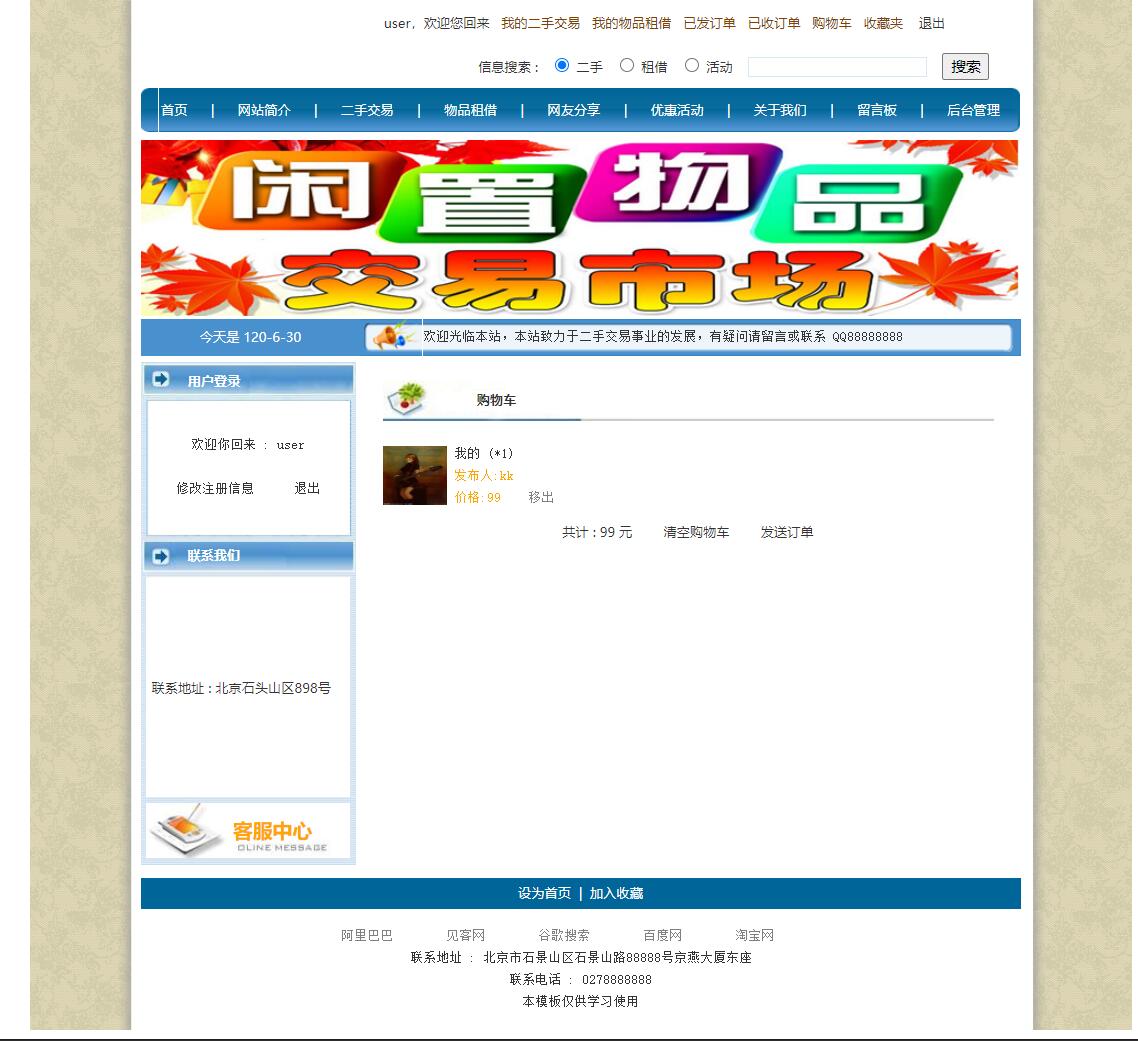
购物车功能采用"若存在则更新数量,否则新建记录"的逻辑,提供了良好的用户体验。上图展示了购物车界面,用户可以清晰查看已选商品、调整数量或移出购物车。
订单生成过程涉及事务处理,确保数据一致性。
@WebServlet("/orders/create")
public class CreateOrderServlet extends HttpServlet {
    protected void doPost(HttpServletRequest request, HttpServletResponse response)
            throws ServletException, IOException {
        User buyer = (User) request.getSession().getAttribute("currentUser");
        String[] cartItemIds = request.getParameterValues("cartItemIds");

        Connection conn = null;
        try {
            conn = DatabaseUtil.getConnection();
            conn.setAutoCommit(false);

            OrderDAO orderDAO = new OrderDAO(conn);
            OrderItemDAO orderItemDAO = new OrderItemDAO(conn);
            CartDAO cartDAO = new CartDAO(conn);
            ItemDAO itemDAO = new ItemDAO(conn);

            Order newOrder = new Order();
            newOrder.setBuyerId(buyer.getUserId());
            newOrder.setStatus("pending_payment");
            newOrder.setTotalAmount(BigDecimal.ZERO);
            int orderId = orderDAO.create(newOrder);

            BigDecimal totalAmount = BigDecimal.ZERO;
            for (String cartItemIdStr : cartItemIds) {
                int cartItemId = Integer.parseInt(cartItemIdStr);
                CartItem cartItem = cartDAO.findById(cartItemId);
                Item item = itemDAO.findById(cartItem.getItemId());

                if (item.getStatus().equals("approved")) {
                    OrderItem orderItem = new OrderItem();
                    orderItem.setOrderId(orderId);
                    orderItem.setItemId(item.getItemId());
                    orderItem.setQuantity(cartItem.getQuantity());
                    orderItem.setUnitPrice(item.getPrice());
                    orderItemDAO.create(orderItem);

                    totalAmount = totalAmount.add(item.getPrice().multiply(new BigDecimal(cartItem.getQuantity())));

                    cartDAO.delete(cartItemId);
                    itemDAO.updateStatus(item.getItemId(), "reserved");
                }
            }

            orderDAO.updateTotalAmount(orderId, totalAmount);
            conn.commit();

            response.sendRedirect("/orders/payment?orderId=" + orderId);
        } catch (Exception e) {
            if (conn != null) {
                try { conn.rollback(); } catch (SQLException ex) {}
            }
            throw new ServletException("订单创建失败", e);
        } finally {
            if (conn != null) {
                try { conn.setAutoCommit(true); conn.close(); } catch (SQLException e) {}
            }
        }
    }
}
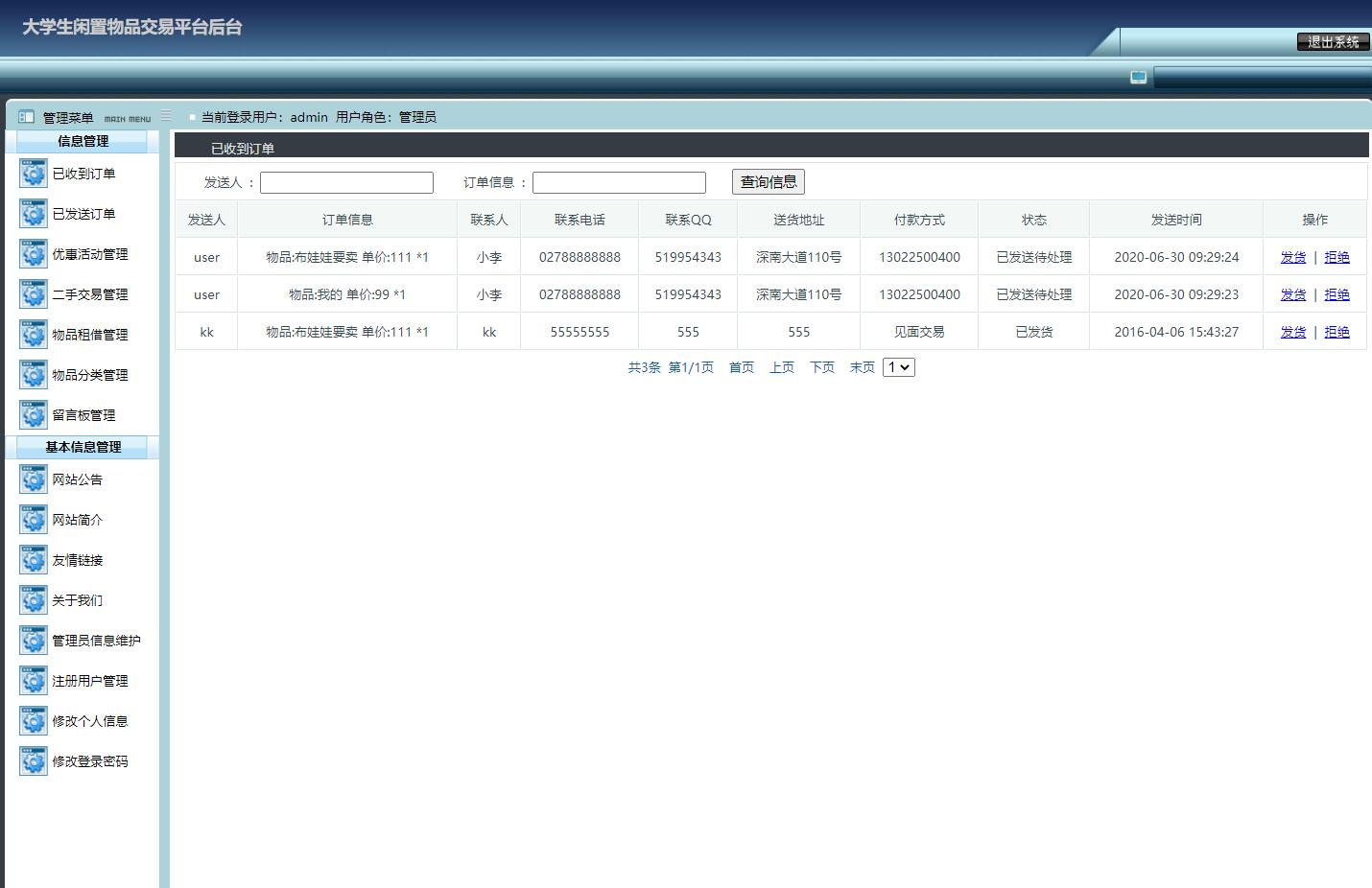
该代码展示了完整的事务处理流程:手动管理数据库连接、关闭自动提交、在try块中执行所有数据库操作、成功则提交、异常则回滚。订单创建过程中,同时更新商品状态为"reserved",防止超卖情况发生。上图从管理员视角展示了订单管理界面,可以查看所有交易记录并进行状态管理。
商品搜索与筛选功能提供了良好的浏览体验。
<%@ page contentType="text/html;charset=UTF-8" %>
<%@ taglib prefix="c" uri="http://java.sun.com/jsp/jstl/core" %>
<div class="search-filter-panel">
    <form action="${pageContext.request.contextPath}/items/search" method="get">
        <input type="text" name="keyword" value="${param.keyword}" placeholder="搜索商品名称或描述">
        <select name="categoryId">
            <option value="">全部分类</option>
            <c:forEach var="category" items="${categories}">
                <option value="${category.categoryId}"
                    <c:if test="${param.categoryId == category.categoryId}">selected</c:if>>
                    ${category.categoryName}
                </option>
            </c:forEach>
        </select>
        <select name="condition">
            <option value="">全部成色</option>
            <option value="new" <c:if test="${param.condition == 'new'}">selected</c:if>>全新</option>
            <option value="like_new" <c:if test="${param.condition == 'like_new'}">selected</c:if>>几乎全新</option>
            <option value="good" <c:if test="${param.condition == 'good'}">selected</c:if>>良好</option>
            <option value="fair" <c:if test="${param.condition == 'fair'}">selected</c:if>>一般</option>
        </select>
        <input type="number" name="minPrice" value="${param.minPrice}" placeholder="最低价">
        <input type="number" name="maxPrice" value="${param.maxPrice}" placeholder="最高价">
        <button type="submit">搜索</button>
    </form>
</div>

<div class="items-grid">
    <c:forEach var="item" items="${items}">
        <div class="item-card">
            <a href="${pageContext.request.contextPath}/items/detail?id=${item.itemId}">
                <img src="${item.mainImageUrl}" alt="${item.title}">
                <h3>${item.title}</h3>
                <p class="price">¥${item.price}</p>
                <p class="condition">成色: ${item.condition}</p>
                <p class="seller">卖家: ${item.seller.username}</p>
            </a>
            <c:if test="${not empty currentUser && currentUser.userId != item.sellerId}">
                <form action="${pageContext.request.contextPath}/cart/add" method="post" class="add-to-cart-form">
                    <input type="hidden" name="itemId" value="${item.itemId}">
                    <input type="number" name="quantity" value="1" min="1" max="10">
                    <button type="submit">加入购物车</button>
                </form>
            </c:if>
        </div>
    </c:forEach>
</div>
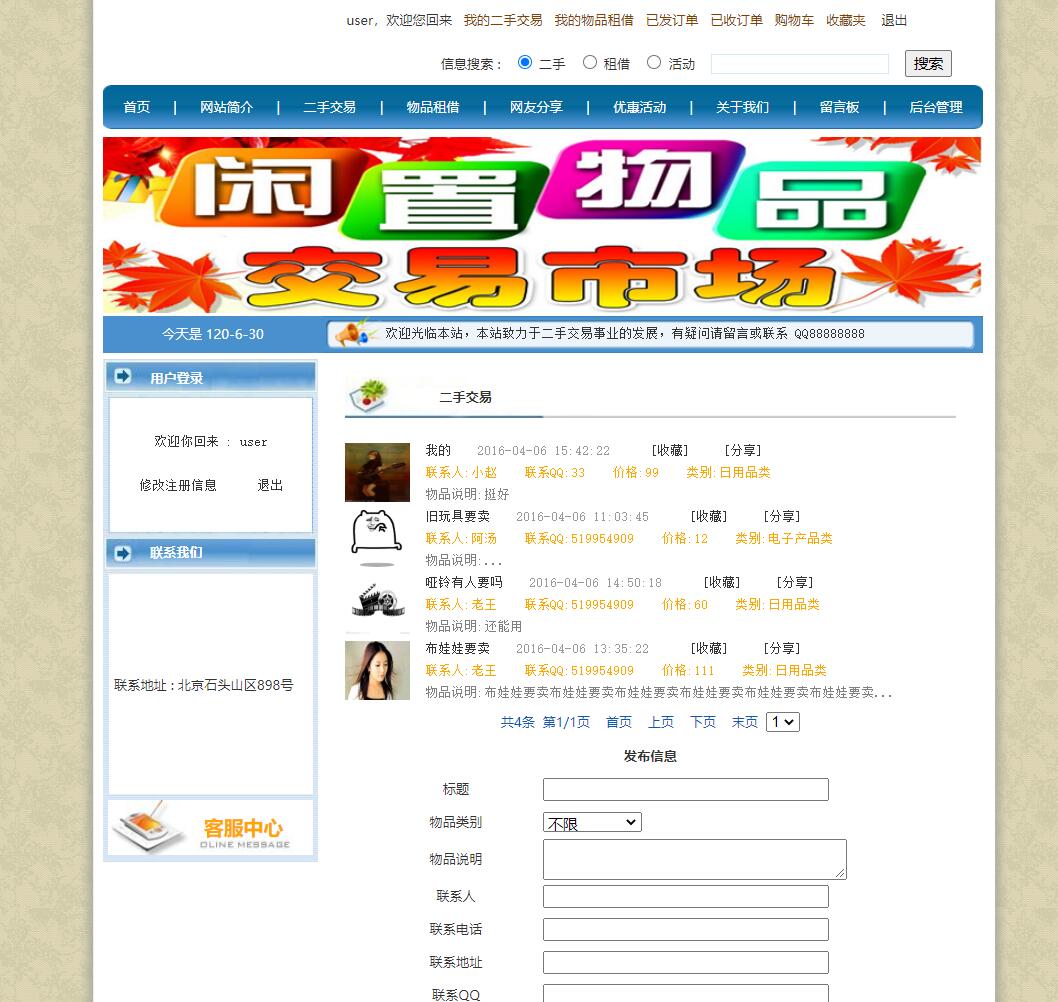
JSP页面使用JSTL标签和EL表达式实现了数据的动态渲染。搜索表单支持多条件筛选,商品卡片展示了关键信息并提供了直接加入购物车的功能。上图展示了商品浏览界面,布局清晰,信息完整。
管理员后台提供了全面的系统管理功能。
@WebServlet("/admin/items/approve")
public class ItemApproveServlet extends HttpServlet {
    protected void doPost(HttpServletRequest request, HttpServletResponse response)
            throws ServletException, IOException {
        User admin = (User) request.getSession().getAttribute("currentUser");
        if (admin == null || !"admin".equals(admin.getRole())) {
            response.sendError(HttpServletResponse.SC_FORBIDDEN);
            return;
        }

        int itemId = Integer.parseInt(request.getParameter("itemId"));
        String action = request.getParameter("action");

        ItemDAO itemDAO = new ItemDAO();
        Item item = itemDAO.findById(itemId);

        if ("approve".equals(action)) {
            itemDAO.updateStatus(itemId, "approved");

            NotificationDAO notificationDAO = new NotificationDAO();
            Notification notification = new Notification();
            notification.setUserId(item.getSellerId());
            notification.setTitle("商品审核通过");
            notification.setContent("您发布的商品《" + item.getTitle() + "》已通过审核,现在可以在平台上正常展示了。");
            notification.setType("system");
            notificationDAO.create(notification);

        } else if ("reject".equals(action)) {
            String rejectReason = request.getParameter("rejectReason");
            itemDAO.updateStatus(itemId, "removed");

            NotificationDAO notificationDAO = new NotificationDAO();
            Notification notification = new Notification();
            notification.setUserId(item.getSellerId());
            notification.setTitle("商品审核未通过");
            notification.setContent("您发布的商品《" + item.getTitle() + "》未通过审核。原因:" + rejectReason);
            notification.setType("system");
            notificationDAO.create(notification);
        }

        response.sendRedirect("/admin/items/pending");
    }
}
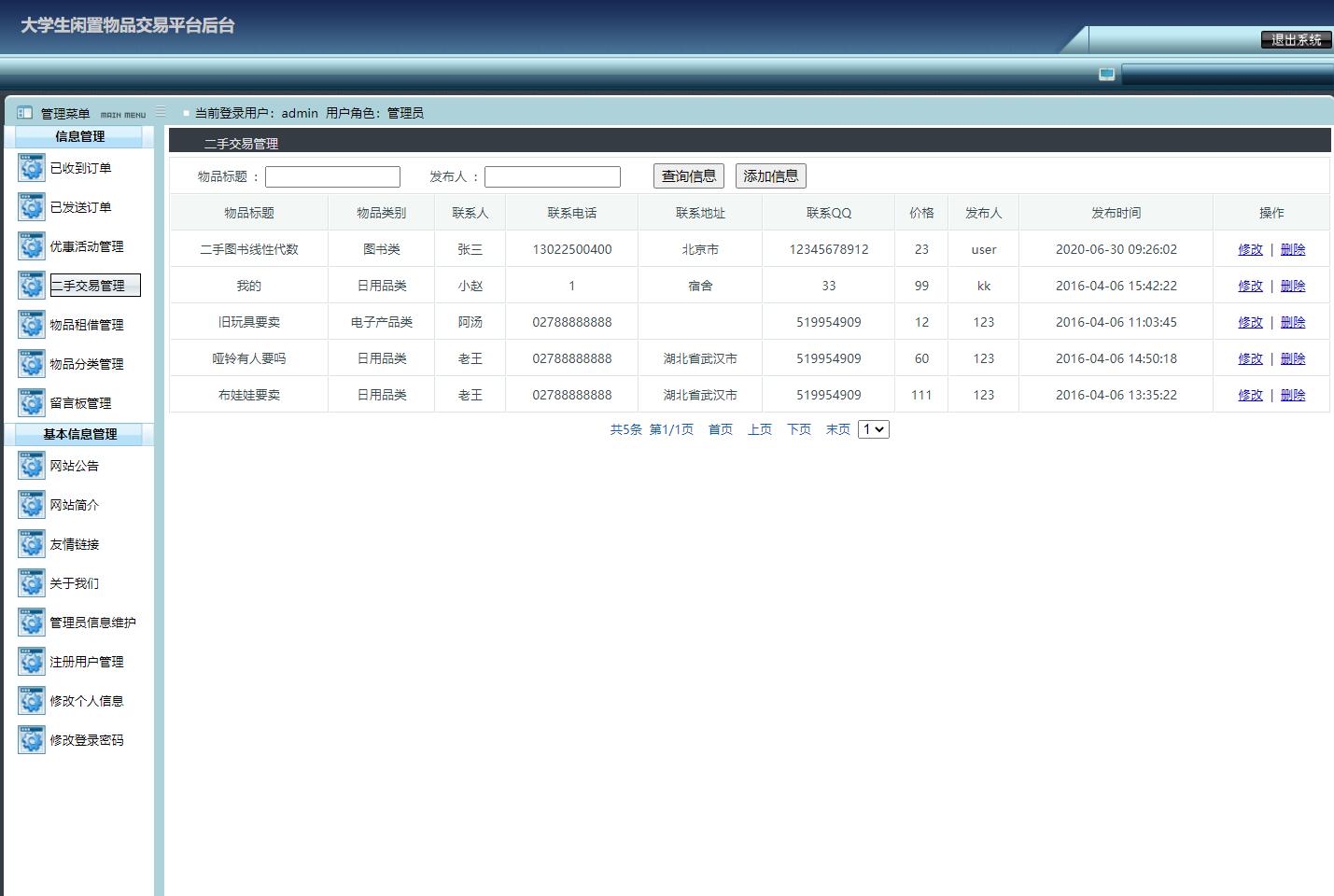
管理员审核功能不仅改变商品状态,还通过站内通知系统向卖家发送审核结果。这种设计提升了用户体验,让卖家及时了解商品状态变化。上图展示了管理员商品管理界面,可以对待审核商品进行批量操作。
系统在多个方面具备进一步优化的潜力。首先,可以引入Redis缓存热点数据,如商品分类信息、用户基本信息、热门商品列表等,显著减轻数据库压力。其次,集成Elasticsearch实现更强大的全文搜索功能,支持分词、同义词、拼音搜索等高级特性。第三,建立用户信用评价体系,基于交易完成情况、评价内容、纠纷处理结果等维度计算信用分数,为交易双方提供更全面的决策参考。第四,实现实时消息通信功能,让买家和卖家能够直接沟通商品细节、议价、约定交易方式,提升交易成功率。最后,开发移动端APP或 Progressive Web App,适应移动互联网趋势,提供更便捷的用户体验。
系统通过严谨的数据库设计、清晰的架构分层、完整的功能实现,为校园二手交易提供了可靠的技术支持。JSP+Servlet技术栈虽然传统,但在中小型项目中依然具备开发效率高、部署简单、性能稳定等优势。随着业务发展,可以通过逐步引入新技术组件来提升系统能力和用户体验。