在当代高等教育环境中,大学生思想建设与心理健康已成为高校育人工作的重要环节。传统线下咨询模式存在时空限制、隐私保护不足等问题,无法满足学生个性化、即时化的需求。为此,我们设计并实现了一个基于JSP技术的大学生思想建设与心理健康服务平台,通过信息化手段为学生提供全方位的心理支持服务。
该平台采用B/S架构,使用JSP+Servlet作为后端核心技术,MySQL作为数据存储方案,前端结合HTML、CSS和JavaScript实现动态交互效果。系统设计了学生、教师和管理员三类角色,分别对应不同的功能模块和权限控制。
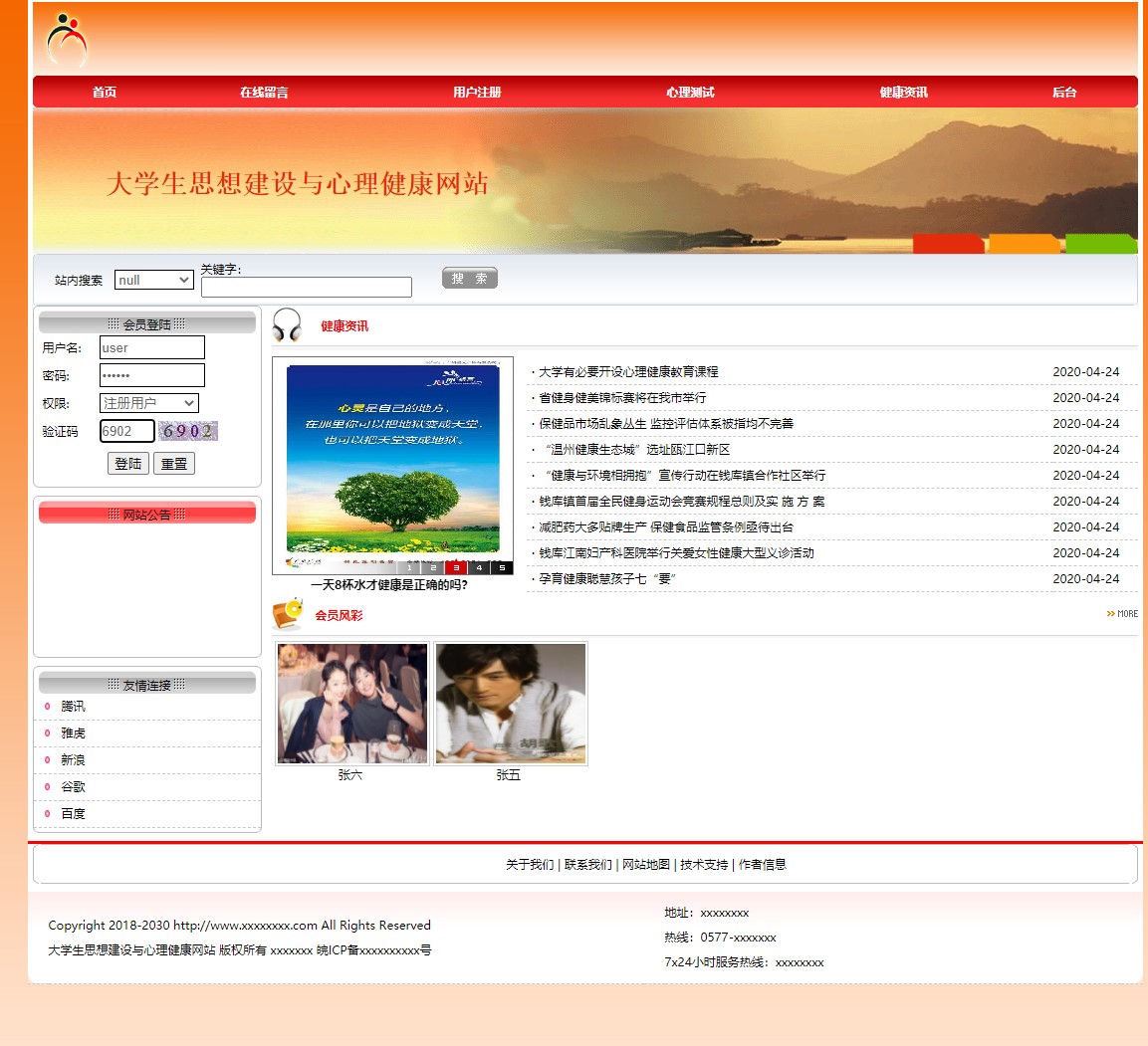
系统架构采用经典的三层架构模式,表现层由JSP页面负责数据展示和用户交互,业务逻辑层通过Servlet处理核心业务规则,数据访问层使用JDBC技术实现与MySQL数据库的通信。这种分层设计使得系统具有良好的可维护性和扩展性。
数据库设计亮点分析
平台数据库包含11张核心表,其中用户表的设计体现了精细化的权限管理策略:
CREATE TABLE users (
    id INT PRIMARY KEY AUTO_INCREMENT,
    username VARCHAR(50) NOT NULL UNIQUE,
    password VARCHAR(100) NOT NULL,
    role ENUM('student', 'teacher', 'admin') NOT NULL,
    real_name VARCHAR(50),
    student_id VARCHAR(20),
    college VARCHAR(100),
    class_name VARCHAR(50),
    phone VARCHAR(20),
    email VARCHAR(100),
    status TINYINT DEFAULT 1,
    created_time DATETIME DEFAULT CURRENT_TIMESTAMP,
    last_login_time DATETIME
);
该表通过role字段实现角色区分,student_id字段仅对学生角色有效,college和class_name字段支持院系班级管理。status字段实现软删除机制,last_login_time记录用户活跃度。
心理健康测试模块的表结构设计展示了复杂业务逻辑的数据建模能力:
CREATE TABLE psychological_tests (
    id INT PRIMARY KEY AUTO_INCREMENT,
    title VARCHAR(200) NOT NULL,
    description TEXT,
    total_questions INT NOT NULL,
    total_score INT NOT NULL,
    evaluation_criteria TEXT,
    created_by INT,
    created_time DATETIME DEFAULT CURRENT_TIMESTAMP,
    status TINYINT DEFAULT 1
);

CREATE TABLE test_questions (
    id INT PRIMARY KEY AUTO_INCREMENT,
    test_id INT NOT NULL,
    question_text TEXT NOT NULL,
    question_type ENUM('single_choice', 'multiple_choice', 'scale') NOT NULL,
    options JSON,
    score_rules JSON,
    sequence INT NOT NULL,
    FOREIGN KEY (test_id) REFERENCES psychological_tests(id)
);
questions表使用JSON类型存储选项和评分规则,支持灵活的多题型配置。sequence字段确保题目顺序可控,test_id外键维护测试与题目的关联关系。
核心功能实现深度解析
- 心理健康测评系统
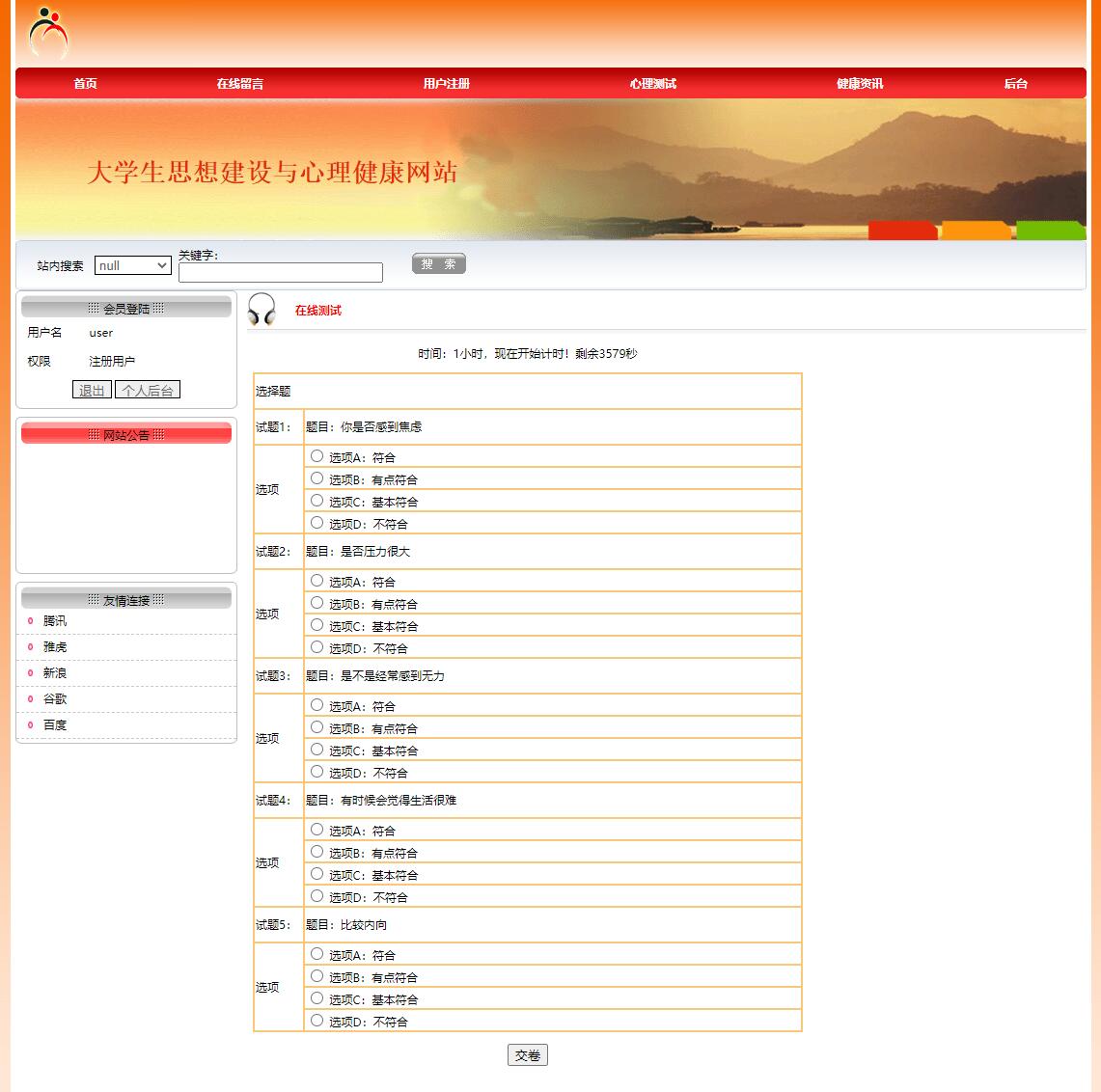
心理测试功能采用动态题目加载机制,通过AJAX技术实现无刷新答题体验:
public class TestServlet extends HttpServlet {
    protected void doGet(HttpServletRequest request, HttpServletResponse response)
            throws ServletException, IOException {
        String testId = request.getParameter("testId");
        String action = request.getParameter("action");

        if ("getQuestions".equals(action)) {
            List<Question> questions = questionService.getQuestionsByTestId(testId);
            String json = new Gson().toJson(questions);
            response.setContentType("application/json");
            response.getWriter().write(json);
        }
    }
}
前端通过JavaScript动态渲染题目选项,实时计算答题进度:
function renderQuestion(question) {
    let html = `<div class="question-item" data-question-id="${question.id}">
        <h4>${question.sequence}. ${question.questionText}</h4>`;

    question.options.forEach((option, index) => {
        html += `<label class="option-item">
            <input type="${question.questionType === 'multiple_choice' ? 'checkbox' : 'radio'}"
                   name="q${question.id}" value="${option.value}">
            ${option.text}
        </label>`;
    });

    html += `</div>`;
    return html;
}
- 在线咨询与消息系统
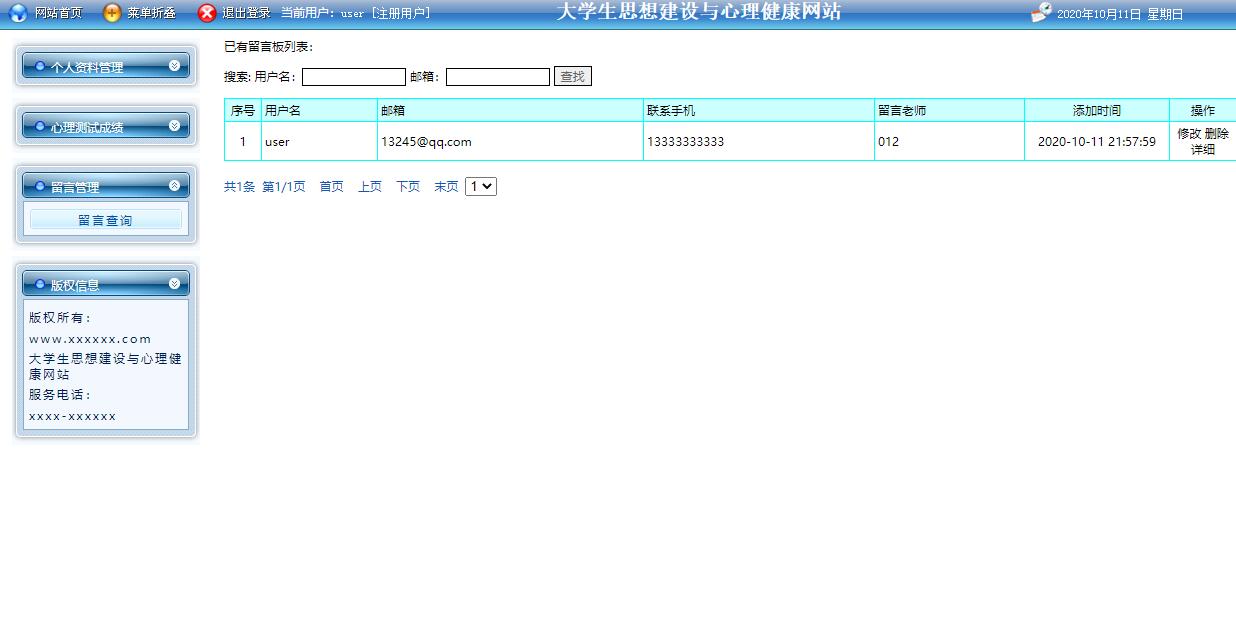
消息模块实现了实时通信功能,支持师生间的安全交流:
public class MessageService {
    public boolean sendMessage(Message message) {
        Connection conn = null;
        PreparedStatement pstmt = null;
        try {
            conn = DatabaseUtil.getConnection();
            String sql = "INSERT INTO messages (sender_id, receiver_id, title, content, message_type, parent_id) VALUES (?, ?, ?, ?, ?, ?)";
            pstmt = conn.prepareStatement(sql);
            pstmt.setInt(1, message.getSenderId());
            pstmt.setInt(2, message.getReceiverId());
            pstmt.setString(3, message.getTitle());
            pstmt.setString(4, message.getContent());
            pstmt.setString(5, message.getMessageType());
            pstmt.setObject(6, message.getParentId());

            return pstmt.executeUpdate() > 0;
        } catch (SQLException e) {
            logger.error("发送消息失败", e);
            return false;
        } finally {
            DatabaseUtil.closeResources(null, pstmt, conn);
        }
    }
}
消息查询功能支持多条件筛选和分页显示:
<%@ page import="java.util.List" %>
<%@ page import="com.model.Message" %>
<%
    List<Message> messageList = (List<Message>) request.getAttribute("messageList");
    int totalPages = (Integer) request.getAttribute("totalPages");
    int currentPage = (Integer) request.getAttribute("currentPage");
%>

<div class="message-filter">
    <form action="message" method="get">
        <select name="type">
            <option value="">全部类型</option>
            <option value="consultation">咨询</option>
            <option value="notification">通知</option>
        </select>
        <input type="text" name="keyword" placeholder="搜索消息内容">
        <button type="submit">筛选</button>
    </form>
</div>
- 心理健康知识库管理
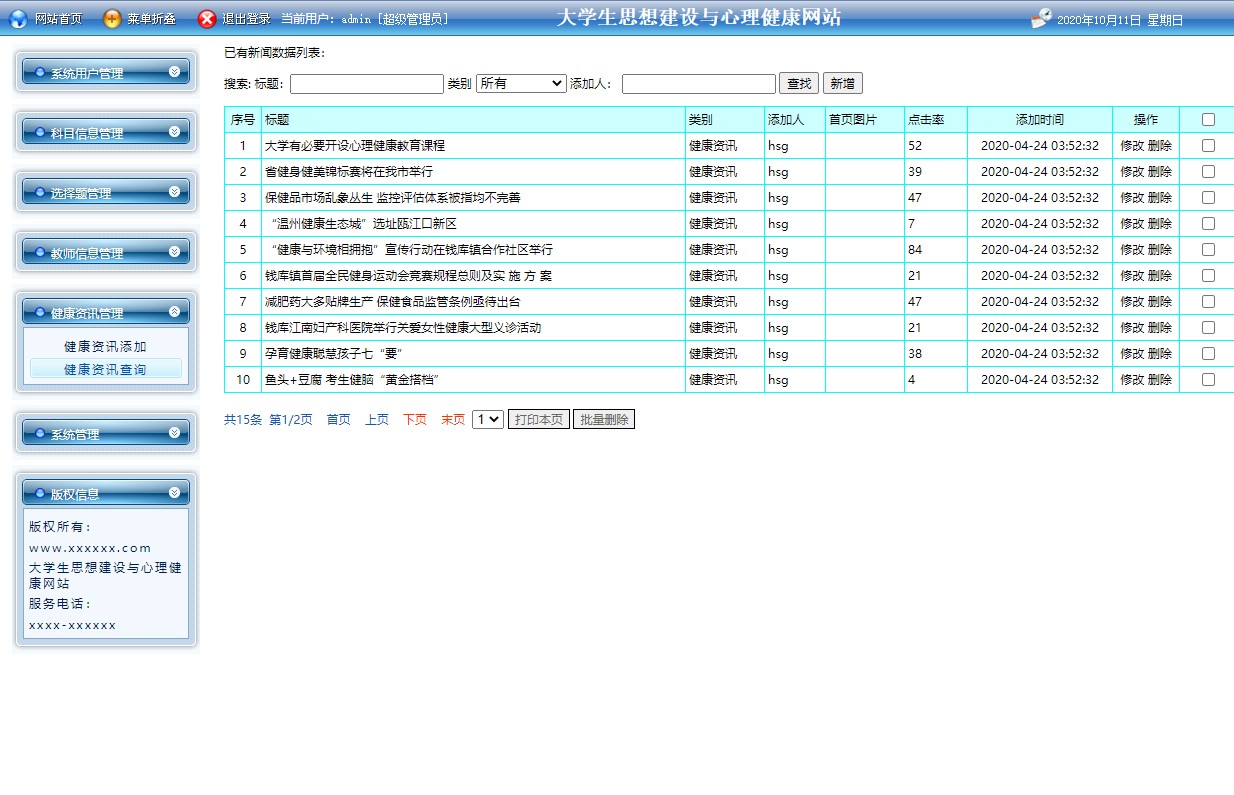
管理员可以动态管理健康新闻和科普文章:
public class NewsService {
    public PaginationResult<News> getNewsList(int page, int pageSize, String keyword) {
        StringBuilder sql = new StringBuilder("SELECT * FROM health_news WHERE status = 1");
        List<Object> params = new ArrayList<>();

        if (keyword != null && !keyword.trim().isEmpty()) {
            sql.append(" AND (title LIKE ? OR content LIKE ?)");
            params.add("%" + keyword + "%");
            params.add("%" + keyword + "%");
        }

        sql.append(" ORDER BY publish_time DESC LIMIT ?, ?");
        params.add((page - 1) * pageSize);
        params.add(pageSize);

        return jdbcTemplate.queryForPagination(sql.toString(), params.toArray(), News.class);
    }
}
- 权限控制与安全机制
系统通过过滤器实现统一的权限验证:
@WebFilter("/*")
public class AuthenticationFilter implements Filter {
    public void doFilter(ServletRequest request, ServletResponse response,
            FilterChain chain) throws IOException, ServletException {
        HttpServletRequest req = (HttpServletRequest) request;
        HttpServletResponse res = (HttpServletResponse) response;

        String path = req.getRequestURI().substring(req.getContextPath().length());

        if (path.startsWith("/admin/")) {
            User user = (User) req.getSession().getAttribute("user");
            if (user == null || !"admin".equals(user.getRole())) {
                res.sendRedirect(req.getContextPath() + "/login.jsp");
                return;
            }
        }

        chain.doFilter(request, response);
    }
}
密码采用MD5加盐加密存储,确保数据安全:
public class SecurityUtil {
    public static String encryptPassword(String password, String salt) {
        try {
            String combined = password + salt;
            MessageDigest md = MessageDigest.getInstance("MD5");
            byte[] digest = md.digest(combined.getBytes());
            return bytesToHex(digest);
        } catch (NoSuchAlgorithmException e) {
            throw new RuntimeException("加密算法不可用", e);
        }
    }

    private static String bytesToHex(byte[] bytes) {
        StringBuilder hexString = new StringBuilder();
        for (byte b : bytes) {
            String hex = Integer.toHexString(0xff & b);
            if (hex.length() == 1) hexString.append('0');
            hexString.append(hex);
        }
        return hexString.toString();
    }
}
实体模型设计
系统采用面向对象的设计思想,构建了完整的实体模型体系。核心实体包括用户、心理测试、题目、消息、新闻等,各实体之间通过明确的关联关系形成有机整体。
用户实体作为系统核心,通过角色区分实现权限控制:
public class User {
    private Integer id;
    private String username;
    private String password;
    private String role;
    private String realName;
    private String studentId;
    private String college;
    private String className;
    private String phone;
    private String email;
    private Integer status;
    private Date createdTime;
    private Date lastLoginTime;

    // 省略getter和setter方法
}
心理测试实体封装了完整的测试业务逻辑:
public class PsychologicalTest {
    private Integer id;
    private String title;
    private String description;
    private Integer totalQuestions;
    private Integer totalScore;
    private String evaluationCriteria;
    private Integer createdBy;
    private Date createdTime;
    private Integer status;
    private List<TestQuestion> questions;

    public void addQuestion(TestQuestion question) {
        if (questions == null) {
            questions = new ArrayList<>();
        }
        questions.add(question);
    }
}
性能优化实践
数据库查询优化方面,系统为常用查询字段添加了索引:
CREATE INDEX idx_users_username ON users(username);
CREATE INDEX idx_users_role_status ON users(role, status);
CREATE INDEX idx_messages_receiver_time ON messages(receiver_id, created_time);
CREATE INDEX idx_test_records_user_test ON test_records(user_id, test_id);
采用连接池技术管理数据库连接,提升系统并发处理能力:
public class DatabaseUtil {
    private static DataSource dataSource;

    static {
        try {
            Context context = new InitialContext();
            dataSource = (DataSource) context.lookup("java:comp/env/jdbc/mentalHealthDB");
        } catch (NamingException e) {
            e.printStackTrace();
        }
    }

    public static Connection getConnection() throws SQLException {
        return dataSource.getConnection();
    }
}
未来优化方向
移动端适配优化:开发响应式布局,支持手机端访问。可采用Bootstrap框架重构前端界面,确保在不同设备上都能获得良好的用户体验。
实时通信增强:集成WebSocket技术实现真正的实时聊天功能。当教师回复学生咨询时,学生能够立即收到通知,提升沟通效率。
数据分析与可视化:引入ECharts等数据可视化库,对心理测试结果进行多维度分析,生成个性化的心理健康报告和趋势图表。
智能化推荐:基于用户行为数据构建推荐算法,为学生精准推送相关的心理健康知识和活动信息。可采用协同过滤算法实现个性化内容推荐。
微服务架构重构:将单体应用拆分为用户服务、测试服务、消息服务等微服务,提升系统的可扩展性和维护性。使用Spring Cloud等技术栈实现服务治理。
该平台通过系统化的功能设计和严谨的技术实现,为大学生心理健康服务提供了数字化解决方案。其模块化架构和标准化的开发规范为后续功能扩展奠定了坚实基础,具有良好的应用前景和发展空间。