在企业级应用开发领域,人力资源管理的数字化转型是一个重要方向。传统的招聘流程通常依赖于电子邮件、Excel表格和线下会议,导致信息孤岛、协同效率低下和数据统计困难。针对这些痛点,设计并实现了一个一体化的智能招聘管理解决方案。该系统将后端管理平台与对外招聘门户紧密结合,实现了招聘流程的全链路数字化管理。
该系统采用SpringBoot作为核心框架,显著简化了企业级应用的初始配置和开发过程。通过依赖注入和自动配置特性,开发者能够快速搭建稳定可靠的后端服务。系统架构严格遵循MVC设计模式,清晰分离了数据持久层、业务逻辑层和前端展示层,确保了代码的良好可维护性和可扩展性。
数据持久化层采用Spring Data JPA框架,通过对实体类的注解配置,简化了与MySQL数据库的交互。JPA的Repository接口提供了丰富的内置方法,支持复杂的查询操作,同时也能通过@Query注解编写自定义的JPQL或原生SQL语句。服务层封装了核心业务逻辑,如候选人自动匹配、面试流程状态机管理等,并通过事务注解确保数据一致性。控制层则提供了一套完整的RESTful API,为前后端分离架构提供了坚实的数据支撑。
前端展示层采用了Thymeleaf模板引擎进行服务端渲染。这种方案特别适合需要快速构建动态内容且风格统一的门户类网站。Thymeleaf的自然模板特性使得前端页面在静态状态下也能正确显示,便于前端开发者和设计师协作。系统安全方面,通过集成Spring Security框架,实现了基于角色的访问控制(RBAC),对不同用户群体(如系统管理员、HR、求职者)的权限进行了精细划分。
数据库架构设计与核心表分析
系统的数据模型由17张数据表构成,涵盖了用户管理、职位发布、简历管理、面试流程等核心业务实体。以下是几个关键表的结构设计分析。
用户表(user)设计体现了多角色支持的特性:
CREATE TABLE `user` (
  `id` bigint(20) NOT NULL AUTO_INCREMENT COMMENT '用户ID',
  `username` varchar(50) NOT NULL COMMENT '用户名',
  `password` varchar(255) NOT NULL COMMENT '密码',
  `email` varchar(100) DEFAULT NULL COMMENT '邮箱',
  `phone` varchar(20) DEFAULT NULL COMMENT '手机号',
  `user_type` int(11) NOT NULL COMMENT '用户类型:1-管理员 2-HR 3-求职者',
  `create_time` datetime DEFAULT CURRENT_TIMESTAMP COMMENT '创建时间',
  `update_time` datetime DEFAULT CURRENT_TIMESTAMP ON UPDATE CURRENT_TIMESTAMP COMMENT '更新时间',
  `status` int(11) DEFAULT '1' COMMENT '状态:0-禁用 1-启用',
  PRIMARY KEY (`id`),
  UNIQUE KEY `uk_username` (`username`),
  KEY `idx_user_type` (`user_type`),
  KEY `idx_status` (`status`)
) ENGINE=InnoDB DEFAULT CHARSET=utf8mb4 COMMENT='用户表';
该表设计中,user_type字段使用整型标识用户角色,便于权限控制模块进行快速筛选。username字段设置了唯一索引,确保用户标识的唯一性。create_time和update_time采用MySQL的自动时间戳功能,简化了开发中对时间字段的处理。状态字段支持软删除逻辑,符合企业级应用的数据安全规范。
职位表(job)的设计支持了复杂的职位信息管理需求:
CREATE TABLE `job` (
  `id` bigint(20) NOT NULL AUTO_INCREMENT COMMENT '职位ID',
  `title` varchar(200) NOT NULL COMMENT '职位名称',
  `department` varchar(100) DEFAULT NULL COMMENT '所属部门',
  `work_city` varchar(50) DEFAULT NULL COMMENT '工作城市',
  `description` text COMMENT '职位描述',
  `requirement` text COMMENT '职位要求',
  `min_salary` int(11) DEFAULT NULL COMMENT '最低薪资',
  `max_salary` int(11) DEFAULT NULL COMMENT '最高薪资',
  `hr_id` bigint(20) NOT NULL COMMENT '负责HR的ID',
  `publish_status` int(11) DEFAULT '0' COMMENT '发布状态:0-草稿 1-已发布',
  `create_time` datetime DEFAULT CURRENT_TIMESTAMP COMMENT '创建时间',
  `update_time` datetime DEFAULT CURRENT_TIMESTAMP ON UPDATE CURRENT_TIMESTAMP COMMENT '更新时间',
  PRIMARY KEY (`id`),
  KEY `idx_hr_id` (`hr_id`),
  KEY `idx_publish_status` (`publish_status`),
  KEY `idx_work_city` (`work_city`),
  FULLTEXT KEY `ft_title_desc` (`title`,`description`)
) ENGINE=InnoDB DEFAULT CHARSET=utf8mb4 COMMENT='职位表';
此表的一个亮点是增加了全文索引ft_title_desc,支持对职位名称和描述的全文搜索,极大提升了求职者找工作的体验。薪资范围字段min_salary和max_salary的设计符合行业惯例,便于前端进行区间筛选。publish_status字段实现了职位信息的发布控制,HR可以先将职位保存为草稿,完善后再正式发布。
简历表(resume)的设计体现了对复杂简历数据的灵活存储:
CREATE TABLE `resume` (
  `id` bigint(20) NOT NULL AUTO_INCREMENT COMMENT '简历ID',
  `user_id` bigint(20) NOT NULL COMMENT '用户ID',
  `job_id` bigint(20) DEFAULT NULL COMMENT '投递的职位ID',
  `file_path` varchar(500) DEFAULT NULL COMMENT '简历文件路径',
  `resume_json` json DEFAULT NULL COMMENT '结构化简历数据',
  `apply_status` int(11) DEFAULT '0' COMMENT '申请状态:0-已投递 1-已查看 2-面试中 3-已录用 4-已拒绝',
  `apply_time` datetime DEFAULT CURRENT_TIMESTAMP COMMENT '投递时间',
  `update_time` datetime DEFAULT CURRENT_TIMESTAMP ON UPDATE CURRENT_TIMESTAMP COMMENT '更新时间',
  PRIMARY KEY (`id`),
  KEY `idx_user_id` (`user_id`),
  KEY `idx_job_id` (`job_id`),
  KEY `idx_apply_status` (`apply_status`),
  KEY `idx_apply_time` (`apply_time`)
) ENGINE=InnoDB DEFAULT CHARSET=utf8mb4 COMMENT='简历表';
该表采用了一种混合存储策略:file_path存储上传的简历文件(如PDF、Word),而resume_json字段则利用MySQL的JSON数据类型存储解析后的结构化数据。这种设计既保留了原始文件的完整性,又支持对简历内容进行结构化查询和分析。apply_status字段完整记录了候选人在招聘流程中的各个阶段,为流程跟踪提供了数据基础。
核心功能模块实现解析
1. 职位管理与发布系统
职位管理是系统的核心功能之一,HR用户可以通过后台管理界面创建、编辑和发布职位信息。前端采用Thymeleaf模板渲染职位表单,后端通过Spring MVC接收并处理数据。
职位实体类(Job.java)定义了数据模型:
@Entity
@Table(name = "job")
@Data
public class Job {
    @Id
    @GeneratedValue(strategy = GenerationType.IDENTITY)
    private Long id;

    @Column(nullable = false, length = 200)
    private String title;

    @Column(length = 100)
    private String department;

    @Column(name = "work_city", length = 50)
    private String workCity;

    @Lob
    @Column(columnDefinition = "TEXT")
    private String description;

    @Lob
    @Column(columnDefinition = "TEXT")
    private String requirement;

    @Column(name = "min_salary")
    private Integer minSalary;

    @Column(name = "max_salary")
    private Integer maxSalary;

    @Column(name = "hr_id", nullable = false)
    private Long hrId;

    @Column(name = "publish_status")
    private Integer publishStatus = 0;

    @CreationTimestamp
    @Column(name = "create_time", updatable = false)
    private LocalDateTime createTime;

    @UpdateTimestamp
    @Column(name = "update_time")
    private LocalDateTime updateTime;
}
职位服务类(JobService.java)封装了核心业务逻辑:
@Service
@Transactional
public class JobService {

    @Autowired
    private JobRepository jobRepository;

    public Page<Job> findPublishedJobs(Pageable pageable) {
        return jobRepository.findByPublishStatus(1, pageable);
    }

    public List<Job> searchJobs(String keyword, String city, Integer minSalary) {
        Specification<Job> spec = Specification.where(null);

        if (StringUtils.hasText(keyword)) {
            spec = spec.and((root, query, cb) ->
                cb.or(cb.like(root.get("title"), "%" + keyword + "%"),
                      cb.like(root.get("description"), "%" + keyword + "%")));
        }

        if (StringUtils.hasText(city)) {
            spec = spec.and((root, query, cb) ->
                cb.equal(root.get("workCity"), city));
        }

        if (minSalary != null) {
            spec = spec.and((root, query, cb) ->
                cb.greaterThanOrEqualTo(root.get("maxSalary"), minSalary));
        }

        spec = spec.and((root, query, cb) ->
            cb.equal(root.get("publishStatus"), 1));

        return jobRepository.findAll(spec, Sort.by("updateTime").descending());
    }

    public Job createJob(Job job, Long hrId) {
        job.setHrId(hrId);
        job.setPublishStatus(0); // 默认为草稿状态
        return jobRepository.save(job);
    }

    public void publishJob(Long jobId) {
        Job job = jobRepository.findById(jobId)
                .orElseThrow(() -> new ResourceNotFoundException("职位不存在"));
        job.setPublishStatus(1);
        jobRepository.save(job);
    }
}
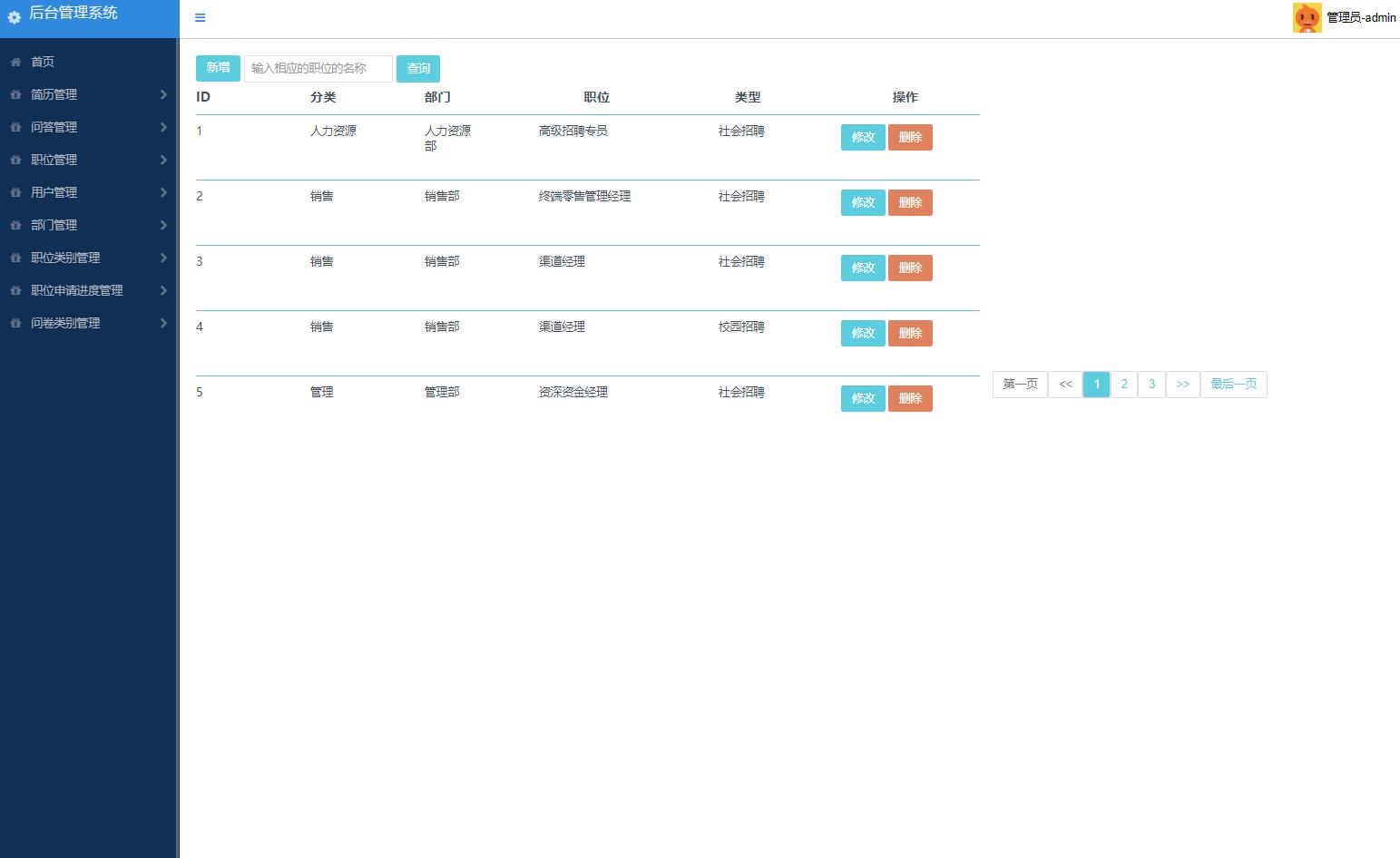
职位管理界面提供了完整的CRUD操作,HR可以方便地管理所有职位信息。上图展示了职位列表页面,包含职位名称、部门、工作城市、薪资范围等关键信息,以及发布状态和操作按钮。
2. 简历自动解析与智能匹配
系统实现了简历文件的自动解析功能,将非结构化的简历内容转换为结构化数据,并支持基于技能关键词的智能匹配。
简历解析服务(ResumeParseService.java)的核心逻辑:
@Service
public class ResumeParseService {

    @Autowired
    private FileStorageService fileStorageService;

    @Autowired
    private SkillsDictionary skillsDictionary;

    public Resume parseResume(MultipartFile file, Long userId, Long jobId) {
        // 保存原始文件
        String filePath = fileStorageService.storeFile(file);

        // 提取文本内容
        String textContent = extractTextFromFile(file);

        // 解析结构化信息
        ResumeData resumeData = parseTextToStructuredData(textContent);

        // 构建简历对象
        Resume resume = new Resume();
        resume.setUserId(userId);
        resume.setJobId(jobId);
        resume.setFilePath(filePath);
        resume.setResumeJson(convertToJson(resumeData));
        resume.setApplyStatus(0);

        return resume;
    }

    private String extractTextFromFile(MultipartFile file) {
        String fileName = file.getOriginalFilename();
        String extension = fileName.substring(fileName.lastIndexOf(".") + 1);

        switch (extension.toLowerCase()) {
            case "pdf":
                return pdfTextExtractor.extract(file);
            case "doc":
            case "docx":
                return wordTextExtractor.extract(file);
            default:
                throw new UnsupportedFileTypeException("不支持的文件格式: " + extension);
        }
    }

    private ResumeData parseTextToStructuredData(String text) {
        ResumeData data = new ResumeData();

        // 使用正则表达式和NLP技术提取信息
        data.setName(extractName(text));
        data.setEmail(extractEmail(text));
        data.setPhone(extractPhone(text));
        data.setEducationList(extractEducation(text));
        data.setWorkExperienceList(extractWorkExperience(text));
        data.setSkills(extractSkills(text));

        return data;
    }

    private Set<String> extractSkills(String text) {
        Set<String> skills = new HashSet<>();
        Set<String> dictionary = skillsDictionary.getSkills();

        for (String skill : dictionary) {
            if (text.toLowerCase().contains(skill.toLowerCase())) {
                skills.add(skill);
            }
        }

        return skills;
    }
}
智能匹配算法(JobMatchingService.java)的实现:
@Service
public class JobMatchingService {

    public MatchingResult calculateMatchScore(Resume resume, Job job) {
        ResumeData resumeData = parseResumeJson(resume.getResumeJson());
        String jobRequirements = job.getRequirement();

        MatchingResult result = new MatchingResult();

        // 技能匹配度计算
        double skillScore = calculateSkillMatchScore(resumeData.getSkills(), jobRequirements);

        // 工作经验匹配度
        double experienceScore = calculateExperienceMatchScore(
                resumeData.getWorkExperienceList(), jobRequirements);

        // 教育背景匹配度
        double educationScore = calculateEducationMatchScore(
                resumeData.getEducationList(), jobRequirements);

        // 综合权重计算
        double totalScore = skillScore * 0.5 + experienceScore * 0.3 + educationScore * 0.2;

        result.setTotalScore(totalScore);
        result.setSkillScore(skillScore);
        result.setExperienceScore(experienceScore);
        result.setEducationScore(educationScore);
        result.setMatchedSkills(findMatchedSkills(resumeData.getSkills(), jobRequirements));

        return result;
    }

    private double calculateSkillMatchScore(Set<String> resumeSkills, String jobRequirements) {
        Set<String> jobSkills = extractSkillsFromRequirements(jobRequirements);

        if (jobSkills.isEmpty()) return 0.0;

        Set<String> intersection = new HashSet<>(resumeSkills);
        intersection.retainAll(jobSkills);

        return (double) intersection.size() / jobSkills.size();
    }
}
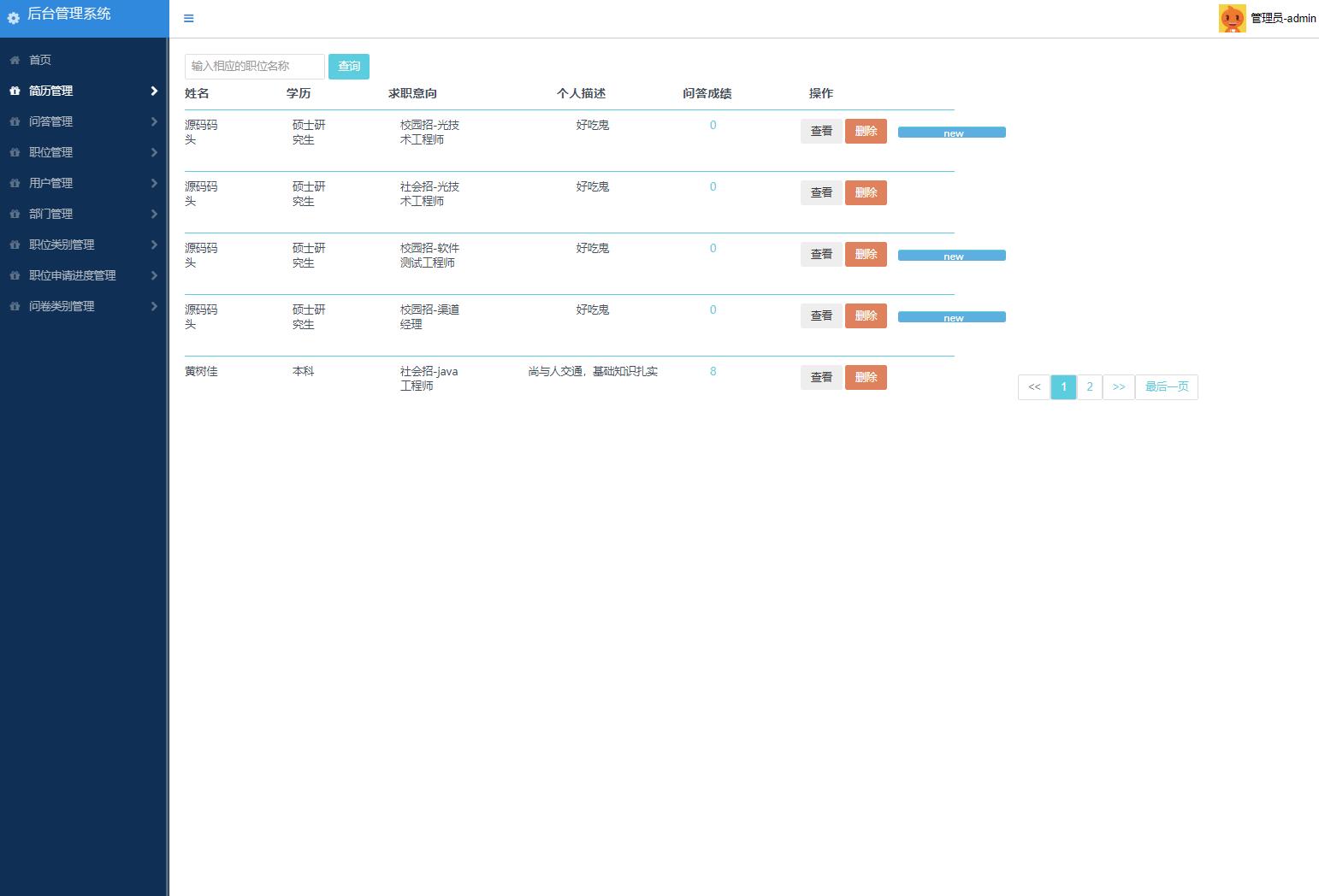
简历管理界面展示了系统对候选人简历的有效管理能力。管理员可以查看所有投递的简历,系统会显示基本的匹配度评分,帮助HR快速筛选合适的候选人。
3. 面试流程状态机管理
系统设计了完整的面试流程状态机,跟踪候选人从投递到录用的全过程。
面试状态枚举(InterviewStatus.java)定义:
public enum InterviewStatus {
    APPLIED(0, "已投递"),
    VIEWED(1, "已查看"),
    PHONE_SCREENING(2, "电话筛选"),
    FIRST_INTERVIEW(3, "初试"),
    SECOND_INTERVIEW(4, "复试"),
    FINAL_INTERVIEW(5, "终试"),
    OFFERED(6, "已发offer"),
    ACCEPTED(7, "已接受"),
    REJECTED(8, "已拒绝");

    private final int code;
    private final String description;

    InterviewStatus(int code, String description) {
        this.code = code;
        this.description = description;
    }

    // getter方法
}
面试流程服务(InterviewProcessService.java)的核心方法:
@Service
@Transactional
public class InterviewProcessService {

    @Autowired
    private InterviewRepository interviewRepository;

    @Autowired
    private EmailService emailService;

    public Interview updateStatus(Long resumeId, InterviewStatus newStatus, String feedback) {
        Interview interview = interviewRepository.findByResumeId(resumeId)
                .orElseGet(() -> createNewInterview(resumeId));

        // 状态转移验证
        validateStatusTransition(interview.getStatus(), newStatus);

        interview.setStatus(newStatus.getCode());
        interview.setFeedback(feedback);
        interview.setUpdateTime(LocalDateTime.now());

        Interview savedInterview = interviewRepository.save(interview);

        // 发送状态更新通知
        sendStatusNotification(savedInterview);

        return savedInterview;
    }

    private void validateStatusTransition(InterviewStatus current, InterviewStatus next) {
        // 定义允许的状态转移规则
        Map<InterviewStatus, Set<InterviewStatus>> allowedTransitions = new HashMap<>();

        allowedTransitions.put(APPLIED, Set.of(VIEWED, REJECTED));
        allowedTransitions.put(VIEWED, Set.of(PHONE_SCREENING, REJECTED));
        allowedTransitions.put(PHONE_SCREENING, Set.of(FIRST_INTERVIEW, REJECTED));
        // ... 其他状态转移规则

        if (!allowedTransitions.getOrDefault(current, Collections.emptySet()).contains(next)) {
            throw new InvalidStatusTransitionException("不允许的状态转移: " + current + " -> " + next);
        }
    }

    private void sendStatusNotification(Interview interview) {
        String toEmail = getCandidateEmail(interview.getResumeId());
        String subject = "您的应聘状态已更新";
        String content = buildNotificationContent(interview);

        emailService.sendEmail(toEmail, subject, content);
    }
}
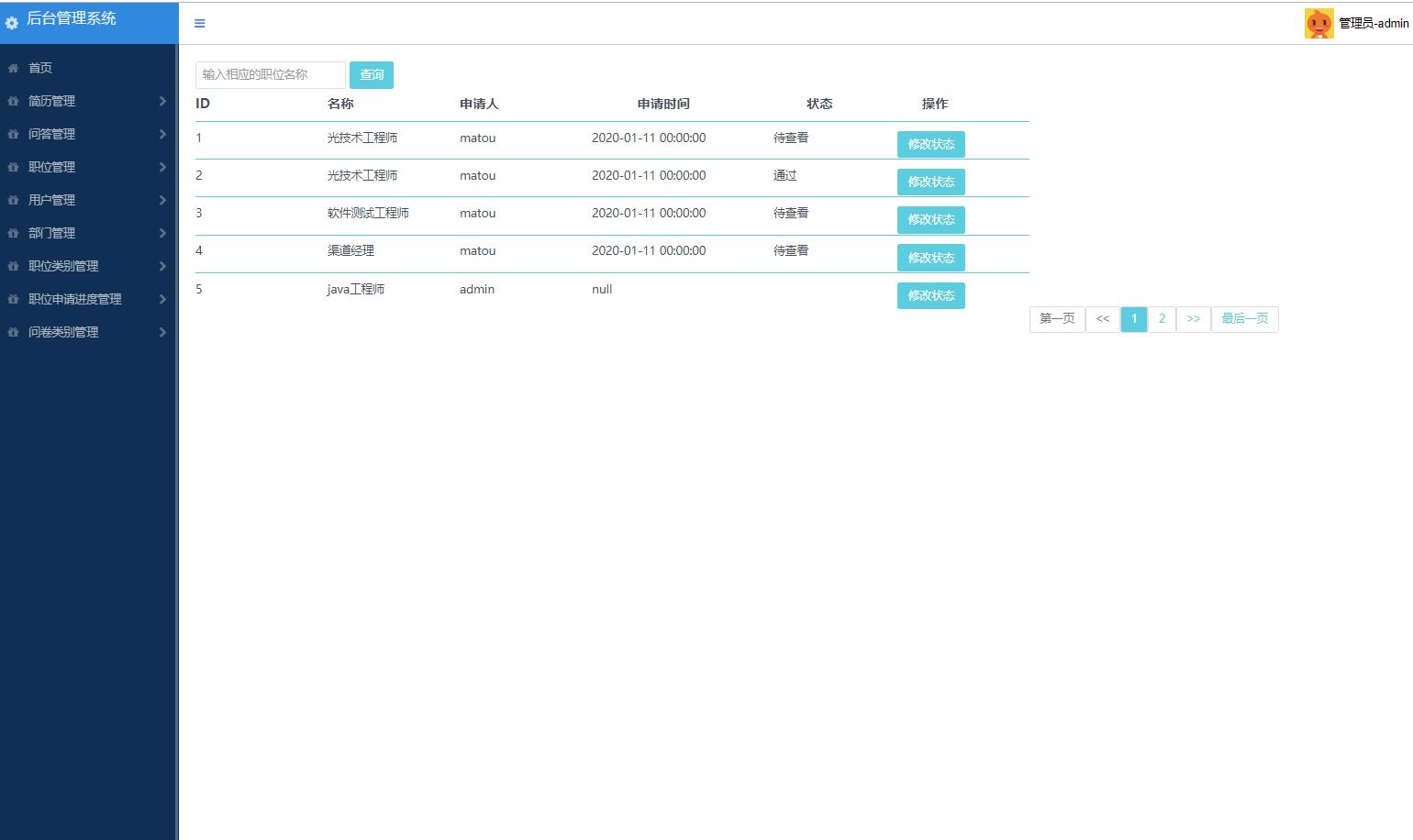
面试流程管理界面提供了直观的状态更新操作。HR可以通过下拉菜单选择下一个状态,系统会自动验证状态转移的合法性,并记录每次状态变更的反馈意见。
4. 权限管理与安全控制
系统通过Spring Security实现了细粒度的权限控制,确保不同角色的用户只能访问其授权范围内的功能。
安全配置类(SecurityConfig.java)的核心配置:
@Configuration
@EnableWebSecurity
public class SecurityConfig {

    @Autowired
    private UserDetailsService userDetailsService;

    @Bean
    public SecurityFilterChain filterChain(HttpSecurity http) throws Exception {
        http.authorizeHttpRequests(authz -> authz
                .requestMatchers("/admin/**").hasRole("ADMIN")
                .requestMatchers("/hr/**").hasAnyRole("HR", "ADMIN")
                .requestMatchers("/api/jobs/**").permitAll()
                .requestMatchers("/api/resumes/apply").permitAll()
                .any